
Key points
- From at least August 29, 2025 to September 25, 2025, Microsoft Copilot Studio did not log certain administrative actions related to sharing, authentication, logging, and publication of Copilot Studio agents.
- We reported this issue to the Microsoft Security Response Center (MSRC) on September 2, 2025. MSRC assessed this finding as important severity and remediated logging for these events by October 5, 2025.
- Since October, we have observed a regression where two of the reported four originally reported events were not logging consistently. This remains the case today, and we have reported this observation to MSRC.
- To detect suspicious modification of agents, review our security considerations later in this post. Datadog customers can use the detections documented in How Datadog can help.
Introduction
During research, we sometimes encounter scenarios that remind us it's a good idea to trust but verify: especially when what's documented doesn't match what's observed. What follows is one of these scenarios.
While completing the research behind our previous post on Copilot Studio, CoPhish: Using Microsoft Copilot Studio as a wrapper for OAuth phishing, we noticed that certain Copilot Studio agent settings did not generate the expected events in Microsoft 365's activity logs. After further investigation, we realized that not all of the activities that Microsoft documented as logged administrative activities for agents were being generated.
Microsoft states that "administrative activities for Copilot Studio are enabled by default on all tenants", so any discrepancy in logged administrative activities while the Unified Audit Log (UAL) is enabled would constitute a gap in logging intended to audit sensitive actions against Copilot Studio agents.
Unlogged administrative activities
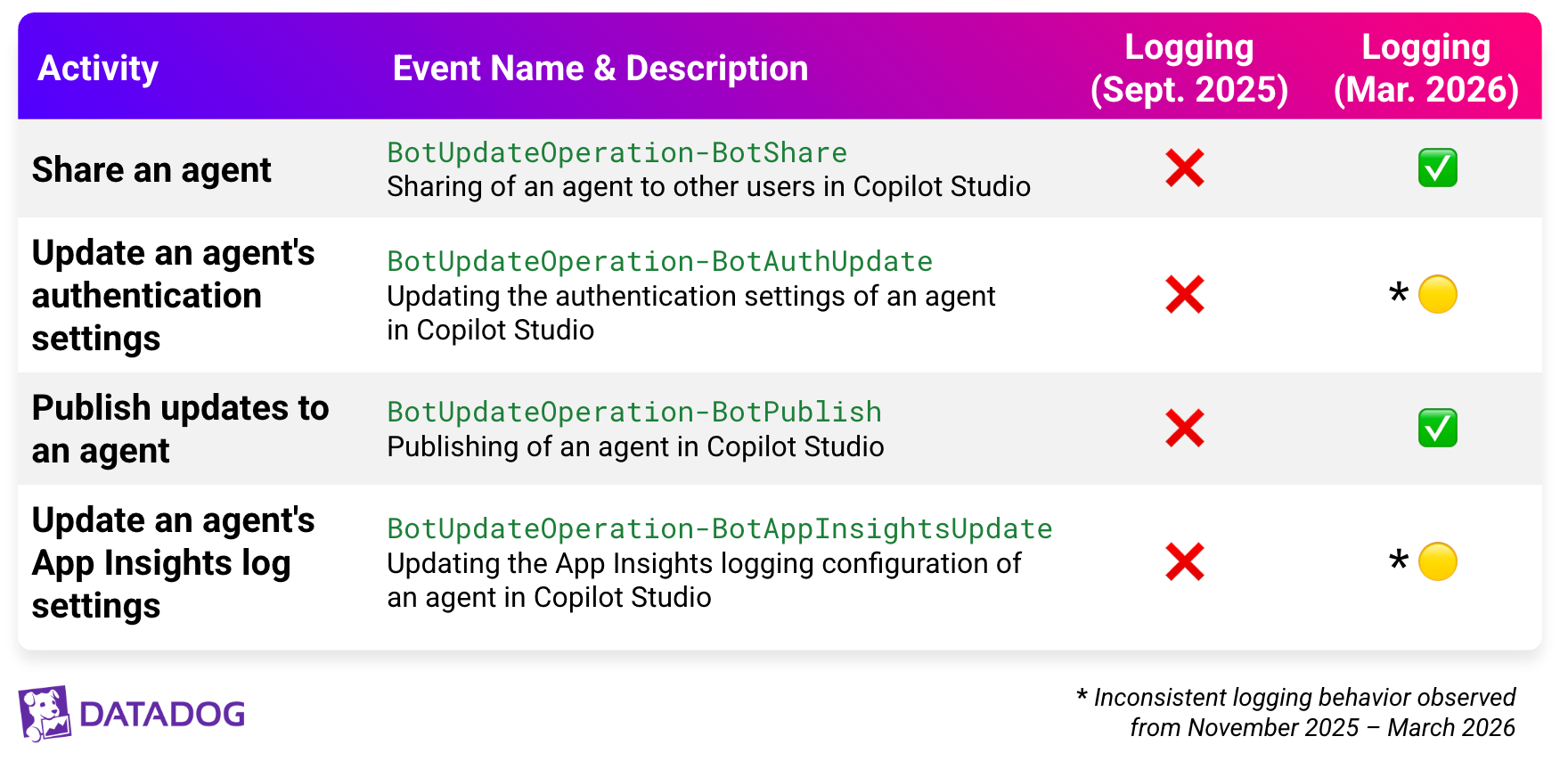
Since any logging gaps could allow malicious activity to go undetected, we set out to discover the full extent of administrative activities that were not logged. The following table shows a summary of our initial findings, along with their remediation status:
Following testing, we waited a period of 24 hours to ensure all possible logged events propagated through the UAL. We then ran a search in Microsoft Purview to review generated logs.
When we first reported this in September 2025, MSRC fixed logging for all of these items. Datadog confirmed during retesting following MSRC's remediation in October 2025 that all four reported events were logging.
However, in subsequent retesting Datadog was not able to generate the BotUpdateOperation-BotAuthUpdate event or the BotUpdateOperation-BotAppInsightsUpdate event consistently. The events were generated occasionally, or not at all, when following the same testing procedure to generate them.
We reported these gaps to MSRC. However, the engineering team stated they could not replicate the anomalous behavior.
Impact
Before August 29, 2025, an attacker with the Editor role for an agent could have performed the following actions without generating an audit record that the event had occurred:
BotUpdateOperation-BotAuthUpdate: Removed an agent's authentication, exposing it to anonymous usersBotUpdateOperation-BotAppInsightsUpdate: Disabled an agent's App Insights logging, including conversation loggingBotUpdateOperation-BotShare: Shared an agent with unintended internal usersBotUpdateOperation-BotPublish: Published updated versions of an agent (including versions with the changes described in the previous items in this list)
A practical example
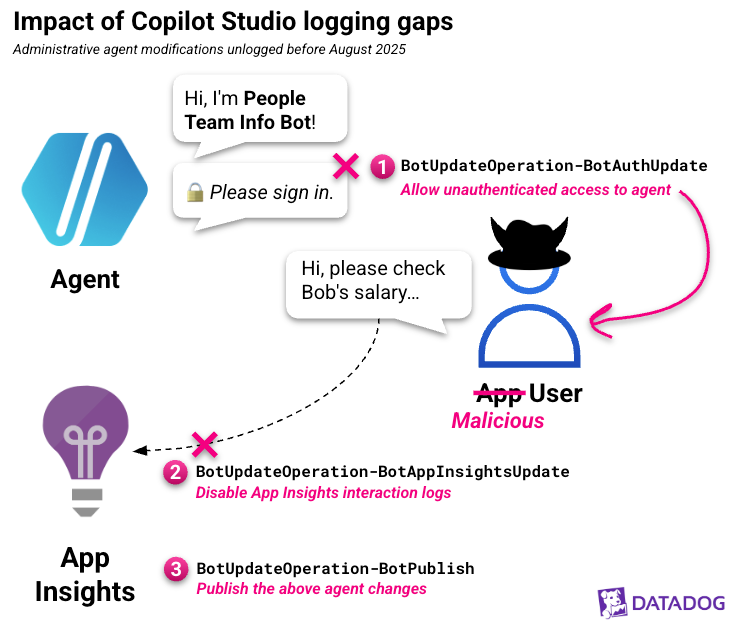
As an example, consider that an attacker with access to manage an agent could have performed the following actions without these changes being logged:
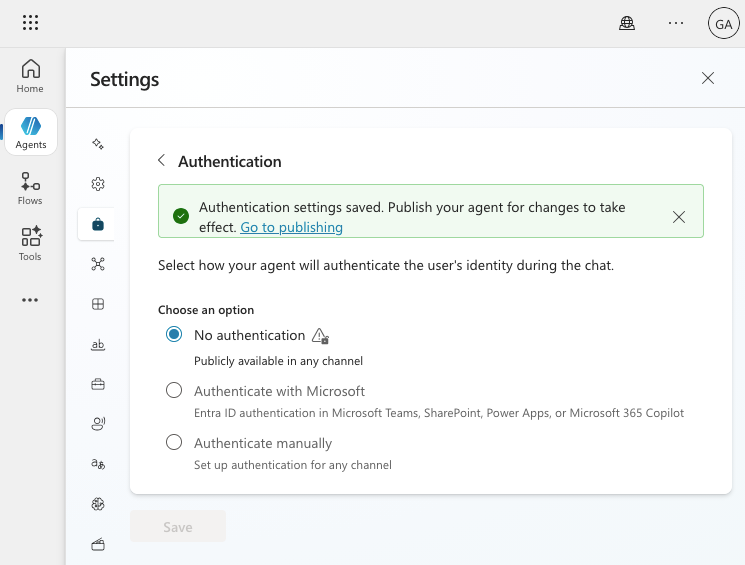
- Exposed internal data within the agent by removing authentication settings
- Disabled App Insights logging of unauthenticated interactions
- Published these updates
- Interacted with the agent externally as an anonymous user to extract the agent's data, without the conversation being logged to App Insights
A visual representation of this scenario is shown in the following diagram:
The potential data impact of a Copilot Studio agent's exposure is explained in Johann Rehberger's Protect Your Copilots: Preventing Data Leaks in Copilot Studio.
Depending on the agent's access, this could have allowed external exposure of sensitive data within an agent to an external party without any logging of this modification or subsequent interactions. Because logging Copilot interactions requires a user to be authenticated, this unauthenticated access would also not generate the CopilotInteraction event.
As a result, a security team would not have had a record of what changes occurred or the subsequent interactions that led to data exposure.
Discovering logging gaps
To test logging coverage, we created a new agent and performed several actions that should have triggered administrative events in the Agents category documented by Microsoft. These included modifying the App Insights and authentication settings of the agent, as well as publishing and sharing the agent.
After 30 minutes, only two actions related to Copilot Studio (BotCreate, ApiEndpointCallEvent) were logged. No further logs appeared for these events after a standard log latency window of 24 hours.
Comparing the list of actions taken to the described Copilot Studio activities documented by Microsoft, four types of actions taken were not logged. The full list of events that were not logged is as follows:
BotUpdateOperation-BotAuthUpdateBotUpdateOperation-BotPublishBotUpdateOperation-BotShareBotUpdateOperation-BotAppInsightsUpdate
Security considerations
Prior to remediation of this issue, administrative activity related to modifying an agent's authentication, App Insights, or sharing settings is not available. However, general Copilot Studio activity can be identified by searching logs for users interacting with the Copilot Studio application.
Security teams that wish to review suspicious Copilot Studio usage can use the events described in this section to hunt for or detect this activity. Datadog customers can find detections related to these events in How Datadog can help. Details on these steps are provided below.
Identify users interacting with Copilot Studio
While administrative logs for the described events are not available during the impacted timeframe, teams can investigate general Copilot Studio activity to identify users who accessed Copilot Studio during this time. This may assist in identifying any suspicious or unusual agent usage prior to MSRC's remediation of logging.
The following searches are provided as a starting point for teams that would like to review Copilot Studio activity where specific events are not available.
Microsoft 365 logs
Copilot Studio logins can be found by using Copilot Studio's application ID. Additionally, operations related to general Copilot Studio activity and PowerPlatform API calls can help identify which users have interacted with Copilot Studio agents.
Note: All asterisk characters (*) in the below searches indicate a wildcard search.
Search #1: Sign-ins to Copilot Studio
Workload:AzureActiveDirectoryOperation:UserLoggedInApplicationId:96ff4394-9197-43aa-b393-6a41652e21f8(Power Virtual Agents)
Search #2: Create and delete actions in Copilot Studio
Workload:PowerPlatformOperation:*Bot*(e.g., BotCreate, BotDelete, etc.)
Search #3: ApiEndpointCallEvent activities
Workload:PowerPlatformOperation:ApiEndpointCallEventJsonPropertiesCollection:*aipluginoperations*,*powervirtualagents*
Entra ID logs
Entra ID sign-in logs and Microsoft Graph activity logs are frequently generated while interacting with Copilot Studio. Activity in either of these log sets can indicate users who were working with Copilot Studio agents.
Base search: User activity in Copilot Studio
Category:NonInteractiveUserSignInLogs,MicrosoftGraphActivityLogsProperties.appId:96ff4394-9197-43aa-b393-6a41652e21f8(Power Virtual Agents)
Monitor suspicious Copilot Studio activities
Copilot Studio's administrative events indicate when an agent's logging and authentication methods have been modified.
Microsoft 365 logs
The following Microsoft 365 Audit log events use events that are now logging correctly, and can be used to identify suspicious modification of an agent's authentication and App Insights logging.
Search #1: Copilot Studio authentication modified
Workload:PowerPlatformOperation:BotUpdateOperation-BotAuthUpdate
Search #2: Copilot Studio App Insights settings modified
Workload:PowerPlatformOperation:BotUpdateOperation-BotAppInsightsUpdate
Details on detecting Copilot Studio topic modification are available in our previous post, CoPhish: Using Microsoft Copilot Studio as a wrapper for OAuth phishing.
You may also consider detecting high-volume instances of the BotPublish and BotShare events. Additional details on Copilot Studio monitoring are provided in Microsoft's guide, Audit Copilot Studio activities in Microsoft Purview.
How Datadog can help
For customers that use Datadog Cloud SIEM, the following detections monitor for possible Copilot Studio agent tampering:
- Microsoft 365 Copilot interaction flagged as indirect attack
- Microsoft 365 Copilot Studio agent access control policy set to open
- Microsoft 365 Copilot Studio agent authentication modified
- Microsoft 365 Copilot Studio agent sign-in topic modified
- Microsoft 365 Copilot Studio Application Insights logging modified
These detections may uncover attempts to disable in-depth logging through App Insights, or to expose or backdoor a Copilot Studio agent.
Disclosure timeline
The following represents a timeline of our communications with MSRC about this issue:
- August 29, 2025: Datadog identified logging gaps in Copilot Studio operations and generated actions to verify that these gaps were still present after a period of several days.
- September 2, 2025: Datadog reported the issue to MSRC after confirming that logs were not created.
- September 3, 2025: MSRC acknowledged the report and opened a case to investigate.
- September 15, 2025: MSRC confirmed that they were able to replicate the reported issue and started investigating a fix.
- September 23, 2025: MSRC determined the case had a severity of "Important" under the Dynamics 365 and Power Platform program.
- September 25, 2025: Datadog provided a draft of this post to MSRC for review.
- October 2, 2025: MSRC asked Datadog to verify if the issue could still be replicated.
- October 15, 2025: Datadog verified that four of five reported events were now resolved and logged, and requested clarification on whether a fix would be issued for the last reported event.
- November 4, 2025: MSRC clarified that the final reported event was logging as intended and updated documentation to reflect this.
- November 13, 2025: Datadog reported that two of the four previously logged in-scope events were not logged during retesting.
- November 19, 2025: MSRC requested additional time to review the issue with the engineering team.
- December 8, 2025: MSRC requested additional testing data.
- December 9, 2025: Datadog provided additional testing data and reiterated that the two events were still not logged.
- December 16, 2025: MSRC confirmed an additional logging fix was in development with an ETA of January 15.
- January 16, 2026: Datadog confirmed that one reported event was now logging sometimes, requested details on the remaining unlogged events, and provided an updated draft of this post.
- January 21, 2026: MSRC requested additional testing data and confirmed that feedback was shared with the engineering team.
- January 27, 2026: Datadog shared additional testing data on the remaining unlogged event. MSRC confirmed receipt of this data.
- February 6, 2026: Datadog requested additional clarification on why events were still not logging consistently, and asked if the engineering team had any post feedback.
- February 12, 2026: MSRC acknowledged sharing this question to the engineering team.
- March 2, 2026: MSRC stated that the engineering team was unable to replicate the anomalous behavior.
Conclusion
In this post, we described a scenario where insufficient logging coverage of Copilot Studio activities could have allowed an attacker to backdoor an agent, modify logging settings, and interact with an agent without detection.
We'd like to thank MSRC for collaborating with us to confirm this finding and remediate the issue. This collaboration helps keep customers secure.
We're always eager to hear from you. If you have any questions, thoughts, or suggestions, send us a message at securitylabs@datadoghq.com. You can also subscribe to our newsletter or RSS feed.