
The open source package distribution ecosystem in general has seen an increase in both velocity and severity of targeted attacks (both attempted and successful) over the past few years. The npm ecosystem in particular has experienced a series of high-profile incidents recently, including the notorious Shai-Hulud attack. In the wake of that incident, GitHub proposed a roadmap for hardening npm's package publishing infrastructure and offered specific guidance on actions that "npm maintainers can take today." While the advice is sound, it is also brief. This blog post explains what the actions refer to, why they are recommended, and how they will help keep the npm ecosystem—and, by extension, the modern internet—safe.
The guidance
The three specific points of guidance are:
- Use npm trusted publishing instead of tokens.
- Strengthen publishing settings on accounts, orgs, and packages to require 2FA for any writes and publishing actions.
- When configuring two-factor authentication, use WebAuthn instead of TOTP.
While the recommendations are a direct response to the aforementioned incident, they are also good advice in general. The idea here is to harden the security posture of three important elements for package publication: CI/CD pipelines, account management, and authentication mechanisms. In that spirit, we'll look at not only the npm-specific advice but also generalize it wherever possible.
One final thing before we continue: like many things in the world of computing, these are interrelated concepts, so the full picture really only becomes clear once we're familiar with the group. To keep things straightforward, we'll tackle these in the order that they were originally presented.
Trusted publishing
The basic idea here is to use the framework called Trusted Publishers (TPF) to deal with the longstanding problem of long-lived authentication tokens. But that's already a mouthful, so we'll start at the beginning: why are long-lived tokens problematic in the first place?
First off, using a token as a proof of authentication and/or authorization is pretty standard stuff. It's either that, or ask the user to put their credentials in each time a request is sent, or a call is made to an API, etc. Furthermore, in the case where automated systems are acting on behalf of a human—such as a CI/CD pipeline—it's neither desirable nor, in most cases, even possible. Instead, the human authenticates against the system in question and creates a token (usually represented by an alphanumeric string) that ultimately allows automated systems to act on behalf of the user.
Traditionally, a human would create a token, pop it into a pipeline processor, and forget about it forever. Given how complex authorization matrices can be, it's also quite common to give (or "grant") a broad swath of permissions to tokens, just to keep things simple. To be clear, this is all totally reasonable behavior, as the whole idea is to not have to think about it, after all. That's what a long-lived token is, and it's a very common, very normal pattern across literally any system that has any notion of automation.
It's also super dangerous.
The problem is that as far as a given machine is concerned, the token effectively represents a human, with all the rights and privileges that entails. If that token leaks—whether through a targeted attack, errant environment variable, or just pasting it into the wrong chat window—those rights and privileges are now in the wild. Since most tokens tend to be scoped quite broadly (i.e., "publish to npm" rather than "publish this one package, this one time"), the blast radius has the potential to be enormous. As we saw with Shai-Hulud, a single leak can cascade into a full-blown supply-chain compromise.
The modern answer to this problem is OpenID Connect (OIDC), which provides an ephemeral but verifiable way for systems to prove who they are. OIDC is a widely adopted standard that allows one trusted service to say "it's really me" to another, using short-lived, cryptographically signed tokens instead of long-lived secrets. In other words, identity isn't something you store anymore—it's something you prove, securely, at the exact moment it's needed.
The Trusted Publishing framework builds directly on that idea. Instead of generating a static token and storing it somewhere, npm implements this model by establishing a trust relationship with your CI/CD provider through OIDC. When your workflow runs, it presents an OIDC identity token issued by that provider, which npm verifies against your package's trusted-publisher configuration.
But wait, I hear you asking: what are we configuring now?
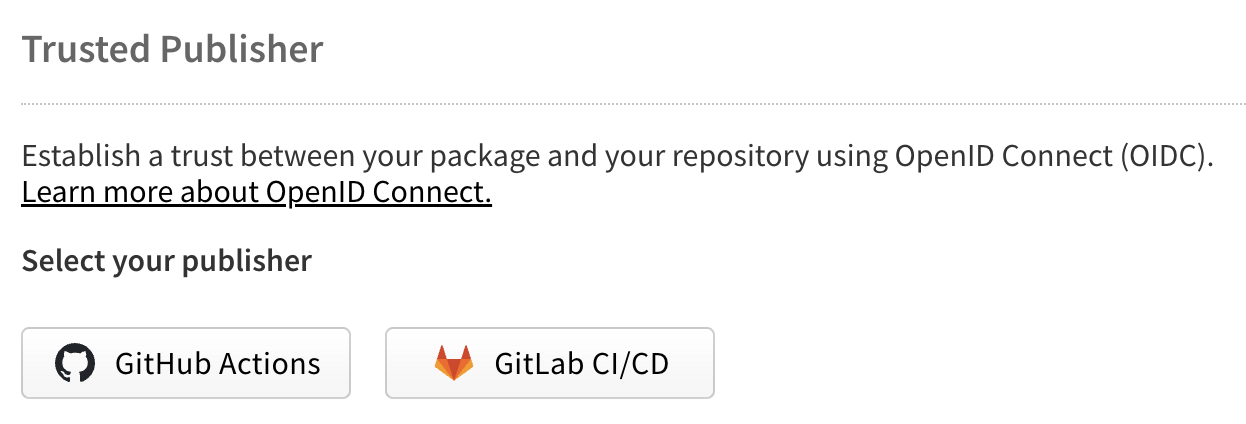
Image by npm is licensed under CC BY 4.0
The trusted-publisher configuration is essentially a policy that tells npm who is allowed to publish what and from where. It binds a specific repository, organization, or workflow identity to a given package so that even if someone could spoof the request, npm would reject it unless it came from the pre-established and pre-approved source. In practice, this setup lives in your npm package settings, where you explicitly register a CI/CD identity (for example, a GitHub repository and workflow) as a trusted publisher. If everything matches, npm accepts (or "exchanges") that proof for a short-lived, tightly scoped publishing credential. The result is that your workflow can publish securely without ever touching a long-lived secret.
The obvious advantage here is the lack of a long-lived token, meaning there's no secret setting in your environment variables waiting to be leaked (or exfiltrated). That alone is worth the price of admission, so to speak, but there's another bonus as well: the established, specific relationship means that npm can now make informed trust decisions based on the provenance of the request. This includes such details as which repository it came from, which branch and commit the build is based on, and whether the request passed all the expected verification gates upstream, to cite a few.
But, as with everything in life, there are trade-offs to consider. Some of them are straightforward enough, but others might end up being real blockers.
Things to consider
First, your CI/CD platform has to support the OIDC / trusted-publisher workflow to begin with, and your publishing platform needs to have the complementary configuration capacity as well. In the specific case of npm, the docs are quite clear: currently, TPF support extends only to GitHub Actions (hosted runners) and GitLab CI/CD Pipelines (shared runners). If you're using a different platform, or self-hosted runners, or anything that doesn't fit into that specification, then you're out of luck (at least for now). That said, even if you do use one of those two accepted providers, your workflow might not be set up to handle the new steps. You will likely still need to modify things like permissions, job definitions, and expectations around where and when auth credentials are issued and consumed.
Speaking of workflows, any npm publishing chain that involves multiple sources is going to run into friction: as it stands right now, each package can only have one trusted publisher configured at a time. As an aside, it's worth noting that while this is a side effect of npm's implementation of TPF, it's a fairly common implementation decision generally speaking. Now, this won't affect run-of-the-mill monorepo situations, but in the case that a package is published from multiple build sources (for example, one repository for UI components, another for the decision engine, a third for docs, and so forth), there's going to be a pain point here to overcome.
The TPF flow is primarily concerned with the publish operation (i.e., the actual release of the package). Ergo, if your project uses any sort of private dependencies, non-public upstream providers, or anything else that may require additional authentication, you're probably still going to have classic tokens floating around in your environment. This would naturally lead to a sort of hybrid model, whereby OIDC is used to interact with npm specifically, but where you still need to manage token lifecycles in general. This isn't a problem in the strictest sense, but it is something to be aware of going forward.
Finally, while the implementation of TPF here does help mitigate the well-known token weakness issue, it does so in part by shifting the responsibility of safety to the CI/CD platform. In this case, you're effectively delegating this part of the trust relationship to the provider. Functionally speaking, this probably doesn't change much about how you think about the supply chain, but it can create a dangerously false sense of security. You still need to harden your repository access controls, review your runner policies, and keep tabs on who and what can create branches or trigger builds.
In summary, Trusted Publishing isn't magic, and OIDC isn't a panacea—you still need to maintain good security hygiene up and down the chain—but it does help to harden a very weak point in the modern software supply chain.
Strengthen publishing settings
Here's the bottom line up front: regardless of implementation details, the whole advice here is to stop relying on passwords to keep the barbarian hordes at bay. The reality is that attackers are increasingly targeting software package maintainers' accounts directly, and while passwords are a good and necessary part of the authentication stack, they are insufficient to properly protect accounts from being compromised. This is where 2FA, or two-factor authentication, comes into play.
As the name suggests, 2FA is a mechanism for authentication that requires two independent verification factors to confirm an identity. A related term is MFA, or multi-factor authentication, which encompasses the same idea. The distinction is fine: 2FA means exactly two factors, whereas MFA means two or more factors. Commonly, these two factors are defined as "something you know and something you have (or are)." Generally speaking, the first factor is a password (that's the thing you know), and the second factor is something else.
That something else could be a lot of things, and there's a good chance you've already encountered at least one of them already. If you've ever had to type in a verification code from an SMS message, for example, you've used a second factor. It could also be a rotating code, a physical key, a biometric validation, or many other things—but no matter what form it takes, that's the "something you have."
If we're talking about "rotating codes," we're probably talking about TOTP, or Time-based One-Time Password (the B is apparently silent). TOTP is a straightforward algorithm that generates a temporary numeric code based on two things: a shared secret and the current time. In terms of user experience, the shared secret is generally handled automatically, with the result being a code that functionally changes over time (often every 30 seconds).
TOTP is an effective second factor that is relatively straightforward to implement and use, and has demonstrable security upsides. The npm platform supported TOTP as a valid 2FA mechanism for a long time, but in mid-October 2025, the decision was made to no longer allow new TOTP setups to be enabled. While this was (and is) a controversial decision, the only paths forward for enabling 2FA today are physical keys and passkeys.
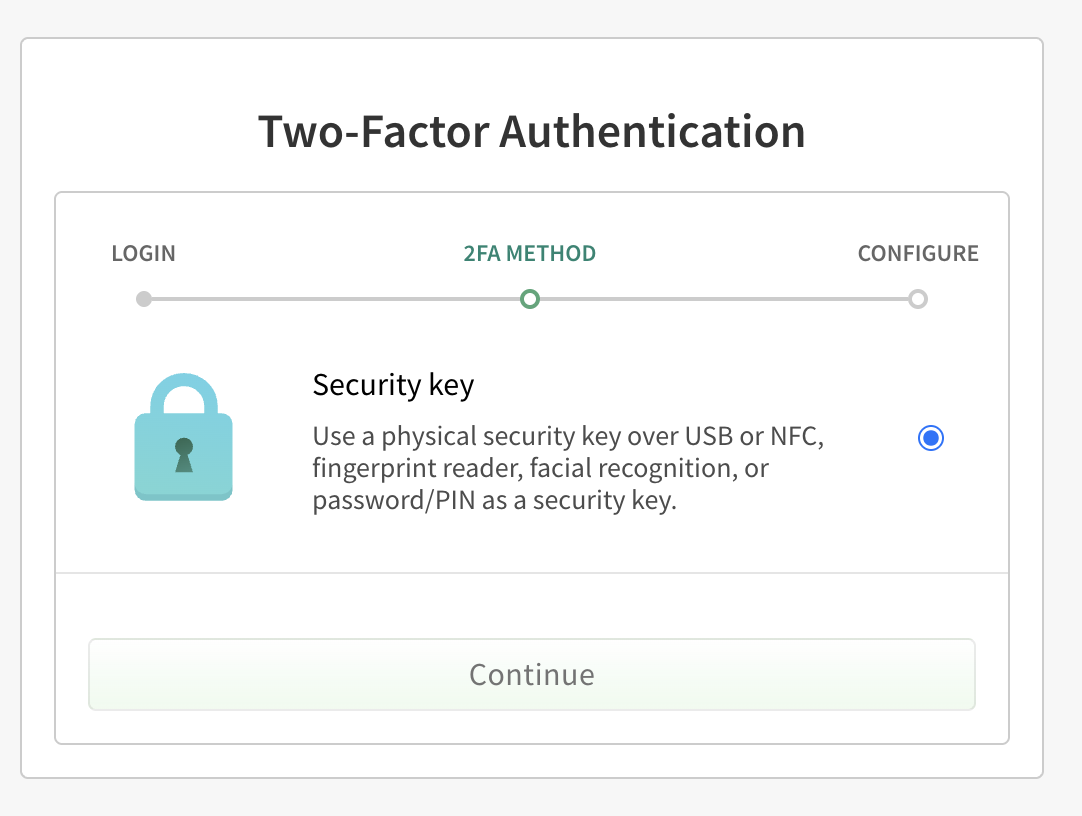
Image by npm is licensed under CC BY 4.0
Physical keys, as the name suggests, are physical items that can in some way be connected to your computer and validated by the service provider in question. A well-known example is Yubikeys, which come in a variety of formats, such as small USB keys with touch sensors on them. The idea here is that when you successfully enter a username and password to log into npm, you'll also need to press the little button on the key to transmit a unique string associated with that actual piece of hardware. In this way, even if your authentication credentials are popped, they can't be used without the physical item.
While this is an effective security control, it does require you to have a physical item available to you, which might not be practical for any number of reasons. In that case, the only option that remains is passkeys, the particulars of which we'll get to in the next section (they're related, in this case, to WebAuthn).
Either way, once you do make the decision to enable 2FA for your account, there will be an impact on workflow one way or another.
Things to consider
The first and most obvious change to your workflow will be the existence of a second challenge when you log into e.g., the npm sign-in page (though you probably expected that one). What's perhaps less obvious is when and where that challenge will pop up in other contexts, such as when working with npm via the command line or when performing specific actions such as publishing a package. Thankfully, the official documentation provides a list of these instances, but with some additional explanation required.
2FA can be configured at the account level to trigger challenges in two distinct ways: at authorization time only, or during authorization and sensitive operations such as publishing packages or altering permissions. While neither GitHub nor the npm documentation recommends one over the other, it's frankly difficult to come up with a reasonable justification for not enabling it across the board. In other words, the more challenges, the better!
Another element of this discussion that isn't well explained is how 2FA plays into automation—specifically, how it may affect, or be affected by, publishing from a CI/CD pipeline. There are three possibilities here: disable 2FA, enable 2FA but disallow tokens, or enable 2FA but allow tokens to bypass the second factor.
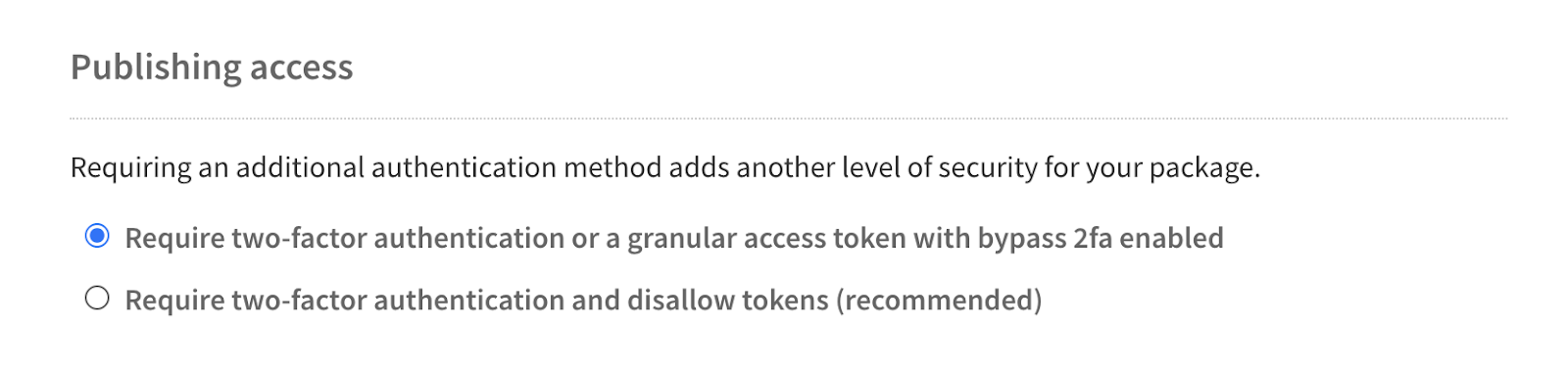
Image by npm is licensed under CC BY 4.0
The first, disabling 2FA, is the exact opposite of the current guidance, and thus no more will be said on the topic.
The second, enabling 2FA and disallowing tokens, has both a big upside and a big downside. On one hand, by restricting publishing actions to strictly interactive sessions, you can eliminate the token reuse / theft attack vector entirely (you can't leak a token that doesn't exist, after all). On the other hand, it effectively breaks all CI/CD pipeline capabilities. The reason it's an option is because not everybody uses automated publishing mechanisms. Frankly stated, this is a great option for maintainers that trigger publishes manually, and be enabled without reservation in those situations.
But for anybody using automation, the third option—enabling token bypass—is the only way forward. Historically, npm used what are now referred to as "legacy tokens." These were simple tokens that gave pipelines the ability to read, write, and publish on behalf of a human.
They were also a massive security hole.
Luckily for the internet at large, legacy tokens were disabled on 5 November 2025. Going forward, non-TPF tokens take the form of "granular access tokens," which have a variety of controls that, when properly configured, restrict permissions and expire after a certain period. This way, even if a token does leak, the blast radius is (hopefully) reduced. There is definitely a learning curve here compared to the legacy tokens, and the expiration situation will probably cause you some headaches at some point, but the additional security guarantees provided by this model are more than worth it.
In summary, if you want automation, you need to use tokens, and if you're going to use tokens, you need to use either TPF or granular access tokens going forward.
WebAuthn (and passkeys)
The thing about TOTP is that it's easy to implement and is way, way better than nothing. While this is great for usability, it's ultimately suboptimal for security. WebAuthn, and by extension passkeys, takes things in a bit of a different direction, one that sacrifices ease of implementation but trades it for a much more reliably secure setup. The salient element in WebAuthn is asymmetric cryptography, and while the mathematical details are arcane, the way it works is actually pretty straightforward!
The most important thing to keep in mind here is the idea of public and private keys. In a WebAuthn flow, your device holds the private key, and the service stores only the corresponding public key. When the service issues an authentication challenge, your device uses the private key to sign that challenge (here's where some of that arcane mathematics comes into play). The service then verifies the signature using the public key. If the signature is valid, the challenge is successful—you're in.
Since the private key never leaves the device during the challenge, it can't be snooped or scooped in transit. Since the public key is just used for verification, it's not useful to an attacker on its own. Since there's no shared secret in the first place, the burden of proof lies in what you have (not what you know). Those are all categorical improvements in security compared to TOTP, especially when you factor in another important feature of WebAuthn: origin binding.
Without going too far into the weeds, origin binding is a mechanism that ties the signature verification process to a specific site, such as https://www.npmjs.com specifically. No other origin, including look-alikes or subdomains, will be valid. All of these features combined make WebAuthn resistant to both man-in-the-middle (MITM) attacks, since attempts cannot alter the origin field without invalidating the signature, and phishing, since a falsified site cannot trick your authenticator into signing the challenge in the first place.
With the theory out of the way, the next natural question is what WebAuthn actually looks like in day-to-day use. The protocol itself doesn't mandate any particular device or gadget; instead, it defines a flow that different types of "authenticators" can implement. The experience varies depending on where your private key lives, how you unlock it, and how it interacts with your browser. Broadly speaking, authenticators fall into a few practical categories, and each has slightly different implications for usability and workflow.
There are "platform authenticators," which are bits of kit already tucked into modern phones and laptops, such as Touch ID, Face ID, Windows Hello, and the various biometric mechanisms on Android devices. These are all capable of storing WebAuthn private keys inside a secure enclave. From a user experience perspective, the challenge is the same as unlocking your device—pretty straightforward.
If you work across multiple devices or don't have a built-in platform authenticator, there are those physical keys that were mentioned earlier. These behave like platform authenticators, but they can be physically transferred to different machines. Beyond that, the experience is much the same.
A third category is software passkeys. There are ecosystem-specific solutions like iCloud Keychain or Google Password Manager, as well as any number of third-party applications such as Bitwarden or 1Password. In this model, the private key is generated inside the password manager's secure vault, and when a WebAuthn challenge occurs, the browser hands it off to the vault, the vault signs it, and the browser returns the signature to the service. The practical difference here is that the same private key can be stored across multiple devices, since these solutions can be synchronized across platforms. You may be thinking to yourself, "wait, isn't that a potential security risk?" And you'd be correct, but that's the nature of security, isn't it? Tradeoffs all the way down.
Things to consider
The first, and most obvious, thing to consider is what type of authenticator you'll use. Platform authenticators are easy, assuming you have one, and you only use one machine to log into npm from. Physical keys are easy too, but you have to buy one (and then try not to lose it). Software solutions are straightforward, but now you're outsourcing your security to yet another service provider. You'll have to figure out what makes sense for your use case here.
It's also worth noting that WebAuthn doesn't work from the npm command line, at least not directly. You'll be redirected to a browser-based process anyway, so be prepared for that.
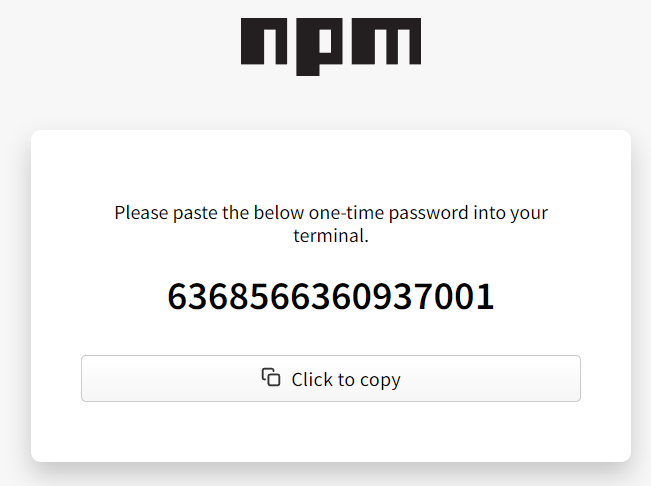
Image by npm is licensed under CC BY 4.0
In fact, because WebAuthn support depends on your browser acting as the intermediary, the experience can vary across environments. Most modern browsers handle the handoff between the site and the authenticator fairly smoothly, but the default choice of authenticator (local device, hardware key, synced vault…) may differ depending on platform. This is rarely a security issue, but it can lead to the occasional "why did it pick that passkey?" moment, especially if you have multiple enrolled authenticators. Over time, people generally settle into whatever combination best suits their workflow, but there can be a frustrating acclimation period.
In the end, none of these things are deal-breakers. They're just the practical realities of moving from shared-secret authentication to a model built on cryptographic proof. With a bit of forethought—mainly around which authenticators you register and how you plan to recover access—passkeys can become surprisingly pleasant to live with.
Conclusion
Taken together, these recommendations aren't about adopting shiny new mechanisms for their own sake—they're about removing some of the most fragile assumptions that have underpinned the npm ecosystem for years. Long-lived tokens, password-centric authentication, and manually managed secrets have served us well enough in calmer times, but the landscape has changed. Trusted Publishing reduces the blast radius of automation. Stronger publishing settings raise the bar for account compromise. WebAuthn replaces shared secrets with verifiable proof. Each addresses a different weak point, and together they make the entire publishing story meaningfully more resilient.
None of this eliminates the need for good security hygiene, of course. But by adopting these controls, maintainers can shift the default posture of their projects from "hopefully safe" to "deliberately hardened." In an ecosystem as vast and interconnected as npm, that shift matters—not just for individual packages, but for everyone who depends on them.