
Key points and observations
- On May 14, 2026, three
node-ipcreleases were published to npm with a backdoored CommonJS entrypoint. Releases:9.1.6,9.2.3, and12.0.1. - All three versions contained the same malicious
node-ipc.cjsfile. - The malicious block is a credential collection and exfiltration payload. It collects environment variables, host information,
/etc/hosts, and a broad set of developer, cloud, package manager, source control, Kubernetes, database, and SSH credential files. - The payload is not triggered by an npm life cycle script. It runs when the package's CommonJS entrypoint is loaded, such as through
require("node-ipc"). - The exfiltration path is DNS-based. The payload prepares a gzip-compressed tar archive, decodes
sh.azurestaticprovider.net:443as its remote DNS endpoint, and builds DNS TXT query names under the decoded suffixbt.node.js.
What the malware does
At a high level, the backdoor runs when the CommonJS entrypoint is loaded, forks a detached child process, collects host and credential files into an archive, and attempts to exfiltrate that archive through DNS TXT queries.
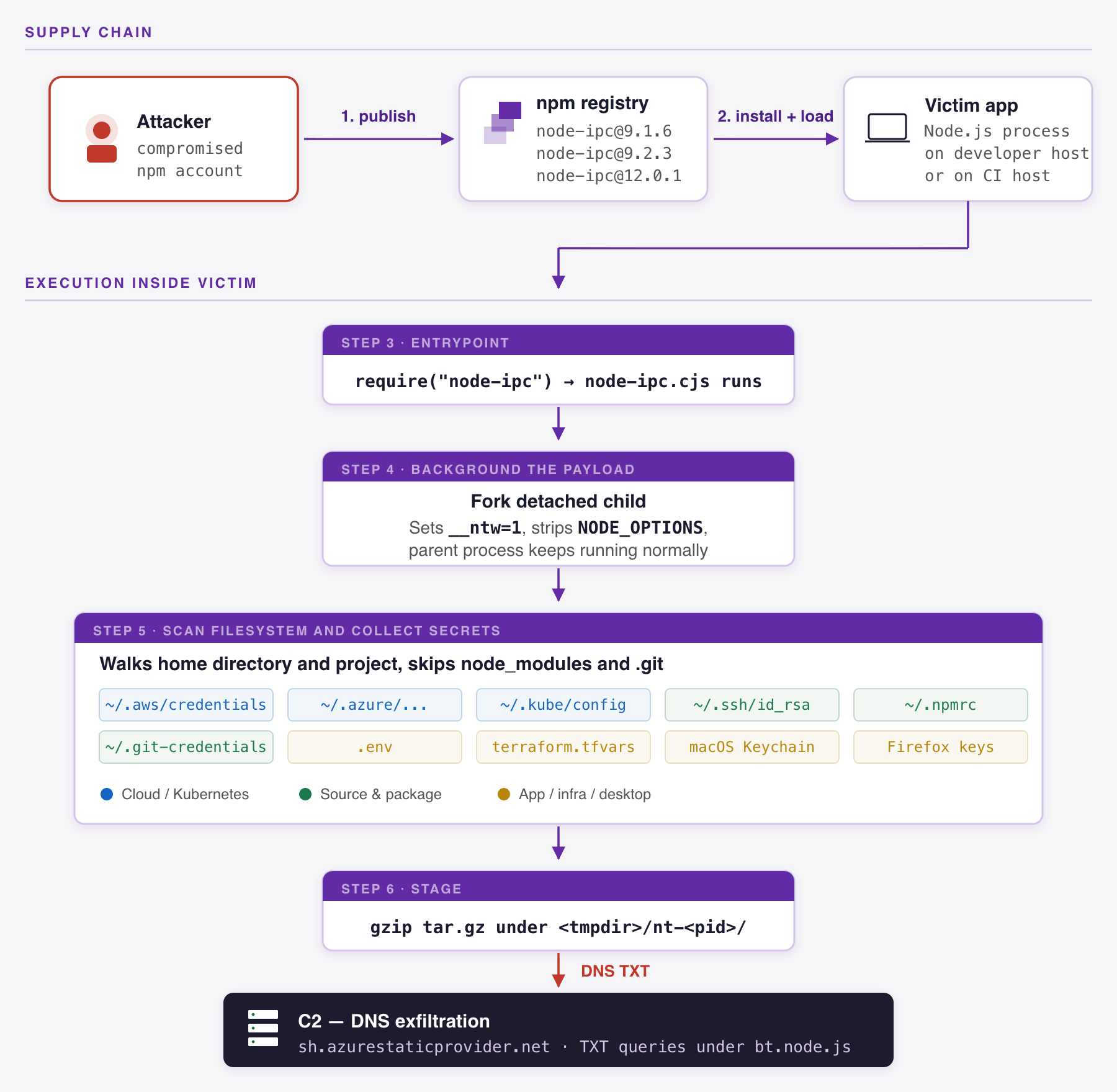
The payload runs from the top level of node-ipc.cjs. If the current process has not already set the environment variable __ntw=1, the code attempts to fork the current module in a detached child process, passes __ntw=1 to that child, removes NODE_OPTIONS, ignores standard I/O, and returns control to the parent. The detached fork gives the parent process a normal package load path while the collection logic continues in the background.
The payload then builds a collection archive. It manually creates tar entries, gzip-compresses the archive, writes a temporary *.tar.gz file under a process-specific temporary directory named like nt-<pid>, calls the exfiltration routine, and then deletes the temporary archive in a finally block.
The archive contains:
uname.txt: Output fromuname -a, when available.etc/hosts: A copy of/etc/hosts, when readable.envs.txt: Sorted environment variables from the process.- Matched credential files: Files from a decoded platform-specific target list, capped at roughly 4 MiB each.
fixtures/_paths.txt: A newline-separated manifest of original file paths that were included in the archive.
Collected files are renamed before being placed in the archive under names matching fixtures/f_<16 hex>_<basename>. The malware hashes each original path with SHA-256, uses the first 16 hex characters, and combines that value with a sanitized basename. This naming scheme keeps the archive's filenames compact while preserving enough information to map files back to their original paths through the manifest.
The decoded target list covers local developer secrets, package manager tokens, source control credentials, cloud provider credentials, infrastructure configuration, and desktop app token stores. Examples include:
| Category | Examples from the decoded target lists |
|---|---|
| Cloud credentials | ~/.aws/credentials, ~/.azure/accessTokens.json, ~/.config/gcloud/application_default_credentials.json, ~/.oci/config |
| Package and source control credentials | .npmrc, ~/.npmrc, ~/.git-credentials, ~/.config/gh/hosts.yml, .git/config |
| SSH and Kubernetes material | ~/.ssh/id_rsa, ~/.ssh/id_ed25519, ~/.kube/config, /var/run/secrets/kubernetes.io/serviceaccount/token |
| Application and infrastructure secrets | .env, .env.production, config/database.yml, terraform.tfvars, wp-config.php |
| Local desktop credential stores | macOS Keychain databases, Firefox key databases, Linux keyrings, KWallet files, and Microsoft Teams LevelDB files |
The file discovery logic handles exact paths, home directory expansion, globbed basenames, directory wildcards, and recursive **/ searches from the current working directory. During recursive searches, it skips directories named node_modules and .git. Those exclusions still leave many project directories in scope, especially when secrets are stored in files such as .env, GitHub workflow files, Terraform variable files, and application configuration.
The exfiltration logic is DNS-based. The malware decodes sh.azurestaticprovider.net:443 as a remote DNS endpoint. It first resolves the hostname with dns.Resolver using public resolvers including 8.8.8.8 and 1.1.1.1. The upload path then sets the resolver to the resolved endpoint and sends archive metadata and body chunks as TXT lookup requests using generated names under bt.node.js.
C2 and exfiltration over DNS
The command and control (C2) channel uses DNS, not HTTP. The decoded endpoint, sh.azurestaticprovider.net:443, is used as a DNS resolver endpoint. The :443 suffix is important. In this payload, port 443 is DNS over a nonstandard port, not HTTPS.
The payload resolves sh.azurestaticprovider.net through public resolvers, then configures a new dns.promises.Resolver() instance to use the resolved IP address on port 443. On May 14, 2026, lookups from our environment resolved sh.azurestaticprovider.net to 37.16.75.69 with a 300-second TTL. After configuring the custom resolver, the payload calls resolveTxt(...) with generated query names. It does not need useful DNS answers because the stolen data is encoded into the query name itself; lookup errors are caught and ignored.
The query names use three prefixes:
| Prefix | Purpose |
|---|---|
xh |
Header chunk |
xd |
Data chunk |
xf |
Footer chunk |
The general query shapes are:
xh.{machineHex}.{sessionId}.{sig}.{chunkIndex}.{hexChunk}.bt.node.js
xd.{machineHex}.{sessionId}.{sig}.{chunkIndex}.{hexChunk}.bt.node.js
xf.{machineHex}.{sessionId}.{sig}.0.{hexChunk}[.{hexChunk}...].bt.node.js
In those names, machineHex is derived from host fingerprinting, sessionId is generated from 5 random bytes and encoded as 10 hex characters, sig is a 12-character truncated HMAC-SHA256 value, chunkIndex is a decimal chunk number, and hexChunk is DNS-safe encoded payload material.
The header is JSON, hex-encoded, and split into DNS labels. It includes metadata such as:
{
  "v": 1,
  "machineHex": "...",
  "cloud": "none",
  "archivePath": "/tmp/nt-<pid>/<machineHex>.tar.gz",
  "gzipBytes": 12345,
  "hdrChunks": 2,
  "datChunks": 400,
  "hostLabel": "hostname"
}
The archive data path is more layered. The payload builds the tar archive, gzip-compresses it, converts the gzip bytes to base64 text, XORs that text with a SHA-256-derived keystream seeded from the hardcoded key and machineHex, re-encodes the XORed bytes as base64, substitutes the base64 alphabet with a keyed shuffled alphabet, slices the transformed string into 31-character chunks, and hex-encodes each chunk before placing it into DNS labels. In the sample we analyzed, header chunks are up to 63 characters, data chunks are 31 characters before hex encoding, TXT lookups are sent in batches of up to 160, and the resolver timeout is about 8 seconds.
Indicators of compromise
The following indicators come from the tarballs and static deobfuscation:
| Type | Context | Indicator |
|---|---|---|
| Package | Affected version | node-ipc@9.1.6 |
| Package | Affected version | node-ipc@9.2.3 |
| Package | Affected version | node-ipc@12.0.1 |
| Tarball SHA-256 | node-ipc@9.1.6 |
449e4265979b5fdb2d3446c021af437e815debd66de7da2fe54f1ad93cbcc75e |
| Tarball SHA-256 | node-ipc@9.2.3 |
c2f4dc64aec4631540a568e88932b61daebbfb7e8281b812fa01b7215f9be9ea |
| Tarball SHA-256 | node-ipc@12.0.1 |
78a82d93b4f580835f5823b85a3d9ee1f03a15ee6f0e01b4eac86252a7002981 |
| File SHA-256 | node-ipc.cjs |
96097e0612d9575cb133021017fb1a5c68a03b60f9f3d24ebdc0e628d9034144 |
| DNS host | Exfiltration endpoint host | sh.azurestaticprovider.net |
| DNS A record | Observed on May 14, 2026 | 37.16.75.69 |
| DNS port | Exfiltration endpoint port | 443 |
| DNS query suffix | TXT lookup suffix | bt.node.js |
| Environment marker | Child process environment | __ntw=1 |
| Export marker | Static code marker | __ntRun |
| Temporary path pattern | System temporary directory | <tmpdir>/nt-<pid>/ |
| Archive names | Under the temporary nt-<pid> directory |
*.tar.gz |
| Archive entries | Archive contents | uname.txt, etc/hosts, envs.txt |
| Archive entry pattern | Collected files | fixtures/f_<16 hex>_<basename> |
| Archive manifest | Collected path manifest | fixtures/_paths.txt |
| Embedded key material | Payload configuration | qZ8pL3vNxR9wKmTyHbVcFgDsJaEoUi |
| Custom encoding alphabet | Payload decoder | 0123456789GHJKMP |
Detection and response
Defenders should start with dependency inventory. On a per-project basis, search package manifests and lock files for node-ipc entries, then confirm whether the resolved versions are 9.1.6, 9.2.3, or 12.0.1:
grep -R 'node-ipc@\|"node-ipc"' package.json package-lock.json yarn.lock pnpm-lock.yaml npm-shrinkwrap.json 2>/dev/nullTo search your GitHub repository or organization, use the following query:
/node-ipc@|"node-ipc"/ path:/(^|\/)(package\.json|package-lock\.json|yarn\.lock|pnpm-lock\.yaml|npm-shrinkwrap\.json)$/If installed dependencies are available for inspection, look for the backdoored CommonJS file hash, the literal export marker, or encoded configuration strings in node_modules/node-ipc/node-ipc.cjs:
shasum -a 256 node_modules/node-ipc/node-ipc.cjs
grep -F -e '__ntRun' \
  -e '3786M216G75727563747164796360727P66796465627M2M65647G34343339' \
  -e '2647M2M6P64656M2G637H' \
  node_modules/node-ipc/node-ipc.cjs
In endpoint, CI, and network telemetry data, useful signals include:
- A Node.js process loading
node-ipcand then spawning a detached child process with__ntw=1. - Node.js processes reading many credential files shortly after package load.
- Temporary directories matching
nt-<pid>under the system temporary directory, especially containing short-lived*.tar.gzfiles. - DNS queries for
sh.azurestaticprovider.netwhile resolving the configured endpoint. - Unexpected DNS resolution attempts from build systems or developer workstations directly to
8.8.8.8or1.1.1.1shortly after loadingnode-ipc. - DNS TXT lookups using query names under
bt.node.jsfrom the same process or host that loadednode-ipc.
For containment, start with DNS sinkholing and egress controls. Sinkhole or block sh.azurestaticprovider.net so the payload cannot resolve its custom resolver endpoint through managed DNS. Because the payload attempts to resolve that name through public resolvers, pair the sinkhole with controls that block direct DNS to unapproved resolvers such as 8.8.8.8 and 1.1.1.1. Teams should also block DNS-like traffic to 37.16.75.69:443, where port 443 is used for DNS rather than HTTPS. Where DNS tooling supports full query-name matching, sinkhole or alert on *.bt.node.js, especially query names beginning with xh, xd, or xf.
Hosts that installed and loaded one of these versions should be treated as potential credential exposure events. Response should include removing the affected package version, preserving relevant host and CI telemetry data, rotating credentials that may have been present in the decoded target paths, and reviewing package publishing tokens, GitHub tokens, SSH keys, cloud credentials, Kubernetes credentials, and CI secrets.
How Datadog can help
Datadog Code Security customers can use Software Composition Analysis (SCA) to identify repositories and running services that reference affected node-ipc versions. Use the following query in the Library Inventory to scope exposure:
library_name:node-ipc status:Open library_version:(9.1.6 OR 9.2.3 OR 12.0.1)You can also open a prefilled Library Inventory query for the affected node-ipc versions. Static SCA helps find declared dependencies in repositories, while Runtime SCA helps identify libraries loaded by monitored services. That distinction matters here because the payload runs when the CommonJS entrypoint is loaded, not during installation. When the query returns results, prioritize services where the library was loaded at runtime, identify the owning repositories and services, and use that scope to guide credential rotation and host review.
Recommendations for dependency consumers and maintainers
Dependency consumers should pin known-good versions, review newly published releases before adopting them, and consider dependency cooldown settings where package managers or update bots support them. A short delay is useful for newly published patch versions of widely used packages because it gives maintainers and the security community time to identify suspicious releases before automation pulls them into builds.
Consumers should also monitor both install-time and runtime package behavior. This incident did not rely on an npm life cycle hook. A check that only blocks preinstall, install, or postinstall scripts would miss the execution path for CommonJS consumers.
Maintainers should use trusted publishing, require multifactor authentication for registry accounts, restrict long-lived publish tokens, and monitor registry metadata for unexpected direct publishes. For packages that ship both ES module and CommonJS entrypoints, maintainers should treat generated bundles as release artifacts that need review. A small source diff can still hide a large malicious bundle diff.