

Overview
To date, the majority of research on cloud storage ransomware has focused on the abuse of AWS's S3, with a comparatively paltry focus on Azure Blob Storage. The existing publicly available research tends to focus on only one or two techniques and often excludes technical explanations and the event codes associated with these actions.
This post will explore four vectors for threat actors to abuse Azure Storage to maliciously encrypt victim blobs, including step-by-step explanations and event codes for detection. Methods 1 and 3 have been exploited in the wild, whereas methods 2 and 4 have not been observed in public reporting. We'll also discuss some of Azure's protections for encryption abuse and how to circumvent them.
Ransomware methods
| Client-side encryption | Customer-provided keys | Encryption scopes | Service encryption (CMK) | |
|---|---|---|---|---|
| Storage data plane permissions | ✅ | ✅ | ✅ | ❌ |
| Key Vault data plane permissions | ❌ | ❌ | ✅ | ✅ |
| Control plane permissions | ❌ | ❌ | ✅ | ✅ |
| Logged | ❌ | ❌ | Partially | ✅ |
| Observed in the wild | ✅ | ❌ | ✅ | ❌ |
Method 1: Client-side encryption
In 2023, Sophos X-Ops reported the BlackCat ransomware gang deployed ransomware on victim Azure Storage accounts by encrypting their blobs with Sphynx encryptor. The blobs were downloaded in bulk, encrypted, and then reuploaded to overwrite the original data. This method is similar to "conventional" ransomware, with Azure Storage as the target instead of a filesystem. Virtually no Azure-native encryption features were used.
This method would have only required data plane permissions in the victim's storage accounts. No control plane permissions in the victim's subscription would be necessary. A compromised storage account access key would have been sufficient to carry out the attack.
Storage resource log event codes
GetBlobPutBlob
Method 2: Customer-provided encryption keys (CPK)
In January 2025, Halcyon reported that a threat actor named Codefinger was conducting a ransomware campaign by abusing the server-side encryption with customer-provided keys (SSE-C) of AWS S3. Azure Storage contains a similar feature: customer-provided encryption keys. Blobs can be encrypted on upload and decrypted on download via populating encryption material in the x-ms-encryption-key, x-ms-encryption-key-sha256, and x-ms-encryption-algorithm HTTP headers of blob requests.
Example curl request
  curl -X PUT "https://${ACCOUNT}.blob.core.windows.net/${CONTAINER}/${BLOB}" \
    -H "Authorization: Bearer ${ACCESS_TOKEN}" \
    -H "x-ms-version: 2025-01-05" \
    -H "x-ms-date: $(date -u +'%a, %d %b %Y %H:%M:%S GMT')" \
    -H "x-ms-blob-type: BlockBlob" \
    -H "Content-Type: text/plain" \
    -H "Content-Length: 13" \
    -H "x-ms-encryption-key: ${ENCRYPTION_KEY}" \
    -H "x-ms-encryption-key-sha256: ${ENCRYPTION_KEY_SHA256}" \
    -H "x-ms-encryption-algorithm: AES256" \
    --data-binary "Hello, world!"
A threat actor could abuse this by bulk downloading blobs and reuploading them with a CPK, making the data inaccessible to the victim, then demand a ransom in exchange for the AES-256 key. The encryption key never enters the victim's Azure environment, making it impossible for the clients to recover the encrypted data.
Unlike SSE-C, Azure resource logs do not log the x-ms-encryption-key-sha256 header, making usage of CPKs difficult to detect in SIEMs. The log of a "normal" PutBlob request looks identical to the log of a PutBlob request using a CPK.
In November 2025, AWS announced that they would be deprecating SSE-C due to low usage and security concerns. However, Azure still fully supports the use of customer-provided encryption keys.
Similar to client-side encryption, CPK requires only data-plane permissions.
Storage resource log event codes
GetBlobPutBlob
Method 3: Encryption scopes
Azure encryption scopes allow users to encrypt blobs server-side using a key other than the default Azure-managed key for the Storage Account. A scope can be created utilizing either a customer-managed Key Vault key or a new Azure-managed key. Then, that scope can be incorporated into the configuration of newly created Storage Accounts or containers, or can be specified at the upload/download time of individual blobs.
Abuse of encryption scopes is the most widely reported tactic of Azure Storage ransomware. Microsoft released detailed reporting on STORM-0501 abusing encryption scopes to extract a ransomware payment from victims. Post-compromise, the attack chain looks something like:
- Attacker creates a new Azure Key Vault in the victim tenant
- Attacker creates an encryption key in the Key Vault and downloads a copy locally
- Attacker creates an encryption scope in a victim storage account, utilizing the newly created key
- Attacker encrypts victim data using the encryption scope
- Attacker deletes the encryption key and/or the Key Vault, rendering the storage data inaccessible
- Attacker demands a ransom from the victim in exchange for the deleted key
Unfortunately, the Microsoft reporting is a bit hazy on how exactly the encryption scope was used to encrypt victim blobs. Encryption scopes do not retroactively encrypt existing blobs, only future blobs. Additionally, encryption scopes can only be set as the default encryption method at creation time of a storage account or container. To use encryption scopes post account/container creation, API requests for blobs must set the x-ms-encryption-scope HTTP header to point toward the newly created encryption scope. To encrypt existing blobs, the attacker would have had to download all of the account's blobs and reupload them with the x-ms-encryption-scope header, similar to the first two methods we described.
  curl -X PUT "https://${ACCOUNT}.blob.core.windows.net/${CONTAINER}/${BLOB}" \
    -H "Authorization: Bearer ${ACCESS_TOKEN}" \
    -H "x-ms-version: 2025-01-05" \
    -H "x-ms-date: $(date -u +'%a, %d %b %Y %H:%M:%S GMT')" \
    -H "x-ms-blob-type: BlockBlob" \
    -H "Content-Type: text/plain" \
    -H "Content-Length: ${#BODY}" \
    -H "x-ms-encryption-scope: ${ENCRYPTION_SCOPE}" \
    --data-binary "${BODY}"
Alternatively, an attacker could have created a new storage account or container that used the attacker-created encryption scope by default, and then used CopyBlob to move the blobs or containers into the new account/container. This would encrypt them with the key used by the encryption scope, although the original blobs would need to be deleted to make the data inaccessible to the victim.
Azure requires Key Vaults used in storage encryption operations to have soft-delete protections enabled. The Microsoft reporting explicitly states that the blobs maliciously encrypted by STORM-0501 were still recoverable due to these protections. These soft-delete protections can be circumvented, which will be discussed later.
This method would require both extensive control plane and data plane permissions. The control plane would have been necessary to create the encryption scope and key vault, and data plane permissions would have been needed to create the encryption key and download/reupload blobs.
Given all of the above complications, it's surprising that this tactic appears to be the attackers' method of choice.
Creation of encryption scopes is logged in the Azure Activity log; however, the usage of encryption scopes in storage operations is not logged in storage resource logs. Similar to CPKs, a PutBlob request using encryption scopes is logged identically to a "normal" PutBlob request.
Azure Activity log event codes
Microsoft.Storage/storageAccounts/encryptionScopes/writeMicrosoft.KeyVault/vaults/writeMicrosoft.KeyVault/vaults/deleteMicrosoft.Authorization/roleAssignments/write(for assigning permissions to the managed identity for storage accounts)
Storage resource log event codes
GetBlobPutBlob
Key vault resource log event codes
KeyCreateKeyDelete
Method 4: Storage service encryption with customer-managed keys
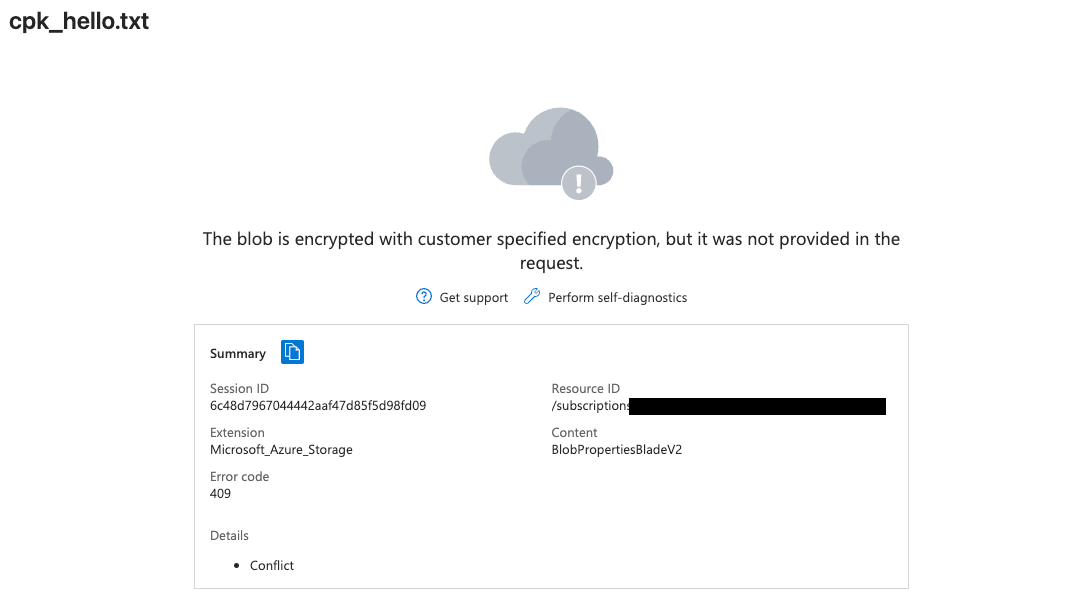
By default, Azure encrypts all storage account objects at rest using an Azure-managed server-side key. Storage service encryption works not by encrypting blobs directly, but rather by wrapping the existing Azure-managed key with a customer-managed key. An attacker can exploit this similarly to the Encryption Scope method; create a key in a key vault, point the Storage service encryption toward that new key, and then delete the key or key vault. With Azure unable to unwrap its managed key, trying to retrieve a blob will result in an error message like below:
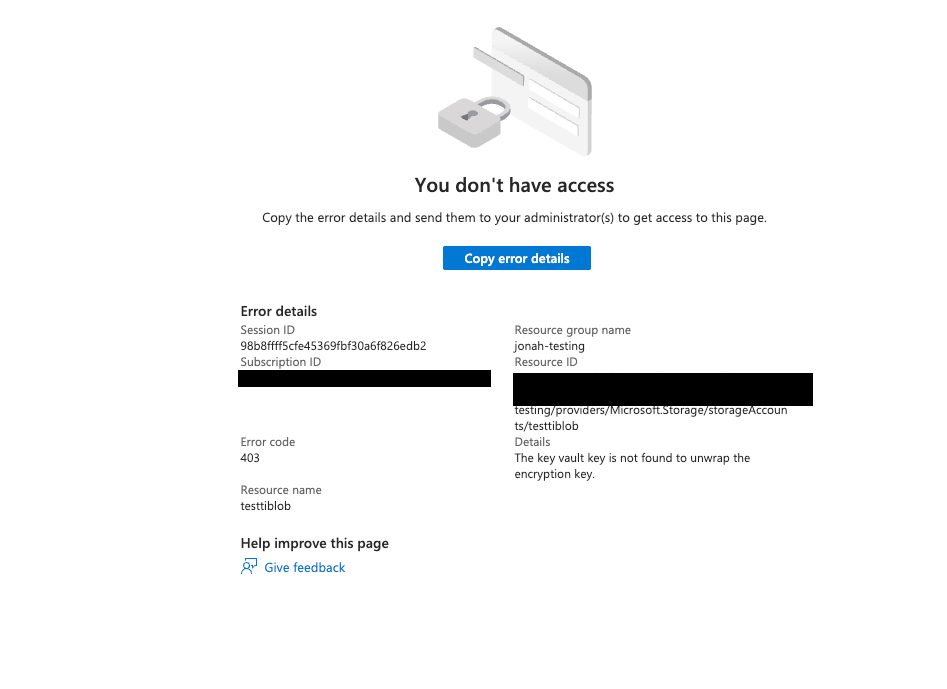
This method is quite attractive compared to the others listed here. Only a single API call to Azure Storage is needed to render data inaccessible, rather than a tedious mass downloading and uploading that may trigger alerts. No data plane permissions are required on the storage account. However, to date there has been no public reporting of this tactic being exploited in the wild.
curl -X PATCH \
"https://management.azure.com/subscriptions/${SUBSCRIPTION_ID}/resourceGroups/${RESOURCE_GROUP}/providers/Microsoft.Storage/storageAccounts/${STORAGE_ACCOUNT}?api-version=2023-05-01" \
      -H "Authorization: Bearer ${ACCESS_TOKEN}" \
      -H "Content-Type: application/json" \
      -d @- <<EOF
    {
      "identity": {
        "type": "SystemAssigned"
      },
      "properties": {
        "encryption": {
          "keySource": "Microsoft.Keyvault",
          "keyvaultproperties": {
            "keyvaulturi": "${KEY_VAULT_URI}",
            "keyname": "${KEY_NAME}",
            "keyversion": "${KEY_VERSION}"
          }
        }
      }
    }
    EOF
This method shares a major flaw with the encryption scope method: Microsoft requires that all key vaults used in Azure Storage CMK encryption have soft-delete policies enabled, meaning the key (and the blobs they encrypted) will be recoverable by the victim even after deletion. However, in the next section, we'll discuss how to circumvent those protections.
Azure Activity log event codes
Microsoft.Storage/storageAccounts/writewithproperties.requestbody.properties.encryption.keySourceset toMicrosoft.KeyvaultMicrosoft.KeyVault/vaults/writeMicrosoft.KeyVault/vaults/deleteMicrosoft.Authorization/roleAssignments/write(for assigning permissions to the managed identity for storage accounts)
Key Vault resource log event codes
KeyCreateKeyDelete
Azure Key Vault protections and how to evade them
As mentioned, Microsoft requires that all key vaults used in Azure Storage CMK encryption have soft-delete policies enabled. If there is no existing soft-delete protection policy on the key vault, it will be automatically set to 90 days retention when linked to the Azure Storage account. Additionally, Microsoft will automatically enable purge protection on the vault, preventing the soft-deleted keys from being permanently deleted before the retention period expires.
Attackers can partially circumvent this by setting the soft-delete retention policy to its minimum value of seven days before linking it to the storage account. Attackers could then theoretically run out the clock and wait for the key to be purged before demanding a ransom. However, victims would likely notice if production-critical data is unavailable, and may be able to recover the Key Vault (and blobs) before attackers can demand a ransom.
A more sophisticated way to evade these protections would be for the attacker to create a Key Vault in an attacker-controlled Entra tenant, and implement cross-tenant CMK encryption on the victim storage account using the method described by Microsoft.
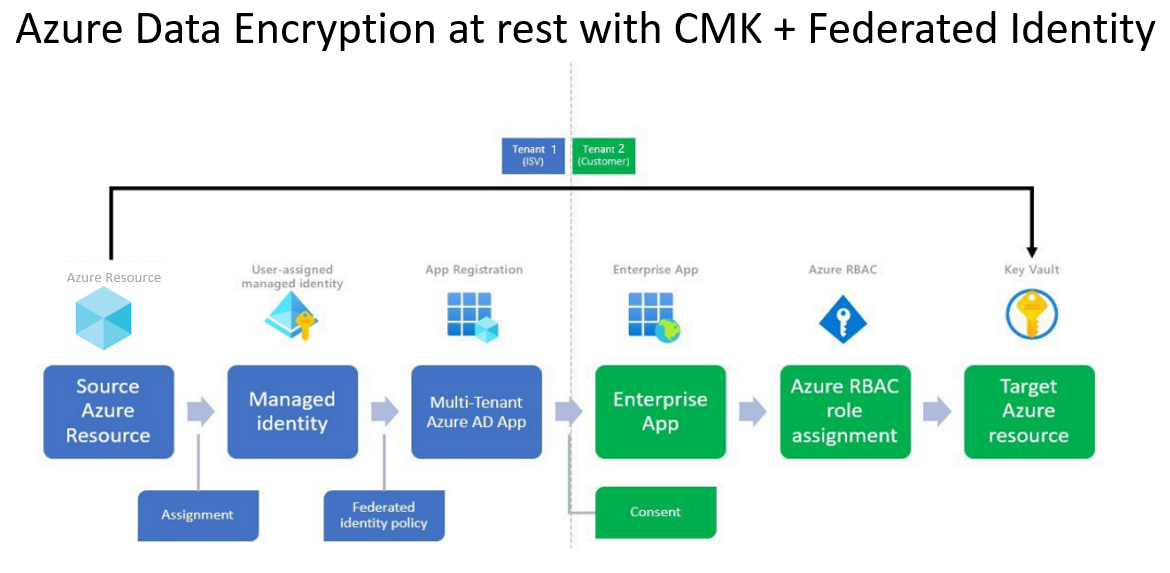
After an attacker creates a multi-tenant app in the victim environment and adds a corresponding service principal in the attacker tenant, they can create a trust relationship between the victim storage account's managed identity and the application by adding federated credentials to the app registration. Then the attacker just needs to grant their tenant's service principal access to a Key Vault key and then input the URI of that key in the victim's CMK configuration.
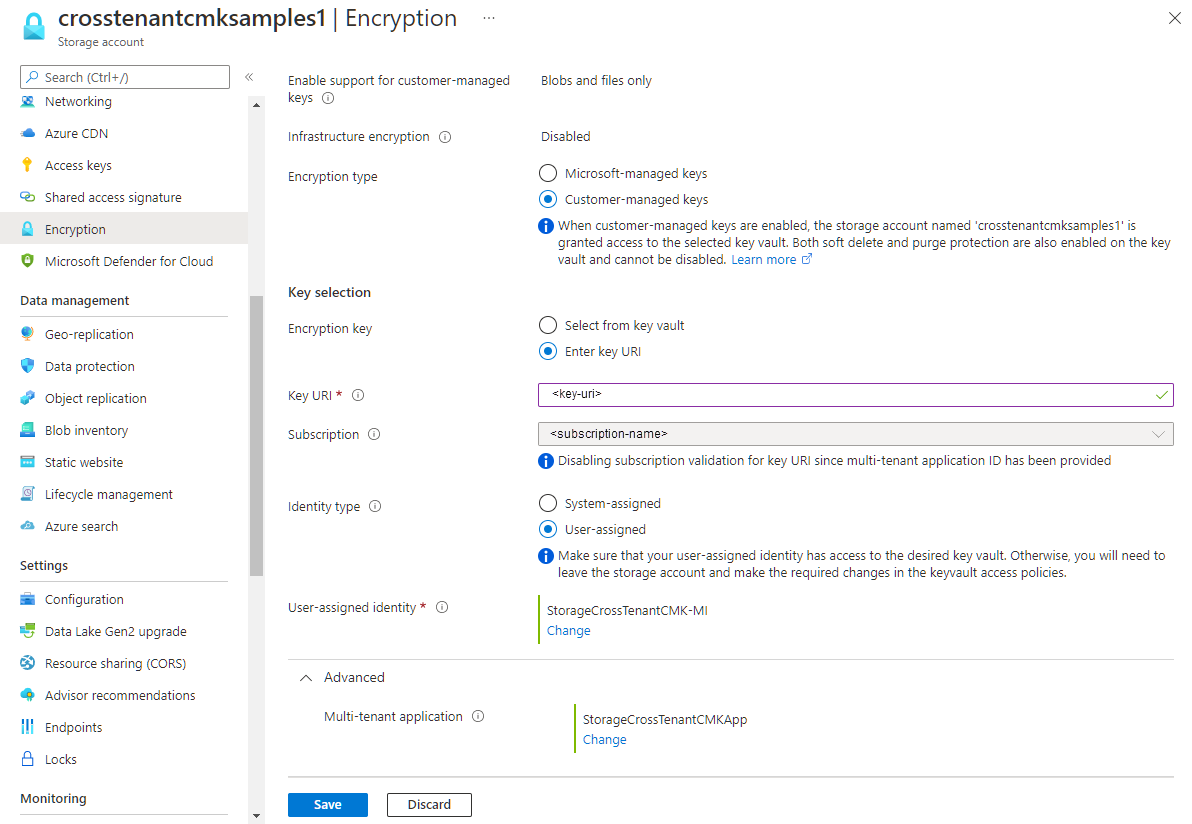
Once the victim data and/or server-side keys have been encrypted, the attacker can delete the attacker-controlled key or simply remove the service principal from the attacker environment. Although the key will only be soft-deleted, since it resides in attacker-controlled infrastructure, there will be no way for the victim to recover the key without paying a ransom.
This variation would need significant control plane permissions in both the victim and attacker-controlled Entra tenants, requiring a privileged role like Application Administrator or Global Administrator.
Entra event codes
Add applicationUpdate Applicationwithproperties.targetResources.modifiedProperties.displayNameset toFederatedIdentityCredentials
Protecting against Azure storage ransomware
Microsoft's guide on ransomware protection in Azure covers this topic in depth and is worth reading alongside this article.
Enable Azure Defender for Storage for threat detection across storage accounts, and harden them with resource locks, immutability policies, and versioning to prevent data from being destroyed or overwritten. Where possible, avoid long-term credentials like storage access keys or SAS tokens, which give attackers persistent data-plane access without needing any control-plane permissions.
For detection, watch for unusual blob upload and download patterns, and for the rapid creation, use, and deletion of key vault keys. Flag any CMK configurations pointing at key vaults in unfamiliar or external tenants. Also monitor for the removal of storage protection features:
Microsoft.Authorization/locks/deleteMicrosoft.Storage/storageAccounts/blobServices/containers/immutabilityPolicies/deleteMicrosoft.Storage/storageAccounts/write(whereproperties.requestbody.properties.immutabilityPolicy.stateisDisabled)
Emulating Azure storage ransomware with Stratus Red Team
Stratus Red Team is an open-source tool for emulating cloud attack techniques against a real cloud environment. The following techniques correspond to the ransomware methods described in this article:
- Azure Blob Storage ransomware through Encryption Scope using client-managed Key Vault key
- Azure Blob Storage ransomware through Customer-Provided Encryption Keys
- Azure Blob Storage ransomware through Customer-Managed Key Vault key and vault deletion
Let's take an example with the first technique. First, we'll use Stratus Red Team to create an Azure storage account with blob containers in it:
$ stratus warmup azure.impact.blob-ransomware-client-encryption-scope

Checking your authentication against azure
Warming up azure.impact.blob-ransomware-client-encryption-scope
Initializing Terraform
Applying Terraform to spin up technique prerequisites
Storage account stratusrtidsg3a with 5 containers ready. Key Vault stratusrtqwgejtyj ready. Blobs will be created during detonation.
Let's now use Stratus Red Team to execute the attack technique against our target bucket:
$ stratus detonate azure.impact.blob-ransomware-client-encryption-scope
Simulating a ransomware attack on storage account stratusrtidsg3a
Creating 51 fake blobs across 5 containers
Created 51 fake blobs
Enabling purge protection on Key Vault: stratusrtqwgejtyj
Purge protection enabled on Key Vault: stratusrtqwgejtyj
Creating RSA 2048 key in Key Vault: stratusrtqwgejtyj
Created Key Vault key: https://stratusrtqwgejtyj.vault.azure.net/keys/ransom-encryption-key/b4aaac30826542a9bea74346d51bd576
Creating encryption scope: ransom-encryption-scope with key: https://stratusrtqwgejtyj.vault.azure.net/keys/ransom-encryption-key
Created encryption scope: ransom-encryption-scope
Found 51 blobs to encrypt across 5 containers
Re-encrypting all blobs with encryption scope: ransom-encryption-scope
Successfully encrypted all blobs with encryption scope
Soft-deleting key: ransom-encryption-key from vault: stratusrtqwgejtyj
Finally, we clean up any infrastructure that was spun up as part of the simulation:
$ stratus cleanup azure.impact.blob-ransomware-client-encryption-scopeConclusion
We have informed Microsoft of the limited logging available for CPK and Encryption Scope based blob encryption.
Thank you for reading! We're always eager to hear from you. If you have any questions, thoughts, or suggestions, send us a message at securitylabs@datadoghq.com, or open an issue. You can also subscribe to our newsletter or RSS feed.