

Key points
- This post provides technical background about agent identities in Microsoft Entra.
- The Entra Agent ID framework builds on Entra's application model by using blueprints, blueprint service principals (SPs), agent identities, and agent users. These objects are all subtypes of existing Entra objects (app registrations, SPs, and users).
- A threat actor who can add a credential to a blueprint can access all agent identities associated with that blueprint, regardless of what tenant they reside in. This is the same risk as using third-party applications, which can lead to incidents like Midnight Blizzard.
- Unlike applications, the agent identity model allows linking a single app registration (blueprint) to multiple identities (blueprint SPs, agent identities, agent users), and their associated privileges, increasing the potential blast radius of a compromised agent.
- In this series of blog posts, we'll take an in-depth look at this risk and review security considerations for working with agent identities.
Introduction
In this post, we share in-depth details on how Entra's agent identity model works on a technical level and the risks associated with it. Microsoft describes Entra Agent ID as an "identity and security framework that extends Microsoft Entra capabilities to AI agents." This framework extends Entra's application model, which uses similar objects in a new architecture to provide application and user identities for agents.
Understanding the internals of agent identity is important when considering the blast radius of a potential compromise. Compared to Entra's standard application model, the agent identity model can lead to more total identities and permissions contexts being compromised from a single app registration (blueprint).
Just as in the application model, blueprints are analogous to app registrations in that they operate under a producer-consumer model. A blueprint is published in one tenant, but can be used to create agent identities in multiple tenants. This can occur in "agent factory"-type solutions or when an agentic service is used across multiple tenants of the same company. Whoever controls the blueprint controls all agent identities associated with it. This can be devastating if a blueprint you rely on for privileged tasks is compromised.
We'll illustrate this risk in depth, and how to defend against it, in the upcoming posts of our series. For now, we'll take a closer look at how agent identities work.
We previously covered the application model in depth. If you are new to Entra's application model, you may find it useful to review it as background to this post, since the agent identity model builds on the application model.
Anatomy of an agent
Entra Agent ID is an extension of Entra's application model that provides identities for AI agents.
The agent identity model uses its own types of app registrations (blueprints) and SPs (blueprint principals), and expands on this model with additional SPs (agent identities) and user accounts (agent users). Agent identities are already in use in Microsoft's own products as the backbone of services like Copilot Studio and Microsoft Foundry (formerly Azure AI Studio).
The agent identity model is similar to Entra's application model and uses similar building blocks. But the similarities end when considering that agent identity was built to provide multiple agent identities out of one app registration, the blueprint. This relationship is different from the application model, which only has one identity (SP) in each tenant where an app registration has been added.
To better understand this, let's take a look at how agent identities are architected.
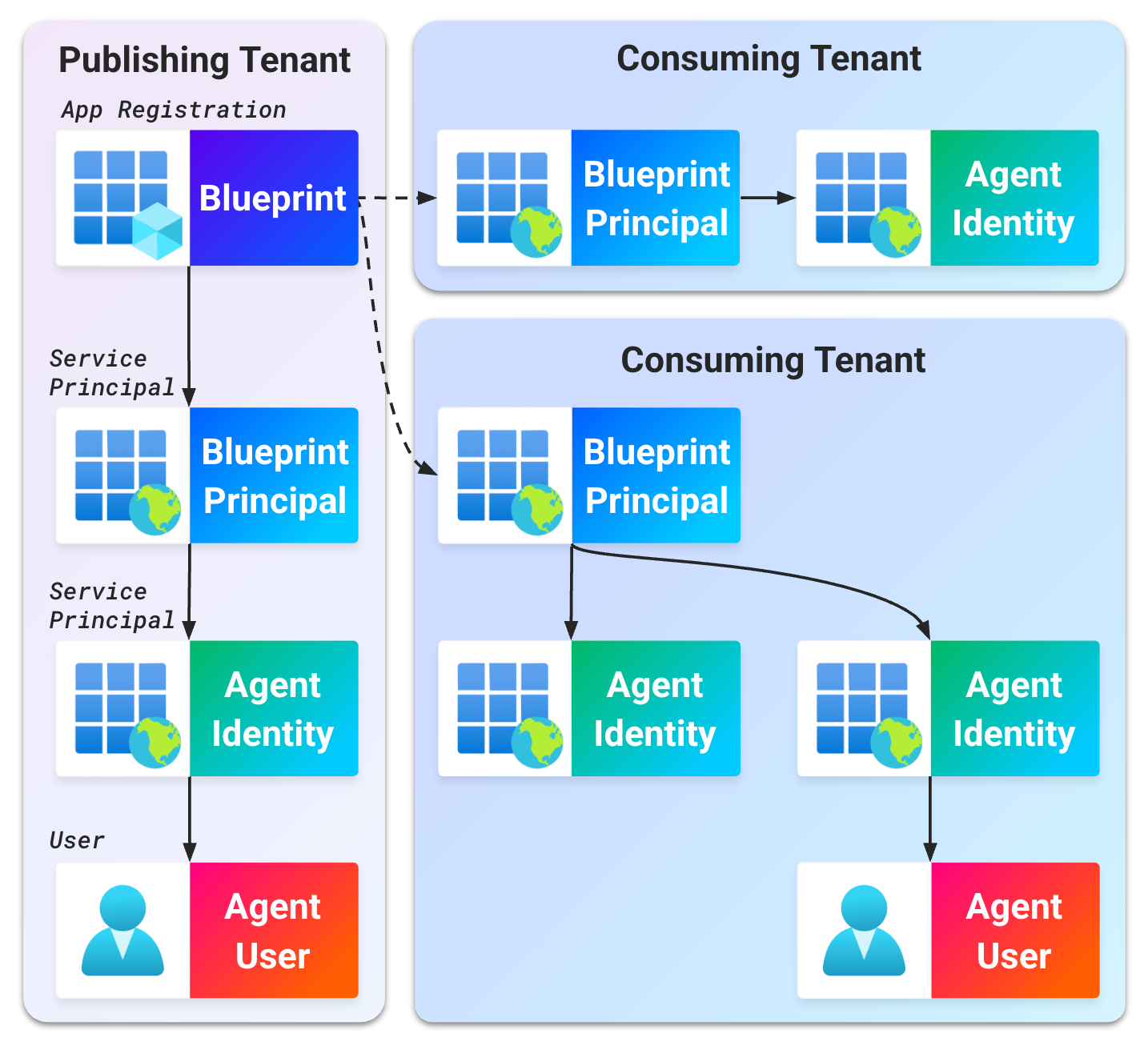
Note: Currently, the agent identity model is primarily managed through the Entra admin center, under the "Agents" panel. Examples below will use this panel to review how to create agents. Agents can also be created using the Microsoft Graph API.
Agent definitions
Similar to an app registration, an agent blueprint is defined by an app registration and instantiated by an SP. They just go by different names: agent identity blueprints and agent identity blueprint principals.
Agent identity blueprints (referred to here as a "blueprints") are a type of app registration that defines the agent service's display name and its basic configuration. Blueprints also define the credentials used to authenticate all identities associated with that blueprint.
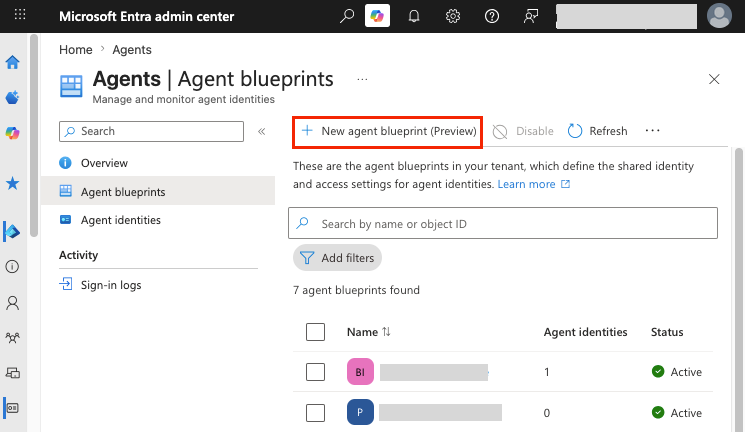
In the Entra admin center, blueprints are created under "Agent blueprints" using the "New agent blueprint" option:
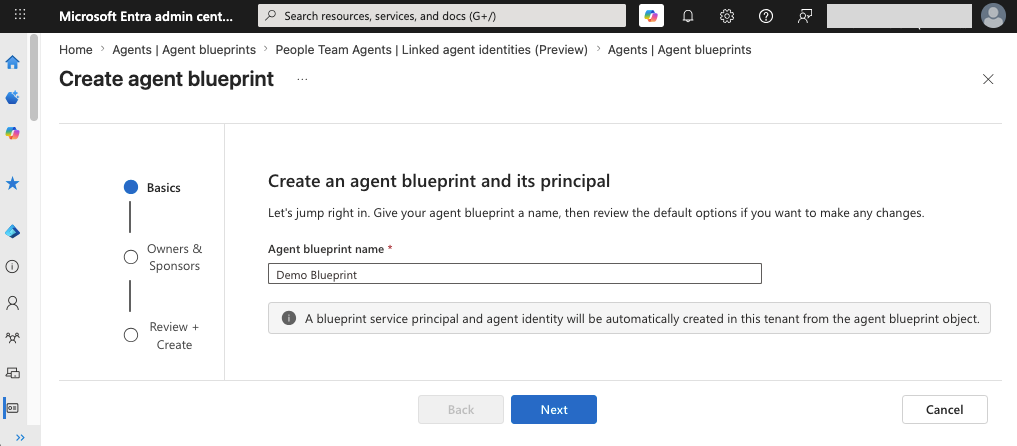
By specifying a blueprint name and selecting "Create," a blueprint, blueprint principal, and agent identity are automatically created.
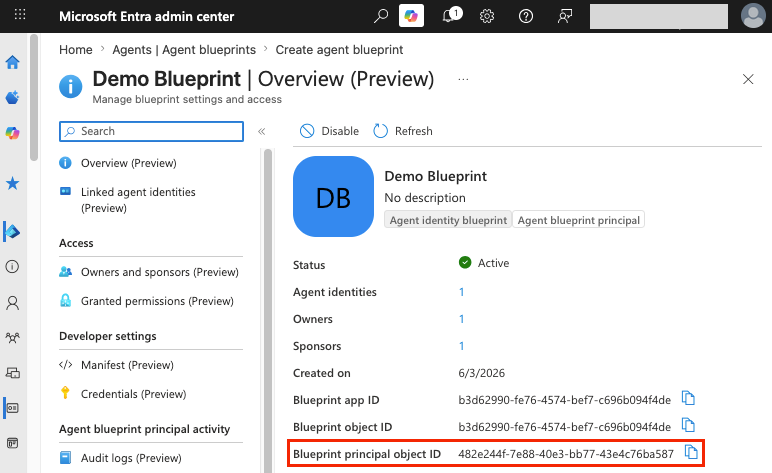
Agent identity blueprint principals (referred to here as a "blueprint principals") are a type of SP that provides the blueprint with a local identity in each tenant it exists in. In other words, the blueprint principal instantiates the blueprint within a local Entra tenant. This allows the blueprint to create and authenticate agents in tenants where it has been added.
Blueprint principals cannot be reviewed individually in the Entra admin center. However, the object ID of a blueprint principal is found in the details of its blueprint.
In the traditional application model, an app registration is associated with a single SP in each tenant where it is added. This is similar to the agent model's architecture, where a single blueprint is associated with a single blueprint principal in each tenant.
At this stage, the similarities between the application model and the agent model stop.
Individual agents
In the agent model, many identities can be associated with each blueprint: Blueprints can have up to 250 agent identities per tenant. Each agent identity can also have an optional agent user. This is many more identities than can be associated with a traditional application.
Once a blueprint has been created and instantiated with a blueprint principal, two identity objects create individual agent instances: agent identities and agent users.
Agent identities are a subtype of SP. These identities are created by blueprint principals to represent individual instances of an agent. These are intended as the identity workers for each instance of an agentic application.
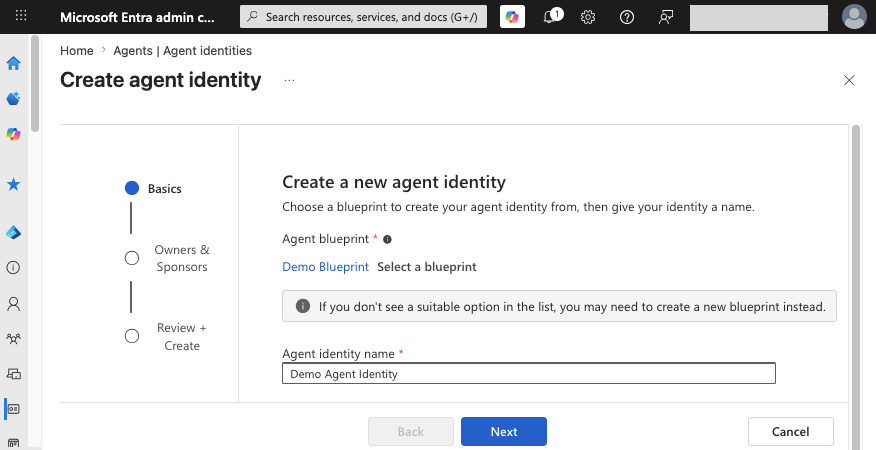
Agent identities are created under "Agent identities" using the "New agent identity" option:
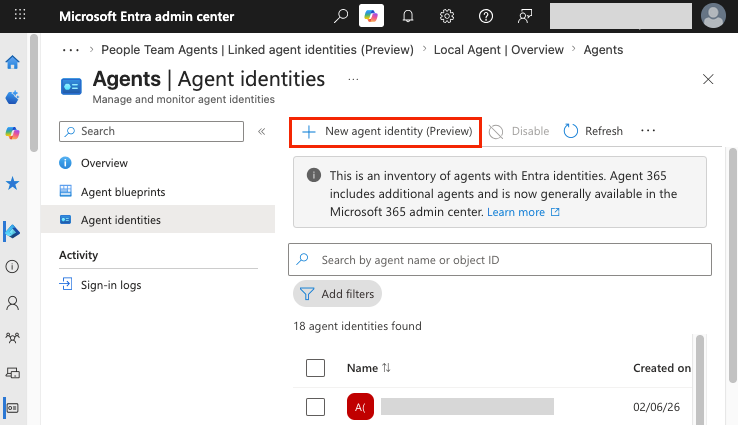
By specifying an agent identity name and the blueprint to associate the agent with, an agent identity will be created.
Agent users provide an optional user account for each agent identity. This account can have a mailbox, join Teams channels, and accomplish other tasks an SP cannot. Each agent identity can have one agent user.
It is not yet possible to create agent users in the Entra admin center. An agent user account can only be created by calling the /beta/users/microsoft.graph.agentUser Microsoft Graph API endpoint with a token containing one of the documented required scopes to modify agent users or user accounts.
An example POST request to this endpoint is shown below:
POST /beta/users/microsoft.graph.agentUser HTTP/2
Host: graph.microsoft.com
Content-Type: application/json
Authorization: Bearer eyJ[...]

{
  "accountEnabled": true,
  "displayName": "Agent User Identity",
  "mailNickname": "AgentUser",
  "userPrincipalName": "agentuser@[domain]",
  "identityParentId": "[Agent Identity Object ID]"
}
Permissions
Along with including more identities, the agent model can compile more types of access under a single blueprint. Since the agent identity model combines both SPs (blueprint principals, agent identities) and users (agent users), both SP and user access can apply to agents.
This includes the following standard types of access:
- Teams and Exchange access for agent users
- Entra role assignments to blueprint principals, agent identities, and agent users
- Application permissions for a blueprint principal or agent identity to act on its own behalf
- Delegated permissions for a blueprint principal or agent identity to act on behalf of users
Additionally, inheritable permissions are a new form of permissions assignment that allows a blueprint to grant additional delegated permissions to an agent.
Inheritable permissions
When using inheritable permissions, a set of delegated permissions is defined on a blueprint (inheritablePermissions). If these delegated permissions are granted to the blueprint principal, they are inherited by all agent identities associated with the blueprint. These delegated permissions create a "base set of scopes" that ensures agents have the permissions they need to function. Delegated scopes are applied when a token is issued and cannot be seen on the agent identities inheriting them.
Restricted permissions
Many privileged Entra roles, application permissions, and delegated permissions are restricted from assignment to agentic identities (blueprint principals, agent identities, and agent users). However, not all privileged roles and permissions are restricted.
For example, while roles like Global Administrator are restricted from assignment, many roles with permissions in applications outside of Entra (Exchange Administrator, Azure DevOps Administrator) and roles with heightened visibility (Global Reader) can still be assigned. These roles can lead to significant impact in the event of a compromise.
In the next post of this series, we'll take a look at how an application permission assignable to agent identities can lead to account takeover of a user with the Global Administrator role.
Authentication
An agent's blueprint is the only location where a credential can be added to authenticate all identities associated with it. Credentials cannot be added directly to blueprint principals, agent identities, or agent users. For those familiar with applications, this is roughly equivalent to already enabling the app instance property lock or disabling SP credentials by policy.
This prevents takeover from child SPs (SP hijacking), such as the blueprint principals or agent identities. However, this means that the blueprint must authenticate all identities associated with it. The blueprint is the one trusted source of authentication for all of its blueprint principals, agent identities, and agent users.
Let's cover the details of an example token exchange to better understand this process. This will become relevant when reviewing an example attack path with agent identities in our next post.
Authenticating as agents
Agents authenticate their identities through a series of token exchanges. The blueprint credential is used to impersonate each identity by requesting a token for that identity, from the top down, until a token for the target identity is reached. Access to the blueprint's credential is required to begin the exchange.
To obtain a token to act as an agent identity, two different token exchanges would take place:
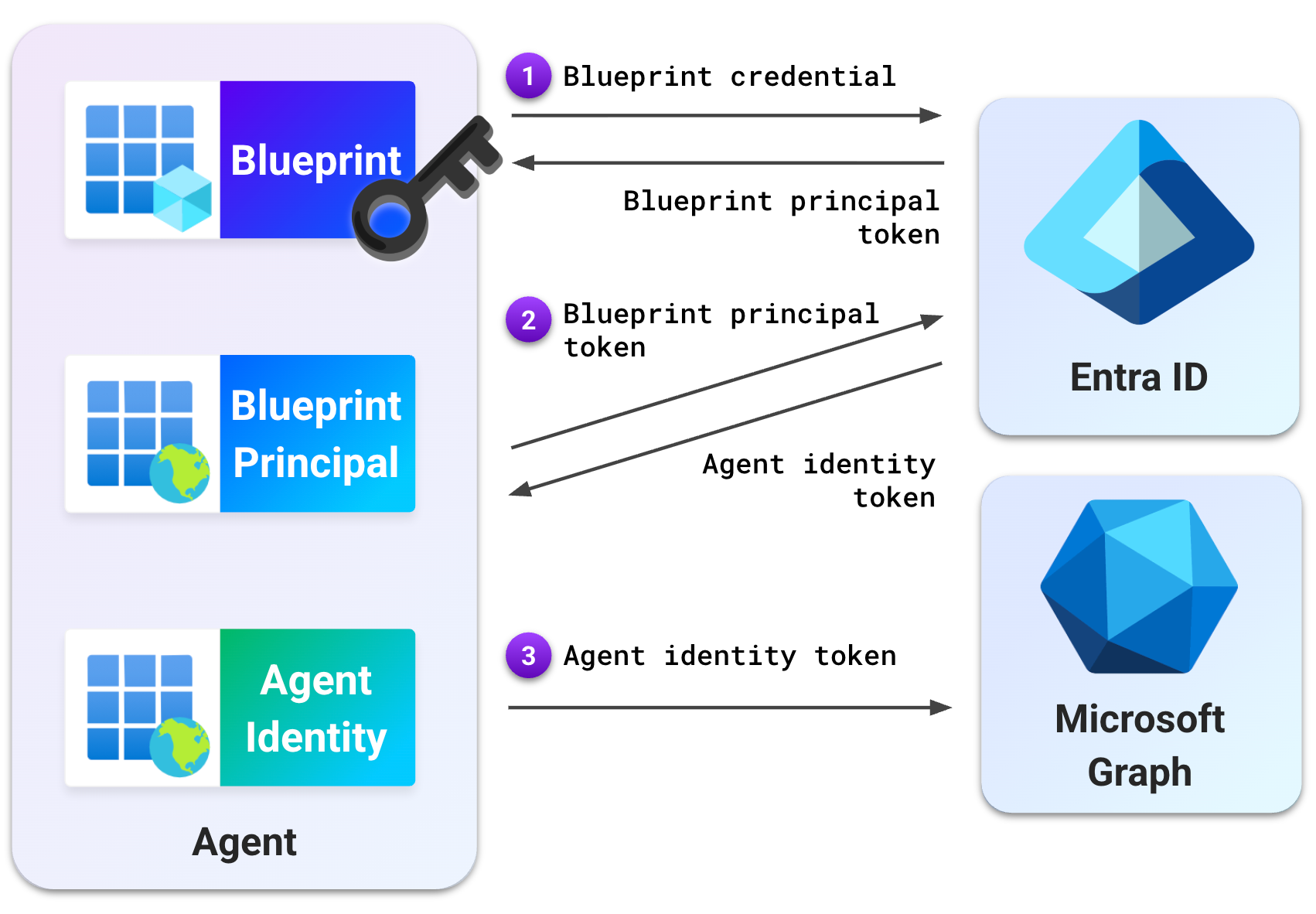
Exchange 1: Blueprint principal token
The blueprint's credential is used in a client_credentials grant to obtain a token as the blueprint principal. A property (fmi_path) is used to specify the object ID (OID) of the agent identity the token will be exchanged for. This token has an audience of api://AzureADTokenExchange/.default so it can be used in a future token exchange.
A sample request for this token is shown below:
POST https://login.microsoftonline.com/[Tenant ID]/oauth2/v2.0/token HTTP/2
Host: login.microsoftonline.com
Content-Type: application/x-www-form-urlencoded

client_id=[Blueprint Application ID]
&scope=api://AzureADTokenExchange/.default
&fmi_path=[Agent Identity Object ID]
&client_secret=[Blueprint Secret]
&grant_type=client_credentials
This request returns a token valid for authentication as the blueprint principal.
Exchange 2: Agent identity token
The initial blueprint principal token from the first exchange is used as the credential for a second client_credentials grant. This exchange requests a token as the agent identity.
Since this token will be used to take actions as the agent identity, the audience is set to the application the agent will use (e.g., Microsoft Graph).
A sample request is shown below:
POST https://login.microsoftonline.com/[Tenant ID]/oauth2/v2.0/token HTTP/2
Host: login.microsoftonline.com
Content-Type: application/x-www-form-urlencoded

client_id=[Agent Identity Object ID]
&scope=[Target Application Scope]
&client_assertion_type=urn:ietf:params:oauth:client-assertion-type:jwt-bearer
&client_assertion=eyJ[...Blueprint Token...]
&grant_type=client_credentials
This request returns a token as the agent identity, which can be used with Microsoft Graph. At this stage, the blueprint credential has been used to effectively become the agent identity.
Full documentation on all agent authentication flows can be found in Microsoft's documentation on authentication protocols in agents.
The blueprint blast radius
If a blueprint is compromised, all identities associated with it can be compromised. This includes blueprint principals, agent identities, and agent users. This also includes all the privileges assigned to these individual identities across all tenants where the blueprint is used.
To recap, when compared to a standard app registration agent identities have key differences that increase the number of identities and permissions held under a single blueprint:
- More identities: A blueprint can include up to 250 associated agent identities per tenant, as opposed to a classic app registration's one SP per tenant.
- Multiple permissions: Each identity can include its own permissions assignments. This can include its own Entra roles, application permissions, and delegated permissions.
- Inherited permissions: Agent identities can also inherit delegated permissions from a blueprint principal (
inheritablePermissions).
When high-risk permissions are granted to agent identities, users controlling the blueprint of these identities can use those permissions to escalate privileges. In the application model, this type of attack has been referred to as backdooring or hijacking.
Visually, the difference between the blast radius of a compromised application and a compromised blueprint is shown below:
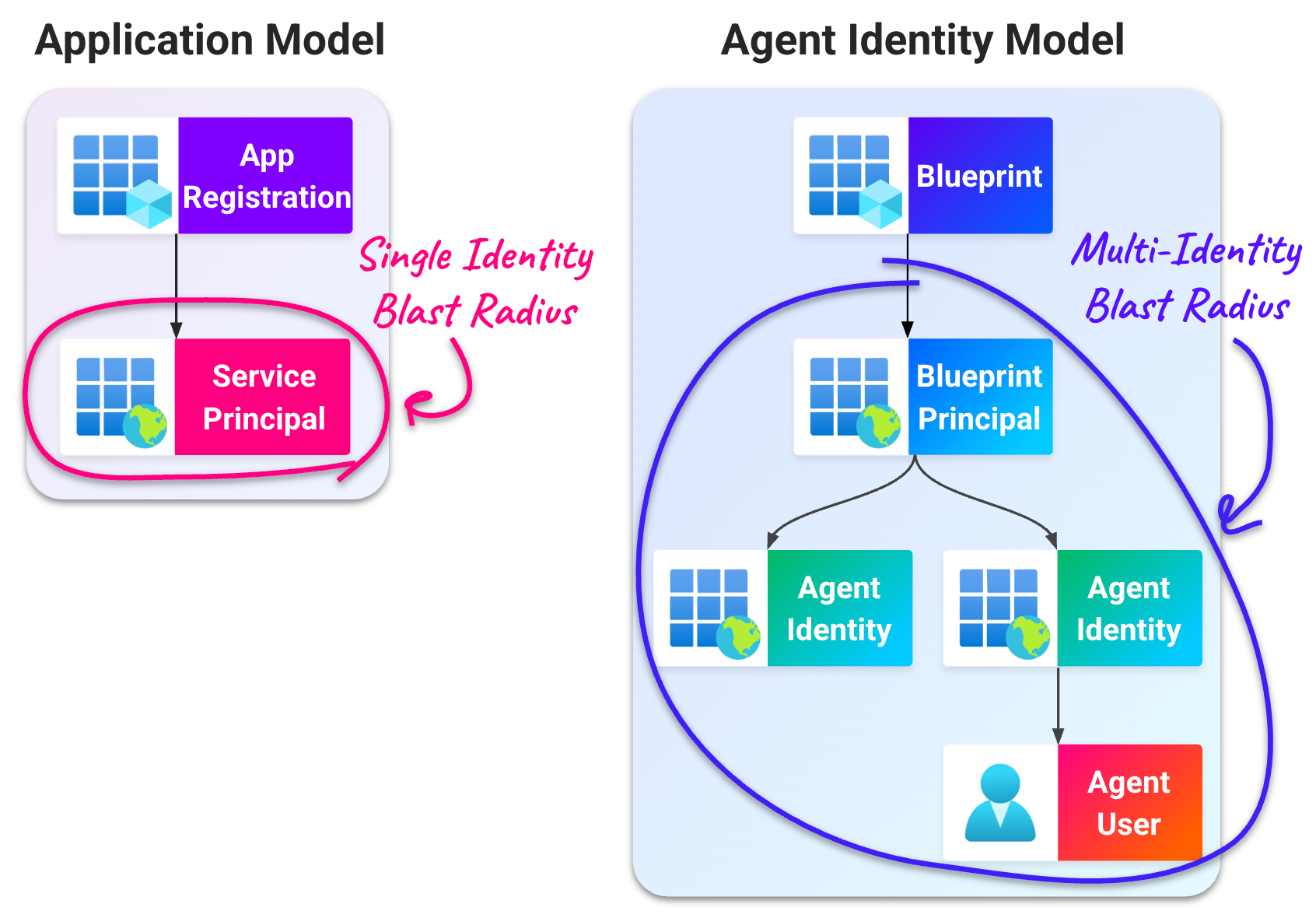
All blueprints carry the risk of a multi-identity blast radius that expands the more they are used to create agents. As new agent identities are created and used for new tasks with more permissions, the scope of permissions accessible through one blueprint grows.
When a blueprint is used across multiple Entra tenants, the impact of a blueprint compromise can increase further.
Third-party blueprint risk
The multi-identity blast radius also applies to blueprints that have been used to create agents in multiple tenants. This can lead to a cross-tenant incident similar to Midnight Blizzard, where the compromise of a third-party app registration in one tenant led to elevated privileges in another tenant.
When a blueprint is used to create agents in another tenant, it becomes a third-party blueprint in the tenant consuming it. The tenant that created this blueprint, the publishing tenant, is responsible for securing the blueprint for the consuming tenant.
Blueprints are used to authenticate all associated identities, regardless of what tenant those identities reside in. A secret added to a third-party blueprint in the publishing tenant will allow that blueprint to authenticate as agent identities in the consuming tenant, leading to a multi-tenant blast radius.
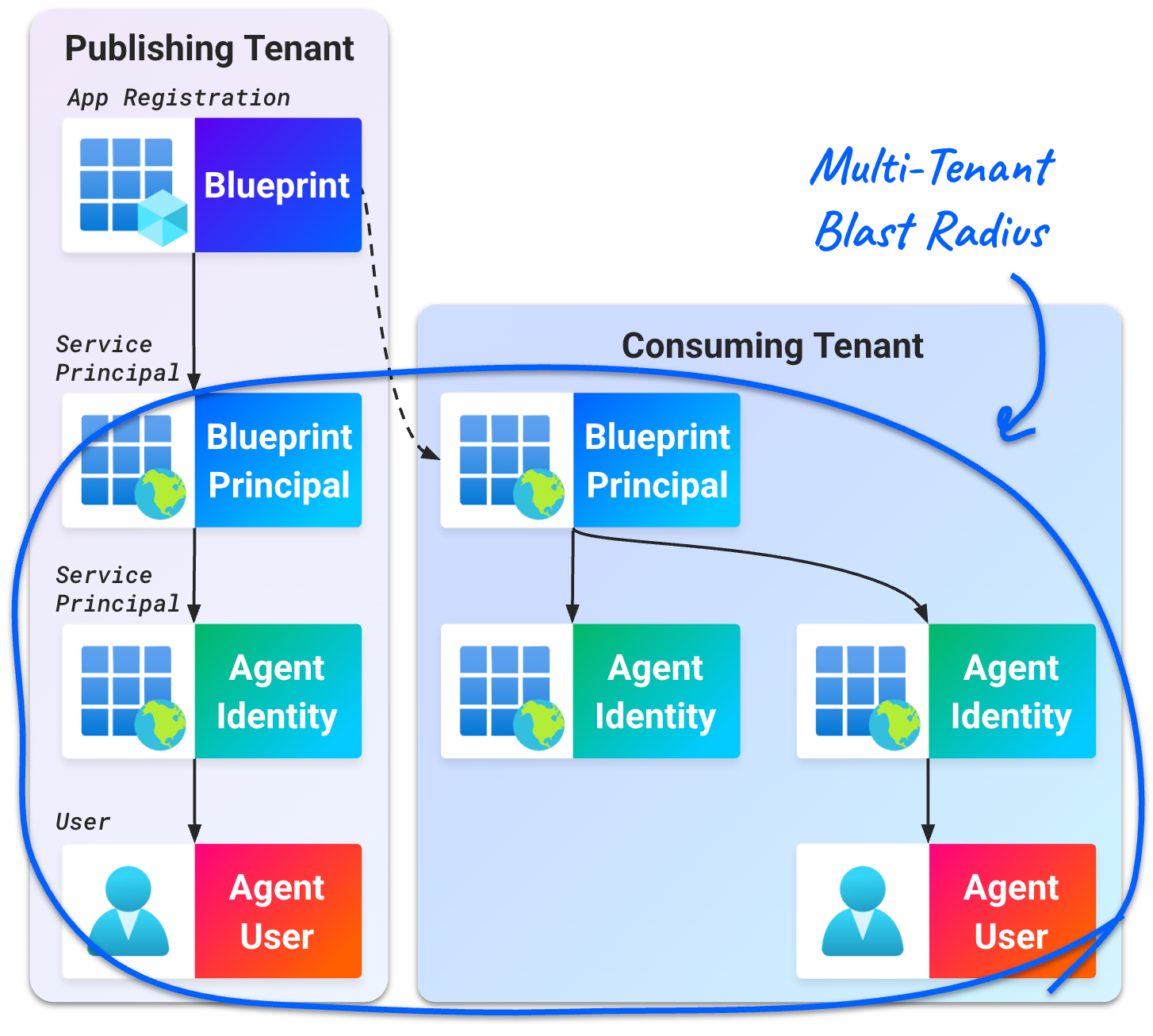
Since a blueprint holds the credential to issue tokens for all identities associated with it, whoever controls the blueprint controls all its associated identities and permissions.
In the next post of this series, we'll see directly how this scenario can allow an attacker to pivot between tenants from a single compromised blueprint.
Conclusion
In this post, we show how Entra agent identities created from third-party blueprints function by combining features of the application model with additional SP and user identities. This can lead to more identities and permissions impacted in the event of a blueprint compromise.
Next time, we'll take a look at the impact of a blueprint compromise from an attacker's perspective. This demonstration will illustrate the increased blast radius of an incident in the agent identity model.
We're always eager to hear from you. If you have any questions, thoughts, or suggestions, send us a message at securitylabs@datadoghq.com, or open an issue. You can also subscribe to our newsletter or RSS feed.