
Overview
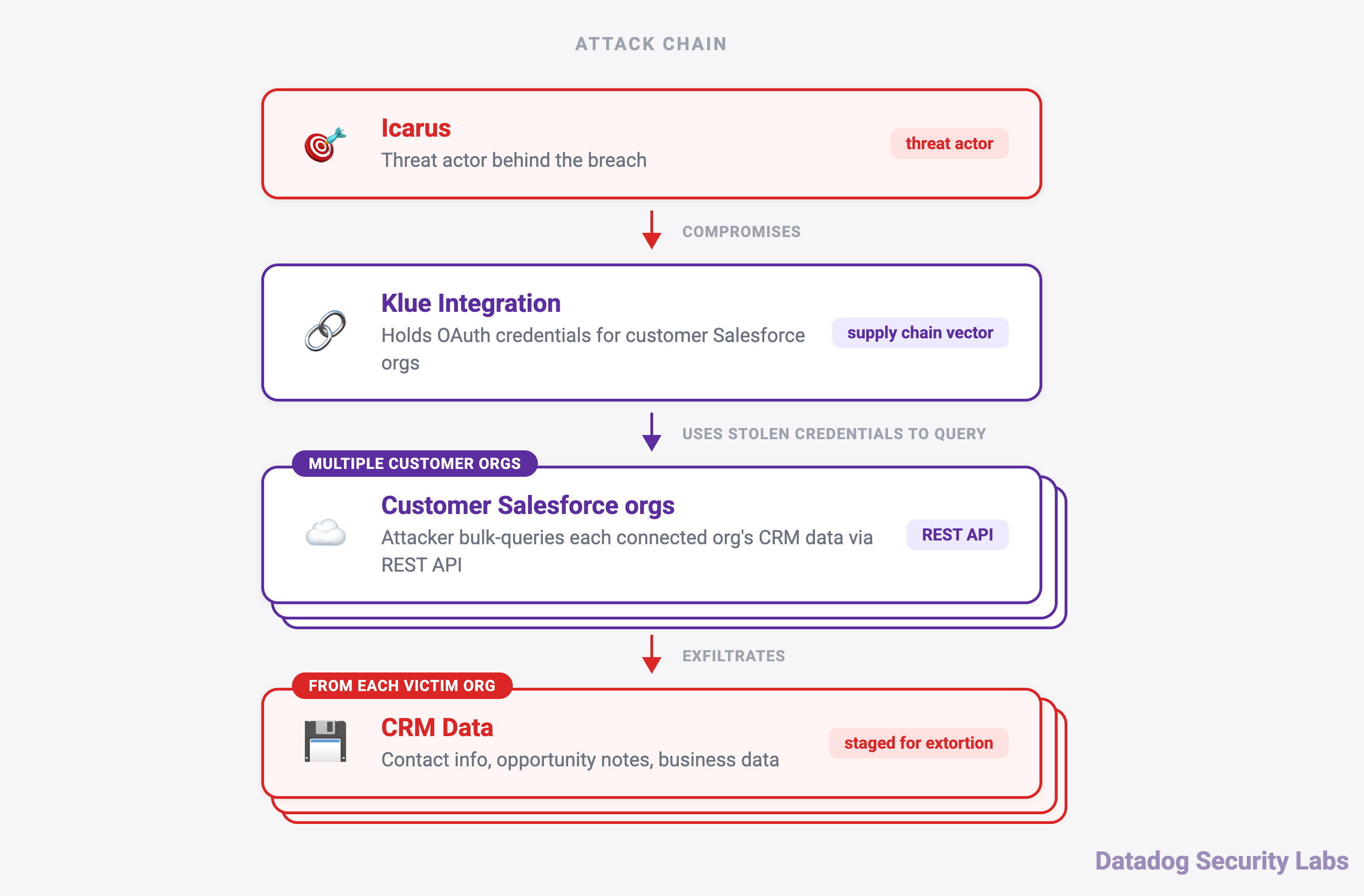
On June 11, 2026, a threat actor compromised backend systems at Klue, a market intelligence platform that hundreds of enterprise organizations use to sync competitive battlecard data with their CRM environments. By the time Klue alerted customers on June 13, the threat actor had already harvested OAuth tokens for Salesforce and Gong, and had begun querying those environments through automated API calls.
The group behind the attack, which self-identifies as "Icarus" and has been active since at least April 28, 2026, has since run an extortion campaign against multiple victims. One victim, Huntress, published a detailed incident report confirming the compromise of CRM data: business contacts, price quotes, and sales communications.
This post summarizes what is known about the attack chain, then provides detection guidance for Salesforce environments monitored by Datadog Cloud SIEM. If you are working through a broader Salesforce threat hunt, our recently published threat hunter's guide to Salesforce covers the many of the threat actor's behaviors and log sources to consider.
What happened
According to Huntress, the compromise followed a pattern common in third-party OAuth abuse campaigns. The threat actor gained initial access through a dormant credential rather than a phishing campaign or a vulnerability exploit. Klue had created the credential for a prototype integration and never decommissioned it.
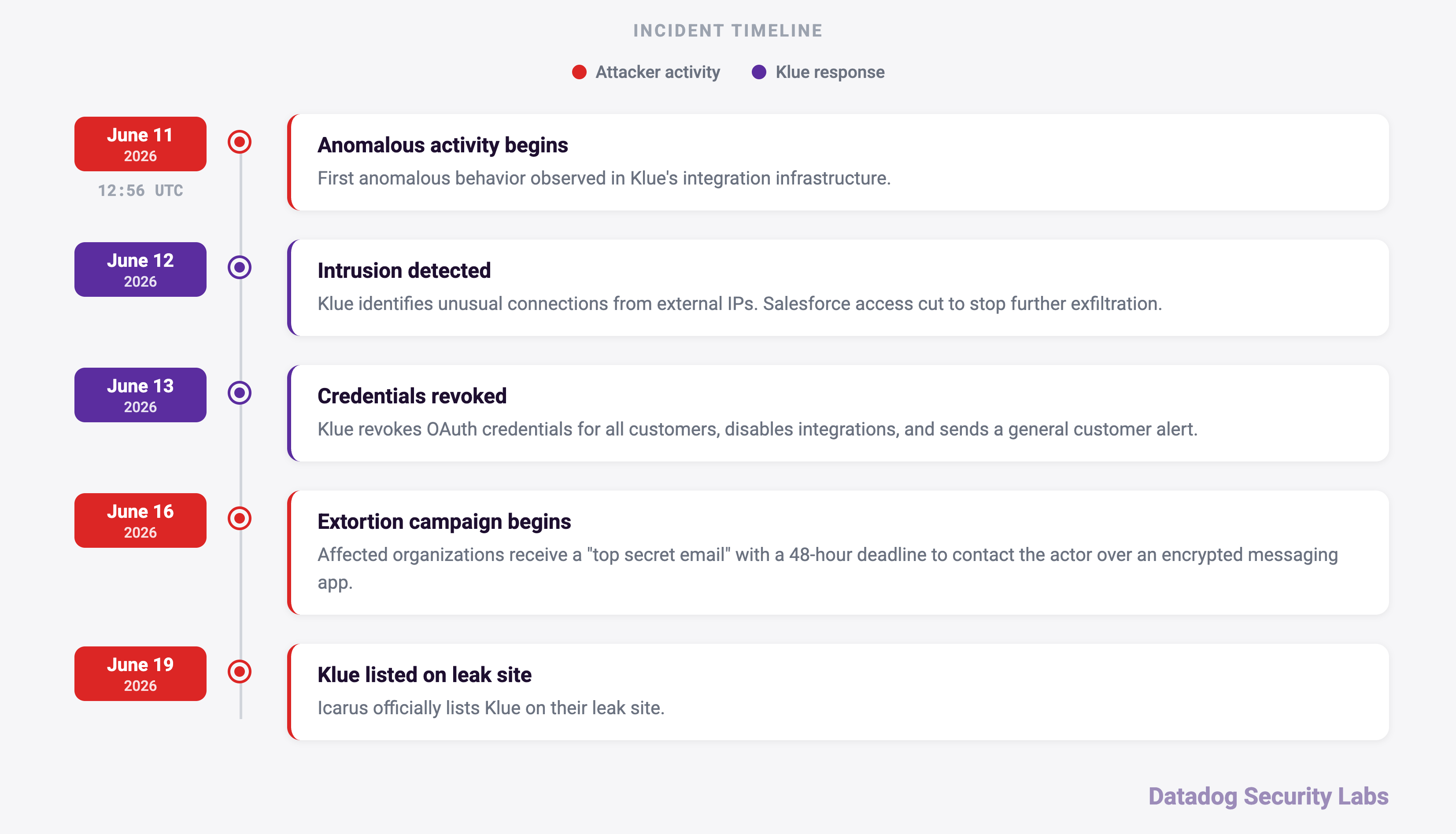
We reconstructed the following timeline from our investigation, Huntress's report, and Klue's disclosures:
- June 11: Anomalous behavior begins in Klue's integration infrastructure. Datadog observes the earliest activity at 12:56 UTC.
- June 12: Klue identifies unusual network connections from external IP addresses and removes Salesforce access to stop further exfiltration.
- June 13: Klue revokes OAuth credentials for all customers, disables integrations, and issues a general customer alert.
- June 16: Extortion emails begin arriving at affected organizations, with the subject line "top secret email" and a 48-hour deadline to contact the actor through Session Messenger.
The threat actor ran scripts to issue REST API queries against connected Salesforce instances. The observed user-agent strings suggest the scripts were written in Python. Huntress observed three primary user-agent strings across logs, which align with Datadog's findings.
Python-urllib/3.12
Python-urllib/3.14
5238
These user agents made malicious requests against the /services/data/v59.0/query/* endpoint to exfiltrate data quickly.
What we found
Our analysis of Salesforce event logs surfaced additional detection opportunities for teams responding to this incident or hunting for evidence of Klue-related activity.
Identifying the compromised connected application
The Klue Battlecards integration will appear in Salesforce logs under different field names depending on the event type.
In LoginEvent logs, look for:
application:"Klue Battlecards"In API events and other event types, the application may surface in the connected app name field:
connected_app_name:"Klue Battlecards"Detecting OAuth refresh token usage
In some instances, the threat actor used OAuth refresh tokens to maintain API access if needed. This behavior appeared in only a subset of affected environments, so treat it as a supplementary indicator rather than a primary detection signal. Where it appears, Salesforce surfaces it differently depending on which event log you have access to.
In the Login object this is reflected through:
login_sub_type:oauthrefreshtokenAnd in the LoginEvent object:
login_sub_type:"OAuth Refresh Token"Threat actor API data access activity
Once authenticated, the threat actor queried standard Salesforce objects through the API. The following entities were the most heavily targeted:
Opportunity
Case
Task
Lead
Contact
Account
User
Contract
Event
Campaign
Scope API event volume by entity type using the entity_name or queried_entities field in your Salesforce audit log data.
Datadog's Security Research team observed another pattern: spikes in failed API requests alongside successful ones. The threat actor scoped these requests broadly to return as much data as possible.
Failed requests came from querying a table that was too large, querying a table that requires a filter on a reified column, or accessing a table that the account lacked permission to read.
The following example shows the threat actor attempting to query all fields in a table:
$ SELECT FIELDS(STANDARD) FROM Event

exception_message: fault=-1;
common.exception.ApiException: exceeded 100000 distinct who/what's
These ApiException messages in the RestApi logs deviate from the expected behavior of a connected application.
As Huntress noted, we also observed the use of QueryMore. To exfiltrate large amounts of data, a threat actor must use QueryMore because Salesforce limits each API request to 2,000 records.
The following queries match REST API events to the v59.0 query endpoint from a connected application account.
Within Event Log File, this behavior is tracked under the ApiTotalUsage or RestApi event.
event_name:ApiTotalUsage connected_app_name:* api_family:REST api_client_category:EXTERNAL_APPLICATION api_resource:*v59.0/query/*The ApiTotalUsage event includes a client_ip field but does not include a user agent.
event_name:RestApi connected_app_id:* method:GET uri:/services/data/v59.0/query* message:Query*The RestApi event includes a client_ip, user_agent, and message to filter within your search. The message field will include QueryMore when it occurs.
Within Real Time Monitoring Events, this behavior is tracked in the ApiEvent event.
event_name:ApiEvent api_type:"REST" operation:Query* connected_app_id:*The ApiEvent includes the operation field to view Query or QueryMore activity. It also includes application, message, user_agent, and source_ip for further filtering.
A spike in read-heavy API queries across many objects, especially alongside the known indicators, is a strong behavioral signal of automated data exfiltration.
How Datadog can help
You can identify anomalous Salesforce activity using the following out-of-the-box Cloud SIEM detection rules, enabled by default for customers who ingest Salesforce logs:
- Anomalous amount of Salesforce query results
- Salesforce anomalous amount of queried tables
- Salesforce previously unseen network for application OAuth token login
Datadog Cloud SIEM customers who ingest Salesforce logs can start hunting with the queries above. Scope your investigation to activity from June 11 to June 12, and cross-reference any sessions tied to the Klue Battlecards application against the IP address and user-agent indicators.
For a full walkthrough of Salesforce log sources, event types, and threat actor tactics, techniques, and procedures (TTPs) to hunt for, including privilege escalation, API abuse, and data access patterns, see our guide: Mapping out your unknown: A threat hunter's guide to Salesforce.
Indicators of compromise
Klue confirmed the following IP addresses as threat actor infrastructure. Cross-reference them against Salesforce login and API event logs, as well as any other services integrated with Klue. The user agents are a lower-confidence indicator, but you can correlate them with the IP addresses.
| Indicator | Type |
|---|---|
| 138.226.246[.]94 | IP address |
| 212.86.125[.]24 | IP address |
| 213.111.148[.]90 | IP address |
| 94.154.32[.]160 | IP address |
| Python-urllib/3.12 | User agent |
| Python-urllib/3.14 | User agent |
| 5238 | User agent |