

Salesforce is one of the world’s most widely adopted SaaS platforms, embedded deep into the operational and data pipelines of modern organizations to better serve customers and understand their business health. The average enterprise Salesforce environment integrates with dozens of third-party applications, from productivity tools to AI-powered workflow engines.
Over the past year, we have seen threat campaigns abuse Salesforce applications and APIs to exfiltrate data, pivot laterally into connected cloud services, and monetize stolen access. Datadog’s Security Research team has analyzed current Salesforce threats, logging, and detection opportunities. This post provides the queries and context you need to begin hunting for attacker behavior across your Salesforce environment. Each query is mapped to a MITRE ATT&CK® tactic to help you connect observed behavior to the broader attack chain.
This is part one of a multipart series. This post covers suggestions for reconnaissance through discovery behaviors.
The threat model
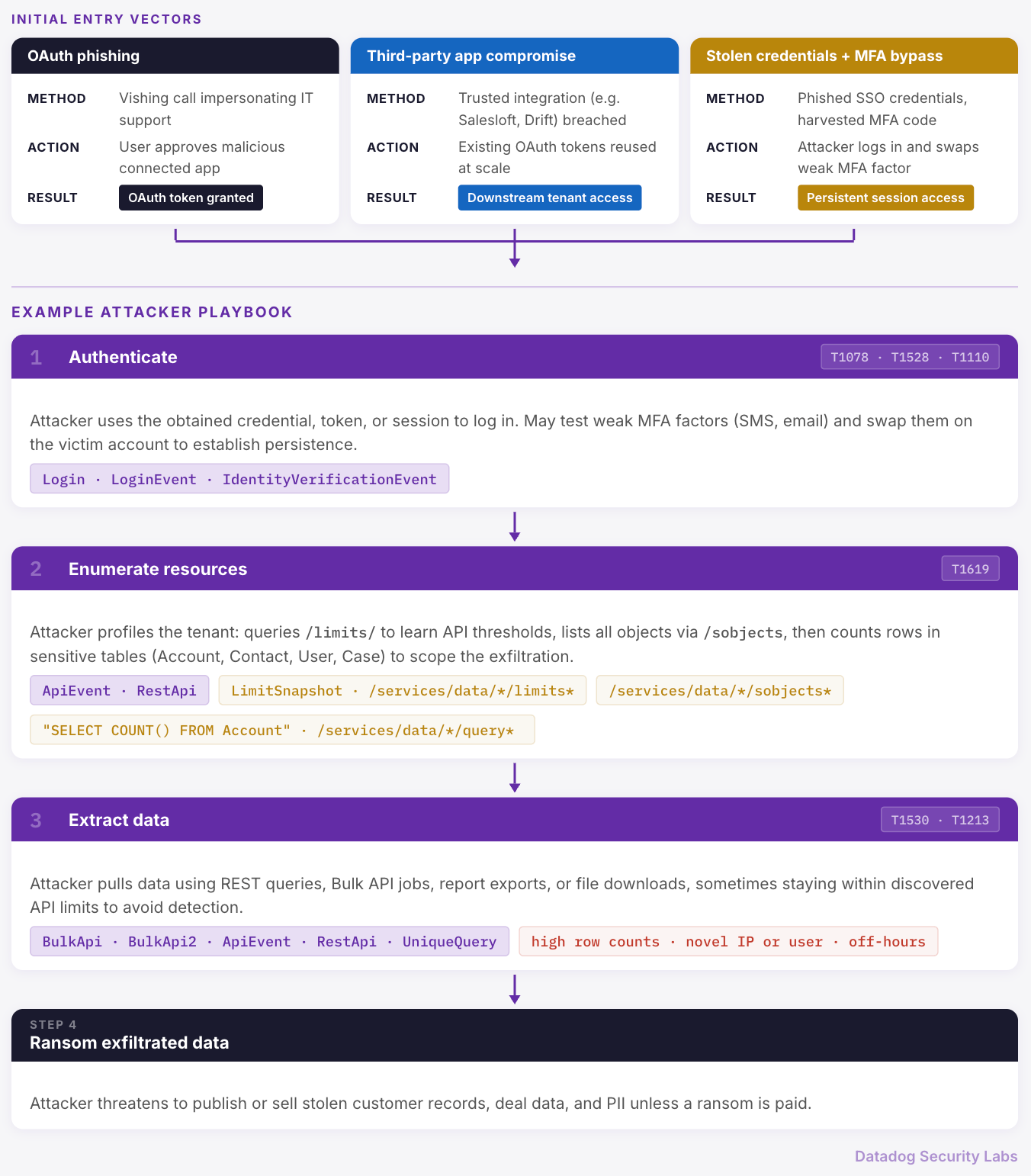
In Salesforce, an attack often starts with compromised account or application access:
- A user is socially engineered into approving a malicious connected app (OAuth), often during a phone call impersonating IT support.
- A trusted third-party integration gets compromised, and its OAuth tokens are used to access downstream Salesforce tenants at scale.
- Stolen SSO credentials and harvested MFA codes turn into session-level access, and Salesforce becomes the target.
From there, the attacker playbook is often consistent across incidents:
- Authenticate (user credentials, SSO session, or OAuth token)
- Enumerate resources (what objects exist, how big they are, what limits apply)
- Extract data (REST queries, Bulk API jobs, report exports, file downloads)
- Ransom exfiltrated data
The diagram below maps these entry vectors and attacker steps to the detection phases covered throughout this post:
Kicking off your threat hunt
Despite some visibility limitations, Salesforce audit log data can yield valuable hunting opportunities. Your logging tier determines what events and fields are generated in your environment. Where applicable, equivalent queries are provided based on the logging tier.
A quick reminder on available logging:
- Event Log Files (ELF): event data surfaced as downloadable log files (often consumed externally)
- Real-Time Event Monitoring (RTEM): near real-time event data available through streaming and queryable event objects, intended for operational monitoring and transaction security use cases
There are several Salesforce-specific nuances to be aware of when hunting, such as the fact that the user agent will populate as 9999 when Salesforce has not captured the user agent.
There are also many API event types. To better understand the APIs available in Salesforce, refer to the Salesforce comparison table. Security event types such as ApiAnomalyEvent and ReportAnomalyEvent may be available based on your logging tier and add-ons.
In the following sections, we'll describe the queries you can use to detect signs of attacker behavior in your Salesforce instance.
Reconnaissance
These queries identify activity that suggests an attacker is trying to gain information from your Salesforce environment that can be used in future attacks.
API requests for configuration information on Salesforce Communities & Sites instances (T1078 - Valid Accounts)
Attackers may attempt to access configuration information on Salesforce sites, observable through Aura Request events, by using a guest or compromised internal user account. This request may return the domain of the organization, some security settings, and available objects.
@evt.name:AuraRequest
# Optional to filter to specific user types
@user_type:(Guest)
# this may be in the uri, several popular paths are used by attackers
@action_message:*HostConfigController/ACTION$getConfigData*
# Other paths may also be accessed, such as: *ACTION$getItems*
What to look for in the results:
Monitor subsequent API activity from the user account or IP address to ensure that activities are expected. Events related to accessing sensitive objects or running broad queries may include paths such as:
SelectableListDataProviderController/ACTION$getItems*ACTION$get*
For a deeper dive into abuse of Salesforce site configurations, see Varonis’s blog post.
Initial access
These queries identify activity that suggests an attacker has successfully gained access to your Salesforce environment.
Successful login events from Guest user account types (T1078 - Valid Accounts)
User types are available to query in a subset of audit logs, which can include Standard, SfdcAdmin, PartnerNetwork, and others. Guest accounts, an unauthenticated user type, may be misconfigured with excessive permissions that give actors access to resources in your environment.
# RTEM
@evt.name:LoginEvent
@user_type:Guest
@status:Success
# @browser will provide you with the user agent

# ELF
@evt.name:Login
@user_type:Guest
@login_status:(LOGIN_NO_ERROR OR LOGIN_TWOFACTOR_REQ)
# @browser_type will provide you with the user agent

# Guest activity via API across both ELF & RTEM
@evt.name:(AuraRequest OR RestApi OR API OR ApiEvent OR ApexRestApi OR UriEvent OR URI)
@user_type:Guest
# @uri, @request_status, and @status_code may be available
What to look for in the results:
Monitor login and API activity from guest user accounts to ensure that activities are expected. If you are ingesting Salesforce logs into your SIEM and enriching them with geolocation data, you can also look for logins from known proxy or VPN services that are not approved by your company. Review subsequent activity from the associated IP address for events related to accessing sensitive objects or running broad queries.
You can expand your login status search for other interesting events such as Nonce Replay Detected. For more information on login types, such as logins initiated through SSO and connected applications, see Login Event Type in the Salesforce documentation.
Credential access
Use these queries to detect potential access of Salesforce credentials by an attacker.
High frequency of failed login attempts using weak MFA methods (T1110 - Brute Force)
Accounts without strong authentication requirements are often targeted by attackers. Monitor for spikes in failed logins or authenticator app denials.
In the vishing-to-extortion cases documented by Google Cloud, the attacker convinces the user to provide or approve soft MFA factors, such as SMS codes, for their login. When the attacker fails to coordinate with the victim, the attacker often resorts to repeated login attempts that appear as brute-force activity in Salesforce login logs.
# RTEM - Failed logins based on weak verification methods
@evt.name:IdentityVerificationEvent
@activity:Login
@policy:TwoFactorAuthentication
@status:(Failed* OR ReportedDenied OR Denied)
@verification_method:(Email OR Password OR Sms OR LL OR SalesforceAuthenticator OR Totp)

# ELF - Failed logins
@evt.name:Login
# Remove external users accessing support related pages
- @login_type:(k OR n or E)
@login_status:(LOGIN_ERROR_INVALID_PASSWORD OR LOGIN_ERROR_LOGINS_EXCEEDED OR LOGIN_ERROR_PASSWORD_LOCKOUT OR LOGIN_ERROR_SSO_PWD_INVALID)
# @browser_type will provide you with the user agent

# ELF - Failed verification attempts using weak methods
@evt.name:URI
-@request_status:S
@uri:(*EmailVerificationFinish* OR *SmsVerificationFinish* OR *LLVerificationFinish* OR *SalesforceAuthenticatorFinish* OR *TotpVerification*)
# Optional to filter on user type
@user_type:Standard
# @user_id will provide you with user attribution
Once inside, an attacker may update the victim account’s weaker factors, such as by changing the email address or phone number that is associated with the account to lock out the legitimate owner. Monitor for attempts to add new MFA options to high privileged accounts.
# RTEM
# For all attempts to add MFA, use logic (@activity:Connect* -@activity:ConnectedApp)
@evt.name:IdentityVerificationEvent
@activity:(ChangeEmail OR ConnectSms)
@status:Succeeded
@verification_method:(Email OR Password OR Sms)
There is no direct event type for this behavior in the ELF logs, but you can search the URI event type for access to paths such as @uri:(/_ui/system/security/ChangePassword).
If your organization manages MFA through an identity provider (IdP) rather than Salesforce directly, check your IdP audit logs for the same patterns, like events where the target application is Salesforce.
What to look for in the results:
Modify the queries for failed logins to use various brute-force attack thresholds. If you see several failed attempts followed by a successful login, investigate the IP address associated with the successful login attempt to ensure that it's been seen previously and can be tied back to the user's behavior through another data source.
Login events using OAuth authentication (T1528 - Steal Application Access Token)
Review use of OAuth access tokens to ensure that they align with expected client type and IP address behavior from your environment.
The configurations of user types, authentication methods, and third-party applications are unique to your environment. You can use login type, subtype, status, browser type, and user type to dive into expected versus unexpected behavior.
For example, review the login subtype values to see logins for connected apps that use various OAuth flows within LoginEvent and Login logs.
# RTEM
@evt.name:LoginEvent
@status:Success
@login_type:("Remote Access 2.0" OR "Remote Access Client")
@login_sub_type:OAuth*
-@application:("N/A" OR "Browser")
# @application provides the associated application name, such as "Drift"
# @source_ip includes the IP address making the request
# @browser is extracted from the user agent which is not provided in full

# ELF
@evt.name:Login
@login_sub_type:oauth*
@login_status:LOGIN_NO_ERROR
# No @application value is included
# @source_ip includes the IP address making the request
# @browser_type is extracted from the user agent which is not provided in full
What to look for in the results:
When reviewing OAuth access token usage, look for:
- New or rare
@applicationvalues tied to successful logins (especially third-party apps you don’t recognize) - Logins from user accounts with IP addresses that differ from typical geolocation or are associated with proxies and VPN services
- OAuth logins followed immediately by API activity that looks like enumeration or extraction (counts, limits, Bulk API)
These patterns are an indicator that an access token was compromised and is being used to obtain access to Salesforce.
Consider reviewing insecure OAuth flows such as OAuth Username-Password or OAuth User-Agent, available in the @login_sub_type field. To monitor what the application is doing via other events such as in API-related logs, use the login or session key field to correlate actions.
Discovery
Following the attack chain for GRUB1/UNC6395, detailed in Cloudflare’s Salesloft incident response blog post and in the Google Threat Intelligence Group’s report, we see a combination of requests to different API endpoints to discover what data entities are available for exfiltration.
These queries can help you detect activity that could indicate an attacker is attempting to learn more about your Salesforce environment.
Query LimitSnapshot for API usage thresholds (T1619 - Cloud Storage Object Discovery)
In a previous campaign targeting Salesforce, attackers queried the /limits/ endpoint to learn about the limits on API usage within the Salesforce tenant, allowing them to minimize the risk of triggering detections.
In the Event Log File, this behavior is tracked under the RestApi event type, which contains details about the record limits. In Real-Time Event Monitoring, you have the full query submitted within the ApiEvent log.
#RTEM
@evt.name:ApiEvent
@api_type:"REST"
@operation:Query*
@queried_entities:*LimitSnapshot*
# message, @user_agent, @rows_returned, @source_ip, and @client can be used for further filtering

#ELF
@evt.name:RestApi
@http.method:GET
@status_code:2*
@connected_app_id:* # only available when from connected app
@uri:(/services/data/*/limits*)
# @client_ip and @user_agent can help determine anomalous @user_id behavior
What to look for in the results:
Examine the associated user, user type, IP address, user agent, and subsequent API events within the Salesforce audit logs. Determine if the query activity is expected for your environment. Queries on the LimitSnapshot entity may be followed by programmatic access to sensitive data. Review subsequent logs for evidence of data collection or exfiltration.
GET request for list of all objects in tenant (T1619 - Cloud Storage Object Discovery)
To prepare for query execution, an attacker may measure the tenant's scale by listing accounts, contacts, users, and other objects that exist.
#RTEM
@evt.name:ApiEvent
@api_type:REST
@operation:Query*
@attributes.url:/services/data/*/sobjects*
# Review message field for wide scoped queries
@connected_app_id:* # only in log when from connected app
# @queried_entities, @user_agent, @rows_returned, @source_ip, and @client can be used for further filtering

#ELF
@evt.name:RestApi
@status_code:2*
@method:GET
@uri:(/services/data/*/sobjects)
@response_size:>2000000 # can filter on large responses
@connected_app_id:* # field only available when from connected app
What to look for in the results:
Examine the associated user, user type, IP address, user agent, and subsequent API events within the Salesforce audit logs. Wide-scoped queries on key entities can indicate that a user account is profiling all critical objects available in your tenant. The activity can be an indicator of collection prior to exfiltration. The attached client should be an expected service for your tenant.
GET request for total object count from sensitive entity tables (T1619 - Cloud Storage Object Discovery)
An attacker may use the object list pulled in the queries above to determine the count of objects available. By counting accounts, contacts, users, and other sensitive objects, the attacker can prepare for data collection and exfiltration by crafting queries for desired data, often using the discovered result return limit to avoid detection.
In Real-Time Event Monitoring, the full query is available within the ApiEvent log. You may also have Unique Query events, which will provide the full SOQL query. With Event Log File, the RestApi event will provide details on a successful request to the query path. For details on all possible REST API resources, review Salesforce’s REST resources documentation.
#RTEM
@evt.name:ApiEvent
@operation:Query*
# Targeted tables typically include Account, Contact, User, or Case
message:("SELECT COUNT() FROM Account")
# Optional to remove WHERE to focus on only broad queries
- message:*WHERE*
@connected_app_id:* # only in log when from initiated by app
# @queried_entities, @user_agent, @rows_returned, @source_ip, and @client can be used for further filtering

#ELF
@evt.name:RestApi
@method:GET
@status_code:200
# @entity_name may include the object queried, can filter for targeted objects such as Account, Contact, User, or Case
@entity_name:Account
@uri:*/services/data/*/query*
@connected_app_id:* # only in log when initiated by app
# you can filter for large response sizes such @response_size:>20000
What to look for in the results:
Examine the associated user, user type, IP address, user agent, and subsequent API events within the Salesforce audit logs. Wide-scoped queries on key entities or entities unique to your own environment can indicate a high amount of data searched, which is a possible indicator of collection prior to exfiltration. Was it successful? Is it a novel IP address?
Conclusion
Salesforce sits at the center of most organizations' most sensitive data: customer records, deal pipelines, support histories, which makes it a natural target for attackers willing to invest time in learning the platform. The hunting techniques in this guide won't catch everything, but they give you a starting point to investigate threats that range the first half of the MITRE ATT&CK. Increase your knowledge of your organization’s logs, revisit your hypotheses when possible, and turn useful queries into a hunting or detection rule so you don't have to hunt for it twice.
For further reading, Salesforce Log Analysis Guide: Investigating Data Exfiltration Using Event Logs provides recommended activity to review based on their investigations.
How Datadog can help
Use Datadog's Salesforce integration to ingest Event Log Files and Real-Time Event Monitoring data directly into Datadog Cloud SIEM. Once your logs are flowing, out-of-the-box detection rules cover some of the key behaviors described in this post.