

Key points
- In the previous two posts, we looked at how Entra agent identities work and the impact of a third-party agent blueprint compromise.
- This post will conclude our series with steps a team can take in their local Entra tenant to limit the likelihood of an agent blueprint takeover, or limit the blast radius of an agent identity compromise.
- Security teams should limit agent-related role assignments and permissions that could allow blueprint takeover. They should also review agents created from third-party blueprints and their associated permissions to limit the impact of a compromised agent.
- Agent identities can be monitored similarly to applications and service principals (SPs), as their sign-in and activity logs are formatted the same as SP activities.
- For Datadog Cloud SIEM customers, product detections that apply to agent identities are provided in How Datadog can help.
Introduction
We now understand how agent identities work, and the practical risk of what can happen when an agent is compromised from our first post on agent identity fundamentals.
We've also seen how assigning high-risk permissions to agent identities can lead to an unexpected impact, such as a full cross-tenant compromise, in our second post on the risk of a blueprint compromise.
This post continues and concludes our series on Agent ID, by outlining steps that an administrator or security team can take to secure blueprints and agent identities created in their local Entra ID tenant.
In the Protect section, we provide guidance on how organizations can secure blueprints and agent identities in their tenant, and reduce the impact of a blueprint compromise. The Detect section outlines ways to identify suspicious agent activity. Customers of Datadog Cloud SIEM can review equivalent detections for these activities in How Datadog can help. Finally, the Respond section documents how to disable and delete a compromised agent identity or blueprint in the event of a compromise.
Protect
This section will detail how a security team can review and limit privileged assignments and agent configurations that could lead to a high-privilege agent compromise. These actions include reducing the use of secrets to authenticate blueprints and limiting agents created from third-party blueprints.
Restrict Entra permissions that allow agent takeover
Security teams should restrict the assignment of roles and permissions that allow privileged management of blueprints within their tenant. This includes the Agent ID Administrator role, as well as custom roles and permissions that allow a user to update blueprint credentials.
Any permission that allows adding credentials to a blueprint can lead to takeover of all agent identities, agent users, and blueprint principals associated with that blueprint, including those in other tenants. This is a similar risk to the Application Administrator role, that can allow takeover of an application by adding a credential.
Note: As a reminder, the tenant that created a blueprint (the publishing tenant) is responsible for managing that blueprint's credentials for any tenants consuming it as a third-party blueprint. Limiting the roles and permissions below will not prevent a third-party agent compromise.
Limiting administrative agent roles
Restrict assignments of the Entra ID Agent ID Administrator role and any custom roles with the microsoft.directory/agentIdentityBlueprints/credentials/update permission.
Additionally, the following Microsoft Graph permissions can allow agent takeover in the same way. These permissions should be restricted from assignment to applications and agents:
AgentIdentityBlueprint.AddRemoveCreds.AllAgentIdentityBlueprint.ReadWrite.All
Applications with these permissions or roles can take over any blueprint in the tenant, and grant themselves control of any identity associated with a blueprint. These permissions should be restricted only to those identities that require them.
Restrict agent permissions
Agents should not hold high-risk privileges. Alongside the risk of an agent performing an unsupervised and over-privileged action, these permissions can allow an attacker to escalate privileges after a blueprint compromise.
Teams should review the Entra roles, application permissions, and delegated permissions of their agents. Any over-privileged or unnecessary assignments should be removed to limit the impact of a compromise.
Privileged assignments are possible
Agent identities are restricted from holding many high-risk application permissions, delegated permissions, and privileged Entra roles. A full review of permissions that can and cannot be assigned to agent identities is beyond the scope of this post. However, some privileged permissions are still assignable to agents.
For example, at the time of publication, Microsoft Graph application permissions with the UserAuthMethod-* prefix could be assigned to an agent identity. These permissions allow an agent identity to modify credentials for any user in the tenant.
More information on privileged roles and permissions can be found in Emilien Socchi's resource Azure Administrative Tiering. At minimum, closely review any "Tier 0" permission assigned to an agent.
Reviewing agent permissions
You can review agent permissions in the Entra admin center. From the main menu, navigate to "Entra ID → Agents," or go directly to the Agents panel. Select both "Agent blueprints" and "Agent identities" to review both blueprints and agent identities within an Entra tenant.
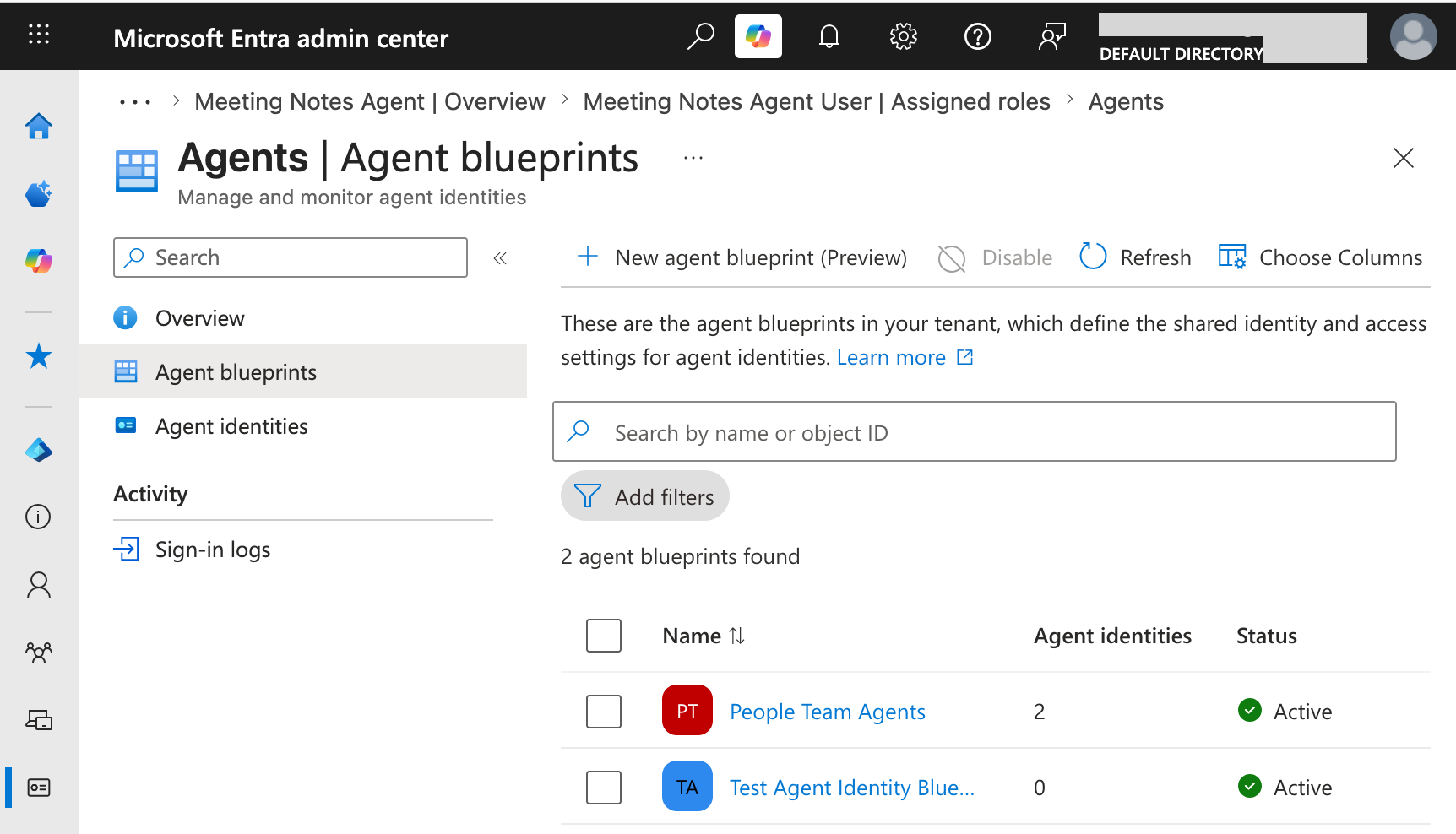
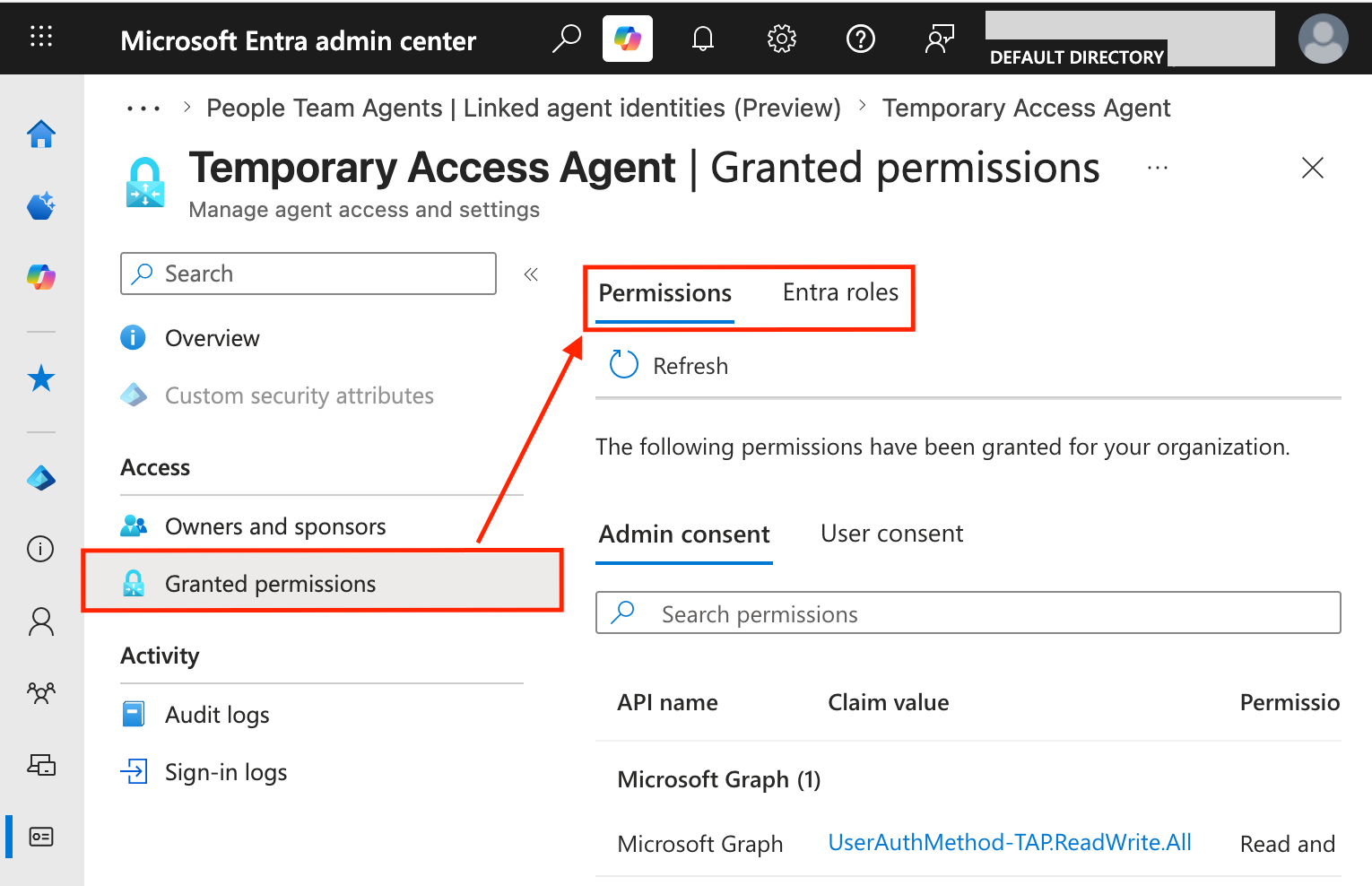
Select each agent or blueprint to review. Under "Access → Granted permissions," use the tabs to review the application permissions ("Admin consent"), delegated permissions ("User consent"), and Entra role assignments ("Entra roles").
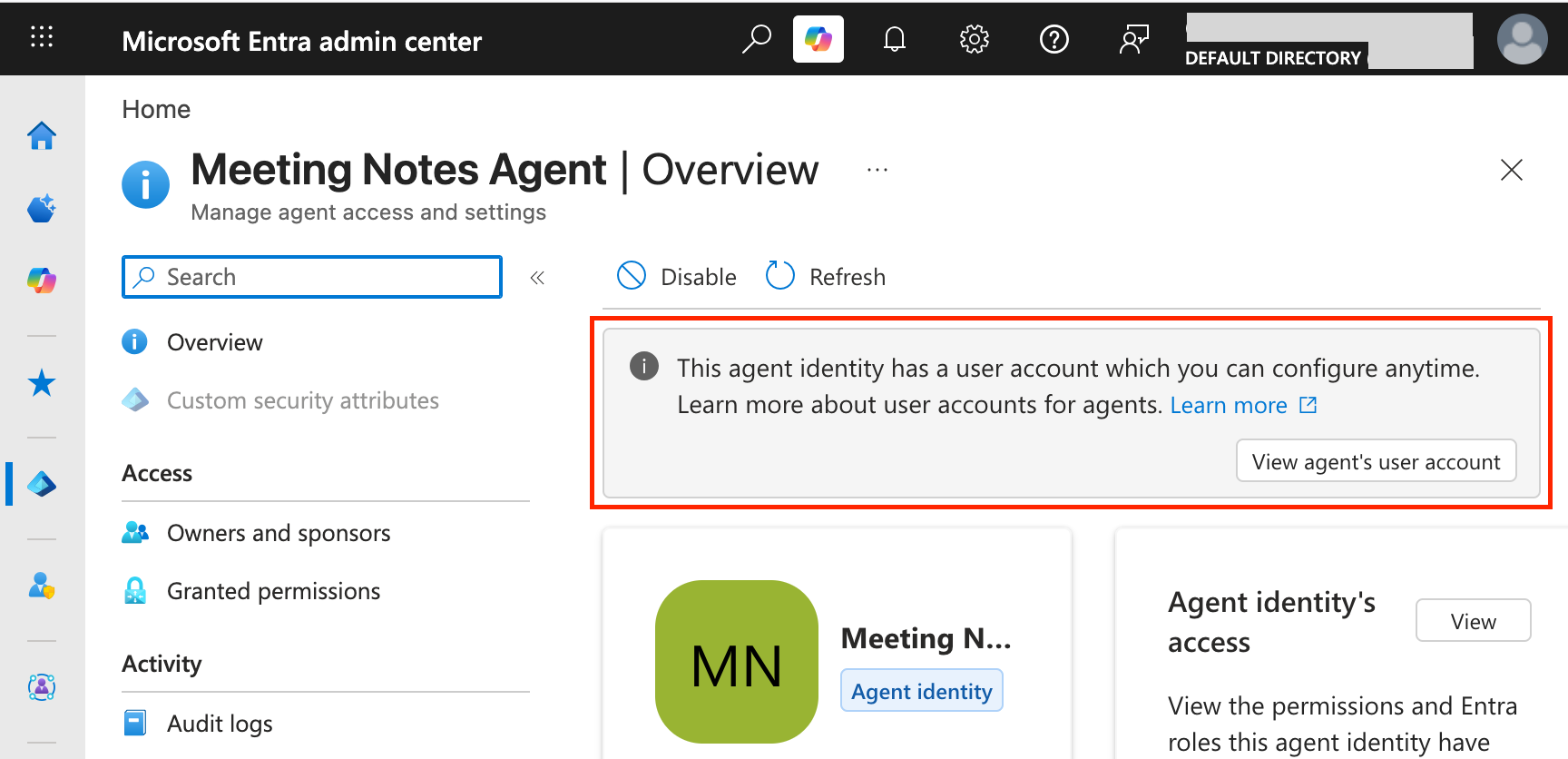
Any agent identity with an associated agent user will show this in the agent identity's details. To review permissions for an agent user, click "View agent's user account," then review Entra role assignments from the user account's menu.
When an unnecessary high-risk permission is identified, remove the assignment by following Microsoft's guides on removing application permissions and Entra role assignments.
Avoid blueprint secrets
Blueprints can authenticate using any combination of secrets, certificates, or federated identity credentials (FICs). Of these, Microsoft has stated that secrets should not be used to authenticate privileged blueprints due to security risks.
A secret is a randomly generated string consisting of letters, numbers, and symbols similar to a password. This string is easily exposed in code or placed in configuration and environment variables.
Any secrets used to authenticate production blueprints should be replaced with certificates or FICs.
Review blueprint secrets in a publishing tenant
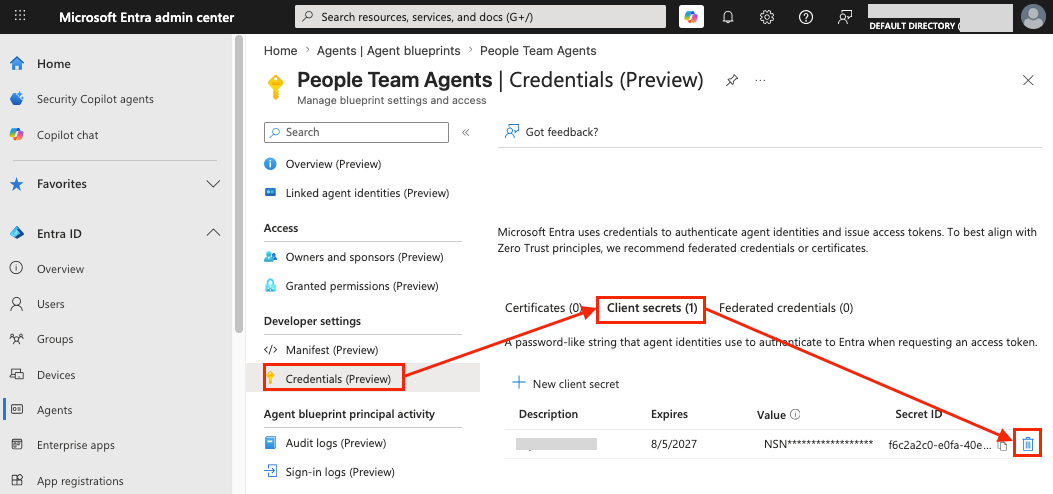
Review and remove blueprint secrets in the Entra admin center. From the main menu, navigate to "Entra ID → Agents," or directly to the Agents panel. Select "Agent blueprints → [Blueprint Name] → Credentials → Client secrets." This menu lists all client secrets for the blueprint.
Once an alternative authentication method is configured, delete each secret using the trash can icon to the right of the credential.
Identify third-party blueprints using secrets
Third-party (also known as external) blueprint credentials do not appear in a consuming tenant. This is because the consuming tenant has no way to manage the third-party blueprint, including its credentials. However, Entra sign-in logs can reveal any third-party blueprints that use a secret to authenticate.
To identify blueprints authenticating with secrets, search for sign-in logs with the following properties:
- Category: ServicePrincipalSignInLogs
- clientCredentialType: clientSecret
- agent.agentType: agentIdentityBlueprintPrincipal
This will identify blueprints that have authenticated with a secret. You can use this log to reach out to a third-party blueprint's developer and request they implement a more secure authentication method.
More details on this method of credential detection can be found in a blog post from Eric Woodruff.
Note: This method will not identify secrets that are not actively used for authentication, such as a backdoor credential. Only secrets that have already been used to authenticate the blueprint will be shown.
Limit third-party blueprints
Only use third-party blueprints if you trust the tenant publishing them with any permissions the agent will require. Permissions assigned to the agentic identities (blueprint principals, agent identities, and agent users) of a third-party blueprint should be carefully reviewed to limit the blast radius of a potential blueprint compromise.
To recap, agents created from third-party blueprints authenticate with credentials that are configured in the third-party tenant. If the blueprint's tenant is compromised, this can lead to a compromise of any agent identities and blueprint service principals created from that blueprint, as well as their associated permissions.
If a developer suggests adding an agent created from a third-party blueprint, consider if a new version of that blueprint can be created in your local Entra tenant instead. This local blueprint would then be used to create any required agent identities. Any credentials to authenticate as this blueprint would also be controlled within the local tenant.
If creating a local blueprint is not possible, carefully consider the risk of any permissions assigned to agentic identities created from the third-party blueprint. Remember that this is equivalent to granting these permissions to an external tenant.
Detect
To detect suspicious agent activity, monitor for the addition of new credentials to blueprints in the local tenant. You may also want to enable Microsoft Entra ID Protection for agents, a feature which may detect suspicious agent activities in the future.
Monitor credentials added to blueprints
Security teams can detect when a new credential is added to a blueprint in the local tenant. This can identify when an attacker has added a credential to a blueprint to take over the blueprint's agents.
The following events are associated with this behavior:
- Service: Core Directory
- Category: ApplicationManagement
- Activity: Update application – Certificates and secrets management
This activity is the same as when a credential is added to an Entra application and may indicate that an attacker is attempting to compromise an Entra application or blueprint.
Consider ID Protection for agents
Microsoft has publicized a feature to detect suspicious agent activity in their ID Protection for agents features. However, at the time of publication, it was not clear if these features are fully enabled. The article states that "at this time, all risk detections for risky agents are offline."
In the future, organizations with Entra P2 licensing may consider using Microsoft's risky agent detections to identify compromised agents. This feature is expected to provide detection of risky agent sign-ins similar to suspicious user sign-ins.
Respond
In the event of an agent compromise, a security team can disable an agent or fully delete it. At this time, agents must be disabled in the Entra admin center. Agents can be deleted only through Microsoft Graph API calls. Details on these steps are provided below.
Disable an agent
Agent identities and blueprints are disabled in the Entra admin center, under "Agents → [Agent or blueprint name] → Disable → Disable". Further details can be found in Microsoft's guide on this topic.
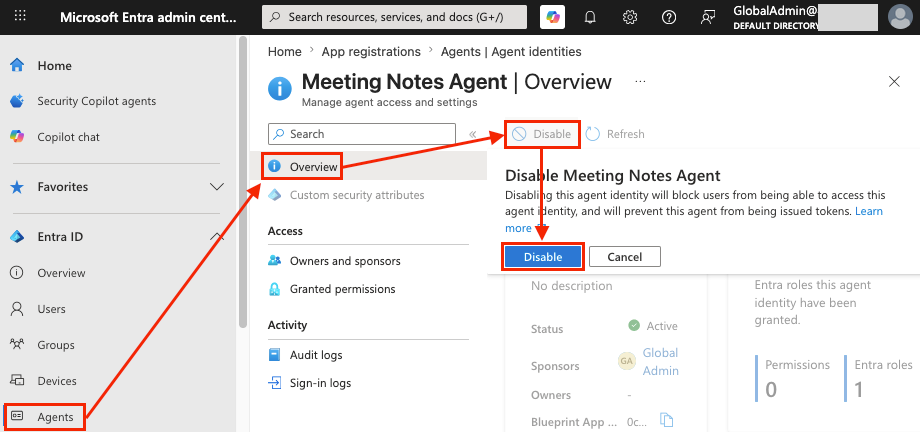
Delete an agent
Agent identities and blueprints must be deleted using Microsoft Graph. At this time, agent identity resources (blueprints, blueprint principals, and agent identities) cannot be deleted in the Entra admin center or the Azure Portal. Attempts to delete these objects in the Azure Portal will result in an error.
Agent identities and blueprints can be deleted by following Microsoft's guide on this topic.
How Datadog can help
Customers using Datadog Cloud SIEM can use the following detections to monitor for suspicious activity against agent identities and applications:
- Credential added to Azure AD application
- Credential added to rarely used Azure AD application
- Unusual authentication by Microsoft 365 Azure AD service principal
Additionally, the following detections identify suspicious activity against agents created using the Copilot Studio blueprint:
- Microsoft 365 Copilot Studio agent access control policy set to open
- Microsoft 365 Copilot Studio agent authentication modified
- Microsoft 365 Copilot Studio agent sign-in topic modified
- Microsoft 365 Copilot Studio Application Insights logging modified
Conclusion
In this post, we provided recommendations to secure and monitor Entra Agent ID. This involves reviewing agent permissions, limiting agent identity management roles, monitoring suspicious agent activity, and preparing to contain agents if a compromise occurs. This has concluded our series on risks in Entra Agent ID.
As Agent ID becomes more common, we encourage you to stay familiar with how agent identities and blueprints work, their risks, and how to secure them. We hope the three posts in this series have provided a solid foundation for you and your team.
We're always eager to hear from you. If you have any questions, thoughts, or suggestions, send us a message at securitylabs@datadoghq.com. You can also subscribe to our newsletter or RSS feed.