

Not all credentials are created equal. An attacker who gains access to credentials usually performs validation to determine how useful each set of captured credentials actually is. For years, this has been true for the AWS SES/SNS services. Attackers use API calls like GetSendQuota, GetSMSAttributes, and GetSMSSandboxAccountStatus to assess whether an account is in a production or sandbox environment and then to assess the sending limits attached to that account. The usefulness of the credentials affects their resale value.
Attackers use similar tactics when targeting LLM resources in AWS. In this post, we will share LLM-specific validation patterns that we have observed after finding multiple credential harvesting platforms.
The value attached to LLM-capable credentials is not merely theoretical. Unit 42 recently shared some research about token-jacking, where third parties run transfer stations that proxy access to commercial AI models and sell that capacity below retail price. Services like these depend on legitimate credentials that can be stolen, rotated, and shared across users. This demonstrates that there is a viable market for stolen credentials outside of a threat actor using them solely for their own purpose.
Credential validation tooling observed in the wild
We've observed several tools and platforms that validate stolen AWS credentials by testing not only whether they are active but also whether they can discover and invoke Amazon Bedrock models.
KMON_NOC
KMON_NOC is a credential harvesting platform that we have observed targeting customers since August 31, 2026. We have identified hosts associated with this platform scanning and probing for credentials in over 80 Datadog Cloud SIEM customers.
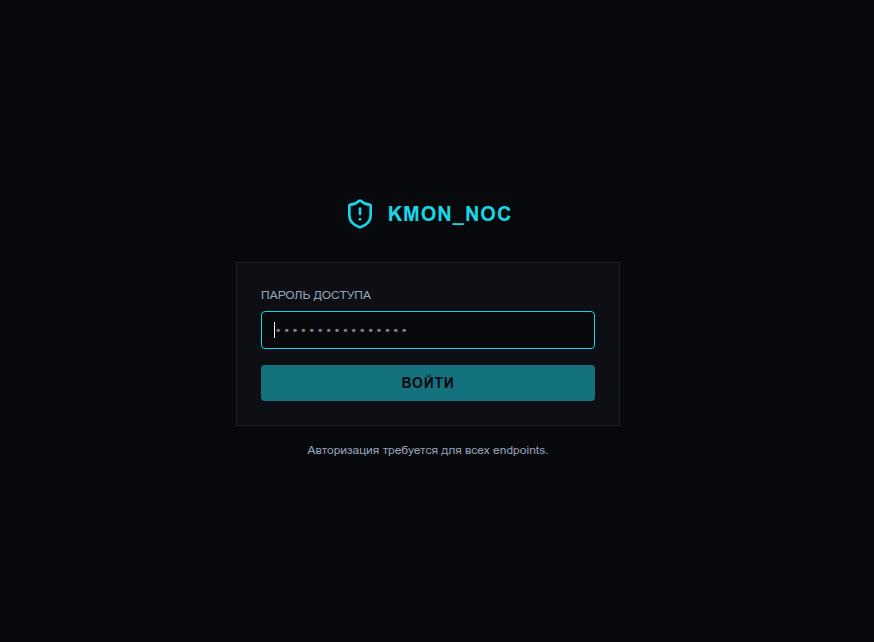
Though we were unable to gain access to KMON_NOC’s validation logic or observe AWS API activity from KMON_NOC’s infrastructure, we analyzed a publicly accessible JavaScript bundle loaded by the KMON_NOC portal. The frontend code contains dedicated fields, filters, statistics, and interface elements for identifying and managing credentials with Bedrock access. These fields indicate that the platform treats Bedrock as a distinct credential capability.
Frontend code snippets
The frontend code states that AWS access key pairs are first validated by using the AWS Security Token Service (STS) GetCallerIdentity API with Signature Version 4 signing. Valid credentials then undergo a separate check for Bedrock access, allowing KMON_NOC to distinguish general-purpose AWS credentials from those that can access Bedrock resources.
<li>
  AWS: uses
  <span className="text-orange-400">
    STS GetCallerIdentity
  </span>
  with SigV4 signing (requires proxy)
</li>

<li>
  AWS valid keys also check for
  <span className="text-orange-400">
    Amazon Bedrock access
  </span>
</li>
This distinction is carried into the platform’s data model and dashboard. The keysWithBedrock field is used to generate BEDROCK and BEDROCK ACCESS statistics which are displayed prominently within the platform, indicating the level of importance assigned to AWS credentials with access to Bedrock.
const bedrockTotal = servers.reduce( (total, server) => total + (server.stats?.keysWithBedrock ?? 0), 0 );
...
{ label: "BEDROCK ACCESS", value: format(bedrockTotal), color: "text-orange-400" }
...
[ { label: "TOTAL", value: format(stats?.keysFound ?? 0) }, { label: "VALID", value: format(stats?.keysValid ?? 0) }, { label: "BEDROCK", value: format(stats?.keysWithBedrock ?? 0), color: "text-orange-400" } ]
KMON_NOC also extracts and displays AWS_BEARER_TOKEN_BEDROCK, the environment variable used for Amazon Bedrock API keys. These bearer tokens are scoped to Bedrock operations. The interface provides dedicated controls to reveal and copy the token, showing that its interest extends beyond determining whether conventional AWS credentials can access Bedrock to harvesting Bedrock-specific credentials directly.
const bedrockToken = extract(
  /AWS_BEARER_TOKEN_BEDROCK\s*[=:]\s*["']?([A-Za-z0-9/+=]{40,})["']?/i
);
...
<span>AWS_BEARER_TOKEN_BEDROCK</span>

<code>
  {revealed
    ? credentials.bedrockToken
    : mask(credentials.bedrockToken)}
</code>

<button
  onClick={() =>
    copy(credentials.bedrockToken, "Bedrock token copied")
  }
>
  Copy
</button>
Together, these excerpts show that Bedrock access is separately identified, validated, copied and exported across the platform. At this stage, we have only been able to make inferences via the available frontend code and continue to monitor for any AWS activity related to this platform.
Other credential harvesting applications
In another blog post about vibe-coded credential harvesting platforms, we looked at two exposed credential-harvesting platforms targeting cloud and AI services. To obtain Bedrock credentials, the platforms first called GetCallerIdentity, then listed the available foundation models by using ListFoundationModels and tried InvokeModel multiple times on different Anthropic models. The platforms were following a specific validation pattern to determine their level of access to Bedrock.
The tooling examined here uses Converse, rather than InvokeModel, to test Bedrock access. Converse provides a common message interface across supported models, which we describe in more detail in the Converse API section, while InvokeModel requires a model-specific request format. Either call can be used to test compromised credentials, so defenders should monitor both for signs of credential validation and LLMjacking.
Amazon Bedrock access checker
In addition to the KMON_NOC platform and the two credential harvesting platforms we analyzed, we also identified two unrelated Python scripts on VirusTotal that were validating AWS credentials and then determining whether they can access and invoke Bedrock models. Both process credential lists, identify associated AWS principals, test Bedrock across multiple regions, and retain successful credentials in plaintext:
c9335bb8a21bd2c568d03b040fb86a0e72145691e54a33495ee0cfaac55835dc923641364ef0ce3a6f1d944890244082b8c7f29c9600c0433b2a0ca9822c0608
The main difference between these two scripts is that one has the additional functionality of enumerating promotional credits (billing:GetCredits). The addition allows it to assess both credential usability and potential financial value. The following diagram describes the overall logic and API calls within the script 923641364ef0ce3a6f1d944890244082b8c7f29c9600c0433b2a0ca9822c0608.
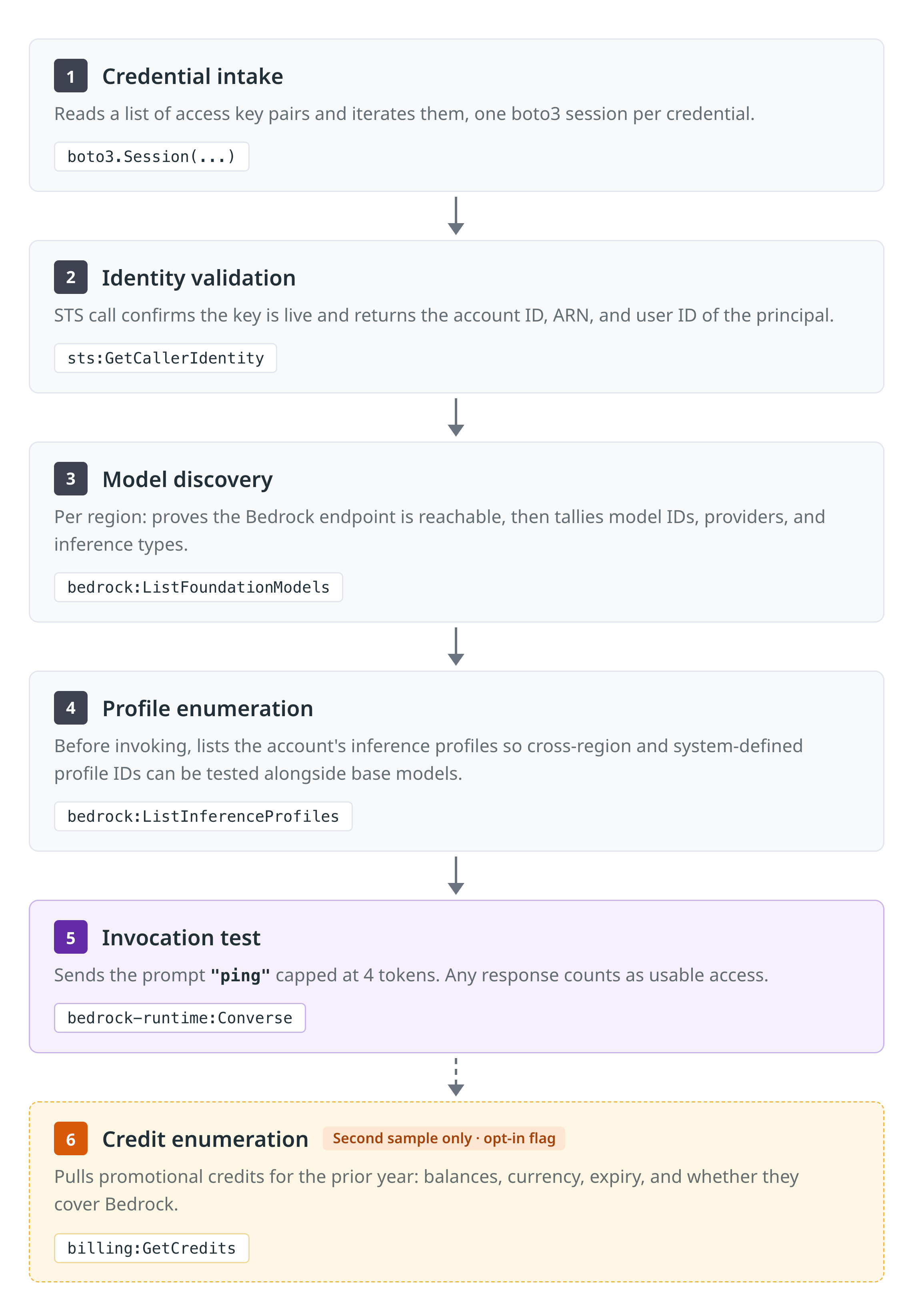
Let’s take an in-depth look at 923641364ef0ce3a6f1d944890244082b8c7f29c9600c0433b2a0ca9822c0608 and work through the AWS API calls and some of the notable features in the script.
Identity validation
The script validates each credential and retrieves the AWS account ID and principal identity using STS:
sts = session.client("sts", region_name=region or "us-east-1", config=cfg)
ident = sts.get_caller_identity()

return {
    "account": ident.get("Account"),
    "arn": ident.get("Arn"),
    "user_id": ident.get("UserId"),
}
Model discovery
For every selected region, the script creates a Bedrock control-plane client and calls ListFoundationModels:
bedrock = session.client("bedrock", region_name=region, config=cfg)
resp = bedrock.list_foundation_models()
models = resp.get("modelSummaries", [])

detail["reachable"] = True
detail["can_list"] = True
detail["model_count"] = len(models)

for m in models:
    provider = m.get("providerName", "Unknown")
    detail["providers"][provider] = (
        detail["providers"].get(provider, 0) + 1
    )
A successful response establishes that:
- The credentials can reach the regional Bedrock endpoint.
- They have permission to call
bedrock:ListFoundationModels. - The script can discover model identifiers, providers, modalities, and supported inference types for further testing.
If invocation testing is enabled, the script will then try to enumerate inference profiles via ListInferenceProfiles before attempting to invoke a model request across a variety of models.
The Converse API
The script then uses the Bedrock runtime API Converse. The reason to use Converse over InvokeModel is that it provides a consistent interface that works with all models that support messages; this is captured in the script as well as the official AWS documentation. The script sends a minimal request with the prompt “ping” and restricts the response to four tokens. Capping the generated output at four tokens minimizes inference cost. This is especially true if many credentials are being tested within a single AWS account. Since this is a validation test, any successful response is treated as usable Bedrock access.
The attacker also left clear comments on design decisions. This overly verbose commenting could indicate that the tool was designed by an LLM model.
The script then deems any successful Converse response as proof that the model or profile can be invoked:
# We deliberately do NOT send 'temperature' - newer Claude models (Opus 4.7+,
# Opus 5, Fable 5, ...) have deprecated it, and sending it makes them reject
# the request with a ValidationException, which would look like "not usable"
# even though the model is actually available. If a model still rejects the
# request shape, we retry once with no inferenceConfig at all so we never
# false-negative a usable model over a parameter quirk.

base = {
    "modelId": model_id,
    "messages": [
        {
            "role": "user",
            "content": [{"text": "ping"}],
        }
    ],
}
for inference_config in ({"maxTokens": 4}, None):
    kwargs = dict(base)
    if inference_config is not None:
        kwargs["inferenceConfig"] = inference_config
    try:
        runtime.converse(**kwargs)
        return {"ok": True, "code": None, "message": None}
    except ClientError as exc:
The script defaults to smaller, cheaper models like haiku, nova-lite, and titan-text-lite, but these defaults can be overridden by using the --models argument.
Anthropic-specific functionality
The dedicated --anthropic mode shows that the author specifically prioritized testing access to Anthropic Claude models. It also checks for a specific Anthropic use case details error:
def _is_usecase_form_block(code, message):
    """
    True when AWS rejects the invoke because this account has not submitted
    the Anthropic 'use case details' form. AWS surfaces it as HTTP 404 with
    the message 'Model use case details have not been submitted for this
    account. Fill out the Anthropic use case details form before using the
    model.' - it blocks EVERY Claude model on the account, so once seen we
    stop trying more Claude models in the region. Non-Anthropic models are
    unaffected, so the general invoke test keeps going.
    """
    return "use case details" in (message or "").lower()
This aligns with the AWS official documentation, which states:
“Anthropic requires first-time customers to submit use case details before invoking a model once per account or once at the organization's management account.”
Promotional credit enumeration
If the -credit option is enabled, the script uses the Billing API to call GetCredits after successfully invoking a model:
billing = session.client("billing", region_name="us-east-1", config=cfg)

start = int(time.time()) - 364 * 24 * 3600
resp = billing.get_credits(accountId=account_id, startDate=start)
Next, it extracts remaining and estimated balances, currency, expiration, and product restrictions:
remaining = c.get("remainingAmount") or {}
estimated = c.get("estimatedAmount") or {}

currency = remaining.get("currencyCode", "USD")
amount = float(remaining.get("currencyAmount", 0) or 0)

products = c.get("applicableProductNames") or []
covers_bedrock = (
    not products
    or any("bedrock" in p.lower() for p in products)
)
Observations from our own data
In the last 30 days, we’ve observed 12 organizations display similar malicious behavior. In the majority of instances, we have seen failed ListFoundationModels API calls in multiple regions without subsequent ListInferenceProfiles or Converse API calls, similar to the error handling in the script above.
In one case, we observed successful multi-region ListFoundationModels and ListInferenceProfiles API calls and then multiple Converse API calls with an AccessDenied response for Anthropic models. Specifically, the attacker attempted to access:
- anthropic.claude-opus-5
- anthropic.claude-fable-5
- anthropic.claude-fable-5-1
We cannot establish a link between the script analyzed in this post and the telemetry observed; however, there is a recurring pattern of behavior.
Conclusion
As with AWS SES credentials, attackers are converging on a repeatable process for validating stolen credentials with Amazon Bedrock access. Minimal validation behavior could be a precursor to an attack with a larger financial impact. For defenders, detecting and containing this threat earlier in the attack chain is essential to avoiding a larger bill further down the line. Unexpected Bedrock activity, particularly from a new source or by an identity with no history of AI usage, should be investigated.
How Datadog can help
Datadog includes out-of-the-box security rules for monitoring suspicious behavior related to Amazon Bedrock activity:
Cloud SIEM:
- Amazon Bedrock console activity
- Amazon Bedrock model catalog enumeration across multiple regions
- Amazon Bedrock discovery attempt by long term access key
- Amazon Bedrock model discovery probing with a long term access key
- Amazon Bedrock activity InvokeModel multiple regions
- Amazon Bedrock Converse API from new ASN with new model ID
- AWS Bedrock InvokeModel from new ASN with new model ID
- Creation of new AWS Bedrock long term access key with no expiration date
- Amazon Bedrock model invocations disabled
- AWS Bedrock service quota increase requested
- AWS Bedrock Enumeration via ValidationException
IOCs
We have provided a list of IP addresses that we have observed attempting this validation pattern since August 31, 2026. The IP addresses are a mix of residential proxies, VPNs, and hosting providers. As such, we only recommend using them within the context of the AWS activity detailed in this post to surface higher confidence findings.
File hashes
| Indicator | Type |
|---|---|
c9335bb8a21bd2c568d03b040fb86a0e72145691e54a33495ee0cfaac55835dc |
SHA-256 |
923641364ef0ce3a6f1d944890244082b8c7f29c9600c0433b2a0ca9822c0608 |
SHA-256 |
IP addresses
| Indicator | Type |
|---|---|
115.138.247[.]83 |
IPv4 |
116.106.179[.]94 |
IPv4 |
128.116.206[.]252 |
IPv4 |
138.94.168[.]132 |
IPv4 |
154.119.213[.]63 |
IPv4 |
157.100.141[.]65 |
IPv4 |
172.56.122[.]32 |
IPv4 |
173.92.116[.]211 |
IPv4 |
181.115.172[.]90 |
IPv4 |
181.51.32[.]38 |
IPv4 |
186.154.182[.]44 |
IPv4 |
190.56.117[.]218 |
IPv4 |
191.93.177[.]69 |
IPv4 |
196.177.214[.]142 |
IPv4 |
200.151.53[.]165 |
IPv4 |
206.206.119[.]201 |
IPv4 |
213.186.157[.]53 |
IPv4 |
45.11.61[.]22 |
IPv4 |
46.100.30[.]188 |
IPv4 |
47.230.250[.]253 |
IPv4 |
50.82.6[.]249 |
IPv4 |
51.15.192[.]215 |
IPv4 |
59.92.240[.]165 |
IPv4 |
71.76.4[.]45 |
IPv4 |
79.117.129[.]254 |
IPv4 |
82.86.130[.]180 |
IPv4 |
83.194.172[.]248 |
IPv4 |
84.50.134[.]231 |
IPv4 |
85.253.221[.]206 |
IPv4 |
88.167.240[.]60 |
IPv4 |
92.144.3[.]108 |
IPv4 |
92.216.157[.]153 |
IPv4 |
93.118.107[.]1 |
IPv4 |
98.44.224[.]55 |
IPv4 |
85.137.53[.]173 |
IPv4 |
87.58.197[.]199 |
IPv4 |
194.36.27[.]53 |
IPv4 |
216.126.227[.]187 |
IPv4 |
146.70.173[.]170 |
IPv4 |
173.249.254[.]173 |
IPv4 |
85.137.52[.]59 |
IPv4 |
103.148.197[.]54 |
IPv4 |
103.160.185[.]100 |
IPv4 |
108.168.65[.]226 |
IPv4 |
109.146.93[.]39 |
IPv4 |
112.78.151[.]90 |
IPv4 |
95.216.34[.]254 |
IPv4 |
89.249.72[.]22 |
IPv4 |
78.109.78[.]211 |
IPv4 |
192.74.128[.]184 |
IPv4 |
72.235.197[.]91 |
IPv4 |
137.103.56[.]107 |
IPv4 |
69.250.15[.]174 |
IPv4 |
138.199.15[.]176 |
IPv4 |
94.154.46[.]248 |
IPv4 |
94.154.46[.]249 |
IPv4 |
94.154.46[.]242 |
IPv4 |
94.154.46[.]243 |
IPv4 |
94.154.46[.]245 |
IPv4 |
94.154.46[.]246 |
IPv4 |
94.154.46[.]247 |
IPv4 |
94.154.46[.]250 |
IPv4 |
87.58.197[.]196 |
IPv4 |
151.243.18[.]111 |
IPv4 |