

What happened
GitHub Actions has been a major topic of discussion recently, playing a large role in multiple attacks. Three of the highest-profile examples each exploited a different class of vulnerability:
- The s1ngularity attack targeted Nx by exploiting the
pull_request_targettrigger to execute arbitrary code using a technique known as a “pwn request”. - hackerbot-claw was an AI-powered campaign that exploited untrusted input in GitHub Actions workflows, achieving remote code execution in more than half of the repositories it targeted.
- TeamPCP used compromised credentials to publish malicious versions of Trivy and KICS on GitHub, along with two compromised versions of LiteLLM on PyPI (Python Package Index), as part of a broader supply chain campaign.
In February, we released the 2026 State of DevSecOps report, but one of the most striking findings didn’t make it into the final write-up: 38% of organizations have a GitHub Actions workflow vulnerable to script injection or dangerous trigger issues, both of which have been recently exploited in the attacks mentioned above. While the report highlighted supply chain risks like unpinned actions, our research pointed to a much broader set of GitHub Actions security gaps.
For simplicity's sake, we separated the vulnerabilities into two categories: vulnerabilities affecting public actions (often from GitHub Marketplace) and vulnerabilities affecting workflows. The report focused on actions; this post focuses on workflows. If you’re not familiar with the difference between workflows and actions, you can read ahead.
We found that two out of three organizations have at least one vulnerability in a GitHub Actions workflow or action. This is especially concerning given how central workflows are to modern development. They routinely execute code, manage credentials, and automate deployments. When these pipelines are misconfigured, they effectively become a high-privilege entry point into the software supply chain.
A look into GitHub Actions
GitHub Actions allows you to build, test, and deploy your code right from your GitHub repository. It uses workflows (YAML-defined pipeline automation) to know what tasks to execute and actions (pre-definited reusable jobs or code that can be custom or from the GitHub Marketplace) to complete the task.
GitHub Actions operates by responding to events in a repository, such as a code push or pull request. When an event occurs, GitHub identifies the relevant workflow files and schedules them to run on a designated runner. The runner then executes the defined jobs, which consist of individual steps like checking out code, running scripts, or invoking reusable actions. As the workflow progresses, results such as logs, statuses, and generated artifacts are collected and reported back to GitHub, providing visibility into the automation process.
GitHub Actions has become a popular target in supply chain attacks because of where they sit in the development process. They have direct access to source code, often handle secrets and tokens, and are tightly connected to build and deployment pipelines. If an attacker can tamper with a workflow or sneak something malicious into an action, they’re not just affecting one piece of code but can potentially change build artifacts, leak credentials, or ship compromised software downstream. This gets even riskier with common patterns like pulling in third-party actions, running workflows on pull requests, and giving broad permissions to the default GITHUB_TOKEN. Since GitHub Actions directly influences how software is built and shipped, compromising it allows attackers to propagate malicious changes downstream, impacting not just a single repository but potentially every user of the affected software.
Key vulnerabilities
Pwn requests
The s1ngularity breach targeting Nx was the most visible (but not the first) attack that exploited the pull_request_target trigger to execute arbitrary code in a CI/CD workflow. GitHub released recommendations more than four years prior to this attack explaining the dangers of misusing that trigger and how pwn requests can be prevented.
To better understand the dangers, we have to understand why the pull_request_target trigger was created. The more common pull_request trigger prevents write permissions and secrets access to the repository by default, but there are some cases where those permissions are needed, which is why pull_request_target was created. That upgraded privilege is reasonable for metadata-only automation, but it becomes hazardous the moment maintainers treat it like a normal CI trigger. The entire security model assumes that pull_request_target will operate on trusted repository code and untrusted PR metadata. It’s not designed to prevent a threat actor trying to exploit it to escalate their privileges.
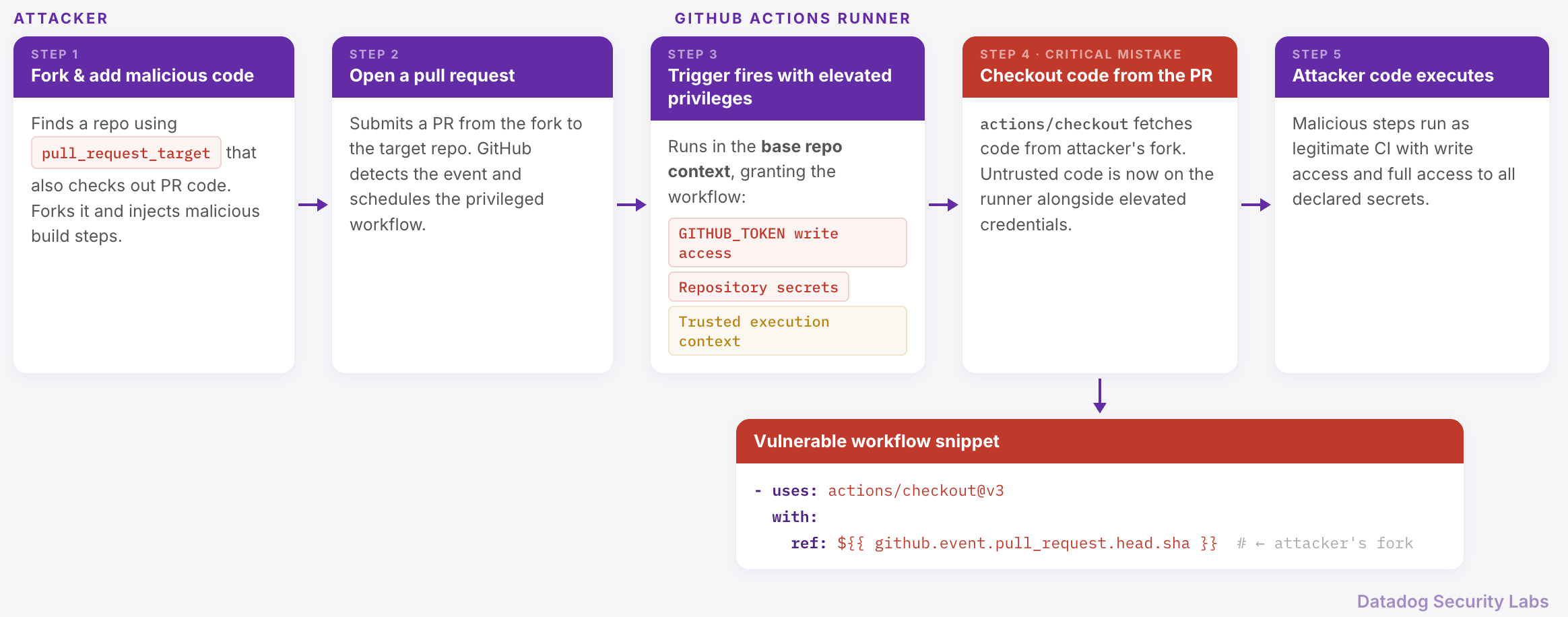
Avoid using pull_request_target whenever possible. If its elevated permissions are truly necessary, limit its use to workflows that operate only on passive data, such as privileged PR management tasks. Even then, do not execute code from the PR. In those cases, configure the workflow to run only when a specific label is applied, indicating that someone with write access to the repository has reviewed and approved the PR. Although not foolproof, the label method adds an extra layer of security when paired with the correct use of pull_request_target.
Untrusted input
Another recent example of workflows being actively targeted is the campaign dubbed hackerbot-claw, an AI-powered attack that specifically went after GitHub Actions workflows. According to StepSecurity, hackerbot-claw was able to achieve remote code execution in more than half of the repositories it targeted. This isn’t a new concept, as security practitioners have been warning against untrusted input for years. While most engineers are careful about validating input in application code, that same level of scrutiny often doesn’t carry over to Infrastructure as Code like GitHub Actions workflows.
Workflows frequently consume data from pull requests, issue comments, branch names, or other user-controlled sources. If that data is passed directly into a shell command, you’ve effectively given an attacker a way to inject and execute arbitrary code. This can escalate to potential secret exposure, repository modification, or full pipeline compromise.
We saw this play out firsthand when an open source Datadog repository was identified as a target during the hackerbot-claw campaign. After digging into it, we confirmed that the existing detections and preventative controls we had in place stopped the attack from being successful. Workflows need to be treated as part of the attack surface by building in the same kinds of safeguards you’d expect in application code.
GitHub recommends a few solid patterns to protect against untrusted input: Use a JavaScript action instead of an inline script and use intermediate environment variables instead of inline variables.
The following is an example of using an inline script in a workflow:
# .github/workflows/main.yml
- name: Print PR Title
  run: echo "The title is: $"
Imagine if a threat actor named their PR "; rm -rf / #. The server would finish the echo command due to the presence of the semicolon and immediately start the next command to delete your entire file system.
Let’s compare that to using a JavaScript action in a workflow:
# .github/workflows/main.yml
- name: Securely process title
  uses: ./.github/actions/my-js-action
  with:
    pr-title: $
// index.js
const core = require('@actions/core');
const title = core.getInput('pr-title');
console.log(`The title is: ${title}`);By creating a JavaScript workflow, the pr-title value is printed as a string variable instead of run as a command. GitHub has documentation on creating JavaScript actions that can help you get started.
The last recommendation is to restrict token permissions to limit the damage even if something does slip through. It's best to assume all input is untrusted and design your workflows accordingly.
Compromised credentials
Compromised credentials continue to be a problem across multiple areas of supply chain security. TeamPCP was busy in March, as they were responsible for multiple compromises, including two major GitHub Actions: trivy and KICS. In both cases, they used compromised credentials to publish a malicious release, forcing the version tags to the compromised version. This becomes a GitHub Actions supply chain risk when workflows reference those tags (e.g., @v1), since a retagged release can cause actions to pull and execute attacker-controlled code.
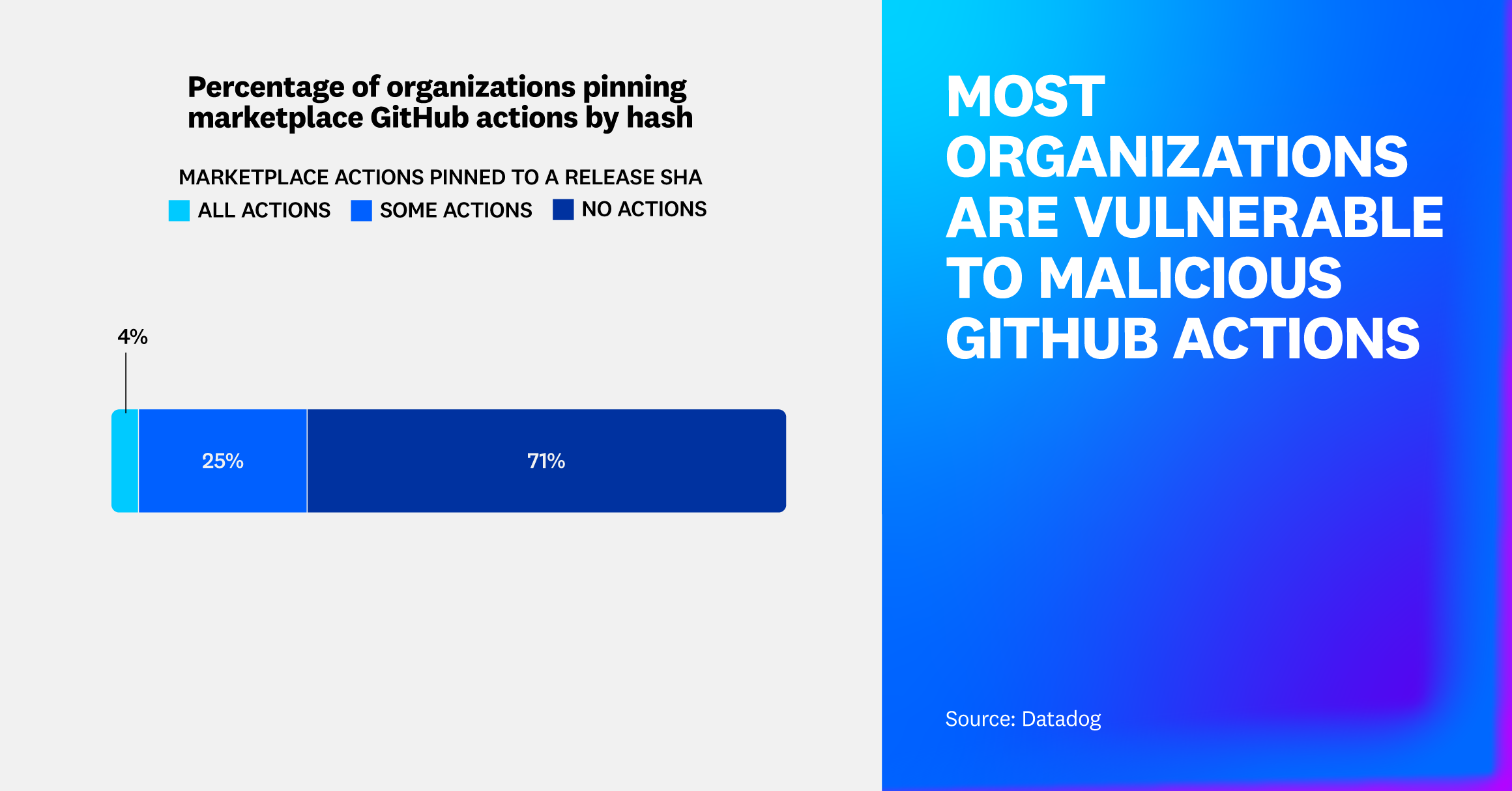
Pinning actions to a commit SHA is the only way to prevent other versions from being used, according to GitHub. However, we found that 71% of organizations never pin the hash for any of their actions. This method, while useful to protect against malicious versions of direct actions and dependencies, will not protect your pipeline against compromised transitive dependencies if they are also not pinned to a version. While pinning actions to a commit SHA won’t fix everything, it can help prevent attacks like trivy from spreading.
# the insecure way: pinning to a tag
uses: thollander/actions-comment-pull-request@v2
# the secure way: pinning to a commit SHA
uses: thollander/actions-comment-pull-request@b07c7f86be67002023e6cb13f57df3f21cdd3411Because manually updaing hashes can be tedious, GitHub’s Dependabot has the capability to create pull requests that will update the hash to the latest version on a regular cadence.
The updated GitHub Actions security roadmap
In March 2026, GitHub released their GitHub Actions security roadmap, identifying four major exploit categories:
- Vulnerabilities that allow untrusted code execution
- Malicious workflows running without observability or control
- Compromised dependencies spreading across thousands of repositories
- Over-permissioned credentials exfiltrated via unrestricted network access
In response, they are focusing on three key areas to harden the security of the supply chain.
The first step is focused on the ecosystem, by adding deterministic dependencies. Currently, action dependencies are resolved at runtime and can be referenced by mutable references, such as tags and branches. GitHub introduced a dependencies: section in the workflow that locks all direct and transitive dependencies with the commits SHA. This will give teams full visibility into dependencies and only run versions that were reviewed. This could be a game changer since we found that most organizations are not pinning their actions to a hash. GitHub is targeting a general release in six months (approximately September 2026).
GitHub’s next step is using secure defaults to minimize the attack surface and eliminate pwn requests. While they initially focused on flexibility, they understand that workflow execution needs more granular access than repositories. By introducing the ability to define central policies to control who can trigger workflows and which events are allowed, the aim is to make these restrictions easier to manage and enforce since they will be in one place. This feature is also expected to be generally available in six months.
In addition to central policies, GitHub is also introducing scoped secrets to bind credentials to explicit execution contexts. This means that credentials are bound to the workflow that declared them, making the trust boundary between calling and called workflows explicit. This is also expected to be generally available in six months.
Lastly, GitHub is introducing endpoint monitoring and control for CI/CD infrastructure. To do this, two new endpoint protections are being added: Actions Data Stream for observability and native egress firewall for control. The Actions Data Stream will provide almost real-time telemetry and event delivery to Amazon S3 and Azure Event Hub/Data Explorer to speed up anomaly detection. The native egress firewall will monitor outbound traffic from the runners and block any traffic according to set policies.
Both features are expected to be available toward the end of 2026.
These are all great additions to GitHub Actions, but they have to be properly configured in order to provide the expected protections.
How Datadog can help
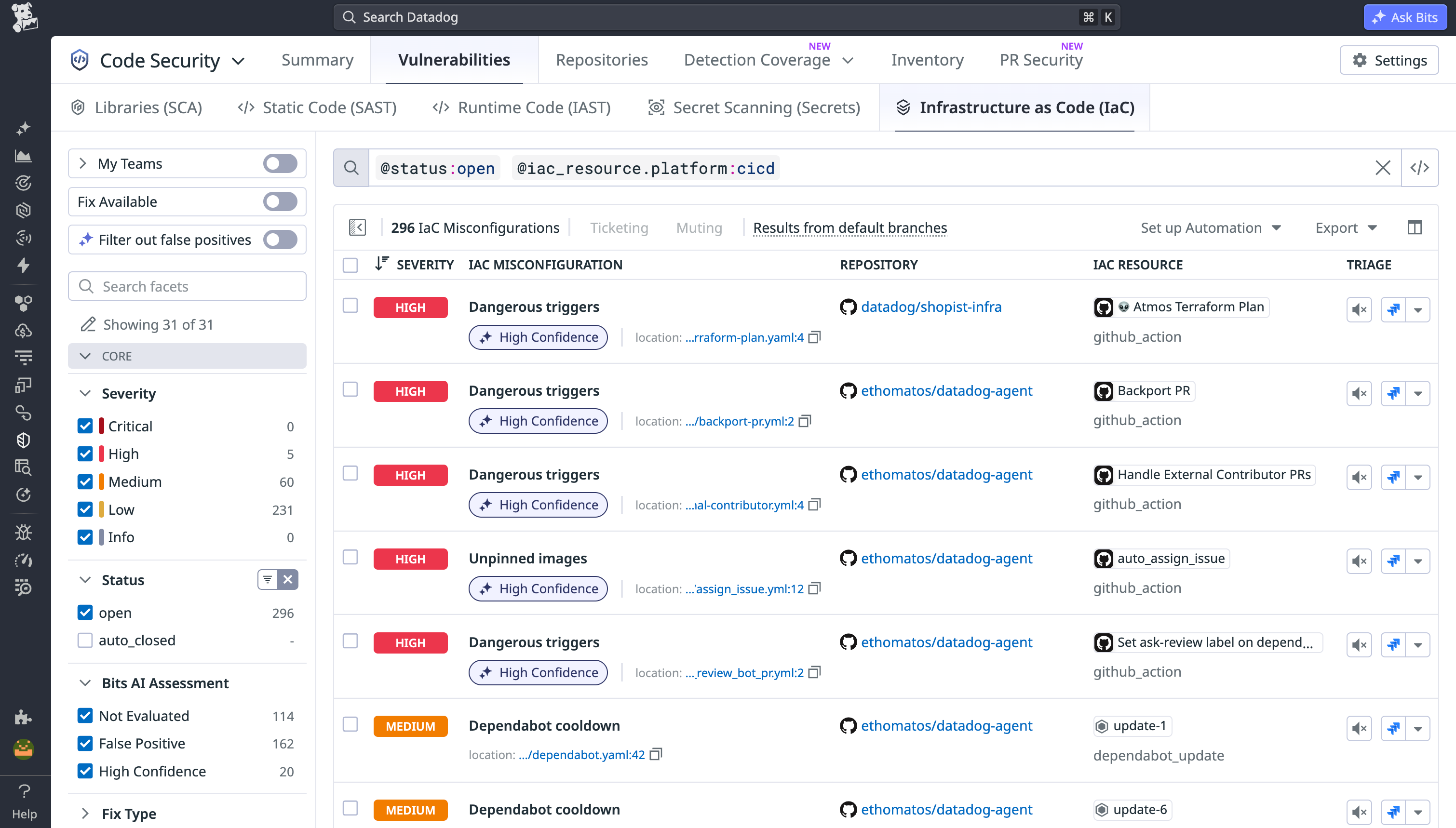
Datadog Infrastructure as Code (IaC) Security has out-of-the-box detection rules for GitHub Actions misconfigurations, including the vulnerabilities covered in this post: dangerous triggers like pull_request_target, script injection, and actions not pinned to a commit SHA. Use this query to see if you are affected.
Check out the key learnings from the 2026 State of DevSecOps study to learn more about other ways that Datadog can help.