

This research was presented at Hybrid Identity Protection Conference (HIPConf) on September 10, 2026.
Key points
- This post provides technical background about entitlement management and access packages in Microsoft Entra ID Governance.
- Entitlement management lets administrators assign multiple permissions to users at once by using access packages. This simplifies permissions management throughout the user life cycle.
- While entitlement management disallows privileged Entra roles like Global Administrator in access packages, role-assignable groups and roles like Exchange Administrator can still be included.
- Attackers may target access packages with these resources to elevate their privileges.
- Auditing permissions for entitlement management requires reviewing Entra ID's role assignments, as well as role assignments in ID Governance.
- In this series of posts, we'll take an in-depth look at the configuration risks and security considerations that come with entitlement management.
Introduction
This post covers the fundamentals of Microsoft Entra ID Governance's entitlement management and outlines why an attacker may target your access packages for privilege escalation.
Entitlement management bundles access for internal users and guests, with options for life cycle management and approvals. While Microsoft states that access packages cannot contain any Entra-defined privileged roles, there are still many roles with permissions that can be used by an attacker to impact an Entra, Microsoft 365, or Azure environment through entitlement management.
This series will describe how everyday access package configurations within entitlement management can lead to scenarios where an attacker could elevate privileges. Future posts will cover scenarios where access packages can be misused and share some defensive measures to monitor and improve their security.
What is entitlement management?
Entitlement management (previously abbreviated as ELM) is a feature of Entra ID Governance to manage user and guest access through their time in an Entra tenant. This is sometimes called the "user life cycle," which encompasses how a user's access will change as they join a company, move between roles, and eventually depart the company.
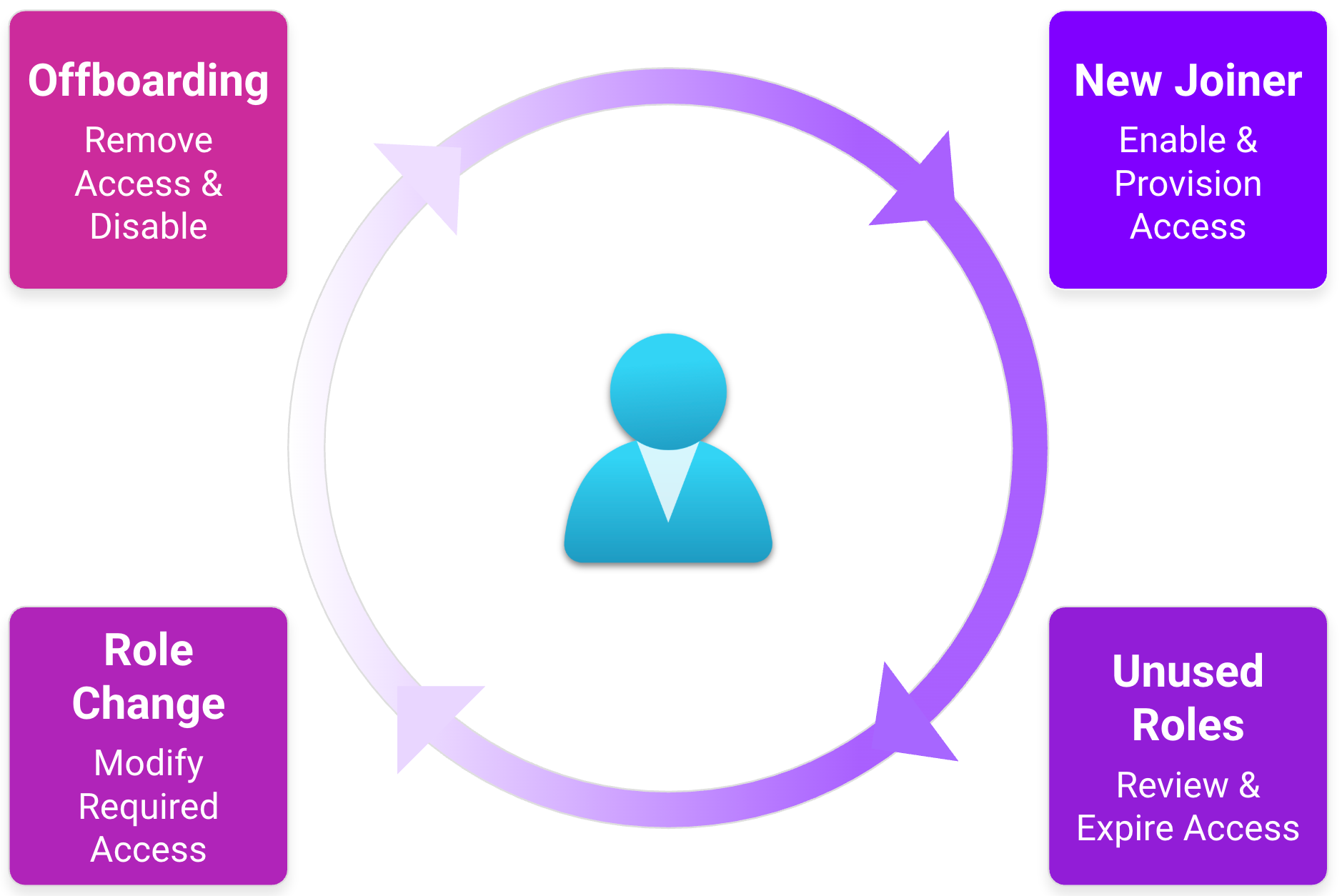
By bundling required access into access packages, entitlement management allows assignment of multiple types of access such as group memberships, application roles, and SharePoint site access at once. This access can then be reviewed, renewed, and revoked together based on a user's roles.
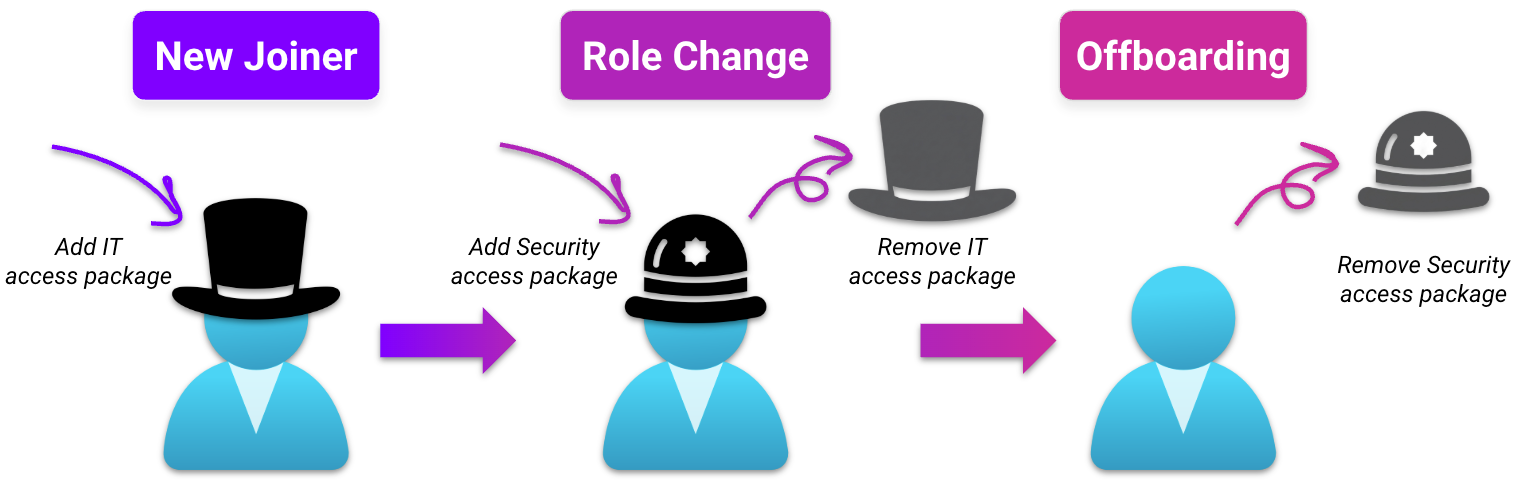
Let's say a user joins our company. Based on their persona in IT, they receive access to the IT team's SharePoint site, various group memberships they need to manage devices, and the IT Teams channel. Entitlement management combines all these needs into one access package, making it simple to onboard the user to these memberships. Once granted, this access can be regularly reviewed.
When the user's team changes to cybersecurity, their access persona changes. The IT access package is removed, and they are instead assigned to a new security access package, with a different Teams channel and group memberships. Finally, all access is revoked through the access package when they leave the company.
Entitlement management versus PIM
Entitlement management may sound similar to privileged identity management (PIM), which helps users manage the approval, renewal, and revocation of privileged Entra roles. Both tools allow role assignment, approval, and continuous review of permissions; however, they serve different purposes.
- PIM focuses on assignment of individual highly privileged Entra roles to users, not bundled access.
- Entitlement management focuses on assignment of bundled access (groups of permissions) but disallows assignment of privileged Entra roles.
While entitlement management prevents direct assignment of privileged Entra roles, there are still ways an administrator or attacker may work around this. We'll cover more details on this later.
Architecture
To better understand how access packages are used and managed, let's look at the architecture of entitlement management.
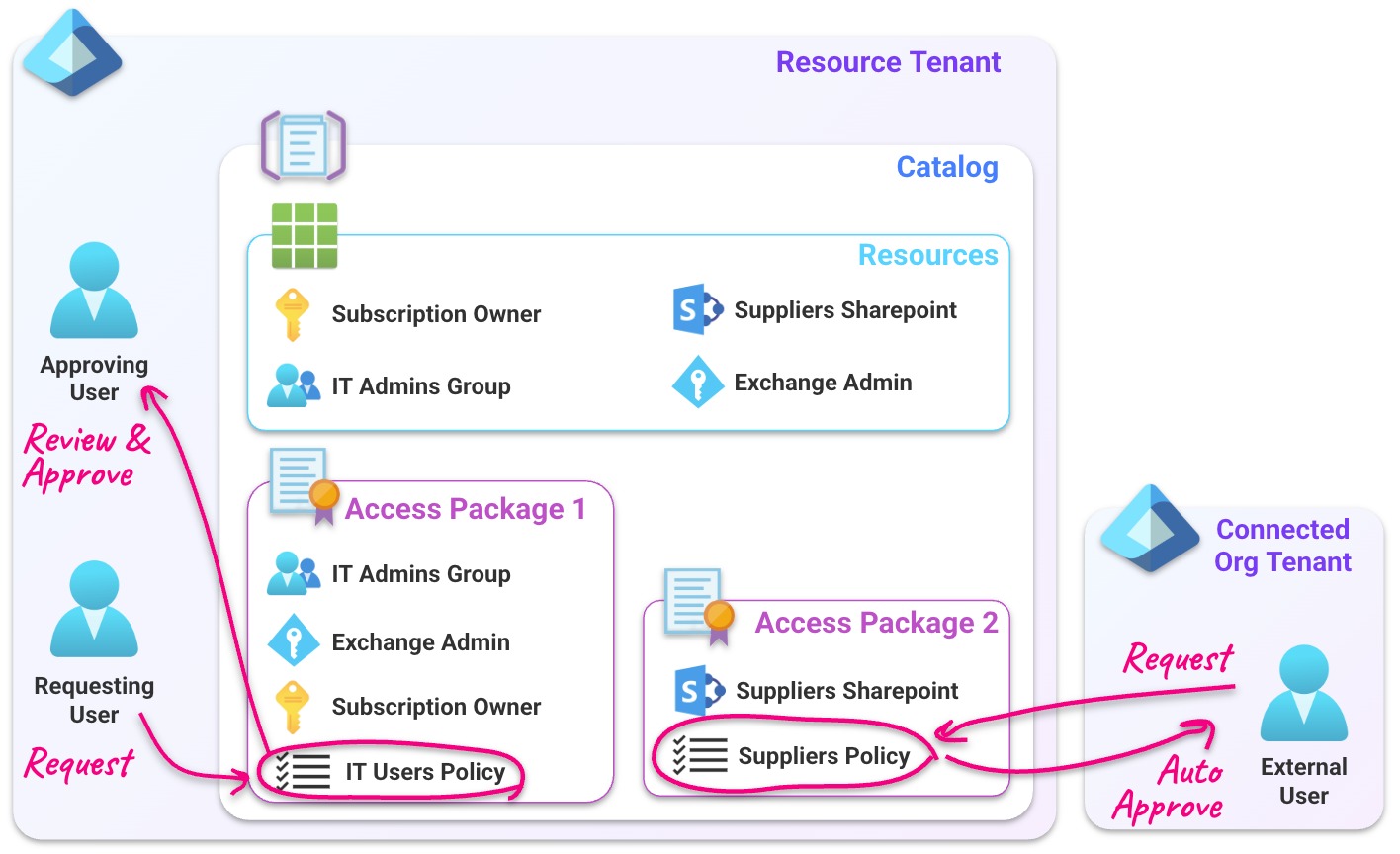
Entitlement management is organized by catalogs that contain the resources a user may need access to. Resources are then added to access packages that bundle multiple resources into what's required for a user's role.
Once an access package is configured, users request or are added to access packages through requests that are evaluated by policies to determine any approvals required before access is granted. Target users may already exist in the Entra tenant, or they may come from an external tenant or preapproved connected organization, based on the policy's configuration.
After approval, the user is granted access to the resources in the requested access package.
Catalogs
Catalogs are the top-level container for entitlement management. They contain the resources that users need access to, as well as access packages that can grant users access to those resources.
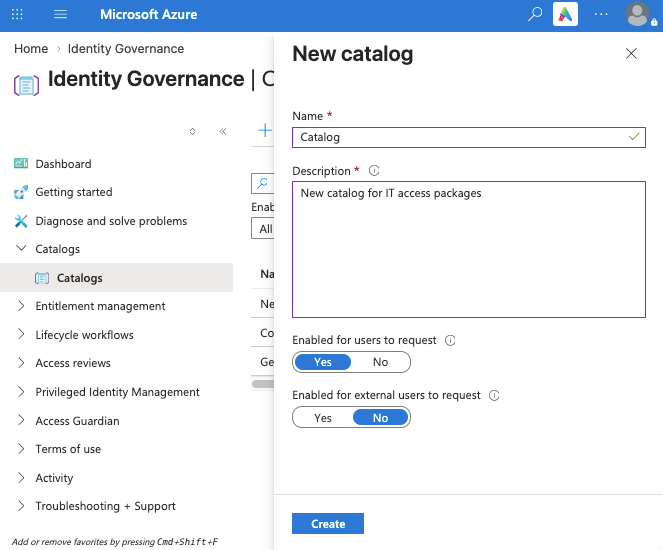
In the Azure portal, new catalogs are added under "Catalogs" in the identity governance panel:
Resources
A resource is any item a user is granted access to through an access package. Resources are added into a catalog and included in access packages.
Resources can include:
- Group membership and ownership
- Azure Resource Manager (ARM) role assignments
- Some Entra role assignments
- Teams in Microsoft Teams
- SharePoint sites
- Application access
If E7 or Agent 365 licensing is in use, application permissions (appRoles) and delegated permissions (oauth2PermissionScopes) can also be added as resources and assigned to service principals (SPs) and agent identities through entitlement management.
Resources are added by selecting a catalog, then adding the target resource under "Add resources to catalog."
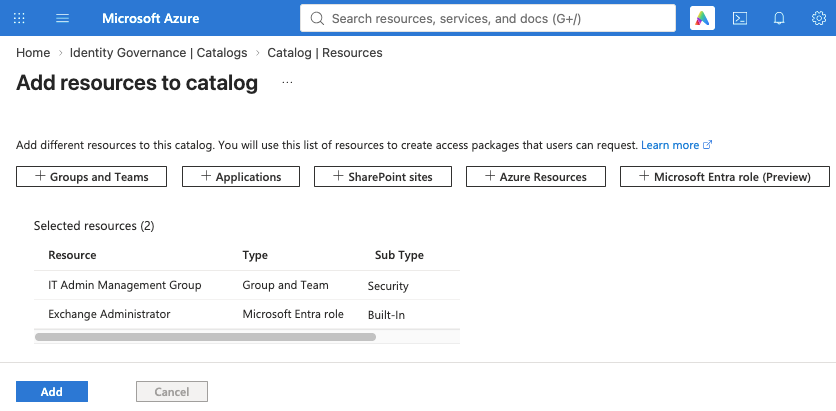
While entitlement management disallows direct assignment of privileged Entra roles, roles with privileges outside of Entra (roles not marked as "privileged") can still be assigned. Currently, this includes roles such as:
- Billing Administrator
- Exchange Administrator
- Power Platform Administrator
- Azure DevOps Administrator
Role-assignable groups that assign privileged roles to users (such as Global Administrator) can also be added as resources to a catalog. This means that while direct privileged role assignments are prevented, administrators might still use workarounds to add highly privileged roles into access packages. We will look into the security implications of this in our next post.
Access packages
Now that resources have been grouped into a catalog, they can be bundled based on a user persona and easily assigned to any users requiring that access.
Catalog resources are added to an access package along with their role status. This could include group membership or ownership, active or eligible membership in an Entra role, or specific Azure roles.
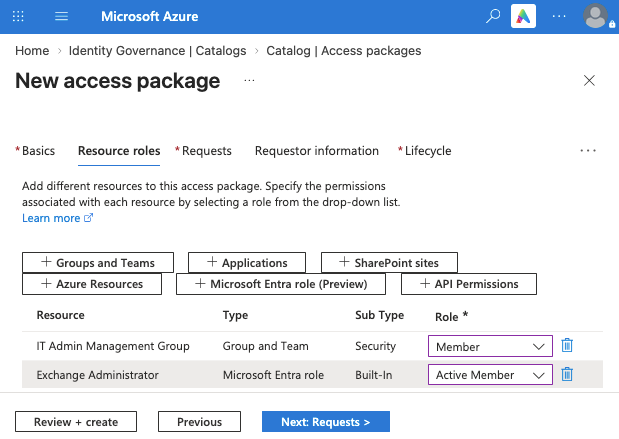
Once created, access packages follow policies to determine if a user is eligible for assignment.
Policies
Policies control which users, groups, or guest users can be assigned to an access package. There may be required justifications, approvals, and life cycle workflow conditions in a policy to control who can request access, who approves it, and how long access lasts once it has been assigned. An access package can have multiple policies governing assignment.
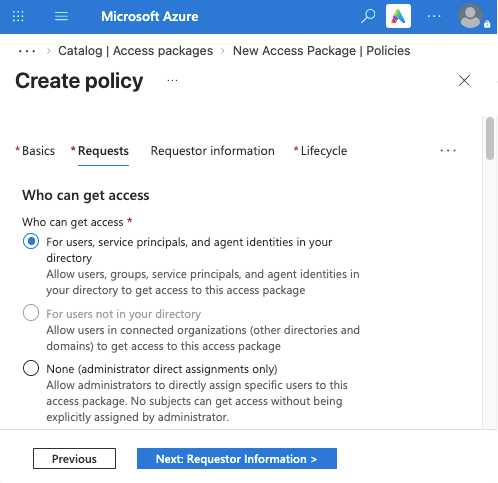
Key policy settings include:
- Who can get access: Can be specific groups or identities, all groups or identities, new or existing guest users, or restricted to administrative assignment
- Who can request access: The user, their manager, or only administrators
- Justification: If a justification is required from the requestor
- Approval: If approval is required for requests, and who approves if so; up to three rounds of approval can be configured
- Lifecycle: How long assignment to an access package lasts, whether users can extend their access, and whether regular access reviews are required
Once approved, the access package is assigned to the user, and all resource assignments in the access package are delivered to the user.
Management roles
How do you know who can control what in entitlement management? Currently, this is more complex to answer than in other access management tools within Entra ID. Both Entra roles and ID Governance roles must be reviewed to understand a user's rights in entitlement management.
An overview of key entitlement management roles is provided below. Full details on these permissions can be found in Microsoft's guide on the topic.
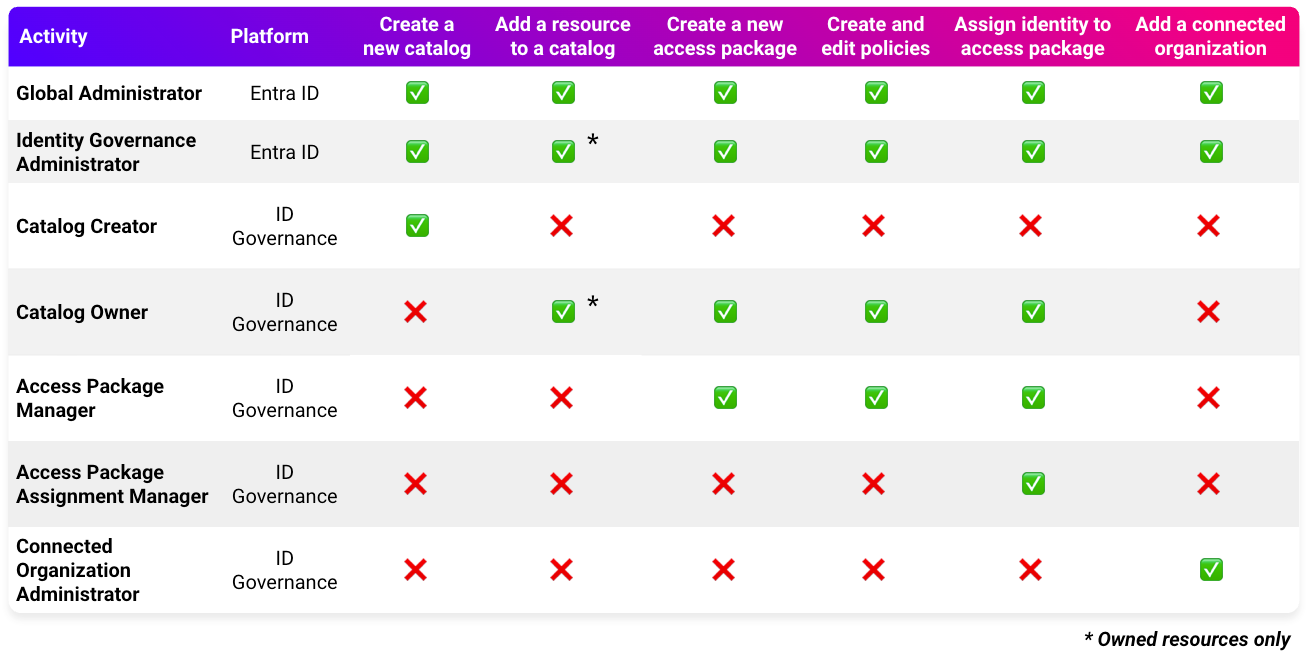
Unlike most permissions management features, entitlement management roles can be assigned outside of Entra's role assignments. This means you'll need to check two different areas to understand who can control your access policies: Entra role assignments and the ID Governance "Roles and administrators" section of each catalog in entitlement management.
Entra roles
Both the Global Administrator and Identity Governance Administrator Entra ID roles can fully control entitlement management. This includes creating new catalogs and access packages, adding resources, and controlling access package assignments and policies.
As the Global Administrator role holds full control of the Entra tenant, this role can assign any resource to a catalog. The Identity Governance Administrator role must own a resource in order to add it to a catalog, meaning that it cannot add Entra ID roles.
Entra ID custom roles with the microsoft.directory/entitlementManagement/allProperties/allTasks permission also hold full control of entitlement management.
These role assignments are found in the standard Entra "Roles and administrators" panel.
ID Governance roles
ID Governance has several roles outside of Entra ID that allow control of entitlement management. The most powerful of these is the Catalog Owner role, which can control the access packages, policies, and resources of any catalog they own. Additionally, the Catalog Creator automatically becomes a Catalog Owner over any catalog they have created.
Additional roles allow control of access packages (Access Package Manager), assignments (Access Package Assignment Manager), and external organizations that can be added to access package policies (Connected Organization Administrator).
Unlike Entra roles, ID Governance roles must be reviewed within the identity governance panel:
- Catalog Creator and Connected Organization Administrator assignments are reviewed in the "Roles and administrators" section of entitlement management.
- All other entitlement management roles are reviewed in the "Roles and administrators" section of each catalog, as seen below.
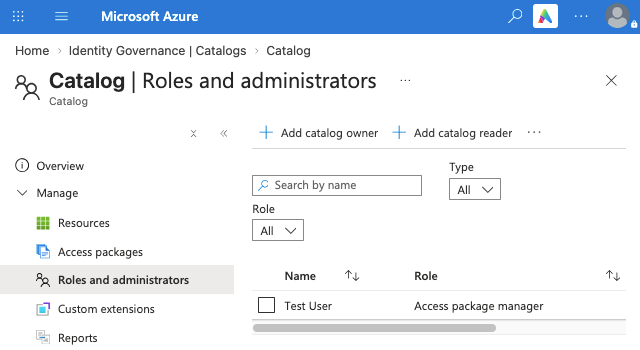
It's important to review these assignments since the access packages, assignments, and policies behind a catalog directly control user role assignments.
Application permissions
Along with permissions in Entra ID and ID Governance, application permissions—specifically, the EntitlementManagement.ReadWrite.All Microsoft Graph permission—can grant SPs full management access to entitlement management. Additional details on SPs and application permissions can be found in our previous post on the topic.
Risks of entitlement management
What's the impact of an entitlement management compromise? Depending on how your access packages are configured, a compromise can be severe.
We'll cover practical examples of this in our next post. In the meantime, let's walk through a conceptual overview of these concerns.
Impact
While entitlement management can't directly assign privileged Entra roles, granting membership in role-assignable groups with privileged roles is still possible. Additionally, entitlement management can still assign Entra roles with permissions outside of Entra (such as Exchange), Azure roles, and sensitive data access within SharePoint and Teams.
Theory
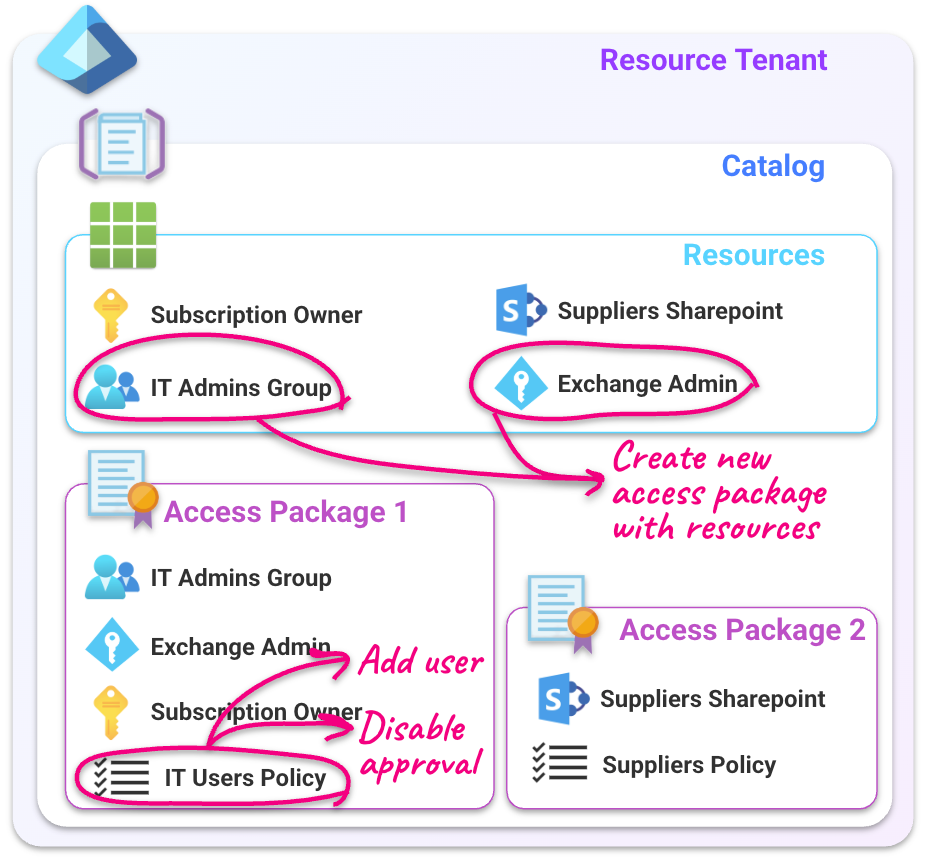
This creates several areas an attacker with control over entitlement management may target to elevate their privileges:
Methods
Attackers may attempt several methods to target these resources, such as:
- Directly escalating to an eligible access package of a compromised user
- Creating new access packages within a catalog they control containing that catalog's privileged resources
- Tampering with group memberships to gain eligibility to an access package
Conclusion
In this post, we looked at access packages in Entra's entitlement management and how their structure can lead to configurations that attackers may want to target. We also covered how permissions for entitlement management must be audited in Entra's role assignments and within ID Governance itself.
Our next post will explore the impact of access package compromises through examples using access package eligibility, ID Governance roles, and group membership tampering.
We're always eager to hear from you. If you have any questions, thoughts, or suggestions, send us a message at securitylabs@datadoghq.com, or open an issue. You can also subscribe to our newsletter or RSS feed.